
Introduction
This manual provides detailed instructions for the safe and effective operation of your Telituny TSH-06F Integrated Circuit Tester. This multifunction IC tester is designed for electronics testing and maintenance, offering versatile testing modes and a comprehensive built-in library of chip and transistor models. Please read this manual thoroughly before use and retain it for future reference.
Safety Information
Always observe the following safety precautions to prevent injury and damage to the device:
- Ensure the device is powered off before inserting or removing components.
- Do not attempt to test components beyond the specified voltage or current limits.
- Keep the device dry and away from liquids.
- Do not open the device casing unless instructed by qualified personnel.
- Replace batteries promptly when the low battery indicator appears to ensure accurate test results.
Product Overview
The Telituny TSH-06F is a compact and portable integrated circuit tester designed for a wide range of electronic components. It features a user-friendly interface and multiple testing capabilities.
Key Features:
- Multiple Test Modes: Supports 5V, 3.3V, and Automatic modes for diverse testing requirements.
- Extensive Component Library: Includes over 1300 chip models and more than 420 transistor models.
- Wide IC Coverage: Compatible with 74HC, 74LS, CD4000, HEF400, and 4500 series, operational amplifiers, interface chips, optocouplers, and voltage regulators.
- Automatic Transistor Identification: Quickly identifies transistor types with included adapters.
- Energy Saving: Automatic shutdown after 60 seconds of inactivity.
- Portable Design: Compact and lightweight for easy transport and use.
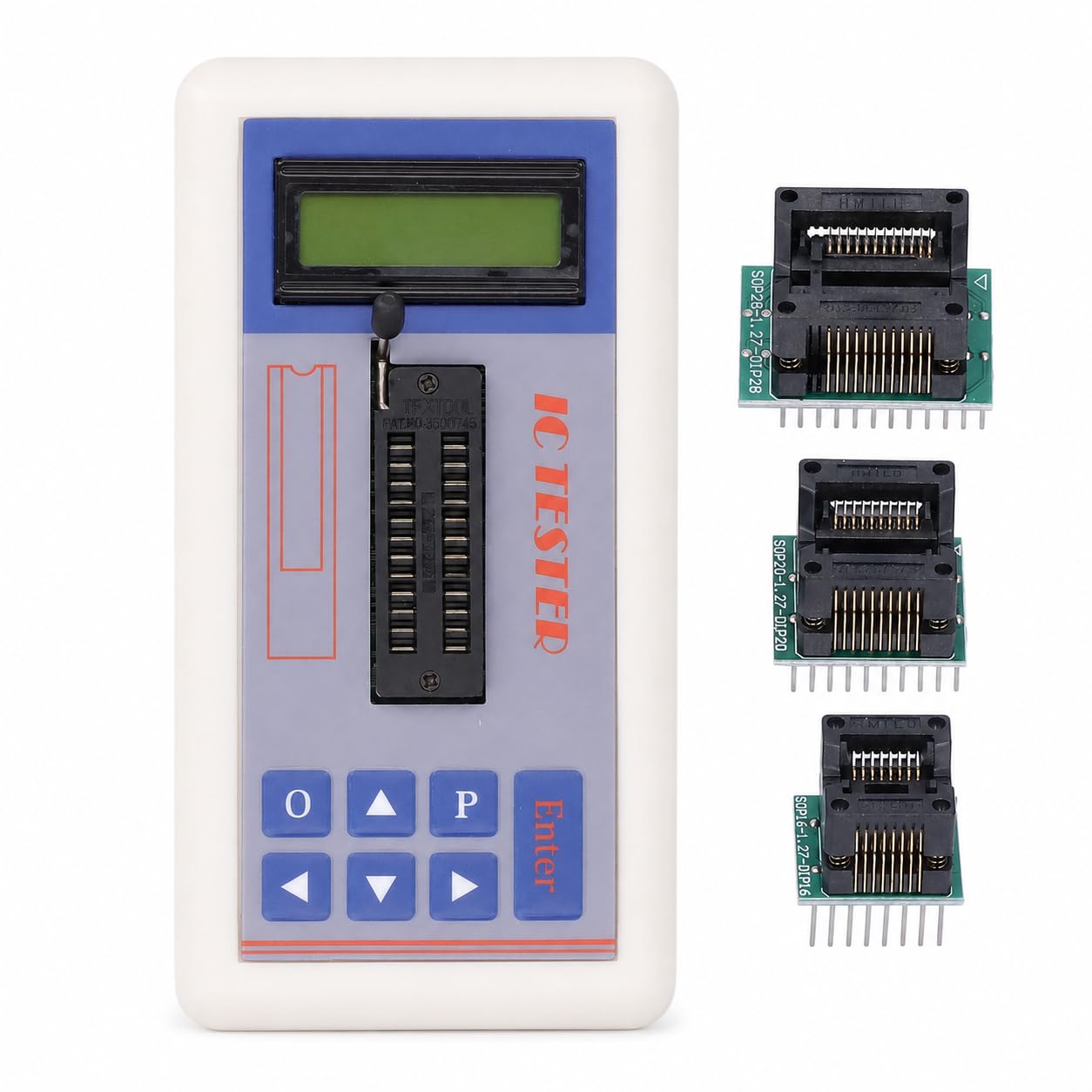
Figure 1: The Telituny TSH-06F IC Tester showing its three test modes: 5V, 3.3V, and AUTO, allowing selection for different testing needs.

Figure 2: The compact and portable design of the TSH-06F IC Tester, emphasizing its small ABS housing and battery power (2xAA, not included).
Setup
Battery Installation:
- Locate the battery compartment on the back of the device.
- Open the battery cover.
- Insert two (2) 1.5V AA batteries, ensuring correct polarity. (Batteries are not included)
- Close the battery cover securely.
Initial Power-On:
Press and hold the Enter button for more than 2 seconds to power on the device. The current battery voltage will be displayed automatically upon startup.
Operating Instructions
The TSH-06F IC Tester provides a straightforward interface for testing various electronic components.
Button Functions:
- Up/Down Arrow Keys: Used to navigate the catalog and change model numbers.
- Left/Right Arrow Keys: Used to move the cursor for selecting and changing parameters.
- Enter Key: Used to switch between devices and execute test commands.
Testing Integrated Circuits (ICs):
- Power on the device.
- Use the arrow keys to select the desired IC series (e.g., 74HC, 74LS, CD4000).
- Insert the IC into the ZIF socket, ensuring correct orientation.
- Select the appropriate test mode (5V, 3.3V, or AUTO) using the designated buttons or menu options.
- Press the Enter key to initiate the test. The results will be displayed on the screen.

Figure 3: The TSH-06F IC Tester is capable of testing multiple component types, such as Logic ICs, Operational Amplifiers, and Transistors.
Testing Transistors:
The device supports automatic identification of transistors. Use the provided adapters if necessary.
- Power on the device.
- Insert the transistor into the appropriate socket or adapter.
- Select the transistor test function.
- Press Enter to perform the test. The device will automatically identify the transistor type and display relevant parameters.

Figure 4: Demonstrating the automatic transistor identification feature, where a transistor is inserted for quick testing.
Maintenance
Cleaning:
Wipe the device with a soft, dry cloth. Do not use abrasive cleaners or solvents.
Battery Replacement:
When the battery voltage is too low, the device will display a warning and may automatically shut down. Replace the batteries as described in the Setup section to ensure reliable operation and accurate test results.

Figure 5: The device features a 60-second automatic shutdown function to conserve battery life when inactive.
Troubleshooting
| Problem | Possible Cause | Solution |
|---|---|---|
| Device does not power on. | Batteries are incorrectly installed or depleted. | Check battery polarity and replace with fresh AA batteries. |
| Inaccurate test results or device shuts down unexpectedly. | Low battery voltage. | Replace batteries immediately. Low voltage affects reliability. |
| IC/Transistor not recognized. | Incorrect insertion or component not supported. | Ensure component is correctly seated in the ZIF socket. Verify if the component is within the supported library (1300+ ICs, 420+ transistors). |
Specifications
- Model: TSH-06F
- Material: ABS
- Power Supply: 2 x 1.5V AA Batteries (not included)
- Supported IC Series: 74HC, 74LS, CD4000, HEF400, 4500 series
- Supported Component Types: Operational Amplifiers, Interface Chips, Optocouplers, Transistors, Voltage Regulators
- Built-in Library: Over 1300 chip models, over 420 transistor models
- Automatic Shutdown: After 60 seconds of inactivity
- Dimensions (Package): 16 x 10 x 4 cm (6.3 x 3.9 x 1.6 inches)
- Weight (Package): 192 grams (0.42 lbs)
Warranty and Support
For warranty information or technical support, please refer to the contact details provided with your purchase or visit the official Telituny website. Keep your proof of purchase for warranty claims.