
ASECAM 5MP 8CH DVR + 4 5MP Cameras
ASECAM 5MP 8-Channel DVR Security Camera System User Manual
Comprehensive instruction manual for the ASECAM 5MP 8-Channel DVR Security Camera System, covering setup, operation, maintenance, troubleshooting, and specifications.
1. Introduction
This manual provides detailed instructions for the installation, operation, and maintenance of your ASECAM 5MP 8-Channel DVR Security Camera System. This wired system offers stable signal output and is designed for reliable outdoor surveillance with advanced features like facial, human, and vehicle detection.

Image 1.1: Overview of the ASECAM 5MP 8-Channel DVR Security Camera System, including the DVR, four 5MP cameras, 1TB HDD, and connection cables.
2. Package Contents
Verify that all components are present in your package:
- 4x 5MP HD Security Cameras
- 1x 5MP HD 8-Channel DVR with pre-installed 1TB Hard Drive
- 4x 18-meter Copper Core BNC Video Cables
- 1x Ethernet Cable
- 1x USB Mouse
- 4x Screw Bags for camera mounting
- Power Adapters
- Quick Start Guide
- Warning Stickers

Image 2.1: Visual representation of all items included in the ASECAM 5MP 8-Channel DVR Security Camera System package.
3. Setup Instructions
3.1 DVR Connection
- Connect Cameras: Connect the BNC video cables from each camera to the corresponding BNC input ports on the back of the DVR.
- Connect Power: Connect the power adapters to the cameras and the DVR.
- Connect Monitor: Use an HDMI or VGA cable to connect your monitor to the DVR's video output port.
- Connect Mouse: Plug the USB mouse into a USB port on the DVR.
- Connect Network (Optional for Remote Access): Connect an Ethernet cable from the DVR to your router for internet access and remote viewing.
- Power On: Plug in the power adapters for the DVR and cameras. The system will boot up automatically.
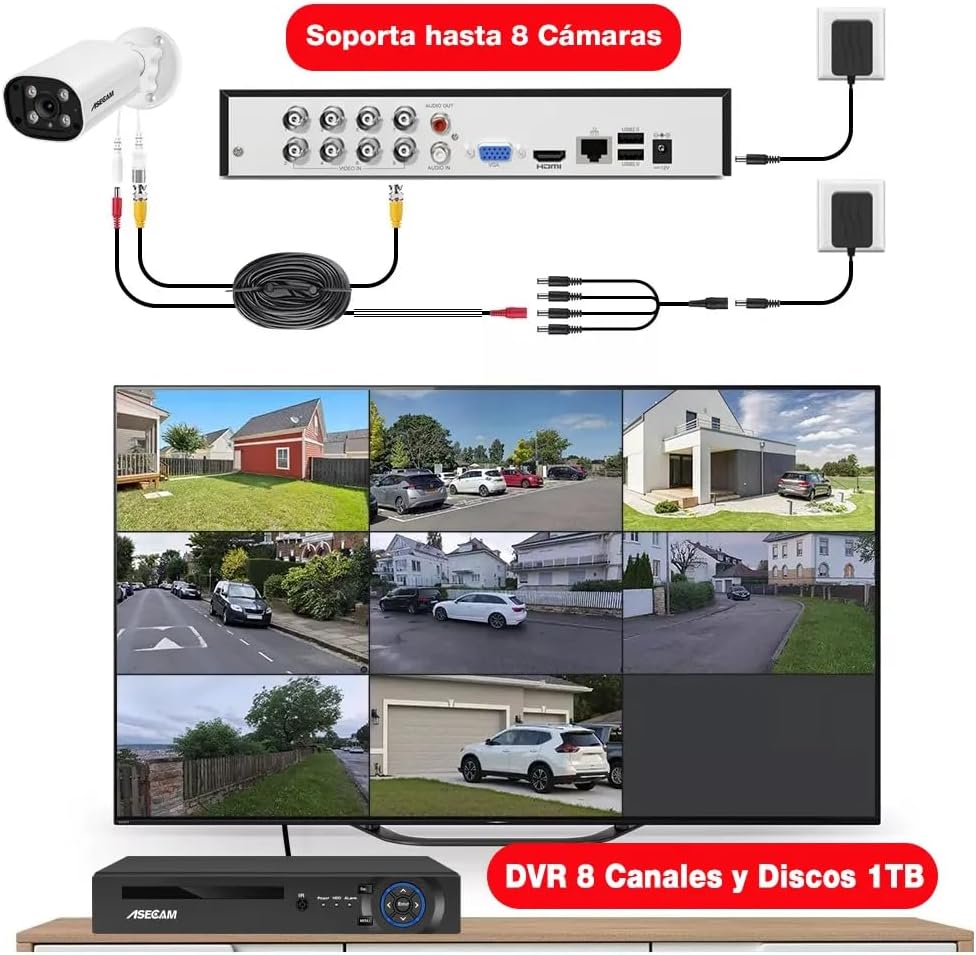
Image 3.1: Illustration of the DVR's rear panel connections, demonstrating how to connect up to 8 cameras, a monitor, and power sources.
3.2 Initial Configuration
Follow the on-screen prompts to complete the initial setup, including setting the date/time, creating a password, and configuring network settings if applicable.
4. Operating Instructions
4.1 Recording and Storage
The DVR comes with a pre-installed 1TB hard drive, supporting 24/7 loop recording for 30-60 days. The H.265+ encoding technology optimizes storage space, saving up to 80% compared to H.264 systems.
4.2 Smart Detection Features
- Facial Recognition and Playback: The system can capture faces and allows for intelligent facial playback. This feature assists in quickly locating specific individuals in recorded footage.

Image 4.1: Demonstration of the facial detection and intelligent playback interface, showing how detected faces can be used to search recordings.
- Human and Vehicle Detection: Receive push notifications on your phone when a person or vehicle enters your property. This AI-based detection accurately identifies relevant events, reducing false alarms.

Image 4.2: Visual example of human and vehicle detection in a surveillance area, highlighting how the system identifies and tracks subjects.
- Customizable Motion Detection and Alerts: Define specific areas for motion detection to receive alerts via app push notifications or email. This helps focus on critical zones and minimize unnecessary alerts.
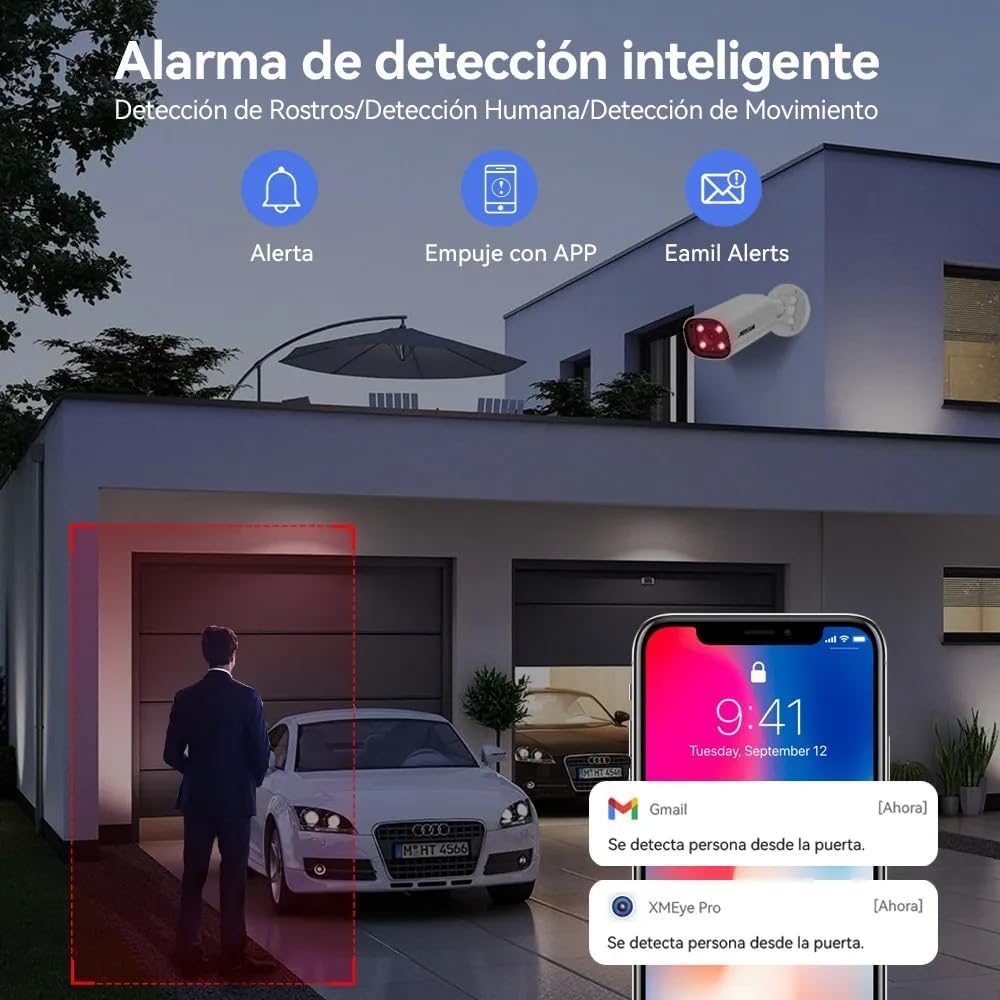
Image 4.3: Example of smart detection alerts, showing notifications for person detection via app and email.
4.3 Audio Functionality
The 5MP cameras feature built-in high-quality microphones for one-way audio recording, capturing sound from the surveillance area.

Image 4.4: Illustration of the one-way audio feature, demonstrating sound capture from the camera's location.
4.4 Day and Night Vision
The cameras provide 5MP Super HD clarity during the day and utilize powerful infrared chips for clear night vision up to 50 meters, even in complete darkness.

Image 4.5: Comparison showing the clarity of 5MP Super HD day vision and detailed infrared night vision.
4.5 Remote Access
Access your camera feeds remotely from anywhere using the "XMEye Pro" application on your smartphone or by visiting "xmeye.net" on a PC/MAC. The system supports multi-screen viewing and shared access for multiple users.
5. Maintenance
Regular maintenance ensures optimal performance and longevity of your security system.
- Camera Cleaning: Periodically clean the camera lenses with a soft, damp cloth to remove dust and dirt that may obstruct the view.
- Connection Check: Ensure all cables (video, power, network) are securely connected and free from damage.
- Weather Resistance: The cameras are IP67 rated, providing protection against rain and dust. However, avoid directing high-pressure water jets directly at the cameras.

Image 5.1: The IP67 waterproof rating ensures the camera's durability in various outdoor conditions, suitable for homes, offices, and warehouses.
- DVR Ventilation: Ensure the DVR is placed in a well-ventilated area to prevent overheating.
- Software Updates: Check the manufacturer's website or the "XMEye Pro" app for any available firmware updates for the DVR or cameras.
6. Troubleshooting
Refer to the following common issues and their solutions:
| Problem | Possible Cause | Solution |
|---|---|---|
| No video display on monitor. | Loose video cable, incorrect monitor input, DVR not powered on. | Check BNC and HDMI/VGA connections. Ensure DVR is powered. Select correct input on monitor. |
| Cameras not showing images. | Camera power issue, cable damage, camera malfunction. | Verify camera power supply. Inspect video cables for damage. Test camera with a known working cable/port. |
| "HDD not available for recording" error. | Hard drive connection issue, hard drive failure, incorrect DVR settings. | Check the internal SATA connection of the HDD. Restart the DVR. Access DVR settings to verify HDD status and format if necessary (this will erase data). If the issue persists, the HDD may need replacement. |
| Poor image resolution/color distortion. | Dirty lens, cable interference, camera settings, faulty camera. | Clean camera lens. Ensure cables are not near strong electrical interference. Check camera resolution settings in DVR. If problem persists, camera may be faulty. |
| Remote access not working. | No internet connection, incorrect network settings, app issues. | Verify DVR is connected to the internet. Check network settings on DVR and router. Ensure "XMEye Pro" app is updated and configured correctly. |
7. Specifications
| Feature | Detail |
|---|---|
| Brand | ASECAM |
| Model | 5MP 8CH DVR + 4 5MP Cameras |
| Video Capture Resolution | 5MP |
| Connectivity Technology | Wired |
| Special Features | Human Detection, Audio Recording, Automatic Overwrite, Night Vision |
| Number of Channels | 8 |
| Power Source | Corded Electric |
| DVR Storage | 1TB HDD (pre-installed) |
| Camera Ingress Protection (IP) Rating | IP67 (Waterproof) |
| Dimensions (Product) | 37 x 30 x 18 cm; 4.4 kg |
8. Warranty and Support
For product support, please contact ASECAM customer service. Refer to your purchase documentation for specific warranty terms.
- Return Policy: This product typically includes a 30-day return period from the date of purchase. Please check with your retailer for exact terms.
- Technical Support: For technical assistance, troubleshooting, or questions regarding your ASECAM security system, please visit the official ASECAM website or contact their customer support channels.
Related documents5MP 8CH DVR + 4 5MP Cameras


Ask a question about this manual
Ask about setup, troubleshooting, compatibility, parts, safety, or missing instructions. Manuals+ will review the question and use this page’s manual context to help answer it.