
Introduction
This manual provides instructions for the PopSockets MagSafe Phone Grip with Kickstand, Model 807503. This accessory is designed to enhance your mobile device experience by providing a secure grip, a convenient kickstand, and compatibility with MagSafe technology. It also includes an adapter ring for use with non-MagSafe devices and cases.

Image: PopSockets MagSafe Phone Grip in Accent Turquoise attached to a clear phone case.
Package Contents
- 1 x PopSockets PopGrip for MagSafe
- 1 x Magnetic Adapter Ring (for non-MagSafe devices/cases)

Image: Exploded view showing the phone case, MagSafe base, and swappable PopGrip top.
Setup Instructions
For MagSafe Compatible Devices/Cases:
- Ensure your iPhone or MagSafe compatible case is clean and dry.
- Align the PopSockets MagSafe Phone Grip with the MagSafe ring on your device or case.
- The grip will magnetically snap into place. Ensure it is securely attached before use.
For Non-MagSafe Devices/Cases (using Adapter Ring):
- Clean the back surface of your phone or case thoroughly.
- Peel off the protective film from one side of the magnetic adapter ring.
- Carefully center and press the adapter ring onto the back of your device or case. Apply firm pressure for 30 seconds to ensure strong adhesion.
- Allow the adhesive to cure for at least 15 minutes before attaching the PopSockets MagSafe Phone Grip.
- Once the adapter ring is secure, align the PopSockets MagSafe Phone Grip with the newly installed magnetic ring.
Important Note: The adapter ring is not compatible with silicone, textured, or anti-fingerprint coated cases.

Image: Compatibility diagram illustrating the use of the magnetic adapter ring for various devices.
Operating Instructions
Using as a Grip:
- Extend the PopGrip by pulling it outwards until it clicks into place.
- Slide your fingers between your device and the extended grip for a secure hold, allowing for one-handed use and reducing the risk of drops.
Using as a Kickstand:
- Extend the PopGrip fully.
- Position your device on a flat surface, using the extended PopGrip as a stand for hands-free viewing in landscape or portrait orientation.
Swapping the Top:
- To change the PopGrip top, push the grip flat into its base.
- Rotate the top 90 degrees in any direction until you hear a click.
- Gently pull the top off.
- To attach a new top, align it with the base, push down, and rotate 90 degrees until it clicks securely.
Wireless Charging:
- The PopSockets MagSafe Phone Grip is designed to be wireless charging compatible.
- For optimal wireless charging, it is recommended to remove the PopGrip from your device before placing it on a wireless charger, especially if not using a MagSafe-specific wireless charger.
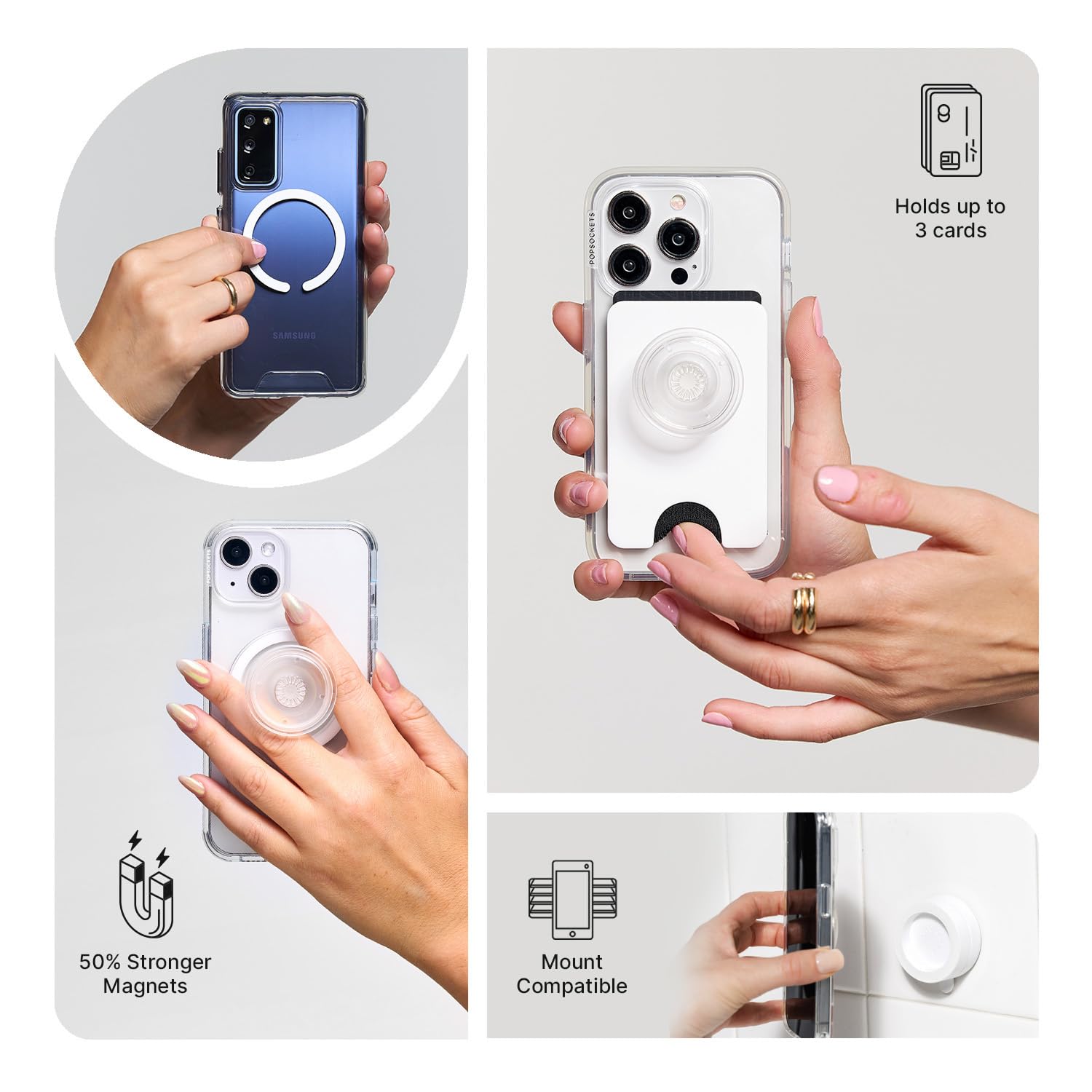
Image: Examples of PopSockets grip usage, including holding, kickstand function, and compatibility with card holders.
Maintenance
To maintain the longevity and appearance of your PopSockets MagSafe Phone Grip, wipe it periodically with a soft, damp cloth. Avoid using harsh chemicals or abrasive cleaners, as these may damage the material or finish. Ensure the magnetic surfaces are kept clean for optimal adhesion.
Troubleshooting
- Grip not adhering securely: Ensure your device or case is MagSafe compatible or that the adapter ring is properly installed on a clean, smooth, non-silicone surface.
- Difficulty extending/collapsing grip: Check for any debris or obstructions in the mechanism. If the issue persists, ensure the top is correctly aligned and securely attached.
- Wireless charging issues: Remove the PopGrip before placing your device on a standard wireless charger. For MagSafe wireless charging, ensure the grip is correctly aligned and not interfering with the charger.
Specifications
| Brand | POPSOCKETS |
| Model Number | 807503 |
| Colour | Accent Turquoise |
| Special Features | Collapsible, Drop Protection, Magnetic, Swappable Top, Wireless Charging Compatible |
| Material | Plastic |
| Grip Type | Phone, Tablet & Kindle |
| Item Dimensions (L x W x H) | 8.3 x 2 x 14.6 Centimeters |
| Item Weight | 18 Grams |
| UPC | 840173783658 |
| Country of Origin | China |
Warranty Information
This product is sold with No Warranty as per the manufacturer's specifications. Please refer to the retailer's return policy for any issues upon purchase.
Support and Contact Information
For further assistance or inquiries, please contact PopSockets India Pvt Ltd:
- Manufacturer/Packer Address: Room no. 501, Fifth Floor, Tapasya One, Golf Course Road, Sector-53, Gurugram, Haryana, 122002
- Contact Number: +91-8860493493


