
1. Introduction
This manual provides essential information for the safe and efficient operation, maintenance, and troubleshooting of your Fafrees F20+ PRO Electric Fatbike. Please read this manual thoroughly before your first ride and keep it for future reference.
The Fafrees F20+ PRO is a versatile electric fatbike designed for both urban commuting and off-road exploration. It features a powerful 250W motor, a long-range 22.5 Ah / 810 Wh battery, and a foldable design for convenient storage and transport.
2. Safety Information
Always wear a helmet and appropriate safety gear when riding. Ensure all components are properly assembled and secured before each use. Adhere to local traffic laws and regulations. Do not ride under the influence of alcohol or drugs.
Important: Regularly check tire pressure, brake function, and battery charge level.
3. Product Overview
The Fafrees F20+ PRO features a robust aluminum alloy frame, 20 x 3.0 inch fat tires, and a front suspension fork for a comfortable ride. It includes front and rear lights, a rear rack, and mechanical disc brakes for safety and convenience.

Image: The Fafrees F20+ PRO Electric Fatbike, showcasing its compact folded design and vibrant chameleon color.
4. Setup and Assembly
Your Fafrees F20+ PRO Electric Fatbike requires some assembly. Please follow these steps carefully:
- Unpacking: Carefully remove all components from the packaging. Retain the packaging for future transport or storage.
- Handlebar Installation: Attach the handlebar to the stem. Ensure it is centered and tightened securely.
- Pedal Installation: Identify the left (L) and right (R) pedals. Thread them into the crank arms. The left pedal threads counter-clockwise, and the right pedal threads clockwise. Tighten firmly with a wrench.
- Seat Post Adjustment: Insert the seat post into the frame and adjust the height to a comfortable riding position. Secure the quick-release lever.
- Tire Inflation: Inflate tires to the recommended pressure indicated on the tire sidewall.
- Brake Check: Verify that both front and rear brakes are functioning correctly. Adjust if necessary.
- Battery Installation and Charging: Insert the battery securely into its compartment. Fully charge the battery before the first use. The charging time is approximately 12 hours.
A tool kit is included to assist with assembly.
5. Operating Instructions
5.1 Powering On/Off and Display
To power on the bike, press and hold the power button on the LCD display. The display will show real-time metrics such as speed, battery level, and PAS level.
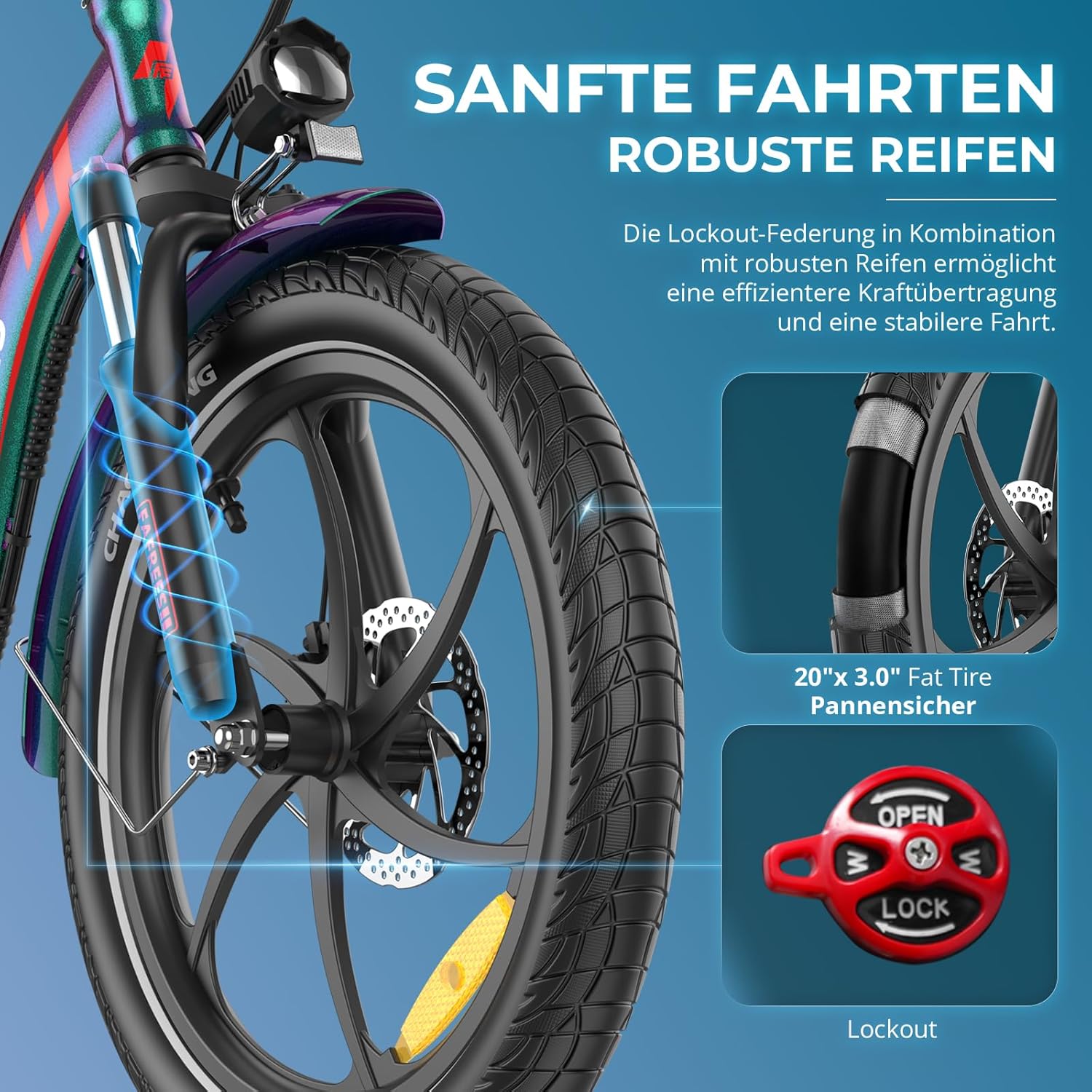
Image: The LCD display showing speed, battery level, and pedal assist (PAS) level, with control buttons for power, lights, and assist levels.
- Power ON/OFF: Press and hold the power button.
- Lights ON/OFF: Press the light button (often integrated with the 'Level UP' button).
- Walk Mode (6 km/h): Activate by holding the 'Level DOWN' button.
- Cruise Control: The bike features a cruise control function.
5.2 Riding Modes
The F20+ PRO offers three riding modes:
- Normal Bicycle Mode: Ride the bike like a traditional bicycle without electric assistance.
- Pedal Assist Mode (PAS): The motor provides assistance as you pedal. Adjust the assistance level from 0-3 using the '+' and '-' buttons on the display. Level 0 provides no assistance, while Level 3 provides maximum assistance.
- Pure Electric Mode: Use the throttle to propel the bike without pedaling.
5.3 Gear Shifting
The bike is equipped with a 7-speed gear system. Use the trigger shifter to change gears according to terrain and desired speed. Shift smoothly to avoid strain on the drivetrain.
5.4 Braking System
The F20+ PRO features 160mm mechanical disc brakes with power-off levers for responsive and safe stopping. Always apply both brakes simultaneously for optimal control.

Image: Detail of the responsive disc brake system and the brake lever with integrated power cut-off for enhanced safety.
5.5 Folding Mechanism
The bike features a compact folding design for easy storage and transport. The frame, handlebars, and pedals are foldable.
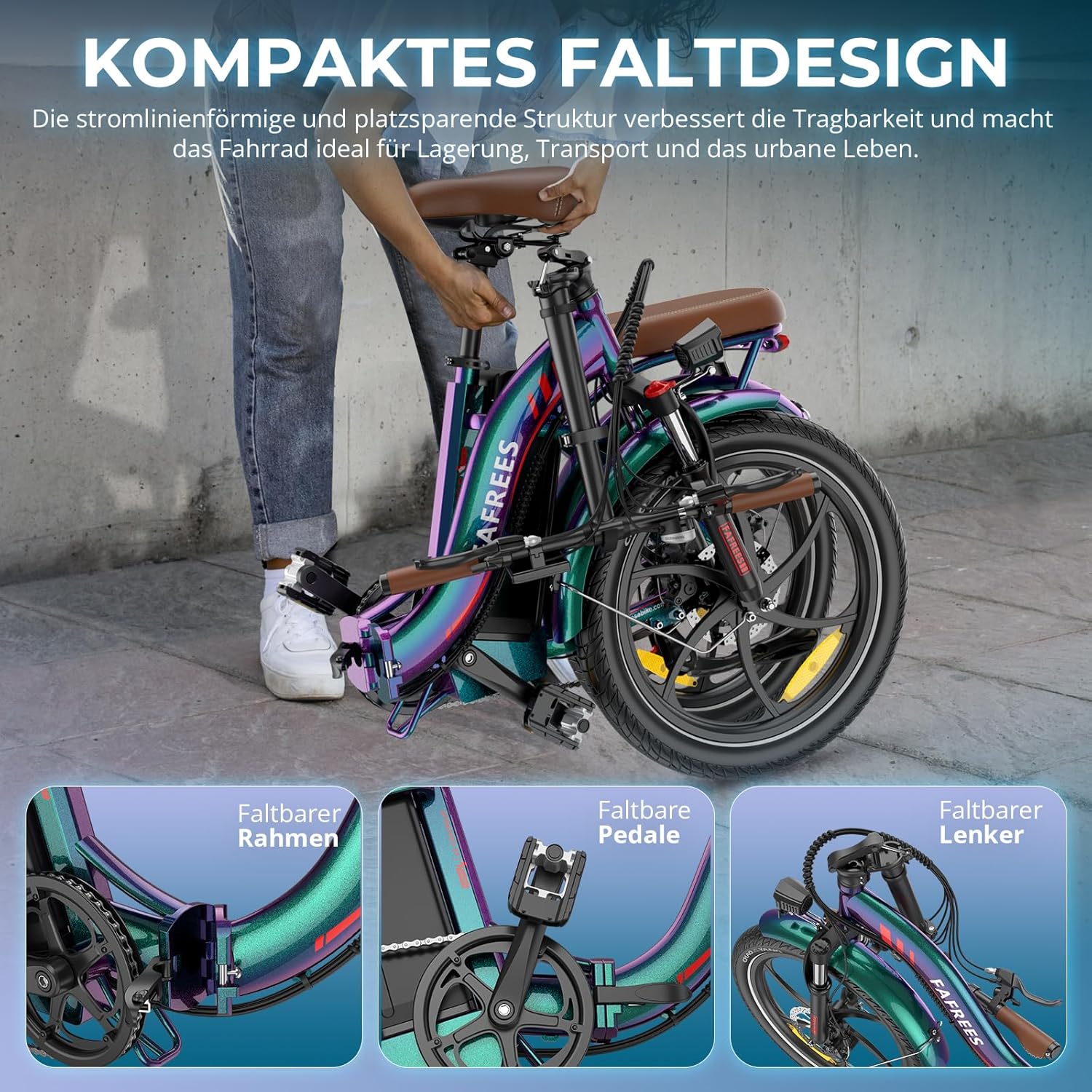
Image: Visual guide demonstrating the folding process of the Fafrees F20+ PRO, showing the frame, pedals, and handlebars in their folded positions.
To fold the bike:
- Open the frame folding latch.
- Fold the handlebars down.
- Fold the pedals inward.
Ensure all folding mechanisms are securely latched before riding.
6. Maintenance
Regular maintenance ensures the longevity and safe operation of your Fafrees F20+ PRO.
- Cleaning: Clean the bike regularly with a damp cloth. Avoid high-pressure washing directly on electrical components.
- Battery Care:
- Charge the battery fully after each ride, especially if it will be stored for an extended period.
- Do not expose the battery to extreme temperatures.
- The battery is IP54 water-resistant, but avoid submerging it in water.
- Brakes: Check brake pads for wear and replace them when necessary. Ensure brake levers are responsive and cables are not frayed.
- Tires: Inspect tires for wear, punctures, and proper inflation before each ride. The 20" x 3.0" fat tires are puncture-resistant.
- Chain: Keep the chain clean and lubricated for smooth gear changes and to prevent wear.
- Fasteners: Periodically check all bolts and fasteners for tightness.
- Frame Number: Record your bike's frame number. This number is unique to your bicycle and is typically located on the underside of the frame. It serves as proof of ownership and is crucial in case of theft.
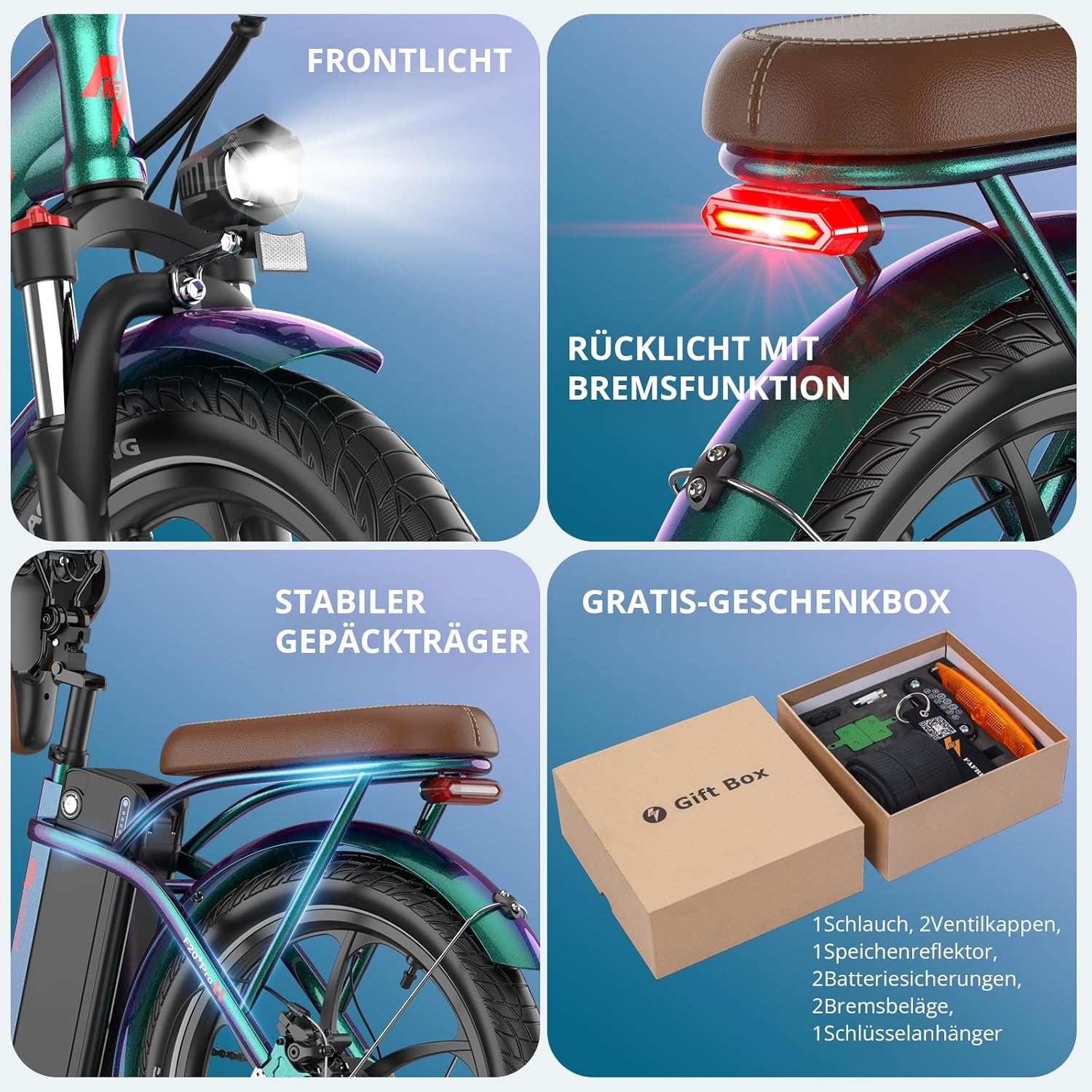
Image: Key features of the Fafrees F20+ PRO, including the front headlight, rear brake light, sturdy rear luggage rack, and a gift box containing essential accessories like an inner tube, valve caps, brake pads, and battery fuses.
7. Troubleshooting
If you encounter any issues with your Fafrees F20+ PRO, please refer to the following common problems and solutions:
| Problem | Possible Cause | Solution |
|---|---|---|
| Bike does not power on. | Battery not charged, battery not properly seated, loose connection. | Ensure battery is fully charged and correctly installed. Check all electrical connections. |
| Motor not assisting. | PAS level set to 0, brake levers engaged, motor connection issue. | Increase PAS level. Release brake levers. Check motor cable connection. |
| Brakes feel weak. | Worn brake pads, loose brake cable, air in hydraulic system (if applicable). | Inspect and replace brake pads. Adjust brake cable tension. Consult a professional if issues persist. |
| Gears are not shifting smoothly. | Dirty or unlubricated chain, misaligned derailleur, stretched cable. | Clean and lubricate the chain. Adjust derailleur. If problem persists, seek professional assistance. |
For complex issues, please contact customer support with a detailed description of the problem. Providing photos or videos can help engineers offer a quicker solution.
8. Specifications
| Feature | Detail |
|---|---|
| Brand | Fafrees |
| Model | F20+ PRO |
| Motor Rated Power | 250 W |
| Max Torque | 45 N.m (Rear Drive) |
| Battery Type | 21700 Lithium-ion |
| Battery Capacity | 22.5 Ah / 810 Wh |
| Rated Voltage | 36 V |
| Charging Time | 12 hours |
| Max Speed | 25 km/h (Standard) |
| Range | 85-100 km |
| Max Incline | 20° |
| Frame Material | Aluminum Alloy |
| Tire Size | 20 x 3.0 inches (Puncture-resistant) |
| Suspension Type | Front Fork with Lockout |
| Brake Type | Mechanical Disc Brakes (160mm) |
| Display Type | LCD Display |
| Gears | 7-speed |
| Unfolded Dimensions | 170 x 60 x 115 cm |
| Folded Dimensions | 86 x 38 x 71 cm |
| Adjustable Handlebar Height | 105 – 120 cm |
| Adjustable Seat Height | 84 – 98 cm |
| Net Weight | 28 kg |
| Max Load Capacity | 140 kg |
| Recommended Rider Height | 160 – 195 cm |
| Water Resistance | IP54 |
| Operating Temperature | -10°C to 40°C |
9. Warranty and Support
9.1 Warranty Information
The Fafrees F20+ PRO Electric Fatbike comes with a 1-year warranty from the date of purchase. This warranty covers manufacturing defects in materials and workmanship. It does not cover damage due to misuse, accidents, normal wear and tear, or unauthorized modifications.
Please retain your proof of purchase for warranty claims.
9.2 Customer Support
For any questions, technical assistance, or warranty claims, please contact Fafrees customer support. Our team aims to respond to all inquiries within 24 hours.
When contacting support, please provide:
- Your purchase details (order number, date of purchase).
- A detailed description of the issue.
- Relevant photos or videos, if applicable, to help diagnose the problem.
- The frame number of your bicycle.
Fafrees is committed to providing excellent after-sales service.


