1. Introduction
Thank you for choosing the Kaidi TWS KD-777 Wireless Earbuds. This manual provides essential information for the proper setup, operation, and maintenance of your new earbuds. Please read this manual thoroughly before use to ensure optimal performance and longevity of the product.
2. Package Contents
Verify that all items listed below are present in your package:
- Kaidi TWS KD-777 Wireless Earbuds (Left and Right)
- Charging Case
- USB Type-C Charging Cable
- Ear Cushions (various sizes)
- User Manual
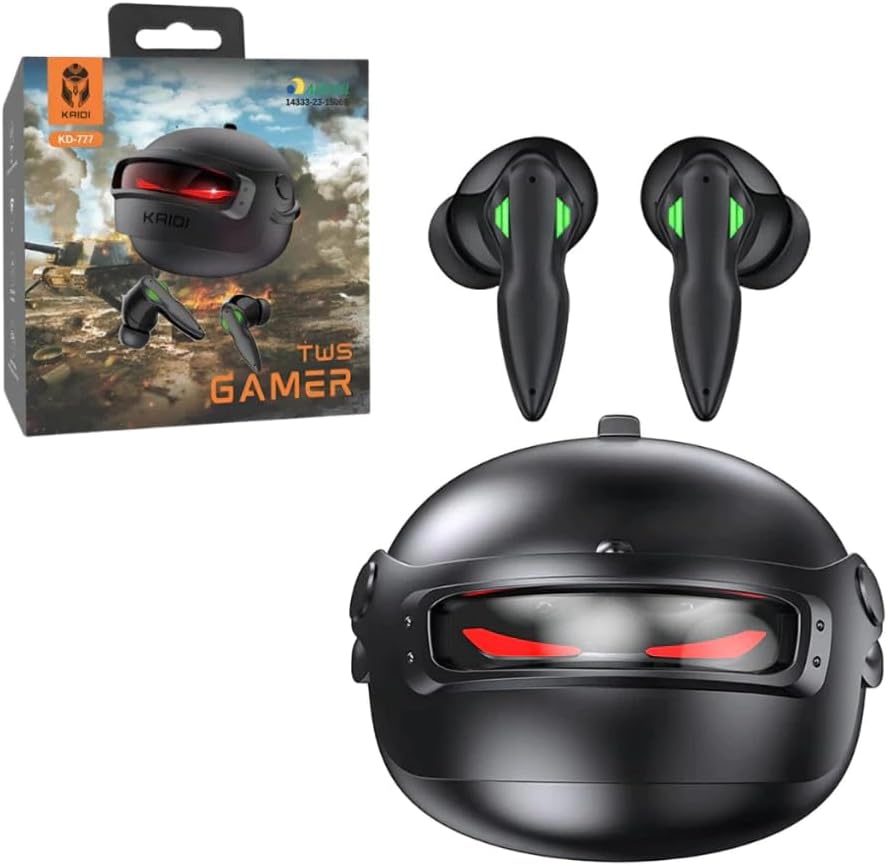
Image 2.1: Kaidi TWS KD-777 Earbuds, charging case, and retail packaging.
3. Product Overview
The Kaidi TWS KD-777 earbuds feature an intra-auricular design for a secure fit and include a compact charging case for portability and extended battery life. Each earbud is equipped with touch controls for various functions.

Image 3.1: The Kaidi TWS KD-777 earbuds and their charging case, showcasing the design and Kaidi branding.
3.1 Components
- Earbuds: Left and right earbuds with integrated touch sensors and microphones.
- Charging Case: Stores and charges the earbuds. Features a unique helmet-like design.
- Charging Port: USB Type-C port located on the charging case.
- LED Indicators: On both earbuds and the charging case to show charging status and connection.
4. Setup
4.1 Initial Charging
Before first use, fully charge the earbuds and the charging case.
- Place both earbuds into the charging case. Ensure they are correctly seated.
- Connect the USB Type-C cable to the charging port on the case and the other end to a USB power source (e.g., wall adapter, computer USB port).
- The LED indicators on the case and earbuds will illuminate to show charging status. A full charge takes approximately 2 hours.
- Once fully charged, the indicators may change color or turn off. Disconnect the charging cable.

Image 4.1: Earbuds placed inside the open charging case, ready for charging or pairing.
4.2 Bluetooth Pairing
To connect your Kaidi TWS KD-777 earbuds to a device:
- Ensure the earbuds are charged and placed inside the charging case.
- Open the charging case lid. The earbuds will automatically enter pairing mode, and their LED indicators will flash.
- On your device (smartphone, tablet, computer), enable Bluetooth.
- Search for available Bluetooth devices. Select "KD-777" from the list.
- Once connected, the earbud LED indicators will stop flashing or change to a solid color, indicating a successful connection.
- The earbuds will automatically reconnect to the last paired device when removed from the case, if Bluetooth is enabled on the device.
5. Operating Instructions
The Kaidi TWS KD-777 earbuds feature touch controls for various functions. Specific touch gestures may vary slightly; refer to the quick start guide included in your package for precise commands.
5.1 Power On/Off
- Power On: Open the charging case lid, or remove the earbuds from the case. They will power on automatically.
- Power Off: Place the earbuds back into the charging case and close the lid. They will power off automatically.
5.2 Music Playback
- Play/Pause: Tap once on either earbud.
- Next Track: Double-tap the right earbud.
- Previous Track: Double-tap the left earbud.
5.3 Call Management
- Answer/End Call: Tap once on either earbud during an incoming call or an active call.
- Reject Call: Press and hold either earbud for approximately 2 seconds during an incoming call.
5.4 Noise Cancellation
The KD-777 earbuds feature active noise cancellation (ANC), passive noise cancellation, and sound isolation.
- Activate/Deactivate ANC: Typically, a long press (e.g., 3 seconds) on one of the earbuds cycles through noise cancellation modes (ANC On, Transparency Mode, ANC Off). Refer to your quick start guide for the exact gesture.
6. Maintenance
6.1 Cleaning
- Regularly clean the earbuds and charging case with a soft, dry, lint-free cloth.
- Remove ear cushions and clean them separately with mild soap and water if necessary. Ensure they are completely dry before reattaching.
- Use a cotton swab or a small, soft brush to gently clean the charging contacts on both the earbuds and inside the case.
- Avoid using abrasive materials, alcohol, or chemical cleaners.
6.2 Storage
- When not in use, always store the earbuds in their charging case to protect them and keep them charged.
- Store the device in a cool, dry place, away from direct sunlight and extreme temperatures.
6.3 Water Resistance
The Kaidi TWS KD-777 earbuds are rated IPX4 water-resistant, meaning they are protected against splashing water from any direction. This makes them suitable for workouts and light rain. However, they are not designed for submersion in water or exposure to heavy rain. Do not use them while swimming or showering.
7. Troubleshooting
If you encounter issues with your Kaidi TWS KD-777 earbuds, try the following solutions:
- Earbuds not pairing with device:
- Ensure both earbuds are charged.
- Turn off and on Bluetooth on your device.
- Forget/delete "KD-777" from your device's Bluetooth list and attempt to pair again.
- Ensure the earbuds are within the 10-meter Bluetooth range of your device.
- Only one earbud working:
- Place both earbuds back into the charging case, close the lid, wait a few seconds, then open the lid and remove them.
- Ensure both earbuds are charged.
- No sound:
- Check the volume level on both your device and the earbuds.
- Ensure the earbuds are properly connected to your device.
- Try playing audio from a different application or source.
- Earbuds not charging:
- Ensure the charging cable is securely connected to both the case and the power source.
- Verify that the power source is active.
- Clean the charging contacts on the earbuds and inside the case.
8. Specifications
| Feature | Specification |
|---|---|
| Model Name | Kaidi TWS KD-777 |
| Connectivity Technology | Wireless (Bluetooth V5.3) |
| Wireless Communication Technology | Bluetooth |
| Earbud Type | Intra-auricular |
| Noise Control | Active Noise Cancellation, Passive Noise Cancellation, Sound Isolation |
| Speaker Size | 13mm |
| Earbud Battery Capacity | 30mAh |
| Charging Case Battery Capacity | 300mAh |
| Charging Time | Approximately 2 hours |
| Music Playtime | Up to 5 hours (at 70% volume) |
| Operating Distance | Up to 10 meters |
| Water Resistance Level | IPX4 (Resistant to splashing water) |
| Control Type | Touch Control, Media Control, Remote Control |
| Compatible Devices | All devices via Bluetooth V5.3 |
| Material | Polycarbonate (PC), Silicone |
| Included Components | Ear cushions, Charging station, Protective case, User manual, Type-C cable |
9. Warranty and Support
9.1 Manufacturer's Warranty
The Kaidi TWS KD-777 Wireless Earbuds come with a 2-year manufacturer's warranty. This warranty covers defects in materials and workmanship under normal use. It does not cover damage caused by misuse, accidents, unauthorized modifications, or normal wear and tear.
Please retain your proof of purchase for warranty claims.
9.2 Customer Support
For technical support, warranty claims, or any questions regarding your Kaidi TWS KD-777 earbuds, please contact your retailer or the manufacturer's customer service through the contact information provided with your purchase.


