
ODK B02021501007
ODK 61-inch L-Shaped Desk Instruction Manual
Model: B02021501007
1. Product Overview
The ODK 61-inch L-Shaped Desk is a versatile and spacious workstation designed for various uses, including home office, study, and gaming. Its thoughtful design incorporates multiple features to enhance productivity and organization.
- Enhanced Storage & Organization: Features four roomy drawers and two reinforced metal hooks for neat storage of documents, supplies, and accessories.
- Integrated Built-in Charging Station: Equipped with three AC outlets and two USB ports for convenient power management of electronic devices.
- Reversible Design & PC Case Shelf: Offers a reversible corner configuration and a dedicated elevated PC case shelf to protect your computer tower.
- Durable Materials & Sturdy Construction: Built with stable panels and a reinforced steel frame, designed for daily wear and stability on uneven floors with adjustable leveling feet.

Figure 1: ODK 61-inch L-Shaped Desk in a typical setup, showcasing its spacious design and integrated features.
2. Important Safety Information
Please read and understand all instructions before assembly and use. Failure to follow these instructions may result in injury or damage to the product.
- Always assemble the desk on a stable, level surface.
- This desk is heavy and large; ensure it is properly assembled and balanced to prevent tipping.
- Do not place excessively heavy items on the desk that could cause it to become top-heavy and unstable.
- Keep small parts away from children during assembly to prevent choking hazards.
- Ensure all screws and fasteners are securely tightened before use. Periodically check and re-tighten as needed.
3. Package Contents
Before beginning assembly, verify that all parts listed in the assembly video and manual are present and undamaged. If any parts are missing or damaged, please contact customer support.
The package includes various metal frame components (E, F, G, H, K, M, N, J, I, S), wooden boards (A, B, C), drawer rails (L, R), fabric drawers (T, V), drawer handles, a power outlet unit (U), and various screws and nuts (labeled with numbers like 1, 2, 3, 4, 5, 6, 7, 8, 9, 10, 11).
4. Assembly Instructions
For ease and safety, we recommend two people for assembly. Please refer to the detailed video guide below for step-by-step instructions. The desk features a reversible design, allowing you to configure the drawer unit on either the left or right side.
Video 1: Installation Guide for ODK 61'' L Shaped Desk with 4 Tier Drawers.
Assembly Steps (Refer to Video for Visuals):
- Step 1: Install Foot Pads and Connect Frame Sections.
Begin by installing the foot pads (part 8) to the bottom of frame sections E, F, G, and H. Then, use screws (part 2) to connect K to E, M to F, N to G, and N to H. Ensure all connections are secure but do not fully tighten screws yet.
- Step 2: Assemble the Main Frame.
Connect sections J, G, and F using screws (part 2). Pay close attention to the orientation of F relative to G based on whether you want the drawers on the right or left side. The short end of F should be installed on the side where the drawers will be placed.
- Step 3: Connect J and E.
Connect sections J and E using part I. Ensure the screw holes on E and F face the same side. Use screws (part 2) to secure these connections.
- Step 4: Connect S Parts to H and G.
Use screws (part 2) to connect the two S parts to H and G. Note that the rectangular screw hole on H should face part G.
- Step 5: Install O and Q between G, F, and E.
Use screws (part 2) and nuts (part 4) to install parts O and Q between G and F, and F and E. Do not fully tighten these screws yet. Once all steel frames are installed onto the boards in the next step, then tighten all screws from previous steps.
- Step 6: Attach Boards A and B.
First, insert all 15 screws (part 2) into the corresponding holes on boards A and B. Then, align boards A and B with the assembled frame and secure them. After the boards are installed, ensure all screws (O and Q) from the previous step are fully tightened.
- Step 7: Install PC Case Shelf.
Install the two P parts to board C using screws (part 2). This forms the PC case shelf.
- Step 8: Install C to M.
Install the assembled PC case shelf (C) to frame section M using screw (part 3).
- Step 9: Install Drawer Rails.
Install drawer rails L and R at an angle into the square holes on G and H. Push down to fully install the rails. Ensure they are securely in place for smooth drawer operation.
- Step 10: Assemble Drawers.
Open drawer T, then place drawer bottom V into T. Then install the drawer handle (part 7) using screw (part 1).

Figure 2: The four fabric drawers provide ample storage to keep your workspace tidy.
- Step 11: Install Power Outlet and Drawers.
Use screws (part 5) to install the power outlet unit (U) into the designated slot on the desk surface. Then, insert the four assembled drawers (T) into the drawer rails.

Figure 3: The recessed power strip offers convenient access to 3 AC outlets and 2 USB ports.
- Step 12: Install Headphone Hooks.
Use screws (part 3) to install part D to the E frame. Then install part 6 (hooks) to part D. These hooks are ideal for hanging headphones or other accessories.

Figure 4: Convenient metal hooks for headphones or other items.
5. Features and Functions
5.1. Reversible Design
The L-shaped configuration of this desk is reversible, allowing you to set up the drawer and shorter side on either the left or right, adapting to your room layout and personal preference. This flexibility is key for optimizing your workspace.
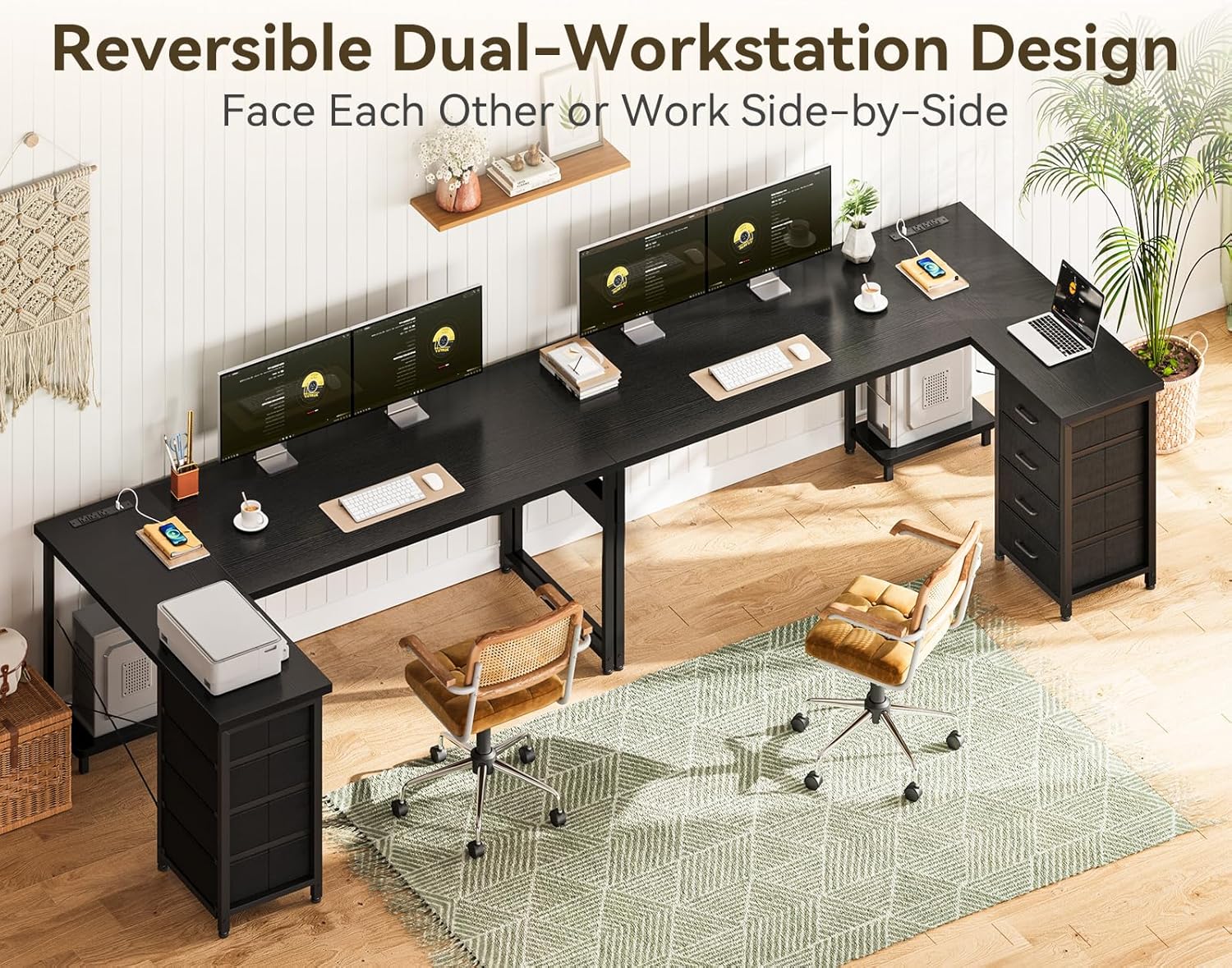
Figure 5: The desk's reversible design allows for flexible placement in your space.
5.2. PC Case Shelf
An elevated PC case shelf is integrated into the design, providing a dedicated space for your computer tower. This helps to keep your PC off the floor, protecting it from dust and moisture, and improving airflow.

Figure 6: The elevated PC case shelf protects your computer from floor dust and moisture.
5.3. Adjustable Leveling Feet
The desk is equipped with adjustable leveling feet to ensure stability on uneven floors. Simply rotate the feet to adjust the height and eliminate any wobbling, providing a firm and steady workspace.

Figure 7: Adjustable leveling feet ensure stability on various floor surfaces.
6. Care and Maintenance
To ensure the longevity and appearance of your ODK L-Shaped Desk, follow these care instructions:
- Cleaning: Wipe the desk surfaces with a dry cloth. For stubborn marks, a slightly damp cloth with mild soap can be used, followed immediately by a dry cloth. Avoid harsh chemicals or abrasive cleaners.
- Spills: Immediately wipe up any spills to prevent damage to the wood and metal components.
- Heat and Moisture: Avoid placing hot items directly on the surface. Use coasters or protective pads. Protect the desk from excessive moisture.
- Sunlight: Prolonged exposure to direct sunlight may cause fading or discoloration. Position the desk away from direct sunlight if possible.
- Fasteners: Periodically check all screws and fasteners to ensure they remain tight. Re-tighten as necessary to maintain stability.
7. Troubleshooting
If you encounter any issues with your ODK L-Shaped Desk, please refer to the following common solutions:
- Desk Wobbles: Check if the desk is on a level surface. Adjust the leveling feet at the bottom of the legs until the desk is stable. Ensure all assembly screws are fully tightened.
- Drawers Not Sliding Smoothly: Verify that the drawer rails (L and R parts) are correctly installed and fully pushed into their slots. Ensure the fabric drawers are not overloaded.
- Power Outlets Not Working: Check if the power cord is securely plugged into a working wall outlet. Ensure the power outlet unit (U) is correctly installed and its internal connections are secure.
- Missing Parts: If you find any parts missing during assembly, please refer to the 'Package Contents' section and contact ODK customer support immediately for assistance.
8. Specifications
| Brand: | ODK |
| Model Number: | B02021501007 |
| Product Dimensions: | 43.3"D x 55"W x 29.9"H |
| Color: | Black |
| Style: | Modern |
| Base Material: | Alloy Steel |
| Top Material Type: | Engineered Wood |
| Special Features: | Reversible, Built-In USB Outlet, Rust Resistant, Scratch Resistant, Adjustable Leveling Feet |
| Number of Drawers: | 4 |
| Item Weight: | 42.4 Pounds |
| Power Outlets: | 3 AC Outlets (120V/12A) |
| USB Ports: | 2 USB Ports (5V/2A) |
9. Warranty and Customer Support
ODK is committed to providing high-quality products and excellent customer service. This product comes with a limited warranty. For specific warranty details, please refer to the product packaging or contact our customer support team.
If you have any questions, concerns, or require assistance with assembly, damaged parts, or missing components, please do not hesitate to contact our professional after-sales service team. We aim to resolve any issues within 24 hours.
Contact Information:
- Refer to your purchase documentation for direct contact methods.
- Visit the official ODK Store on Amazon for FAQs and support options: ODK Store
Related documentsB02021501007


Ask a question about this manual
Ask about setup, troubleshooting, compatibility, parts, safety, or missing instructions. Manuals+ will review the question and use this page’s manual context to help answer it.