
1. Product Overview
The XUNFOX H8 is a versatile wireless rechargeable gaming mouse designed for comfort and precision. It offers triple-mode connectivity (2.4G wireless, Bluetooth, and wired) to adapt to various computing environments. Its lightweight, ergonomic design and adjustable DPI settings enhance user experience for both gaming and general use.
Package Contents:
- 1 x XUNFOX H8 Wireless Mouse
- 1 x USB Receiver (for 2.4G wireless mode)
- 1 x USB Charging Cable
- 1 x Anti-Slip Sticker Set
- 1 x User Manual

Image 1.1: Top-down view of the XUNFOX H8 wireless mouse in black, showcasing its ergonomic shape and scroll wheel.

Image 1.2: The XUNFOX H8 mouse available in black and white, illustrating its triple connectivity modes: 2.4G, Bluetooth, and Wired.
2. Setup and Connectivity
The XUNFOX H8 mouse supports three connection modes: 2.4G wireless, Bluetooth, and wired USB. Select the appropriate mode based on your device and preference.
2.1. 2.4G Wireless Connection
- Insert the USB receiver into an available USB port on your computer.
- Locate the three-speed mode switch on the bottom of the mouse. Slide the switch to the "2.4G" position.
- The red indicator light on the mouse will flash briefly, then connect automatically.
2.2. Bluetooth (BT) Connection
- Locate the three-speed mode switch on the bottom of the mouse. Slide the switch to the "BT" position.
- Long press the DPI switch button (located on the top of the mouse, behind the scroll wheel) for 3-5 seconds to initiate Bluetooth pairing mode. The indicator light will flash rapidly.
- On your computer or device, open Bluetooth settings and search for new devices. Select "XUNFOX H8" (or similar name) from the list to pair.
2.3. Wired Connection
- Connect the provided USB charging cable to the front port of the mouse.
- Connect the other end of the USB cable to an available USB port on your computer.
- The mouse will function as a wired mouse and will also charge its internal battery.

Image 2.1: The bottom of the XUNFOX H8 mouse, illustrating the mode switch (2.4G/OFF/BT), the DPI/BT pairing button, and the storage slot for the 2.4G USB receiver.

Image 2.2: Visual representation of the three connectivity options: Bluetooth (BT), Wired via USB cable, and 2.4G wireless using the USB receiver.
3. Operating Instructions
3.1. DPI Adjustment
The mouse features adjustable DPI (Dots Per Inch) settings for precise cursor control. To change the DPI:
- Short press the DPI switch button (located behind the scroll wheel) to cycle through available DPI levels.
- The XUNFOX H8 offers 6 adjustable DPI steps: 1200, 2400, 3200, 6600, 9600, and 12000 DPI.
3.2. Charging the Mouse
When the battery is low, connect the mouse to your computer using the provided USB charging cable. The mouse can be used while charging in wired mode.
3.3. Ergonomic Design and Lightweight
The XUNFOX H8 is designed for comfort during extended use, weighing only 59g. Its contoured shape helps reduce hand strain and supports a relaxed grip.

Image 3.1: A detailed view highlighting key features such as the PAW-3311 sensor, high-quality IC supporting up to 12000 DPI, triple connectivity modes, and durable 20 million click sensitive switches.

Image 3.2: The underside of the mouse, emphasizing the high-quality IC and sensor, with indicators for 6 DPI steps (1200-12000) and 4 return rates (125-1000Hz).

Image 3.3: The lightweight design of the XUNFOX H8 mouse, weighing approximately 59g, contributing to comfortable and fatigue-free use.
4. Customization
4.1. Anti-Slip Stickers
The XUNFOX H8 mouse includes a set of anti-slip stickers. These can be applied to the mouse surface to enhance grip and personalize its appearance.

Image 4.1: Illustration of applying the machine-style PU anti-slip stickers to the mouse for improved grip and aesthetic customization.
5. Maintenance
To ensure the longevity and optimal performance of your XUNFOX H8 mouse, follow these maintenance guidelines:
- Cleaning: Use a soft, dry cloth to clean the mouse surface. For stubborn dirt, slightly dampen the cloth with water or a mild cleaning solution. Avoid harsh chemicals.
- Sensor Care: Keep the optical sensor on the bottom of the mouse clean and free from dust or debris to maintain tracking accuracy.
- Battery Care: Avoid fully discharging the battery frequently. For best battery life, charge the mouse when the low battery indicator appears. Do not expose the mouse to extreme temperatures.
- Storage: When not in use for extended periods, store the mouse in a cool, dry place.
6. Troubleshooting
If you encounter issues with your XUNFOX H8 mouse, refer to the following common solutions:
- Mouse not responding:
- Ensure the mouse is charged. Connect it via USB cable to charge.
- Check the mode switch on the bottom of the mouse. Ensure it is set to the correct mode (2.4G, BT, or OFF/Wired).
- For 2.4G mode, ensure the USB receiver is securely plugged into a working USB port. Try a different USB port.
- For Bluetooth mode, ensure Bluetooth is enabled on your device and the mouse is paired. Re-initiate pairing if necessary (long press DPI button).
- For wired mode, ensure the USB cable is securely connected to both the mouse and the computer.
- Intermittent connection or lag:
- Move the mouse closer to the USB receiver (for 2.4G) or your Bluetooth device.
- Avoid using the mouse near strong sources of interference (e.g., Wi-Fi routers, other wireless devices).
- Ensure the mouse sensor is clean.
- Cursor movement is erratic or inaccurate:
- Clean the optical sensor on the bottom of the mouse.
- Use the mouse on a clean, uniform surface. Avoid highly reflective or transparent surfaces.
- Adjust the DPI setting to a level that suits your preference.
- Mouse not charging:
- Ensure the USB charging cable is properly connected to both the mouse and a working USB port on your computer or a USB power adapter.
- Try a different USB port or charging cable.
7. Specifications
| Feature | Specification |
|---|---|
| Model Number | goodstumblernty130vae2-4B |
| Connectivity | 2.4G Wireless, Bluetooth, Wired (USB) |
| Material | ABS |
| Battery Capacity | 300mAh |
| DPI Settings | 1200, 2400, 3200, 6600, 9600, 12000 (6 steps) |
| Return Rate | 125, 250, 500, 1000Hz (4-tier) |
| Item Size | 12.6 x 6.3 x 3.9 cm (4.96 x 2.48 x 1.54 inches) |
| Item Weight | 59g (2.08 oz) |
| Manufacturer | goodstumbler |
| First Available | March 13, 2025 |
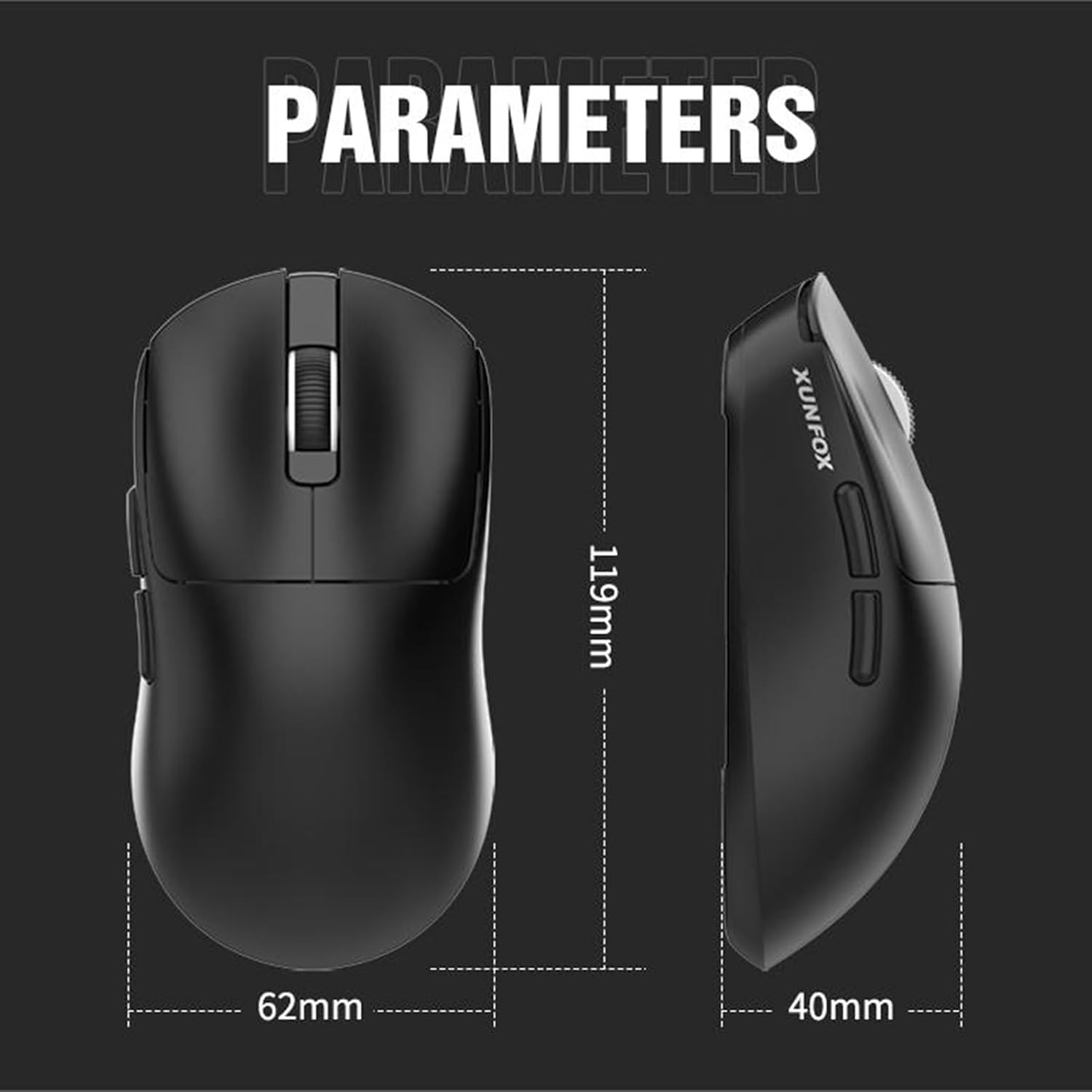
Image 7.1: Dimensional parameters of the XUNFOX H8 mouse, indicating its length, width, and height.
8. Warranty and Support
For warranty information and technical support, please refer to the documentation provided with your purchase or contact the retailer/manufacturer directly. Keep your proof of purchase for warranty claims.
