
1. Introduction
Thank you for choosing the GRECELL 240W Portable Power Station T200. This compact and versatile power station is designed to provide reliable power for various applications, including outdoor activities, mobile office work, and emergency backup at home. Featuring a durable LiFePO4 battery, multiple output ports, and convenient charging options, the T200 ensures your devices stay powered wherever you are. Please read this manual thoroughly before use to ensure safe and optimal operation.
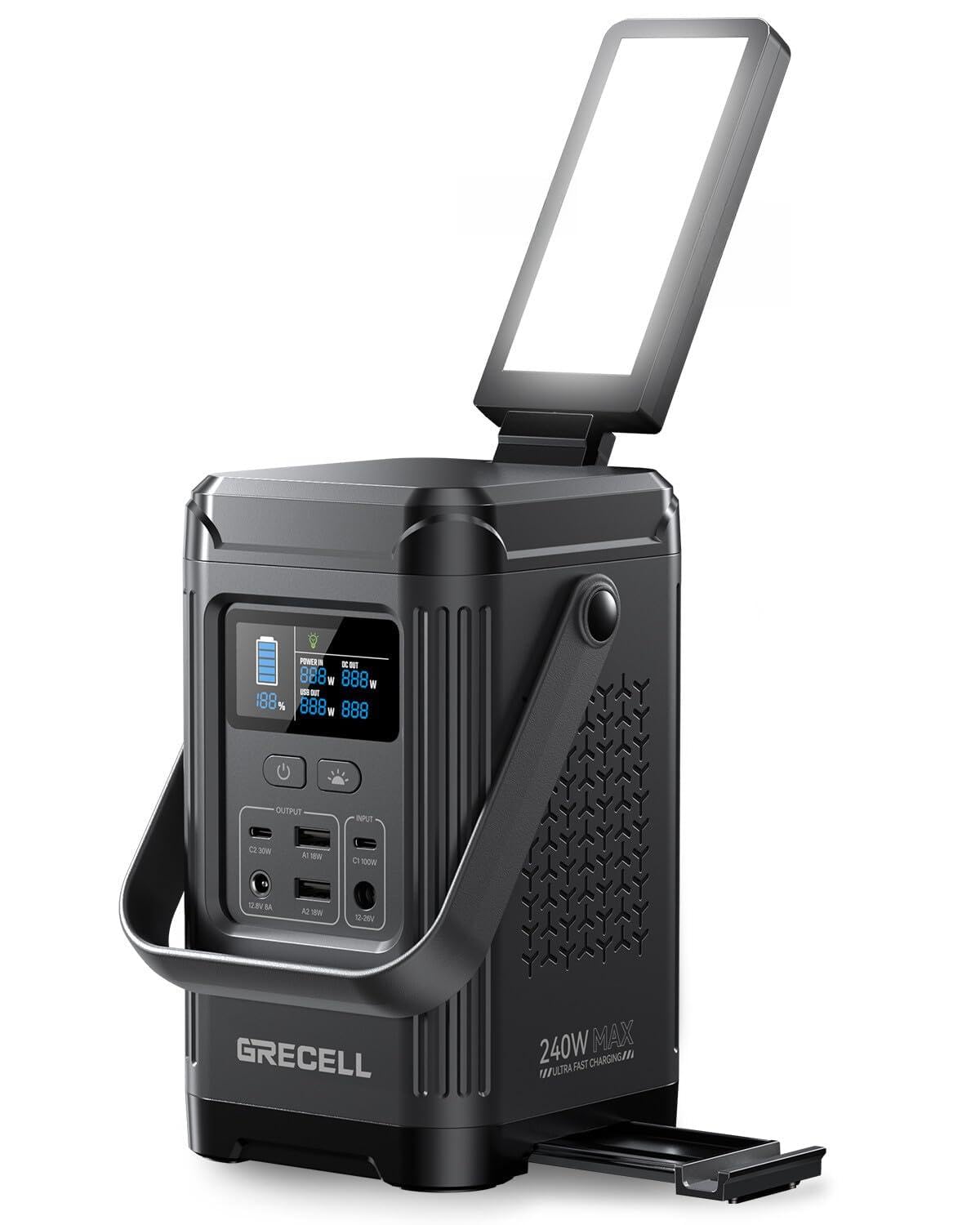
Image: GRECELL 240W Portable Power Station T200, showcasing its compact design.
2. Safety Instructions
To ensure safe operation and prolong the lifespan of your power station, please adhere to the following safety guidelines:
- Do not expose the device to water, moisture, or rain.
- Avoid using or storing the device in high-temperature environments or near heat sources.
- Do not disassemble, repair, or modify the device. Contact authorized service personnel for assistance.
- Keep the device away from children and pets.
- Ensure proper ventilation during use and charging to prevent overheating.
- Use only recommended charging cables and adapters.
- Avoid dropping or subjecting the device to strong impacts.
- Dispose of the battery and device according to local regulations.
3. Package Contents
Verify that all items are present in your package:
- 1 x GRECELL 240W Portable Power Station T200
- 1 x USB-C Charging Cable
- 1 x DC to Cigarette Lighter Outlet (Output)
- 1 x User Manual
Note: A wall charger and solar panel are not included and must be purchased separately to utilize all charging options.

Image: Contents of the GRECELL T200 package, showing the power station, USB-C cable, DC to cigarette lighter adapter, and user manual.
4. Product Overview
Familiarize yourself with the various components and functions of your GRECELL T200 Power Station.
4.1. Ports and Buttons

Image: Front panel of the power station with clearly labeled output and input ports, and control buttons.
- Power Button: Press to turn the unit on/off.
- Light Button: Controls the LED light modes (50% brightness, 100% brightness, flash, SOS, off). Long press for 1.5 seconds to turn off all lights.
- Output Ports:
- USB-C (C2): 30W Output
- USB-A (A1, A2): 18W Output each
- DC (12.8V 8A): Output for compatible devices
- Input Ports:
- USB-C (C1): 100W Power Delivery (bidirectional for input/output)
- DC (12-26V): Input for solar panel or car charger
4.2. LCD Display
The LCD display provides real-time information about the power station's status:
- Battery Level: Shows the remaining battery percentage.
- Power In (W): Displays the current input wattage.
- DC Out (W): Shows the current DC output wattage.
- USB Out (W): Displays the current USB output wattage.
- ECO Mode: Indicates when the 8-hour hibernation mode is active to conserve battery life.
4.3. Integrated Features
- Adjustable LED Light: The built-in LED light can be adjusted to various angles (up to 180 degrees) and offers multiple lighting modes including SOS for emergencies.
- Built-in Phone/Tablet Stand: A convenient pull-out stand is integrated into the unit for holding your smartphone or tablet while charging or viewing content.

Image: The power station demonstrating its adjustable LED light and integrated phone stand.
5. Setup
Before first use, it is recommended to fully charge your GRECELL T200 Power Station.
5.1. Initial Charging
Connect the provided USB-C charging cable to the 100W USB-C PD (C1) input port on the power station and to a compatible 100W USB-C PD wall adapter (not included). The LCD display will show the 'Power In' wattage and the battery icon will animate, indicating charging. A full charge typically takes 1.5-2 hours with a 100W input.

Image: Multiple charging methods for the power station, including USB-C wall charging and solar input.
6. Operating Instructions
6.1. Charging the Power Station
The T200 offers flexible charging options:
- USB-C PD (100W): Use a compatible USB-C PD wall charger (not included) for fast charging.
- Solar Panel (up to 100W): Connect a compatible solar panel (not included) to the DC input port (12-26V) for eco-friendly charging. Charging time varies based on sunlight intensity and panel efficiency.
- Car Charger: Use a compatible car charger (not included) with the DC input port (12-26V).
6.2. Using Output Ports
To power your devices:
- Press the Power Button to turn on the power station.
- Connect your device's charging cable to the appropriate output port (USB-C, USB-A, or DC).
- The LCD display will show the output wattage for the active ports.

Image: The power station actively charging multiple devices, including a laptop, phone, and tablet.
6.3. LED Light Operation
The integrated LED light provides illumination for various situations:
- Press the Light Button to cycle through the modes: 50% brightness → 100% brightness → Flash → SOS → Off.
- Long press the Light Button for 1.5 seconds to turn off all lights directly.
- Adjust the light panel to your desired angle (up to 180 degrees) for optimal illumination.
6.4. Using the Phone/Tablet Stand
Pull out the integrated stand from the side of the power station to prop up your smartphone or tablet for hands-free viewing.

Image: The power station with its built-in phone stand extended, supporting a smartphone.
7. Maintenance
Proper maintenance ensures the longevity and performance of your power station:
- Storage: Store the device in a cool, dry place away from direct sunlight and extreme temperatures. For long-term storage, charge the battery to 50-80% every 3-6 months.
- Cleaning: Use a soft, dry cloth to clean the exterior of the device. Do not use abrasive cleaners or solvents.
- Battery Care: The LiFePO4 battery offers a long lifespan (3000+ cycles). Avoid fully discharging the battery frequently to maximize its life.
8. Troubleshooting
If you encounter issues, refer to the following common problems and solutions:
- Device not turning on: Ensure the battery is charged. Press and hold the Power Button for a few seconds.
- No output from ports: Check if the power station is turned on. Ensure the connected device is compatible and within the power station's output limits. Try a different port or cable.
- Slow charging: Verify that the input source (wall adapter, solar panel) provides sufficient wattage. Ensure the charging cable is functioning correctly.
- ECO mode activates unexpectedly: The device automatically powers down after 8 hours of low or no activity to conserve battery life. This is normal operation.
- Overload/Short Circuit Protection: If an overload or short circuit occurs, the device will automatically shut down. Disconnect the problematic device and restart the power station.
If problems persist, please contact GRECELL customer support.
9. Specifications
| Feature | Specification |
|---|---|
| Brand | GRECELL |
| Model Name | T200 |
| Wattage | 240 Watt-hours |
| Battery Capacity | 153.6Wh / 48000mAh |
| Battery Cell Type | Lithium Iron Phosphate (LiFePO4) |
| Output Wattage | 240W (Max) |
| USB-C Output (C1) | 100W PD (Input/Output) |
| USB-C Output (C2) | 30W |
| USB-A Output (A1, A2) | 18W each |
| DC Output | 12.8V 8A |
| DC Input | 12-26V (for Solar/Car Charger) |
| Item Weight | 5.3 Pounds |
| Product Dimensions | 11.6"L x 6.65"W x 6.14"H |
| Special Features | Comfort Grip, Lightweight, Portable, Short Circuit Protection, USB Port, Adjustable LED Light, Phone Stand |
10. Warranty and Support
The GRECELL 240W Portable Power Station T200 comes with a 1-year warranty from the date of purchase, covering manufacturing defects. For warranty claims, technical support, or any inquiries, please contact GRECELL customer service through the retailer where the product was purchased or visit the official GRECELL website for contact information.
Please have your purchase receipt and product model number (T200) ready when contacting support.
11. Official Product Videos
GRECELL 240W Portable Power Station Overview
Video: An official overview of the GRECELL 240W Portable Power Station, highlighting its features and uses.
GRECELL 240W Power Station Unboxing
Video: An official unboxing of the GRECELL 240W Portable Power Station, showing what's included in the package.
240W Camping Power Bank in Use
Video: The GRECELL 240W Portable Power Station being used as a camping power bank, demonstrating its portability and utility outdoors.


