
SOBAST S-T26pro Purple
SOBAST T26pro OWS Open Wireless Earbuds User Manual
Model: S-T26pro
Brand: SOBAST
Introduction
Thank you for choosing the SOBAST T26pro OWS Open Wireless Earbuds. These earbuds are designed to provide a secure and comfortable open-ear listening experience, featuring Wireless 5.4 connectivity, clear stereo sound, and advanced AI translation capabilities. This manual will guide you through the setup, operation, and maintenance of your new earbuds to ensure optimal performance and enjoyment.
The T26pro earbuds are lightweight and splashproof, making them suitable for various activities, including gaming, calls, and music listening. Their open-ear design avoids pressure on the ear canal, enhancing ambient awareness.
What's in the Box
Please check the contents of your package to ensure all items are present:
- SOBAST T26pro OWS Open Wireless Earbuds (Left and Right)
- Wireless Charging Case
- USB Charging Cable
- User Manual
- Activation Code Card

Image: The SOBAST T26pro OWS Open Wireless Earbuds in their charging case, showcasing their compact and ergonomic design.
Setup
1. Charging the Earbuds
Before first use, fully charge your earbuds and the charging case. Connect the USB charging cable to the charging case and a power source. The indicator lights on the case will show the charging status.
2. Downloading the Nebula Translation App
To unlock the full potential of your SOBAST T26pro earbuds, including AI translation features, you need to download the Nebula Translation App. Scan the QR code provided in the packaging or search for "Nebula Translation" in your device's app store.
Video: A step-by-step guide on how to activate the AI Translation Earphones using the Nebula app, including unboxing and scanning the activation code.
3. Activating and Pairing Your Earbuds
- Open the Nebula Translation App.
- Go to "Connection Management" and select "Bind device".
- If prompted, log in to your account.
- Go to your phone's Bluetooth settings and connect/pair with the "S-OW1pro" earbuds.
- Return to the Nebula app. Scan or manually enter the activation code found on the card included in your package.
- Click "Connect" to complete the activation.
Important: Keep the activation code card safe, as it is required for future device management and potential returns.
Operating Instructions
General Earbud Controls
- Power On/Off: Earbuds power on automatically when removed from the case and power off when placed back in.
- Play/Pause: Tap either earbud once.
- Next Track: Double-tap the right earbud.
- Previous Track: Double-tap the left earbud.
- Answer/End Call: Tap either earbud once.
- Reject Call: Press and hold either earbud for 2 seconds.
- Activate Voice Assistant: Triple-tap either earbud.
AI Translation Features (via Nebula App)
1. Face-to-Face Translation (Dual Ear Mode)
This mode allows two people to communicate face-to-face with real-time bilingual translation. Each person wears one earbud.
- On the Nebula app homepage, click "Dual Ear Mode".
- Select the languages for each earbud in the upper text area. The middle arrow allows for quick language swapping.
- Click the red dot to start recording. Speak into your earbud. The translation will be played through the other person's earbud.
- Click the red dot again to stop recording.
Video: Demonstrates the SOBAST AI Face-to-Face Translation feature, showing how two individuals can use the earbuds for real-time communication.
2. Simultaneous Interpretation (Headphones + Mobile Mode)
This mode is ideal for situations where one person wears the earbuds and the other person speaks into the phone, with real-time interpretation.
- On the Nebula app homepage, click "Headphones + Mobile Mode".
- Select the languages in the upper text area. The left side is your language (earbuds), and the right side is the other person's language (phone).
- When you speak, click the headphones icon. Your speech will be translated and played through the phone.
- When the other person speaks, click the phone icon. Their speech will be translated and played through your headphones.
- Click the top-left corner to stop recording.
Video: An overview of the SOBAST AI Simultaneous Interpretation feature, demonstrating how it facilitates real-time language translation.
3. AI Assistant
The Nebula app also features an AI Assistant that can help with various tasks, including image generation.
- Enter the "AI Interface" within the Nebula app.
- Click "AI Image Creation".
- Input text describing the image you want to generate or upload a reference photo.
- Select the desired image aspect ratio.
- Click to send your request, and the AI will generate the image.
Video: Shows the SOBAST AI Earbuds' AI Assistant feature, demonstrating its capability to generate images based on user input.
Product Features & Highlights
- Secure and Comfortable Open Ear Design: Professional OWS construction avoids pressure on the ear canal, ideal for ambient awareness and extended wear.
- Clear Stereo Sound: 14.2mm drivers deliver punchy bass and clear dialogue across the 20Hz-20kHz range, enhanced by a built-in AI microphone for calls.
- Wireless 5.4 Gaming-Grade Sync: Stable, low-latency 10-meter connection with auto-pairing in 2 seconds for seamless gaming and media consumption.
- Kid-Friendly Durability: IPX4 splash-proof coating and ASTM F963 safety standards ensure resilience against drops and minor water exposure.
- Long Playtime & Lightweight: Up to 6 hours of play per charge, with each earbud weighing only 4.2 grams for comfortable all-day wear.

Image: The SOBAST T26pro earbuds positioned next to a smartphone displaying a game, illustrating their low-latency performance for an immersive experience.
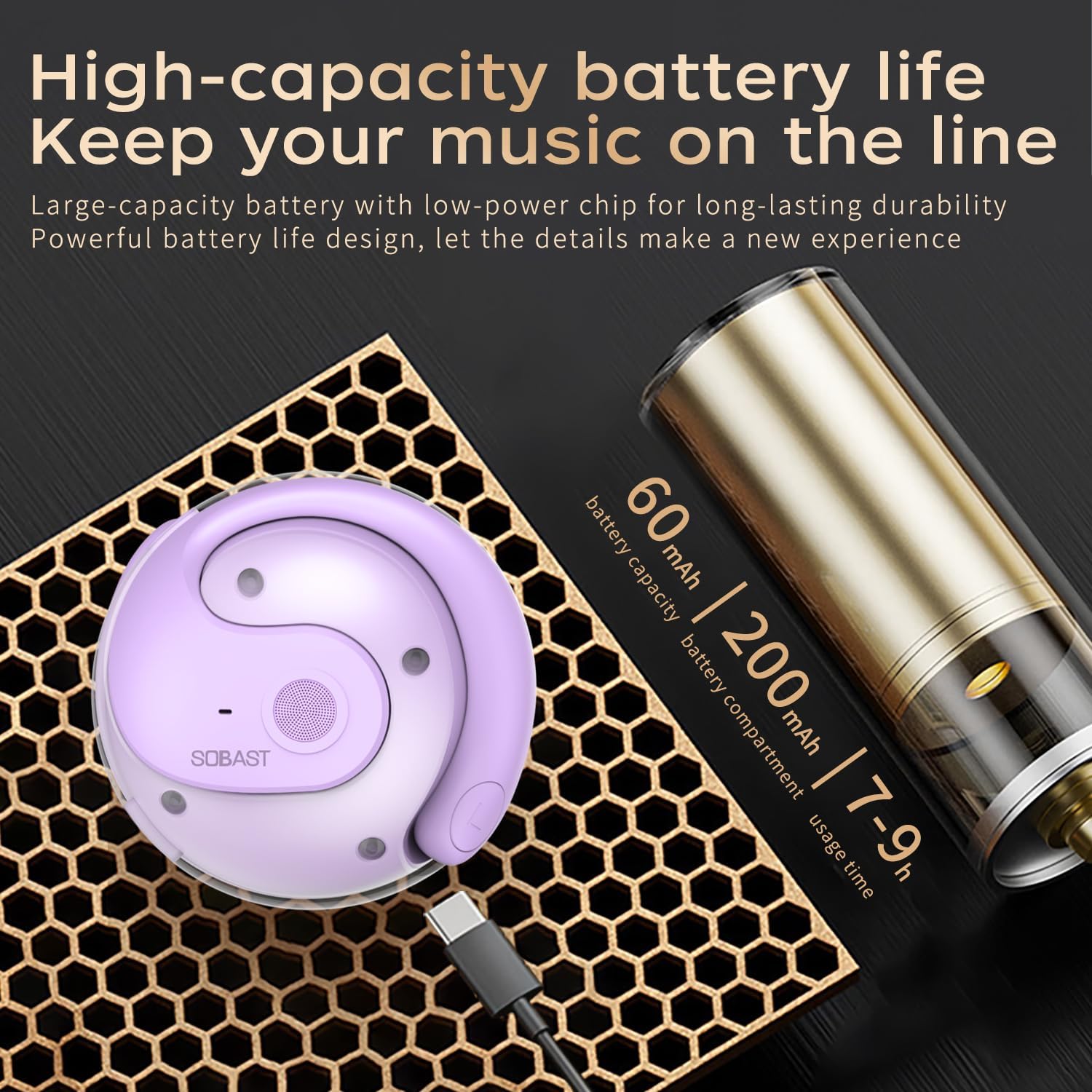
Image: The SOBAST T26pro charging case connected to a USB-C cable, with text indicating 60mAh earbud battery capacity, 200mAh charging bay capacity, and 7-9 hours of usage time.

Image: A detailed view of the Bluetooth 5.3 chip, emphasizing faster connection and higher stability for the SOBAST T26pro earbuds.
Specifications
| Feature | Specification |
|---|---|
| Model Name | SOBAST S-T26pro |
| Connectivity Technology | Wireless (Bluetooth 5.4) |
| Ear Placement | On Ear (Open-ear Curved Hook) |
| Audio Driver Type | Dynamic Driver (14.2mm) |
| Frequency Range | 20Hz-20kHz |
| Battery Life (Earbuds) | 6 Hours |
| Charging Case Battery Life | 24 Hours |
| Charging Time | 1.5 Hours (Earbuds), 1 Hour (Case) |
| Bluetooth Range | 33 Feet (10 meters) |
| Water Resistance Level | IPX4 Splashproof |
| Item Weight (Earbud) | 4.2 grams (0.004 ounces) |
| Product Dimensions | 2.36 x 1.97 x 1.57 inches |
| Control Type | Touch Control |
| Noise Control | Hybrid Noise Cancellation |
Maintenance
To ensure the longevity and optimal performance of your SOBAST T26pro earbuds, follow these maintenance guidelines:
- Cleaning: Gently wipe the earbuds and charging case with a soft, dry, lint-free cloth. Do not use harsh chemicals, cleaning solvents, or strong detergents.
- Water Exposure: The earbuds are IPX4 splashproof, meaning they can withstand light splashes of water. Do not submerge them in water or expose them to heavy rain. Dry them thoroughly if they get wet.
- Storage: When not in use, store the earbuds in their charging case to protect them from dust and damage. Store in a cool, dry place away from extreme temperatures.
- Charging: Use the provided USB charging cable. Avoid using damaged cables or chargers.
- Avoid Drops: While designed for durability, avoid dropping the earbuds or case from significant heights to prevent internal damage.
Troubleshooting
If you encounter issues with your SOBAST T26pro earbuds, try the following solutions:
- No Sound/Poor Sound Quality:
- Ensure earbuds are fully charged.
- Check Bluetooth connection; try re-pairing.
- Clean any debris from the earbud speakers.
- Adjust volume on both the earbuds and your connected device.
- Earbuds Not Pairing:
- Ensure earbuds are in pairing mode (usually by opening the case).
- Turn off and on Bluetooth on your device.
- Forget the device in your Bluetooth settings and try pairing again.
- Ensure the earbuds are within the 10-meter Bluetooth range.
- App Issues (Nebula Translation):
- Ensure the app is updated to the latest version.
- Restart the app or your phone.
- Check your internet connection for translation features.
- Verify the activation code is correctly entered and activated.
- Charging Problems:
- Check the charging cable and power adapter.
- Ensure the earbuds are correctly seated in the charging case.
- Clean the charging contacts on both the earbuds and the case.
Warranty and Support
Your SOBAST T26pro OWS Open Wireless Earbuds come with a standard manufacturer's warranty. Please refer to the warranty information provided with your purchase for details on coverage and duration.
For technical support, troubleshooting assistance, or warranty claims, please contact SOBAST customer service through the contact information provided on the official SOBAST website or your retailer's support channels. Have your product model number (S-T26pro) and proof of purchase ready when contacting support.
Ask a question about this manual
Ask about setup, troubleshooting, compatibility, parts, safety, or missing instructions. Manuals+ will review the question and use this page’s manual context to help answer it.