
FiiO SA1
FiiO SA1 High-Fidelity Desktop Speaker User Manual
Model: SA1 | Brand: FiiO
Introduction
The FiiO SA1 is a high-fidelity desktop speaker system designed to deliver exceptional audio performance for various applications, including music listening, gaming, and home theater. Featuring a 31-band PEQ, LDAC Bluetooth connectivity, and multiple input options including a built-in phono preamp, the SA1 offers versatile and customizable sound experiences. This manual provides detailed instructions for setting up, operating, maintaining, and troubleshooting your FiiO SA1 speakers.
What's in the Box
- FiiO SA1 Desktop Speakers (Pair)
- Power Cable
- Remote Control
- User Manual (this document)
- Warranty Card
Product Overview
Familiarize yourself with the key components and features of your FiiO SA1 speakers.
Front and Rear Panels
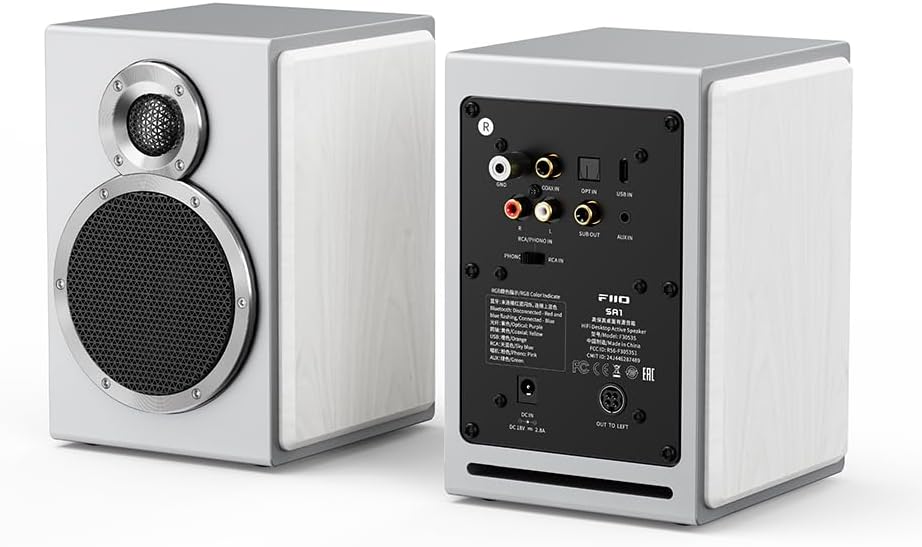
Image: Front and rear view of the FiiO SA1 speakers. The front features the woofer and tweeter, while the rear panel displays a comprehensive array of input and output connections.
- Woofer: 3.5-inch wood fiber woofer for powerful and natural bass response.
- Tweeter: 3/4 inch aluminum-magnesium alloy dome tweeter for clear and silky smooth high frequencies.
- Physical Knobs: Two large knobs on the front for convenient operation, including an RGB light indicator.
- Rear Panel Inputs: RCA/Phono IN, Coaxial IN, Optical IN, USB IN, AUX IN.
- Rear Panel Outputs: SUB OUT (for connecting an external subwoofer), OUT TO LEFT (for connecting the passive left speaker).
- Power Input: DC IN 18V 2.8A.
Internal Components and Design

Image: Detailed view of the 3.5-inch wood fiber woofer, highlighting its construction for robust sound reproduction.

Image: Detailed view of the 3/4 inch aluminum-magnesium alloy dome tweeter, designed for crisp and clear high-frequency audio.

Image: Circuit diagram showing the Texas Instruments digital amplifier (TPA3118) used in the SA1 for robust and clear sound output.

Image: Exploded view of the SA1 speaker cabinet, demonstrating its high-density MDF construction for reduced sound resonance and natural sound.
Setup
Speaker Placement
For optimal sound quality, place the FiiO SA1 speakers on a stable, flat surface, ideally at ear level when seated. Ensure there is adequate space behind the speakers for proper airflow and cable management. Position the speakers equidistant from your listening position to create a balanced stereo image.
Connecting the Speakers
- Connect the passive left speaker to the active right speaker using the provided speaker cable. The connection port on the active speaker is labeled "OUT TO LEFT".
- Connect the power cable to the "DC IN" port on the active speaker, then plug the power adapter into a wall outlet.
Connecting Audio Sources
The FiiO SA1 offers a variety of input options:

Image: Detailed view of the rear panel, illustrating the various input and output options available on the FiiO SA1 speakers.
- RCA/Phono IN: Connect devices with RCA outputs, such as CD players, DACs, or turntables. The built-in phono preamp supports vinyl turntables. If your turntable has a built-in preamp, switch the input toggle to RCA IN. If not, use the PHONO setting.

Image: FiiO SA1 speakers set up with a turntable, demonstrating the use of the built-in phono preamp for vinyl playback.
- Coaxial IN: Connect devices with coaxial digital audio output.
- Optical IN: Connect devices with optical digital audio output.
- USB IN: Connect to a computer or other USB audio source for high-quality digital audio playback.
- AUX IN: Connect devices using a 3.5mm auxiliary cable.
- Bluetooth: For wireless connection, refer to the "Bluetooth Pairing" section under Operating.

Image: Illustration of the Bluetooth 5.4 chip, emphasizing support for LDAC high-resolution wireless audio transmission.
Connecting an External Subwoofer
The SA1 features a "SUB OUT" RCA connector, allowing you to connect an active subwoofer to create a 2.1 channel system for enhanced bass performance.

Image: Close-up of the "SUB OUT" port on the SA1's rear panel, indicating its function for connecting an external subwoofer.
Operating Instructions
Power On/Off
Press the power button on the remote control or the main knob on the active speaker to turn the unit on or off.
Input Selection
Cycle through the available inputs (RCA/Phono, Coaxial, Optical, USB, AUX, Bluetooth) using the input selection button on the remote or the physical knob on the speaker. The RGB light indicator on the knob will change color to indicate the active input:
- Red: RCA/Phono
- Green: Coaxial
- Blue: Optical
- Cyan: USB
- Yellow: AUX
- Pink: Bluetooth

Image: Close-up of the physical knobs on the SA1, one featuring an RGB light indicator for input status.
Volume Control
Adjust the volume using the dedicated volume knob on the speaker or the volume buttons on the remote control.
Bluetooth Pairing
- Select Bluetooth as the input source. The RGB indicator will flash pink, indicating pairing mode.
- On your device (smartphone, tablet, computer), search for Bluetooth devices and select "FiiO SA1".
- Once connected, the RGB indicator will turn solid pink.
PEQ Adjustment and Sound Presets (via FiiO Control App)
The FiiO SA1 supports 31-band high-precision lossless PEQ (Parametric Equalizer) adjustment and multiple sound presets via the FiiO Control app. This allows for fine-tuning of the frequency response curve to optimize sound for your listening environment and preferences.

Image: Screenshot of the FiiO Control app displaying the 31-band PEQ interface, allowing users to customize the sound profile.

Image: Screenshot of the FiiO Control app showing various built-in sound presets and options for saving custom PEQ settings.
- Download the "FiiO Control" app from your device's app store.
- Connect your SA1 speakers to the app via Bluetooth.
- Within the app, you can access the 31-band PEQ to fine-tune frequencies, save up to three custom PEQ setups, and select from eight built-in sound presets (e.g., Pop, Jazz, Classical, R&B, Dance, Monitor).
- The "Monitor" preset provides a flat frequency response curve, transforming the SA1 into active desktop studio monitor speakers.
Remote Control Usage
The included infrared remote control provides full functionality for operating your SA1 speakers.

Image: The custom infrared remote control included with the FiiO SA1, offering comprehensive control over the speaker functions.
- Power Button: Turns the speakers on/off.
- Input Selection: Cycles through audio inputs.
- Volume +/-: Adjusts the master volume.
- Mute: Mutes/unmutes audio.
- Playback Controls: Play/Pause, Next/Previous Track (for Bluetooth/USB input).
- EQ/Preset Buttons: Access and switch between sound presets.
Automatic Standby and Wake-up
The SA1 features an automatic standby function to conserve power. If no audio input is detected for 20 minutes, the speakers will enter standby mode (RGB light indicator turns red and then off after another 20 minutes). When an audio signal is detected, the device will automatically wake up, and the RGB light indicator will return to its previous color.

Image: Illustration depicting the automatic standby and wake-up functionality of the FiiO SA1 speakers based on audio signal detection.
Maintenance
- Cleaning: Use a soft, dry cloth to clean the speaker surfaces. Avoid using abrasive cleaners, waxes, or solvents as they may damage the finish.
- Dust: Regularly dust the speaker grilles and vents to prevent accumulation, which can affect sound quality and internal components.
- Placement: Ensure speakers are placed in a well-ventilated area, away from direct sunlight, heat sources, and excessive moisture.
- Cables: Periodically check all cable connections to ensure they are secure and free from damage.
Troubleshooting
| Problem | Possible Cause | Solution |
|---|---|---|
| No power | Power cable not connected; Power outlet not active. | Ensure power cable is securely connected to the speaker and a working power outlet. |
| No sound | Incorrect input selected; Volume too low; Audio cable loose/damaged; Bluetooth not paired. | Verify correct input is selected. Increase volume. Check all audio cable connections. Re-pair Bluetooth device. |
| Distorted sound | Volume too high; Source audio quality poor; Speaker placement issues. | Reduce volume. Try a different audio source. Adjust speaker placement. Check PEQ settings in the app. |
| Bluetooth connection unstable | Device too far; Interference; Other Bluetooth devices. | Move device closer to speakers. Avoid obstacles. Turn off other Bluetooth devices. |
| Remote control not working | Batteries dead; Obstruction between remote and speaker. | Replace remote batteries. Ensure clear line of sight to the speaker's IR receiver. |
Specifications
| Feature | Detail |
|---|---|
| Model Name | SA1 |
| Speaker Type | Desktop Speaker |
| Special Feature | Hi-Res Audio, 31-Band PEQ, Built-in Phono Preamp |
| Color | White |
| Product Dimensions | 6.3"D x 5.51"W x 7.48"H |
| Item Weight | 10.52 pounds |
| Manufacturer | FiiO |
| Speaker Maximum Output Power | 20W*2 (Woofer) + 5W*2 (Tweeter) |
| Connectivity Technology | Bluetooth 5.4 (LDAC), Coaxial, Optical, RCA, USB |
| Audio Output Mode | Stereo |
| Mounting Type | Tabletop Mount |
| Woofer | 3.5-inch wood fiber |
| Tweeter | 3/4 inch aluminum-magnesium alloy dome |
| Amplifier | Texas Instruments Class D (TPA3118) |
| Crossover | Active electronic two-way (3.5kHz) |
| Cabinet Material | High-density MDF (up to 12mm thick) |
Warranty Information
The FiiO SA1 speakers come with a Limited Warranty. For specific terms and conditions, please refer to the warranty card included in your product packaging. Protection plans are also available for extended coverage:
- 2-Year Protection Plan: Available for purchase.
- 3-Year Protection Plan: Available for purchase.
- Complete Protect: A monthly plan covering eligible past and future purchases.
Please retain your proof of purchase for warranty claims.
Customer Support
For further assistance, technical support, or inquiries regarding your FiiO SA1 speakers, please visit the official FiiO Store or contact FiiO customer service.
FiiO Official Store: https://www.amazon.com/stores/FiiO/page/09C6D6C0-71E3-4540-968D-1F76CDBC4444
Related documentsSA1


Ask a question about this manual
Ask about setup, troubleshooting, compatibility, parts, safety, or missing instructions. Manuals+ will review the question and use this page’s manual context to help answer it.