1. Introduction
The RDINSCOS MT18CUS02 is a digital pin-type moisture meter designed for accurately measuring moisture content in various materials, including wood, drywall, and other building materials. This device is suitable for home inspections, woodworking, construction, and testing firewood. It features a clear LCD display, multiple material modes, and an auto-alarm function for efficient moisture detection.
2. Safety Information
- The measurement pins are sharp. Handle the device with care to prevent injury.
- Keep the device out of reach of children.
- Do not attempt to measure live electrical circuits.
- Do not expose the device to extreme temperatures, humidity, or direct sunlight.
- Remove batteries if the device will not be used for an extended period.
3. Product Overview
The RDINSCOS MT18CUS02 moisture meter features a compact design with an easy-to-read LCD display and intuitive controls.
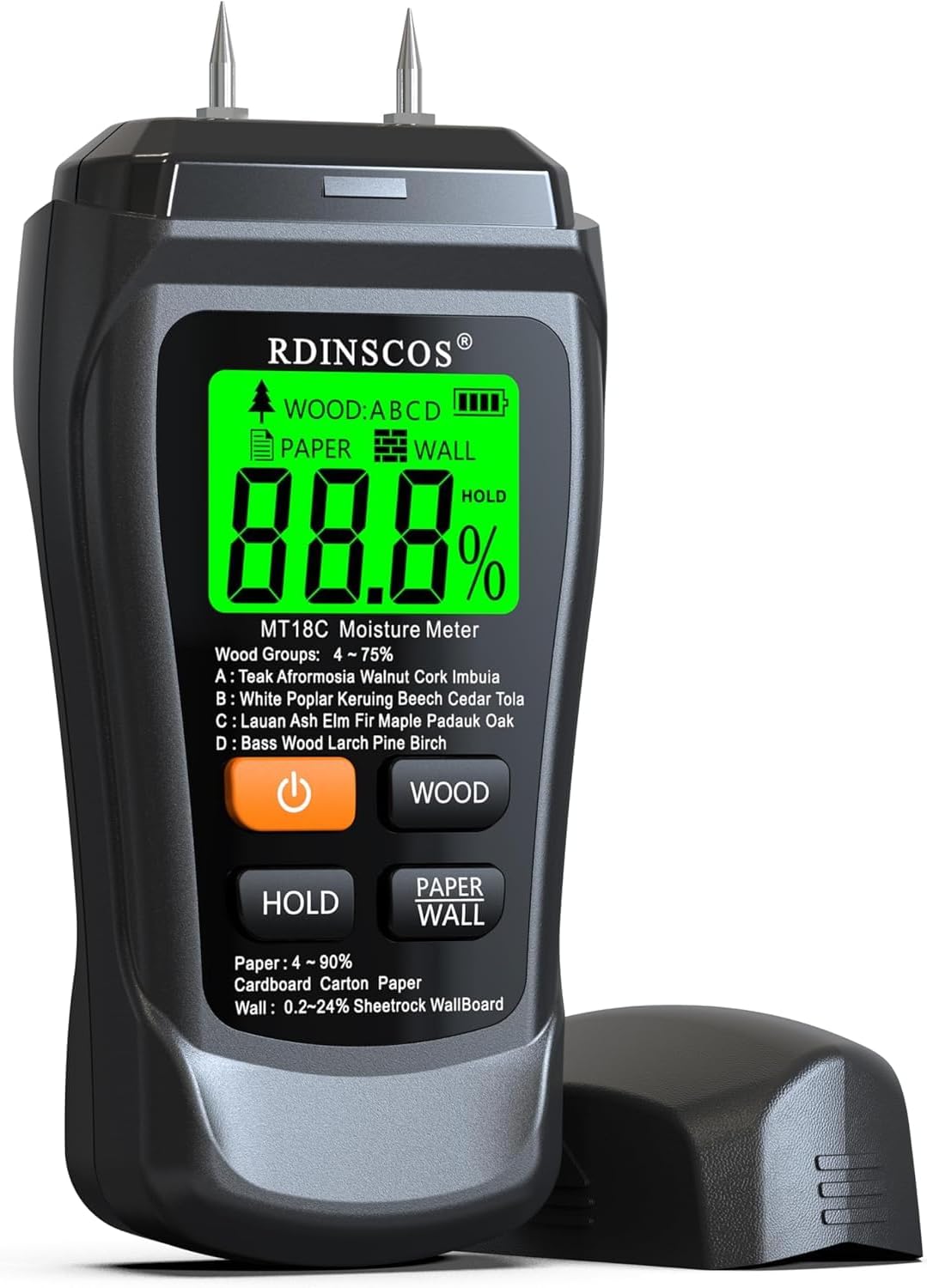
Figure 1: Front view of the RDINSCOS MT18CUS02 Digital Moisture Meter, showing the LCD display, measurement pins, and control buttons.
3.1 Components
- Measurement Pins: Two sharp pins for penetrating materials to measure moisture content.
- LCD Display: Digital screen showing moisture percentage, material mode, battery status, and hold indicator.
- Power Button: Turns the device on and off.
- HOLD Button: Freezes the current reading on the display.
- WOOD Button: Selects wood measurement mode and cycles through wood groups (A, B, C, D).
- PAPER/WALL Button: Selects paper or wall (drywall/building materials) measurement mode.
- Protective Cap: Covers the measurement pins when not in use.

Figure 2: Close-up view of the highly sensitive metal probes (pins) with a probe length of 0.39 inches (approximately 10mm).
4. Setup
4.1 Battery Installation
The RDINSCOS MT18CUS02 moisture meter requires two AAA batteries for operation. The device typically includes batteries in the package.
- Locate the battery compartment on the back of the device.
- Open the battery compartment cover.
- Insert two AAA batteries, ensuring correct polarity (+/-).
- Close the battery compartment cover securely.

Figure 3: Included components: moisture meter, user guide, soft bag, and AAA batteries.
5. Operation
5.1 Power On/Off
- To power on the device, press the Power Button (
 ). The LCD display will illuminate.
 - The device features an automatic shut-off function to conserve battery power. It will power off after a period of inactivity.
5.2 Mode Selection
The meter offers different modes for various materials:
- Press the WOOD Button to select the wood measurement mode. Repeated presses will cycle through different wood groups (A, B, C, D).
- Press the PAPER/WALL Button to switch between paper and wall (drywall/building materials) measurement modes.

Figure 4: Mode switch functionality for Wood (ABCD), Paper, and Wall materials.
5.3 Taking Measurements
- Remove the protective cap from the measurement pins.
- Select the appropriate material mode (Wood, Paper, or Wall) using the respective buttons. For wood, ensure the correct wood group is selected.
- Firmly insert the measurement pins into the material to be tested. Ensure the pins penetrate the surface sufficiently to obtain an accurate reading, up to 12mm deep.
- Read the moisture content percentage displayed on the LCD screen.
- After taking a reading, gently remove the pins and replace the protective cap.

Figure 5: The meter can measure moisture up to 10mm below the surface when pins are fully inserted.

Figure 6: For optimal results, ensure the pins are pushed deep into the material being tested.
5.4 Hold Function
Press the HOLD Button to freeze the current measurement on the display. This is useful when taking readings in hard-to-reach areas where the display cannot be viewed directly. Press the HOLD button again to release the reading and resume live measurement.

Figure 7: The Hold function allows you to lock the current reading on the screen.
5.5 Auto-Alarm and Backlight
The meter features an auto-alarm system with a three-color backlight to indicate moisture levels:
- Green Backlight: Indicates low moisture levels.
- Orange Backlight: Indicates medium moisture levels.
- Red Backlight: Indicates high moisture levels, often accompanied by an audible alarm.

Figure 8: The display backlight changes color (green, orange, red) to visually indicate moisture levels, with an audible alarm for high moisture.
6. Material Modes and Ranges
The MT18CUS02 offers specific measurement ranges for different materials:
6.1 Wood Measurement (4% - 75%)
The meter includes four wood groups to provide more accurate readings for various wood types. Select the appropriate group using the WOOD button.
| Wood Group | Examples of Wood Types |
|---|---|
| A | Teak, Afrormosia, Walnut, Cork, Imbuia |
| B | White Poplar, Keruing, Beech, Cedar, Tola |
| C | Lauan, Ash, Elm, Fir, Maple, Padauk, Oak |
| D | Basswood, Larch, Pine, Birch |

Figure 9: Wood moisture measurement in progress, showing a range of 5% to 70% with ±0.5% accuracy for both hardwood and softwood.
6.2 Paper Measurement (4% - 90%)
This mode is suitable for measuring moisture content in paper products such as cardboard and carton paper.
6.3 Wall/Building Materials Measurement (0.2% - 24%)
This mode is designed for detecting moisture in building materials like drywall, sheetrock, and wallboard. The accuracy for this mode is ±0.5%.

Figure 10: Drywall moisture detection in progress, showing a range of 0.2% to 24% with ±0.5% accuracy, suitable for powder walls, gypsum board, and floors.
7. Maintenance
- Cleaning: Wipe the device with a soft, dry cloth. Do not use abrasive cleaners or solvents.
- Storage: Store the meter in a cool, dry place, away from direct sunlight and extreme temperatures. Always replace the protective cap over the pins when storing.
- Battery Replacement: Replace batteries when the low battery indicator appears on the display to ensure accurate readings.
8. Troubleshooting
- Q: Display shows no reading or erratic readings.
- A: Ensure the pins are fully inserted into the material. Check battery level and replace if necessary. Ensure the correct material mode is selected.
- Q: Readings seem inaccurate.
- A: For wood, verify that the correct wood group (A, B, C, or D) is selected for the specific type of wood being tested. Ensure the pins are clean and free from debris. Pin meters measure moisture at a specific spot by touching the material; ensure good contact. This tool is designed for home inspection, woodworking, and construction use with ±2.5% accuracy, not for laboratory testing.
- Q: When should I use a pin-type meter?
- A: Pin-type meters are best for thick wood, drywall, or concrete where the probes need to penetrate the material to get an internal moisture reading. They provide precise readings at the point of penetration.
9. Specifications
| Feature | Specification |
|---|---|
| Model Number | MT18CUS02 |
| Measurement Principle | Electrical Resistance |
| Wood Moisture Range | 4% - 75% |
| Paper Moisture Range | 4% - 90% |
| Wall Moisture Range | 0.2% - 24% |
| Accuracy | ±2.5% |
| Probe Length | 0.39 inches (approx. 10mm) |
| Power Source | 2 x AAA Batteries (Included) |
| Auto Shut-off | Yes |
| Item Weight | 7.4 ounces |
| Package Dimensions | 6.57 x 3.35 x 1.61 inches |
| Upper Temperature Rating | 60 Degrees Celsius |
10. Warranty and Support
For warranty information or technical support, please contact the manufacturer, SHENZHEN REDDRAGON INSTRUMENTS CO.,LTD, or refer to the contact details provided in your product packaging or on the official RDINSCOS website.

