
OOSSXX Dual Lens & Dual View Extend Camera
OOSSXX 4MP Dual Lens WiFi Security Camera System User Manual
Model: Dual Lens & Dual View Extend Camera
1. Product Overview
The OOSSXX 4MP Dual Lens WiFi Security Camera System provides comprehensive surveillance with its innovative dual-lens design, offering both a fixed wide-angle view and a pan-tilt-zoom (PTZ) lens for dynamic monitoring. This outdoor-ready camera supports dual-band WiFi (2.4G/5.8G) for stable connectivity and features advanced functionalities like AI auto-tracking and two-way audio.
Key Features:
- Dual Lens Full Coverage: One fixed lens for key areas, one PTZ lens for blind spot coverage.
- 4MP HD Clarity & 130° Wide View: Captures sharp 4MP video with a broad viewing angle.
- 2.4G/5.8G Dual Band WiFi: Ensures stable wireless connection and faster data transmission.
- Auto Tracking & 2-Way Audio: Automatically tracks moving subjects and enables real-time communication.
- IP66 Waterproof: Designed for outdoor use, resistant to rain, snow, and dust.
- Free App No Monthly Fee: Access live view, playback, and alerts without subscription costs.
What's in the Box:
- Wireless Camera x 1
- Power Supply 12V1A 10ft Cable x 1
- Mounting Screw Pack × 1
- Manual x 1

Image: The OOSSXX 4MP Dual Lens WiFi Security Camera System, showing its dual lenses and antennas.
2. Setup
2.1 Initial Setup
- Power On: Connect the camera to the provided 12V1A power supply. The camera will initiate its startup sequence.
- Download App: Download the "Honestview" app from your device's app store.
- Register & Login: Create an account and log in to the Honestview app.
- Add Device: In the app, click the "+" icon on the top right corner to add a new device. Follow the on-screen instructions to connect the camera to your 2.4GHz or 5.8GHz WiFi network.
Video: Unboxing and initial setup guide for the OOSSXX Wireless Wi-Fi Camera, demonstrating how to handle the camera and its components.
Video: A step-by-step guide on the easy setup process for the OOSSXX Dual Lens Camera, including app download and device pairing.
2.2 Mounting the Camera
The camera is designed for wall mounting. Use the provided mounting screw pack to securely attach the camera to a suitable surface. Ensure the mounting location provides a clear view of the desired surveillance area and is within range of your WiFi network.

Image: Illustration showing both wireless and wired connection options for the camera, highlighting network and power ports.
3. Operating Instructions
3.1 Live View and PTZ Control
Once connected, open the Honestview app to access the live feed from your camera. The app provides controls for the PTZ lens, allowing you to pan (355°), tilt (90°), and digitally zoom to adjust the viewing area. The dual-lens system offers a comprehensive view, with one lens providing a fixed wide perspective and the other offering flexible PTZ control.
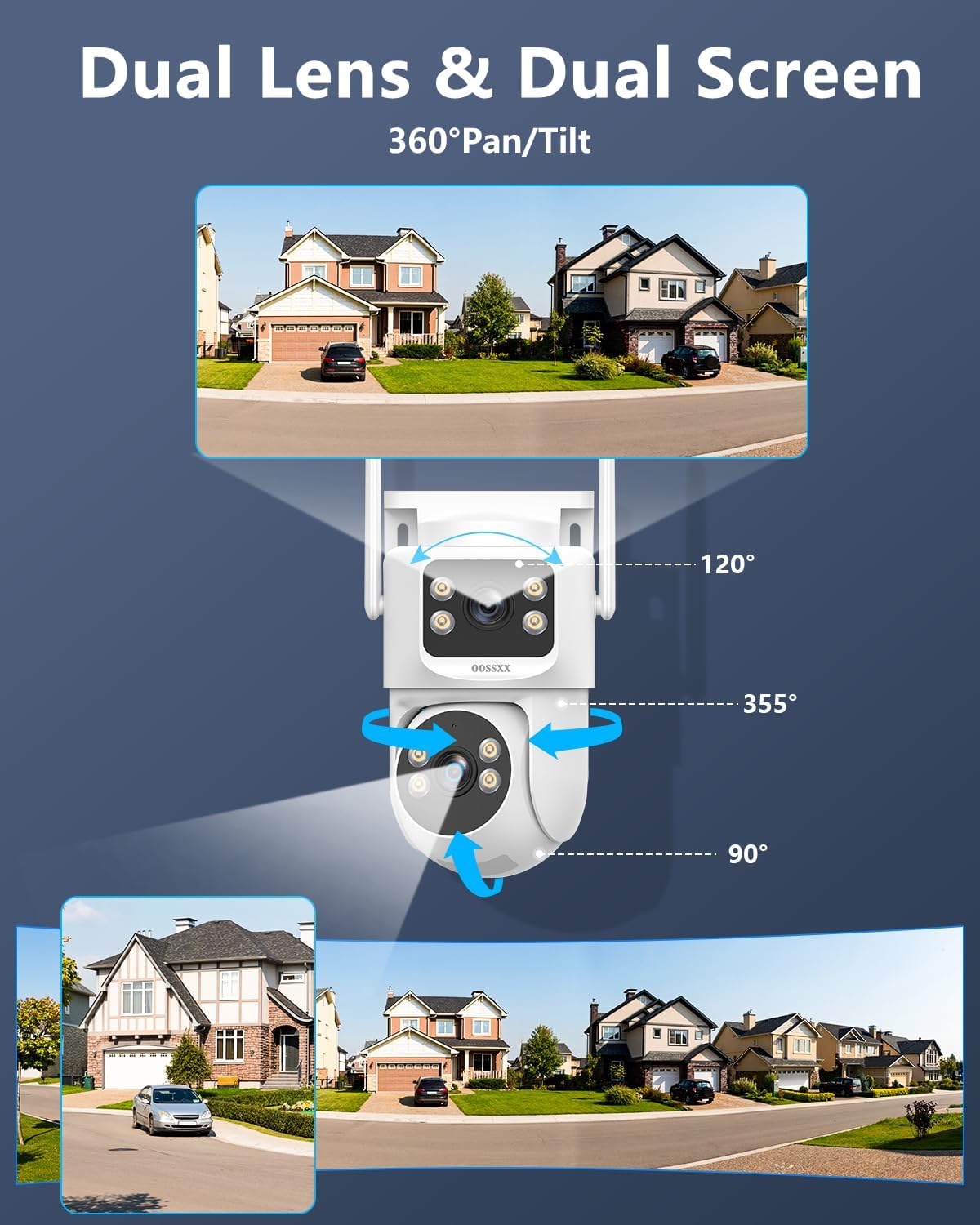
Image: Diagram illustrating the dual-lens and dual-screen functionality, showing the fixed wide view and the PTZ lens's range of motion (355° pan, 90° tilt).

Image: The OOSSXX camera demonstrating its 355° pan and 90° tilt capabilities, ensuring no blind spots in surveillance.
3.2 Two-Way Audio
The camera features a built-in microphone and speaker, enabling two-way audio communication. Use the app to speak through the camera to visitors, delivery personnel, or to deter unwanted guests.

Image: An illustration of the two-way audio feature, showing a person communicating through the camera with a delivery driver.
3.3 Motion Detection & Auto Tracking
The camera is equipped with AI motion detection and auto-tracking capabilities. When motion is detected, the camera can automatically track the moving object and send instant alerts to your smartphone. You can customize detection zones within the app to focus on specific areas and reduce false alarms.

Image: Visual representation of AI humanoid detection and auto-tracking, showing the camera identifying and following a person.

Image: Screenshot of the app interface demonstrating how to customize detection zones for privacy and targeted monitoring.
3.4 Night Vision Modes
The camera offers three night vision modes for clear monitoring in low-light conditions:
- Infrared Night Vision: Standard black and white view using IR LEDs.
- Full Color Night Vision: Provides color images in low light using integrated spotlights.
- Sound & Light Alarm Night Vision: Activates spotlights and an audible alarm upon detection.

Image: Visual comparison of the three night vision modes: Infrared, Full Color, and Sound & Light Alarm Night Vision.
3.5 Storage Options
Video recordings can be stored locally on a Micro SD card (up to 256GB, not included) or via optional cloud storage services. The camera utilizes H.265 video compression to optimize storage space.

Image: Diagram showing the Micro SD card slot for local storage and an icon representing cloud storage options.
4. Maintenance
4.1 Cleaning
To ensure optimal performance, periodically clean the camera lenses and housing. Use a soft, damp cloth to gently wipe away dust and dirt. Avoid using harsh chemicals or abrasive materials that could damage the camera's surface or lenses.
4.2 Environmental Considerations
The camera is IP66 waterproof, designed to withstand various outdoor weather conditions. However, for prolonged durability, avoid direct exposure to extreme conditions such as prolonged submersion or high-pressure water jets.

Image: The OOSSXX camera shown enduring sunny, snowing, and rainy conditions, highlighting its IP65 waterproof rating.
5. Troubleshooting
5.1 Common Issues and Solutions
- Camera not connecting to WiFi:
- Ensure the camera is within range of your router.
- Verify that you are connecting to a 2.4GHz or 5.8GHz network (not 5GHz only if your router broadcasts both on the same SSID).
- Check WiFi password accuracy.
- Restart the camera and your router.
- Poor image quality:
- Clean the camera lenses.
- Ensure adequate lighting for optimal image clarity.
- Check network stability for smooth streaming.
- Motion detection not working:
- Verify motion detection settings are enabled in the app.
- Adjust detection sensitivity.
- Ensure no obstructions are blocking the camera's view in the detection zones.
- Two-way audio issues:
- Check microphone and speaker permissions for the app on your smartphone.
- Ensure volume levels are adjusted correctly.
For further assistance, please refer to the support section.
6. Specifications
| Feature | Specification |
|---|---|
| Brand | OOSSXX |
| Model Name | 360° Full Coverage |
| Connectivity Technology | Dual-Band 2.4G / 5G, Wi-Fi IEEE802.11 a/n/f, Wireless |
| Special Features | 2-Way Audio, Dual 2.4G/5G Hz WiFi, Dual Lens, Dual Screen, Free APP No Month Fee, PTZ Technology |
| Indoor/Outdoor Usage | Indoor, Outdoor |
| Photo Sensor Resolution | 4 MP |
| Video Capture Resolution | 2.5K, 5MP |
| Viewing Angle | 360 Degrees |
| Digital Zoom | 10x |
| Night Vision Range | 65 Feet |
| Waterproof Rating | IP65 |
| Max SD Card Supported | 256 GB (Micro SD) |
| Video Encoding | H.265 |
| Power Source | Corded Electric (110 Volts, 5 watts) |
| Item Dimensions | 5 x 7 x 5 inches |
| Item Weight | 1 Pounds |
7. Warranty and Support
7.1 Manufacturer Warranty
The OOSSXX 4MP Dual Lens WiFi Security Camera System comes with a 1-Year Manufacturer Warranty from the date of purchase, valid in the US location.
7.2 Technical Support
For any technical issues, setup assistance, or troubleshooting not covered in this manual, please contact OOSSXX customer support. OOSSXX provides 24/7 online support and lifetime technical support.

Image: Graphic highlighting OOSSXX's reliable after-sales support, including 24/7 online support, 1-year warranty, and lifetime technical support.
You can find contact information on the official OOSSXX website or through the Honestview app's support section.
Ask a question about this manual
Ask about setup, troubleshooting, compatibility, parts, safety, or missing instructions. Manuals+ will review the question and use this page’s manual context to help answer it.