Introduction
Thank you for choosing the TALOYA 46 Inch Low Profile Ceiling Fan with Light. This modern ceiling fan is designed to provide optimal air circulation and customizable lighting for various indoor spaces, including bedrooms, living rooms, dining rooms, kitchens, and offices, as well as covered outdoor areas like patios or porches. It features a whisper-quiet DC motor, reversible airflow for year-round comfort, and convenient remote control operation.

Figure 1: TALOYA 46 Inch Low Profile Ceiling Fan with Light.
Setup and Installation
The TALOYA ceiling fan is designed for effortless installation, often requiring no professional electrician. Most installations can be completed within approximately 30 minutes.
Pre-Installation Checklist
- Ensure power is turned off at the circuit breaker before beginning installation.
- Verify that your ceiling electrical box is rated for ceiling fan support.
- Confirm the fan's voltage requirement (110 Volts) matches your electrical supply.
Installation Steps
- Mounting Bracket Installation: Secure the mounting bracket to the ceiling electrical box using appropriate screws.
- Wiring Connections: Connect the fan's electrical wires to your household wiring according to local electrical codes. Ensure all connections are secure.
- Fan Assembly: Attach the fan motor housing to the mounting bracket.
- Blade Attachment: Securely attach the five fan blades to the motor.
- Light Kit Installation: Install the integrated LED light kit to the fan body.
- Remote Control Pairing: Follow the instructions provided with the remote control to pair it with the fan.

Figure 2: Effortless installation process for the TALOYA ceiling fan.
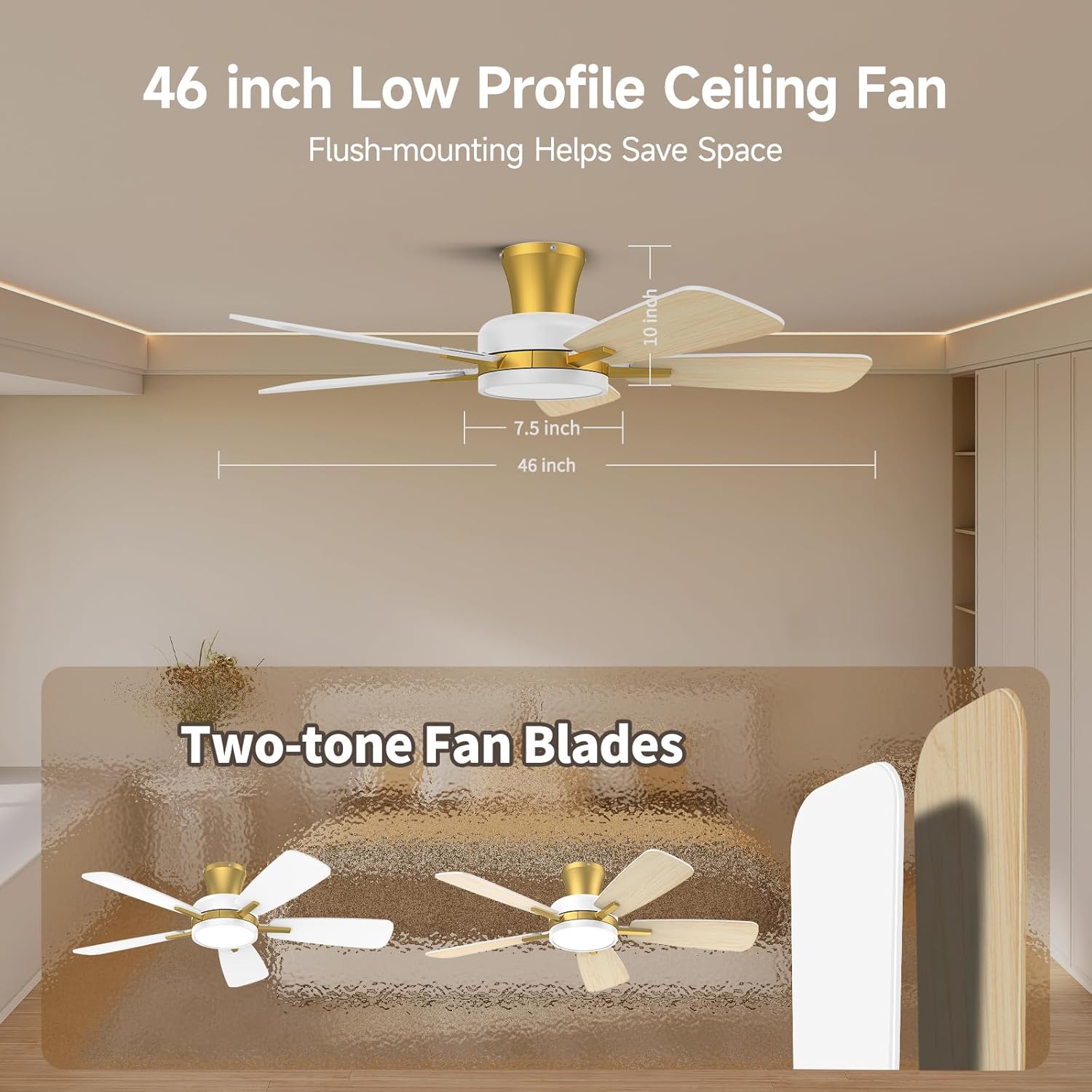
Figure 3: Dimensions of the 46-inch low profile ceiling fan, showing its flush-mount design.
Operating Instructions
All functions of your TALOYA ceiling fan are controlled via the included remote control.
Fan Operation
- Fan Speed: The remote offers 6 fan speed settings. Adjust the speed to your preference for optimal air circulation. The fan operates quietly at just 35dB.
- Reversible DC Motor: Utilize the reversible function for year-round comfort.
- Summer Mode: Blades rotate counter-clockwise to create a downward airflow, providing a cooling effect.
- Winter Mode: Blades rotate clockwise to create an upward airflow, circulating warm air trapped near the ceiling.
- Timer Function: Set the fan to automatically turn off after 2, 4, or 8 hours using the timer buttons on the remote.

Figure 4: Illustration of the reversible DC motor, showing summer cooling and winter air circulation modes.

Figure 5: Visual representation of the 6 selectable fan speeds, from low comfortable wind to high cooling wind.
Light Operation
- Independent Control: The fan and light can be controlled independently using the remote.
- Color Temperature Adjustment: Choose any color temperature between 3000K (warm white) and 6500K (cool white) to create the perfect ambiance.
- Dimmable Settings: Adjust the light brightness from 20% to 100% to suit your needs.
- Memory Function: The fan's light features a memory function. Set your preferred light brightness and color temperature, then turn off the light for at least 10 seconds to save these settings. When you turn the light back on, it will recall your last settings. Note: Turning the light back on within 10 seconds will change the color temperature.

Figure 6: Demonstrates the customizable light settings, including color temperatures (3000K, 4500K, 6500K) and dimmable range (20%-100%).

Figure 7: Highlights the fan's quiet operation (35dB) and timer functions for a peaceful environment, especially with the nightlight feature.
Maintenance
Regular maintenance ensures the longevity and optimal performance of your TALOYA ceiling fan.
- Cleaning: Periodically wipe down the fan blades and motor housing with a soft, damp cloth. Avoid using harsh chemicals or abrasive cleaners, as they may damage the finish.
- Blade Balance: If the fan wobbles, check that all blades are securely attached and balanced. A balancing kit (not included) may be used if necessary.
- Light Source: The integrated LED light is designed for long life and is generally not user-replaceable. If issues arise, contact customer support.
Troubleshooting
Before contacting customer support, please refer to the following common issues and solutions:
| Problem | Possible Cause | Solution |
|---|---|---|
| Fan does not operate | No power; Remote control battery low/dead; Incorrect wiring. | Check circuit breaker; Replace remote battery; Verify wiring connections. |
| Light does not turn on | No power to light; Light setting incorrect; Remote control issue. | Check power supply; Adjust light settings via remote; Replace remote battery. |
| Fan wobbles | Loose blades; Unbalanced blades; Loose mounting bracket. | Tighten blade screws; Use a balancing kit; Secure mounting bracket. |
| Remote not responding | Battery low/dead; Remote not paired; Obstruction between remote and fan. | Replace battery; Re-pair remote (refer to pairing instructions); Remove obstructions. |
Specifications
| Feature | Detail |
|---|---|
| Brand | TALOYA |
| Model Name | TLY46-WG-5X-T5-A |
| Color | White Gold |
| Electric Fan Design | Ceiling Fan |
| Power Source | AC |
| Style | Modern |
| Product Dimensions | 46"D x 46"W x 10"H |
| Room Type | Living Room (also suitable for Bedroom, Dining Room, Kitchen, Office, Covered Outdoor Patio/Porch) |
| Special Feature | Remote Controlled, Reversible DC Motor, Dimmable, 3CCT, Nightlight |
| Recommended Uses | Air Circulation, Cooling |
| Noise Level | 35 dB |
| Wattage | 53 watts |
| Number of Blades | 5 |
| Air Flow Capacity | 2813 Cubic Feet Per Minute (CFM) |
| Blade Length | 46 Inches |
| Voltage | 110 Volts |
| Item Weight | 12 Pounds |
| Included Components | Light Kit, Remote Control |
| Light Type | LED |
Warranty and Support
For warranty information or technical support, please contact TALOYA customer service. Refer to the product packaging or the official TALOYA website for the most up-to-date contact details.
Important Note: Some users have reported difficulty reaching seller support via phone or website. If you encounter issues, please utilize the contact methods provided on the product's official listing page or through your purchase platform.


