
Blukar K9116
Blukar K9116 LED Headlamp User Manual
Model: K9116 | Brand: Blukar
1. Introduction
Thank you for choosing the Blukar K9116 LED Headlamp. This manual provides essential information for the safe and efficient operation, maintenance, and troubleshooting of your device. Please read it thoroughly before use and retain it for future reference.
2. Package Contents
- Blukar K9116 LED Headlamp
- USB Cable
- Lithium Ion Battery (1 included)
3. Product Features
- Super Bright LED: Utilizes T6+XPE material wick for even and stable light beam.
- 5 Lighting Modes: Main light (white), side light (white), all lights (white), all lights flashing (white), and main light (red).
- Adjustable Zoom: Rotate the main light lens to switch between floodlight and spotlight modes.
- USB-C Rechargeable: Fast charging in approximately 5 hours, providing over 20 hours of runtime.
- 90° Adjustable Head: Beam angle can be adjusted by moving the headlamp up and down.
- Comfortable Headband: Equipped with a breathable, non-slip, and adjustable elastic headband.
- IPX6 Waterproof: Designed for excellent waterproof and shockproof performance, suitable for various outdoor conditions.
- Rear Red Light: Provides constant visibility for enhanced safety in dark environments.
4. Setup
- Initial Charge: Before first use, fully charge the headlamp using the provided USB-C cable. Connect the cable to the charging port on the battery pack located at the back of the headlamp. The indicator light will show red during charging and turn green when fully charged.
- Adjust Headband: Place the headlamp on your head. Adjust the elastic straps on the top and sides to ensure a comfortable and secure fit. The headband is designed to accommodate various head sizes without shaking.
- Position Headlamp: Adjust the angle of the main light assembly. It can be rotated up to 90° to direct the light beam as needed.
5. Operating Instructions
- Power On/Off: Press the power button located on the top of the headlamp to turn it on. Press and hold the button to turn it off.
- Switch Lighting Modes: With the headlamp on, press the power button repeatedly to cycle through the 5 available lighting modes:
- Main Light (White)
- Side Lights (White)
- All Lights (White)
- All Lights Flashing (White)
- Main Light (Red)
The red light on the back of the headlamp remains active in all lighting modes for rear visibility.
- Adjust Zoom (Main Light): To adjust the focus of the main light, gently rotate the lens of the central light. This allows you to transition between a wide floodlight and a concentrated spotlight.
- Charging the Headlamp: Connect the provided USB-C cable to the charging port on the battery compartment. Connect the other end to a compatible USB power source (e.g., wall charger, power bank, laptop, car charger). The LED indicator will show red during charging and green when fully charged.

Image: Blukar K9116 LED Headlamp (Green) - Front view showing the three light sources and adjustable headband.

Image: The Blukar K9116 LED Headlamp demonstrating its super bright illumination in a dark outdoor environment, lighting up a large rock face and surrounding trees.

Image: An illustration showing the zoomable design of the headlamp, transitioning between a 30° spotlight beam for long distances (300M/984Ft) and a 100° floodlight beam for wider area illumination.
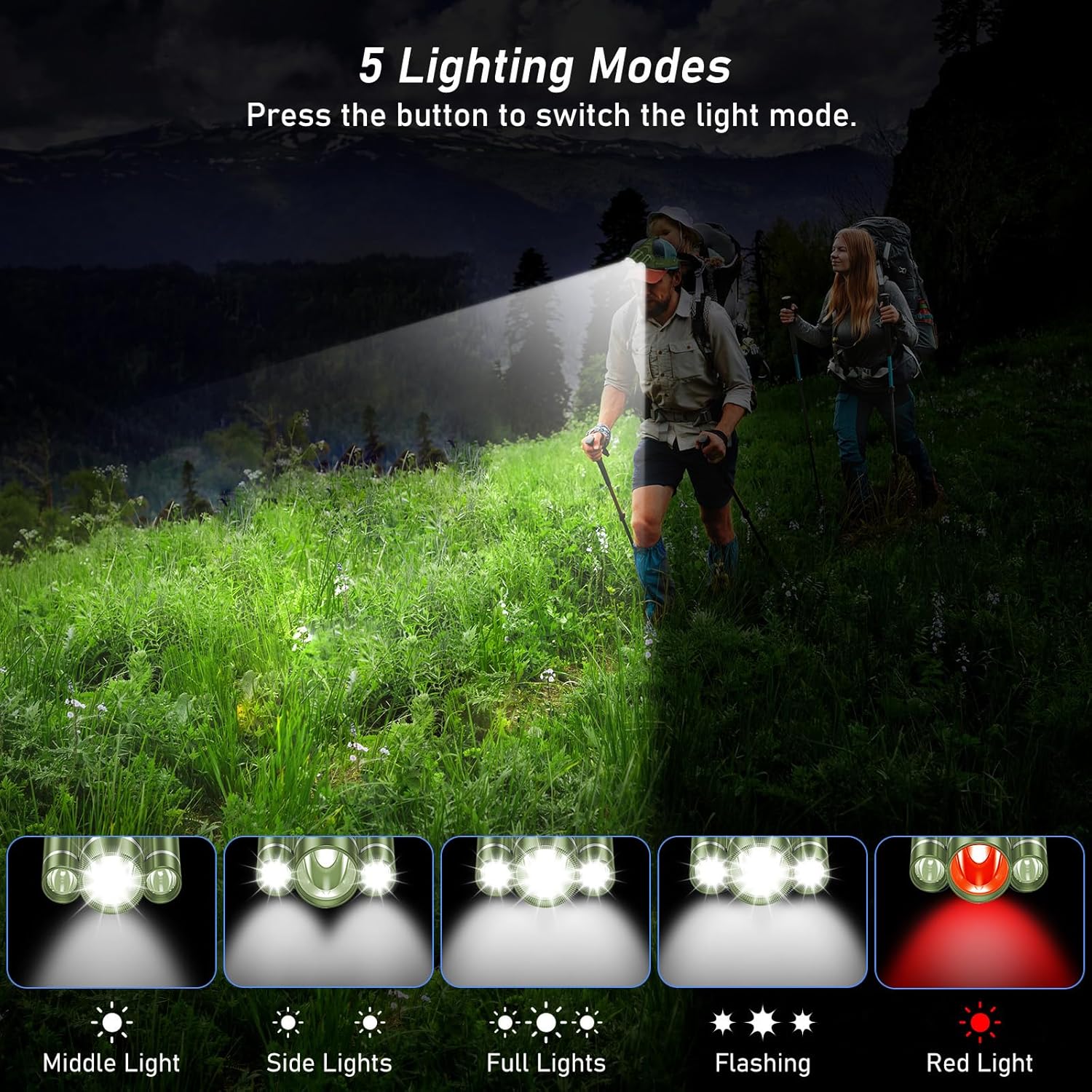
Image: An illustration depicting the five lighting modes of the headlamp: Middle Light, Side Lights, Full Lights, Flashing, and Red Light, with a person hiking in the background.

Image: A person wearing the Blukar K9116 LED Headlamp while hiking in the rain, demonstrating its IPX6 waterproof capability.
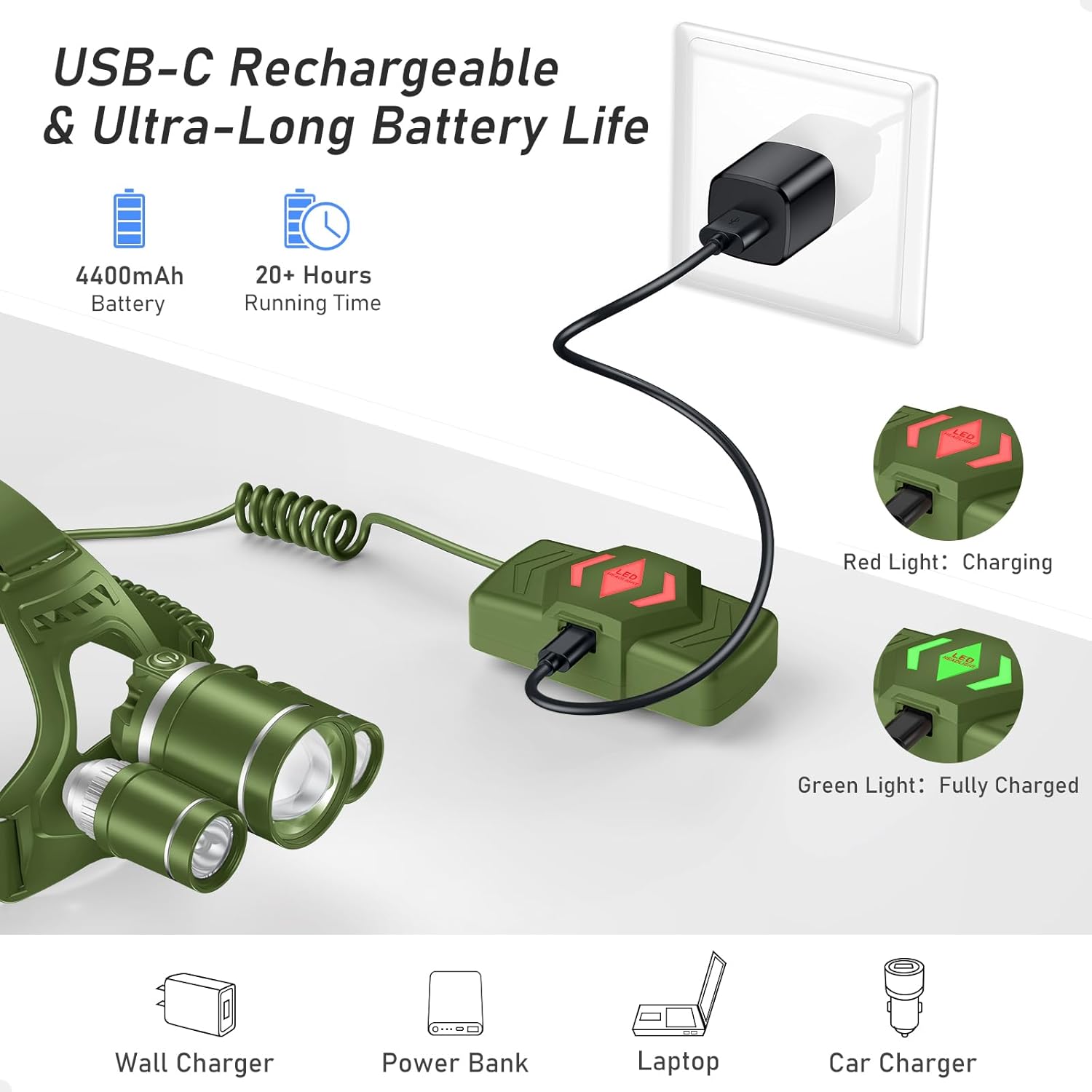
Image: An illustration showing the USB-C charging process of the Blukar K9116 LED Headlamp, highlighting the 4400mAh battery and 20+ hours running time, with indicator lights for charging (red) and fully charged (green).

Image: An illustration detailing the adjustable features of the Blukar K9116 LED Headlamp, including the breathable and adjustable headband, 90° adjustable light head, and the rear warning light.
6. Maintenance
- Cleaning: Wipe the headlamp with a soft, damp cloth. Do not use abrasive cleaners or solvents.
- Storage: Store the headlamp in a cool, dry place away from direct sunlight when not in use for extended periods.
- Battery Care: To prolong battery life, charge the headlamp fully every 3-6 months even if not in use. Avoid fully discharging the battery frequently.
7. Troubleshooting
| Problem | Possible Cause | Solution |
|---|---|---|
| Headlamp does not turn on | Low battery; Power button not pressed correctly | Charge the headlamp fully; Ensure firm press on power button |
| Light is dim | Low battery | Recharge the headlamp |
| Headlamp not charging | Faulty cable/adapter; Loose connection | Try a different USB-C cable or power adapter; Ensure cable is securely connected |
| Headlamp slips during activity | Headband not adjusted properly | Tighten the adjustable straps for a snug fit |
8. Specifications
- Model Number: K9116
- Light Source Type: LED (T6+XPE)
- Power Source: Battery Powered
- Battery Type: Lithium Ion (1 included)
- Charging Time: Approximately 5 hours
- Runtime: 20+ hours
- Material: ABS
- Water Resistance Level: IPX6 Waterproof
- Product Dimensions: 4.05"D x 3.34"W x 3.54"H
- Item Weight: 276 Grams (9.7 ounces)
- Special Features: Dustproof, Rechargeable, Adjustable Focus, Spotlight & Floodlight Combination
9. Safety Information
- Eye Safety: Do not look directly into the LED light source to avoid eye irritation or damage.
- Water Exposure: While IPX6 waterproof, avoid prolonged submersion or exposure to high-pressure water jets. Ensure the charging port cover is securely closed when not charging.
- Battery Safety: Use only the specified battery type. Do not attempt to disassemble, crush, or expose the battery to extreme temperatures or fire.
- Children: Keep out of reach of children.
10. Warranty and Support
For warranty information, technical support, or any inquiries regarding your Blukar K9116 LED Headlamp, please contact us:
- Email: support@blukar.com
- Website: www.blukar.com
Related documentsK9116


Ask a question about this manual
Ask about setup, troubleshooting, compatibility, parts, safety, or missing instructions. Manuals+ will review the question and use this page’s manual context to help answer it.