
1. Introduction
The LEOBOG AULA F75 is a versatile 75% layout mechanical keyboard designed for various computing environments. It features tri-mode connectivity, hot-swappable switches, dynamic RGB backlighting, and durable PBT keycaps. This manual provides detailed instructions for setup, operation, and maintenance to ensure optimal performance.
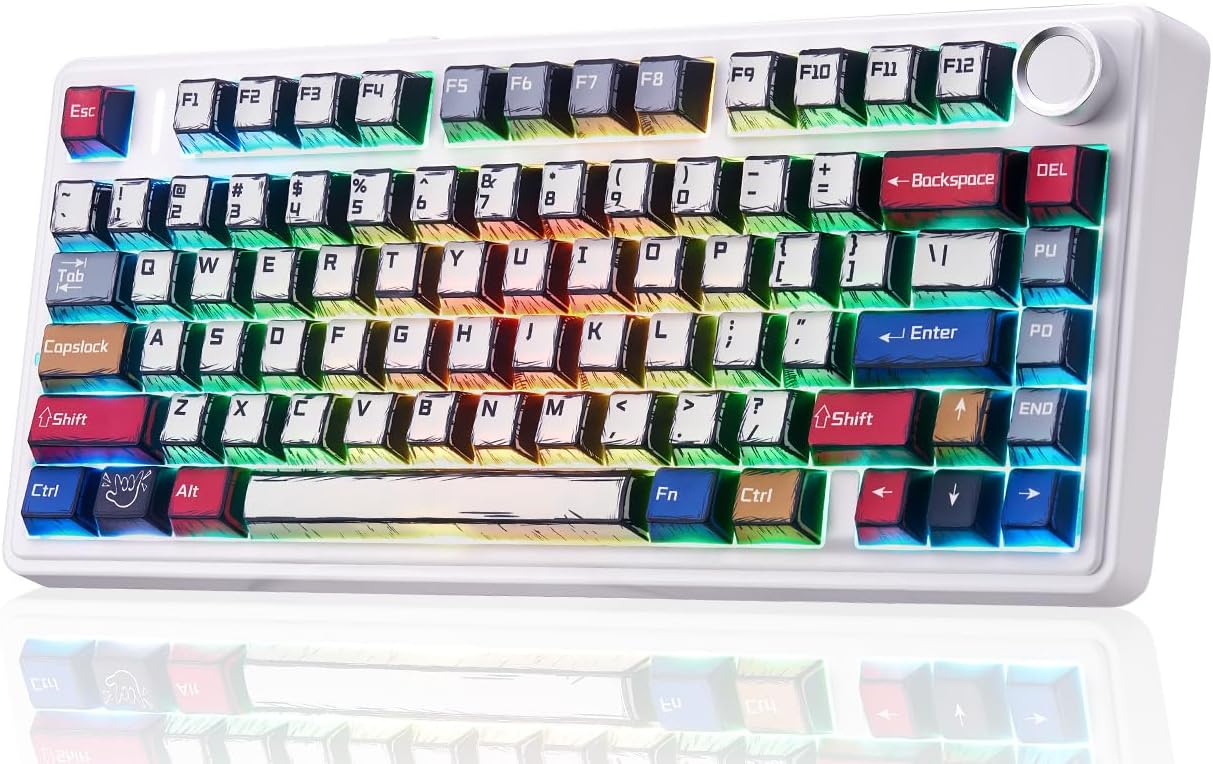
Figure 1: LEOBOG AULA F75 Wireless Mechanical Keyboard
2. What's in the Box
- AULA F75 Gaming Keyboard x1
- LEOBOG Reaper Switches x4 (extra)
- USB Cable x1
- Keycap Puller x1
- User Manual x1
- Dust Cover x1
3. Setup
3.1. Tri-Mode Connection
The AULA F75 keyboard supports three connection modes: Bluetooth 5.0, 2.4GHz wireless, and USB wired. You can connect up to 5 devices simultaneously.

Figure 2: Tri-Mode Connection Options
3.1.1. 2.4GHz Wireless Connection
- Locate the 2.4GHz USB receiver stored in the keyboard's dedicated slot.
- Plug the receiver into an available USB port on your device.
- Switch the keyboard's mode selector to 2.4G. The keyboard will automatically connect.
3.1.2. Bluetooth 5.0 Connection
- Switch the keyboard's mode selector to BT.
- On your device, enable Bluetooth and search for available devices.
- Select "AULA F75" from the list to pair.
- The keyboard can store up to 3 Bluetooth connections (BT1, BT2, BT3). Use FN + 1/2/3 to switch between paired devices.
3.1.3. USB Wired Connection
- Connect the provided USB-C cable to the keyboard's USB-C port.
- Connect the other end of the cable to an available USB port on your device.
- The keyboard will automatically switch to wired mode and begin charging.
3.2. Battery Information
The AULA F75 is equipped with a large 4000mAh battery. Battery life varies based on usage and RGB backlight settings:
- With backlight ON: Approximately 17.5 hours
- With backlight OFF: Approximately 266.5 hours

Figure 3: High-Capacity 4000mAh Battery
4. Operating Instructions
4.1. Multi-functional Knob
The knob located on the top right of the keyboard provides quick control over various functions:
- Turn Right: Increase Brightness / Volume Up
- Turn Left: Decrease Brightness / Volume Down
- Press: Switch RGB Mode / Mute ON/OFF

Figure 4: Multi-functional Control Knob
4.2. Dynamic RGB Backlight
The F75 features 16.8 million RGB lighting colors and 16 lighting effects. You can adjust the lighting using the knob or FN key combinations:
- FN + /: Switch Lighting Color
- FN + ↑: Increase Lighting Brightness
- FN + ↓: Decrease Lighting Brightness
- FN + →: Increase Lighting Speed
- FN + ←: Decrease Lighting Speed
4.3. Full-Key Macro Programmable
Customize single keys or key combinations using the F75 driver software to enhance work efficiency or gaming performance. The keyboard also supports WIN key lock to prevent accidental presses during gameplay.

Figure 5: Driver Macro Customization Interface
4.4. Hot-Swap Customization
The F75 keyboard is equipped with a hot-swappable base that supports both 3-pin and 5-pin switches, allowing for easy customization without soldering. It comes with pre-lubricated LEOBOG Reaper switches for a smooth and creamy typing experience.

Figure 6: Hot-Swappable Switches and LEOBOG Reaper Switches
4.5. Double-Shot PBT Manga Keycaps
The F75 features Cherry-profile double-shot PBT manga keycaps, offering durability and a unique aesthetic. These keycaps are resistant to wear and maintain their appearance over time.
4.6. Gasket Structure
The keyboard incorporates a gasket structure with 5 sound and shock-absorbing layers. This design effectively reduces cavity noise and provides a softer, more comfortable typing feel.
4.7. 75% Layout
This 81-key compact layout integrates all essential keys in a smaller footprint, optimizing desk space without compromising functionality.
5. Maintenance
To ensure the longevity and optimal performance of your AULA F75 keyboard, follow these maintenance guidelines:
- Cleaning Keycaps: Use the provided keycap puller to carefully remove keycaps. Clean them with a soft, damp cloth and mild soap if necessary. Ensure they are completely dry before reattaching.
- Cleaning the Keyboard Base: Use a can of compressed air to remove dust and debris from between the switches. Wipe the surface with a microfiber cloth.
- Switch Maintenance: If switches feel inconsistent, they can be hot-swapped with new ones using the switch puller.
- Cable Care: Avoid sharp bends or excessive pulling on the USB-C cable to prevent damage.
6. Troubleshooting
If you encounter issues with your AULA F75 keyboard, refer to the following common solutions:
- Keyboard Not Responding: Ensure the keyboard is charged. Check the connection mode (2.4G, BT, or Wired) matches your device. For wired mode, try a different USB port or cable. For wireless modes, try re-pairing.
- Bluetooth Connection Issues: Ensure the keyboard is in BT mode and discoverable. Remove previous pairings on your device and try pairing again. Ensure no other devices are interfering with the Bluetooth signal.
- 2.4GHz Wireless Issues: Ensure the USB receiver is securely plugged in. Try a different USB port. Ensure the keyboard is in 2.4G mode.
- RGB Backlight Not Working: Check brightness settings using FN key combinations or the multi-functional knob. Ensure the keyboard is not in a low power state.
- Keys Not Registering: If specific keys are not working, try hot-swapping the switch with one of the spare switches provided.
7. Specifications
| Feature | Detail |
|---|---|
| Product Dimensions | 12.67 x 5.62 x 1.69 inches |
| Item Weight | 2.25 pounds |
| Manufacturer | LEOBOG |
| Item Model Number | F75 |
| Batteries | 1 AA batteries required (included) |
| Connectivity Technology | 2.4GHz Wireless, Bluetooth, USB-C |
| Keyboard Description | Mechanical |
| Special Features | Backlit, Hot-Swappable, Integrated Stand, Programmable Keys, Volume Roller |
| Keyboard Backlighting | RGB |
| Compatible Devices | Gaming Console, Laptop, PC, Smartphone, Tablet |
8. Official Product Videos
AULA F75 Keyboard Manga Style
This video showcases the unique manga-style keycaps and RGB lighting effects of the AULA F75 keyboard, highlighting its aesthetic appeal and dynamic visual features.
AULA F75, Pro & Max Hands-On Review - Worth the Hype?
A detailed hands-on review comparing the AULA F75, F75 Pro, and F75 Max models, discussing their features, typing experience, and overall value.
Watch First! LEOBOG x Aula F75 Mechanical Keyboard Review!
An in-depth review of the LEOBOG x Aula F75 mechanical keyboard, covering its design, features, and performance aspects.
These Gaming Keyboards Couldn't Be More Different, Which Wins?
A comparative video reviewing various gaming keyboards, including the AULA F75, highlighting their unique features and differences.
9. Warranty and Support
For warranty information and technical support, please refer to the official LEOBOG website or contact their customer service. Keep your purchase receipt for warranty claims.


