
1. Introduction
The visiPower GS-107-E is a comprehensive GSM/4G Wireless 2.4GHz WiFi Home Alarm System designed for enhanced home security. It features a 4.3-inch TFT full-color touch screen with an intuitive interface, displaying live status, date, and time. This system supports both GSM/4G and 2.4GHz WiFi networks, ensuring reliable communication. It is compatible with the Tuya and Smart Life applications for remote control and monitoring.
The system is expandable, supporting up to 90 wireless zones for various accessories such as sensors, remote controls, and RFID tags. It provides multiple alarm notification channels including APP push, SMS, and voice phone calls, ensuring you are promptly informed of any security events.
2. Package Contents
The GS-107-E kit includes the following components:
- 1 x Alarm Panel
- 2 x PIR Motion Sensor
- 2 x Door Sensor
- 2 x Remote Controller
- 2 x RFID Tag
- 1 x GS520 (likely a solar siren or similar accessory)
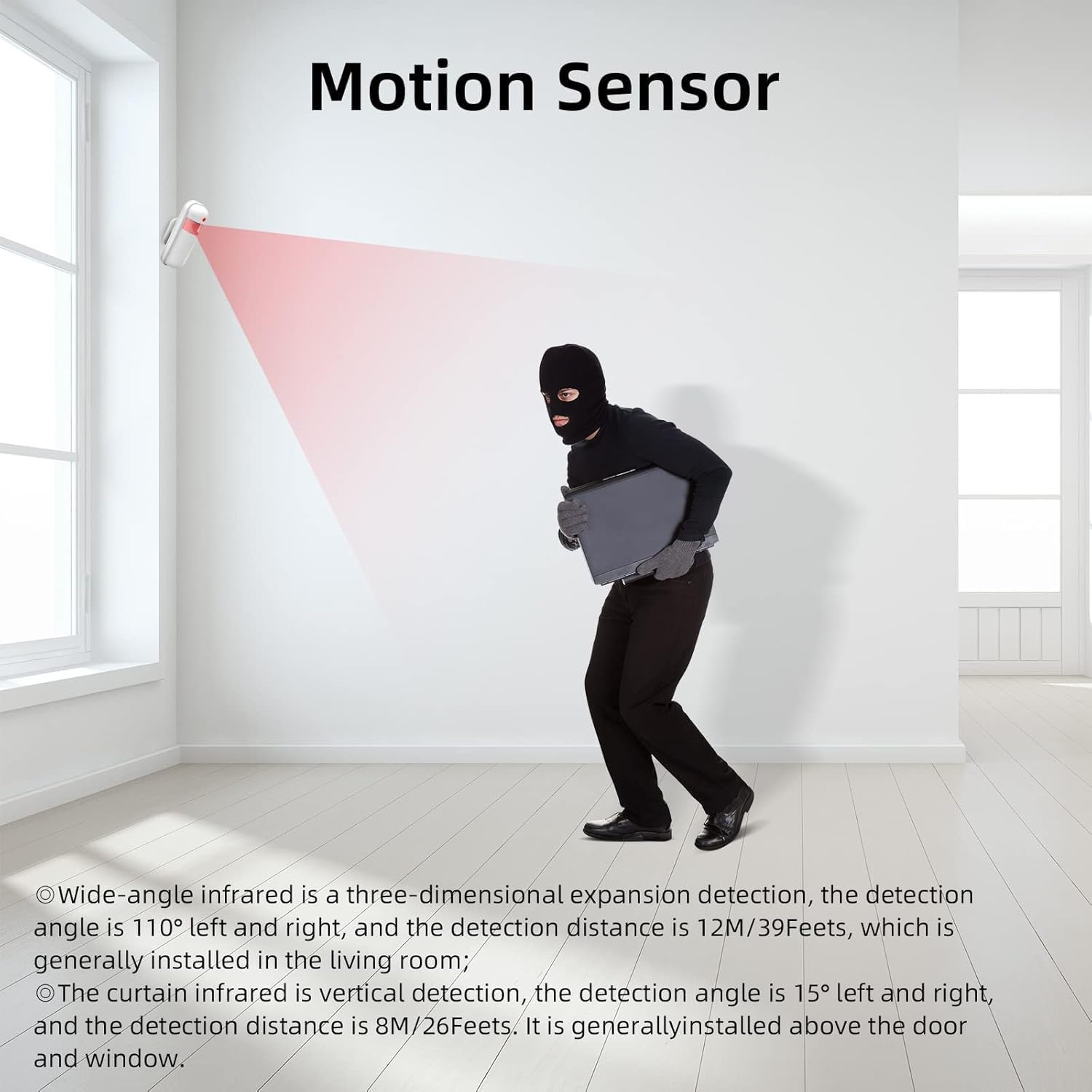
Image: Overview of the visiPower GS-107-E Home Alarm System components, including the main panel, sensors, and remote controls.
3. Setup Instructions
The visiPower GS-107-E system is designed for easy installation without the need for professional assistance, wiring, or drilling. Follow these steps for initial setup:
- Mount the Alarm Panel: Securely fix the main alarm panel to a wall using the provided screws. Choose a central location within your home for optimal signal coverage.
- Connect Power: Connect the alarm panel to a power source using the micro USB standard interface power supply. The system includes a built-in rechargeable lithium-ion battery (3.7V/500mAh) that acts as a backup for up to 8 hours during power outages.
- Insert SIM Card (Optional): If using GSM/4G functionality, insert a compatible 2G/3G/4G SIM card into the designated slot on the alarm panel.
- Connect to WiFi: Access the system settings on the 4.3-inch touch screen to connect to your 2.4GHz WiFi network. Note that 5GHz WiFi is not supported.
- Pair Sensors: Follow the on-screen instructions to pair the PIR motion sensors, door/window sensors, remote controllers, and RFID tags with the alarm panel. The system supports up to 90 wireless zones.
- Install Sensors:
- PIR Motion Sensors: Install in areas where intruders are likely to pass. The wide-angle infrared detection covers 110° left and right with a detection distance of 12 meters (39 feet). Vertical curtain infrared detection covers 15° left and right with a detection distance of 8 meters (26 feet), typically installed above doors or windows.
- Door/Window Sensors: Attach to doors and windows to detect unauthorized openings.
- Solar Siren: Position the solar siren outdoors in a location with direct sunlight for automatic charging.
- Download App: Download the "Tuya" or "Smart Life" app from your smartphone's app store (available for iPhone and Android). Register an account and add your alarm system to the app for remote control and notifications.
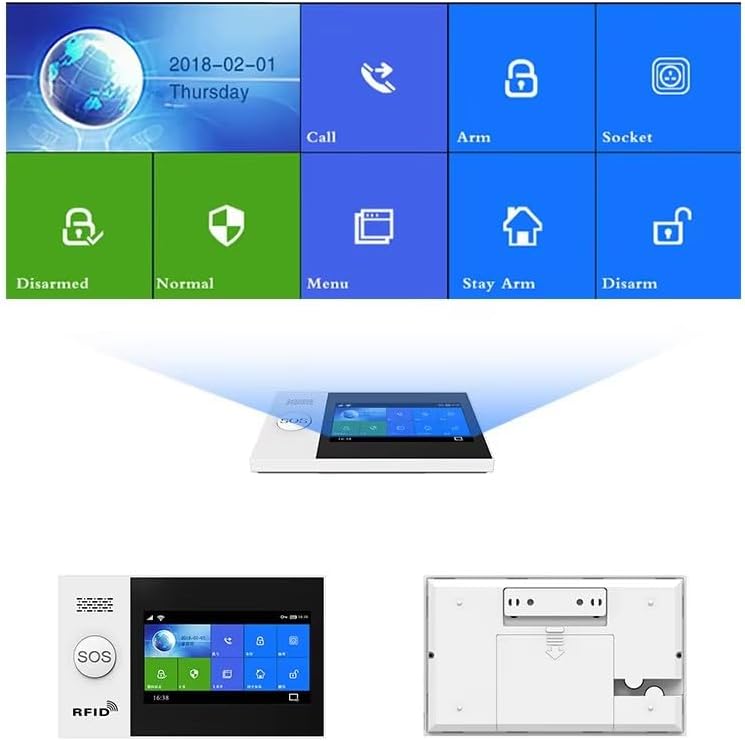
Image: Front view of the alarm panel displaying the user interface and a rear view showing connection ports and battery compartment.

Image: Illustration of a door magnetic sensor installed on a door frame, indicating an alarm trigger when the door opens.
Image: A PIR motion sensor mounted on a wall, illustrating its infrared detection beam covering a wide area, detecting movement.

Image: A WiFi solar multi-functional siren with dimensions, highlighting its automatic charging during the day and automatic sensing at night features.
4. Operating Instructions
4.1 System Overview and Navigation
The 4.3-inch IPS screen provides a clear interface for managing your alarm system. Navigate through menus using the touch screen to access various functions such as arming, disarming, call logs, and settings. The IPS technology offers a large viewing angle and accurate color reproduction.
4.2 Network Connectivity
The system supports dual network connectivity:
- GSM/4G: Insert a SIM card to enable SMS arm/disarm, parameter settings, voice arm/disarm, and alarm calls. The system can operate via GSM/4G even if WiFi is disconnected.
- 2.4GHz WiFi: Connect to your home WiFi network for APP control and push notifications. Time synchronization is also available through the GSM/WiFi network.
4.3 Tuya/Smart Life App Control
Manage your alarm system remotely using the free Tuya or Smart Life mobile application. The app allows you to:
- Arm and disarm the system from anywhere.
- Receive instant alarm notifications.
- Control smart sockets (with the same RF frequency) to manage electrical appliances.
- Access operation logs and alarm event history.
4.4 SOS Emergency Function
In case of an emergency, press the dedicated SOS button on the alarm panel. The system will trigger an immediate alarm and notify preset emergency contacts via APP push, SMS, or voice call. You can preset up to 5 groups of phone numbers for emergency calls when a SIM card is inserted.

Image: A hand pressing the SOS button on the alarm panel, illustrating the rapid alert function for emergencies.
4.5 Two-Way Voice Intercom
The alarm panel supports a two-way voice intercom function, allowing you to make and receive calls directly through the system. This feature enables communication with individuals at home, providing an additional layer of security and convenience.

Image: Depicts the two-way voice intercom function, showing a person making a call and receiving a message through the alarm panel.
4.6 Voice Control Integration
The system is compatible with Amazon Alexa and Google Assistant, allowing for voice control commands such as arming or disarming the system. This integration provides hands-free operation and enhances smart home connectivity.

Image: Illustrates the alarm system's compatibility with Amazon Alexa and Google Assistant for voice control commands.
4.7 Zone Settings
The system allows for various zone settings to customize sensor behavior:
- In/Out Zone: Sensors trigger an alarm after a delay, allowing entry/exit.
- Indoor Zone: Sensors trigger an alarm immediately when the system is armed.
- Outdoor Zone: Sensors trigger an alarm immediately, typically for perimeter protection.
- 24 Hours Zone: Sensors are always active, triggering an alarm regardless of arming status (e.g., smoke detectors).
- Doorbell Zone: Sensors act as a doorbell chime when triggered.
4.8 Timed Arm/Disarm
Schedule specific times for the system to automatically arm or disarm, providing convenience and ensuring security routines are maintained.
4.9 Message and Voice Alarm
The system supports 20 seconds of message and voice alarm recording, allowing for personalized alerts.
5. Maintenance
To ensure optimal performance and longevity of your visiPower GS-107-E Home Alarm System, consider the following maintenance guidelines:
- Battery Management: The alarm panel has a built-in 3.7V/500mAh lithium-ion standby battery. This battery provides power for approximately 8 hours during a power outage. The system will notify you of low battery status for both the hub and accessories. Ensure the main power supply is connected for continuous operation and battery charging.
- Sensor Battery Replacement: Replace batteries in wireless sensors (PIR motion sensors, door/window sensors, remote controllers) when low battery alerts are received. Refer to individual sensor manuals for specific battery types and replacement procedures.
- Cleaning: Periodically clean the alarm panel screen and sensor surfaces with a soft, dry cloth. Avoid using abrasive cleaners or solvents.
- Firmware Updates: Check for available firmware updates through the Tuya/Smart Life app to ensure your system has the latest features and security enhancements.
- Solar Siren Placement: Ensure the solar siren remains in a location with adequate sunlight exposure for efficient charging. Keep its solar panel clean from dirt and debris.

Image: Illustration of the alarm panel's built-in rechargeable 1000mAh lithium battery, supporting wired connection and automatic conversion to standby power.
6. Troubleshooting
If you encounter issues with your visiPower GS-107-E Home Alarm System, refer to the following common troubleshooting tips:
- System Not Responding: Check if the alarm panel is properly connected to power. Verify the built-in battery is charged. If using a SIM card, ensure it is correctly inserted and has active service.
- No App Notifications: Ensure the alarm panel is connected to a 2.4GHz WiFi network. Check your smartphone's notification settings for the Tuya/Smart Life app. Verify that the app is logged in and the system is linked.
- Sensor Not Triggering: Check the sensor's battery level. Ensure the sensor is within the wireless range of the alarm panel. Verify that the sensor is correctly paired and assigned to an active zone. For door/window sensors, ensure the two parts are aligned correctly and within the specified gap.
- False Alarms: Review sensor placement to avoid areas with drafts, direct sunlight, or pets that might trigger motion sensors. Adjust sensor sensitivity if available. Check for tamper alarms if a sensor has been disturbed.
- GSM/4G Issues: Confirm the SIM card is active and has sufficient credit/data. Check the signal strength displayed on the alarm panel. If issues persist, try restarting the alarm panel.
- Voice Control Not Working: Ensure your alarm system is correctly linked to your Amazon Alexa or Google Assistant account. Verify that your voice assistant device is online and properly configured.
If these steps do not resolve the issue, please contact visiPower customer support for further assistance.
7. Specifications
| Feature | Specification |
|---|---|
| Model Number | GS-107-E |
| Power Input | DC 5V (Micro USB) |
| Working Current | <120mA |
| Standby Current | <80uA |
| Alarm Current | <500mA |
| Wireless Frequency | 433MHZ |
| Wireless Coding | EV 1527 |
| 2G Bands | 850/900/1800/1900MHZ |
| Wi-Fi Bands | IEEE802.11b/g/n RF standard (2.4GHz only) |
| Standby Battery | 3.7V/500mAh Lithium-ion |
| Temperature Range | 0℃ ~ 55℃ |
| Humidity Range | <80%RH (Non-freezing) |
| Product Dimensions | 6.3 x 3.9 x 0.7 inches |
| Item Weight | 1.3 pounds |
| Color | White |
| Connectivity Technology | Wireless |
| Included Components | Alarm Panel, PIR Motion Sensors, Door Sensors, Remote Controllers, RFID Tags, GS520 |
| UPC | 717687666121 |
8. Warranty and Support
For warranty information or technical support regarding your visiPower GS-107-E Home Alarm System, please refer to the documentation included with your purchase or visit the official visiPower website. You may also contact visiPower customer service directly for assistance with product operation, troubleshooting, or replacement parts.
Manufacturer: visiPower
Brand Store: visiPower Security Store on Amazon