
GRAUGEAR G-M2ST235-CL
GRAUGEAR M.2 NVMe & SATA SSD/HDD Docking Station
Model: G-M2ST235-CL
Introduction
The GRAUGEAR M.2 NVMe & SATA SSD/HDD Docking Station is a versatile and high-performance solution designed for efficient data management, backup, and drive cloning. It supports a wide range of storage devices, including M.2 NVMe SSDs, M.2 SATA SSDs, and 2.5-inch/3.5-inch SATA HDDs/SSDs. With USB-C 10Gbps connectivity, tool-free installation, and an offline cloning function, this docking station provides a convenient and reliable way to handle your storage needs. Its built-in cooling fan ensures optimal performance and extends the lifespan of your drives.
Package Contents
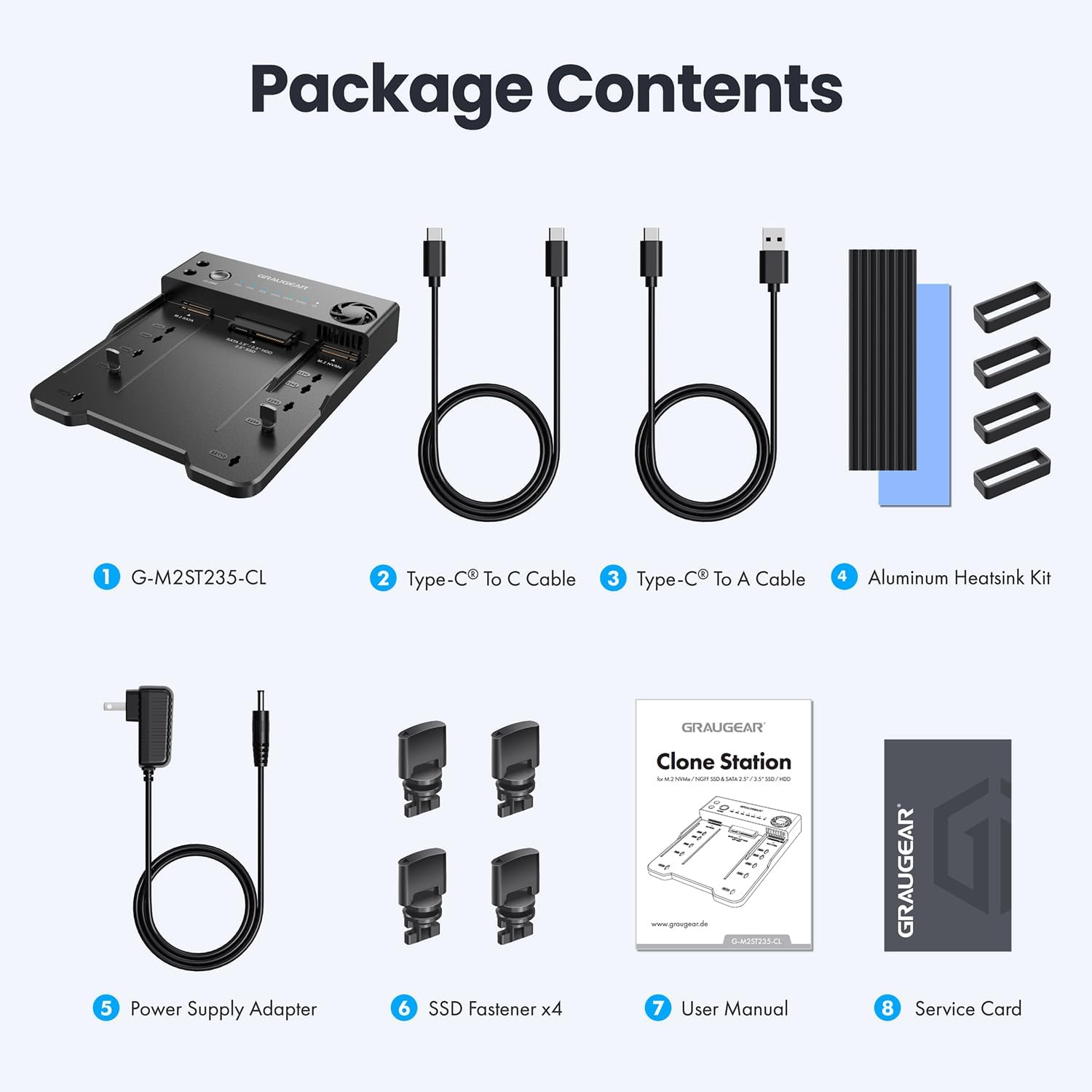
Image: Contents included in the GRAUGEAR docking station package.
Please check the package for the following items:
- 1 x GRAUGEAR M.2 NVMe & SATA SSD/HDD Docking Station (G-M2ST235-CL)
- 1 x Type-C to C Cable
- 1 x Type-C to A Cable
- 1 x Aluminum Heatsink Kit
- 1 x Power Supply Adapter
- 4 x SSD Fasteners
- 1 x User Manual
- 1 x Service Card
Product Overview
The GRAUGEAR docking station is designed for ease of use with clearly labeled slots and controls.
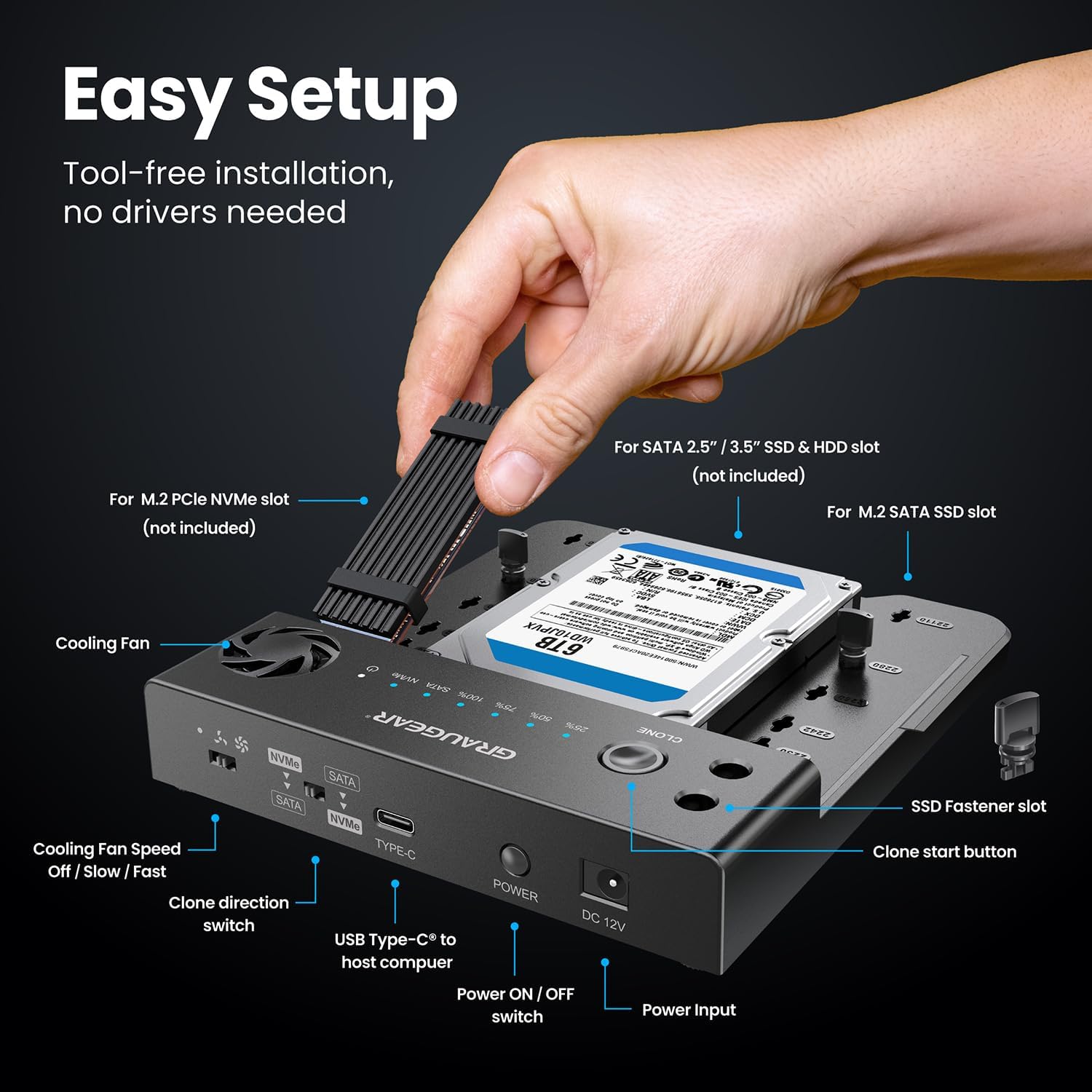
Image: Labeled components of the GRAUGEAR docking station.
Key Features
- Versatile Compatibility: Features M.2 NVMe, M.2 SATA, and SATA slot supporting M.2 NVMe and SATA SSD and 2.5"/3.5" HDD/SSD. Seamlessly read and write M.2 NVMe SSD and one SATA SSD at a time.
- Ultra-Fast Data Transfer: Enjoy lightning-fast speeds up to 10Gbps for M.2 NVMe SSDs and 6Gbps for SATA SSDs, significantly reducing file transfer and backup time.
- One-Touch Offline Cloning: No computer needed for cloning. Easily copy data from NVMe to SATA or SATA to NVMe with a simple switch.
- Built-in Cooling Fan with 3-Speed Adjustment: Prevents overheating and extends the lifespan of your SSDs and HDDs. Choose between Off, Low, and High speed.
- Tool-Free, Hassle-Free Installation: No drivers required. Easily swap SSDs and HDDs without tools. Plug & play with Windows, macOS, and Linux.
- Universal Compatibility & Wide Support: Supports M.2 NVMe & M.2 SATA SSDs in sizes 2230/2242/2260/2280/22110, and 2.5"/3.5" SATA HDDs & SSDs. Compatible with M-Key, M&B-Key NVMe, and M&B-Key SATA SSDs.
- Perfect for Backup, Storage Expansion & Data Migration: Ideal for PC enthusiasts, content creators, or IT professionals for upgrading, cloning, and data management.
Setup
Installing an M.2 SSD

Image: Installation of an M.2 SSD with an optional heatsink.
- Locate the M.2 NVMe or M.2 SATA slot on the docking station.
- Gently insert your M.2 SSD into the corresponding slot at an angle.
- Press down the M.2 SSD and secure it with the provided SSD fastener.
- For optimal performance and heat dissipation, apply the aluminum heatsink to your M.2 SSD if desired.
Installing a 2.5"/3.5" SATA HDD/SSD
- Locate the 2.5"/3.5" SATA HDD/SSD slot.
- Align your SATA drive with the connector pins in the slot.
- Gently push the drive down until it is firmly seated.
Connecting to a Computer
- Connect the power supply adapter to the DC 12V input port on the docking station and plug it into a power outlet.
- Connect one end of the provided USB-C cable (or USB-C to A cable) to the USB Type-C port on the docking station.
- Connect the other end of the USB cable to a compatible USB port on your computer (USB 3.0/3.2 Gen 1 or higher for optimal speed).
- Turn on the docking station using the Power ON/OFF switch. The device is plug & play and requires no drivers for Windows, macOS, or Linux.
Operating Instructions
Data Transfer Mode

Image: High-speed data transmission capabilities of the docking station.
Once connected to your computer and powered on, the installed drives will appear as external storage devices. You can now drag and drop files, perform backups, or access data directly from the drives. The docking station supports simultaneous reading and writing of one M.2 NVMe SSD and one SATA SSD/HDD.
Offline Cloning

Image: Clone direction switch and supported cloning paths.
The offline cloning feature allows you to duplicate a source drive to a target drive without needing a computer connection.
- Ensure the docking station is powered off.
- Insert your Source Drive (the drive you want to copy from) into the designated slot (e.g., M.2 NVMe slot).
- Insert your Target Drive (the drive you want to copy to) into the other designated slot (e.g., SATA slot). Ensure the target drive has equal or larger capacity than the source drive.
- Use the Clone Direction Switch to select the desired cloning direction (e.g., NVMe to SATA or SATA to NVMe).
- Power on the docking station.
- Press and hold the CLONE button for 5 seconds until the progress indicator LEDs start flashing.
- Release the button, then press it again briefly to start the cloning process.
- The progress LEDs (25%, 50%, 75%, 100%) will illuminate sequentially to indicate cloning progress.
- Once all LEDs are solid, the cloning process is complete. Power off the docking station before removing the drives.
Cooling Fan Operation

Image: Built-in cooling fan and its airflow.
The docking station features a built-in cooling fan to prevent overheating during prolonged use or intensive operations. You can adjust the fan speed using the dedicated switch:
- Off: Fan is inactive.
- Low Speed: Provides moderate cooling.
- High Speed: Provides maximum cooling for demanding tasks.
Compatibility

Image: Supported drive types and M.2 form factors.
The GRAUGEAR docking station offers broad compatibility:
- M.2 NVMe SSDs: Supports M-Key and M&B-Key NVMe SSDs in sizes 2230, 2242, 2260, 2280, and 22110.
- M.2 SATA SSDs: Supports M&B-Key SATA SSDs in sizes 2230, 2242, 2260, 2280, and 22110.
- SATA Drives: Supports 2.5-inch and 3.5-inch SATA HDDs and SSDs.

Image: Simultaneous connection capabilities with various drive combinations.
The docking station allows for simultaneous connection of up to two devices, specifically one M.2 NVMe SSD and one SATA drive (either M.2 SATA, 2.5" SATA, or 3.5" SATA).
Maintenance
To ensure the longevity and optimal performance of your GRAUGEAR docking station, follow these maintenance guidelines:
- Cleaning: Use a soft, dry cloth to wipe the exterior of the docking station. Avoid using liquid cleaners or solvents. For the fan area, use compressed air to remove dust buildup.
- Storage: When not in use, store the docking station in a cool, dry place away from direct sunlight and extreme temperatures.
- Handling: Handle the device with care. Avoid dropping it or subjecting it to strong impacts.
- Ventilation: Ensure the cooling fan vents are not obstructed during operation to allow for proper airflow.
Troubleshooting
| Problem | Possible Cause | Solution |
|---|---|---|
| Drive not detected by computer. | Loose cable connection, insufficient power, drive not properly seated, unformatted drive. | Check all cable connections. Ensure power adapter is securely plugged in. Re-seat the drive in its slot. For new drives, format them via Disk Management (Windows) or Disk Utility (macOS). |
| Cloning process fails or does not start. | Target drive capacity is smaller than source drive, clone direction switch incorrect, drive errors. | Ensure target drive capacity is equal to or larger than source drive. Verify the clone direction switch is set correctly. Check drives for errors using disk utility software on a computer. |
| Slow data transfer speeds. | Connected to a slower USB port (e.g., USB 2.0), cable issue, drive performance limitations. | Connect the docking station to a USB 3.0/3.2 Gen 1 (5Gbps) or USB 3.2 Gen 2 (10Gbps) port on your computer. Try a different USB cable. Ensure your drives are capable of high speeds. |
| Docking station overheating. | Cooling fan off or set to low, obstructed vents, prolonged heavy use. | Set the cooling fan to High Speed. Ensure vents are clear of obstructions. Allow the device to cool down if used for extended periods. |
Specifications
| Brand | GRAUGEAR |
| Model | G-M2ST235-CL |
| Compatible Devices | M.2 SATA SSD, M.2 NVMe SSD, 3.5 Inch SATA HDD, 2.5 Inch SATA SSD/HDD |
| Hardware Interface | USB Type C, USB 3.2 Gen 1, USB 3.0, USB 3.2 Gen 2 |
| Data Transfer Rate | 10 Gigabits Per Second (max) |
| Hardware Platform | Linux, Windows, macOS |
| Product Dimensions | 16.26 x 13.97 x 2.03 cm |
| Item Weight | 155 Grams |
| Color | Dark Gray |
Warranty and Support
GRAUGEAR products are designed for reliability and performance. For detailed warranty information and technical support, please refer to the service card included in your package or visit the official GRAUGEAR website.
Official Website: www.graugear.de
Related documentsG-M2ST235-CL


Ask a question about this manual
Ask about setup, troubleshooting, compatibility, parts, safety, or missing instructions. Manuals+ will review the question and use this page’s manual context to help answer it.