
1. Introduction
Thank you for choosing the Gree Aovia 12000 BTU Portable Air Conditioner. This manual provides essential information for the safe and efficient operation, installation, and maintenance of your new appliance. Please read it thoroughly before use and keep it for future reference.
This compact unit combines efficiency, technology, and modern design, offering a range of features for comfort and practicality:
- Compact Design: Occupies less space, ideal for any environment.
- Digital Display: Shows operation mode, temperature, and protection codes clearly and intuitively.
- Rapid Cooling: Ensures a cool environment in a short time.
- Dehumidification: Improves air quality by removing excess humidity.
- 3 Fan Speed Options: Customize air distribution according to your needs.
- Dual Drain Outlet Design: Facilitates installation and management of condensed water.
- Low Noise Level: Operates quietly to avoid disturbance.
- Timer Function: Program the unit to turn on and off at your convenience.
- Sleep Mode: Ideal for peaceful sleep with automatic temperature adjustments.
- Anti-Corrosion Protection: Ensures greater product durability and resistance.
2. Safety Instructions
Please read and follow these safety precautions carefully to prevent accidents and ensure optimal performance.
- Always use the appliance on a stable, level surface.
- Do not block the air inlets or outlets. Maintain at least 20 cm (8 inches) clearance around the unit.
- Ensure the power supply matches the voltage specified on the rating label (127V).
- Do not operate the unit with wet hands or near water.
- Unplug the unit before cleaning or maintenance.
- Keep children and pets away from the unit during operation.
- Do not insert objects into the air outlets.
- If the power cord is damaged, it must be replaced by the manufacturer, its service agent, or similarly qualified persons to avoid a hazard.
3. Product Components
3.1 Main Unit
The following images illustrate the main unit from different angles.

Figure 3.1: Front view of the Gree Aovia portable air conditioner, showing the air outlet louvers and Gree logo.

Figure 3.2: Angled front view of the Gree Aovia portable air conditioner, highlighting the side air intake and front panel.
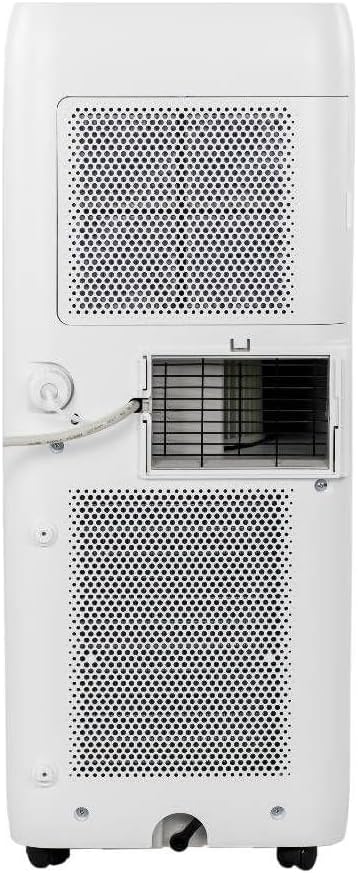
Figure 3.3: Rear view of the Gree Aovia portable air conditioner, showing the exhaust outlet, air filters, and power cord connection.
3.2 Control Panel
The control panel is located on the top of the unit for easy access to all functions.

Figure 3.4: Close-up of the top control panel with digital display and buttons for Mode, Timer, Sleep, Fan, and temperature adjustment.
3.3 Remote Control
The remote control allows convenient operation from a distance.

Figure 3.5: The remote control for the Gree Aovia portable air conditioner, featuring buttons for power, cool, dry, fan speed, and fan only.
3.4 Installation Kit
The unit comes with an installation kit for easy setup.
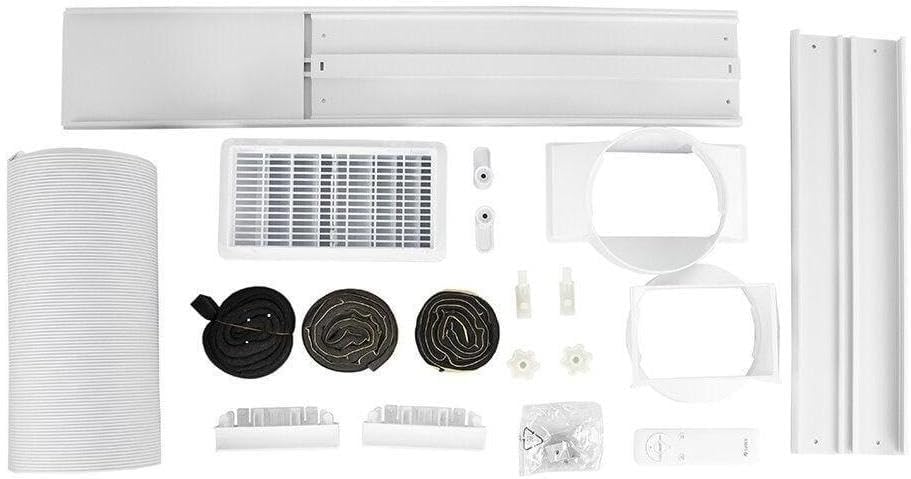
Figure 3.6: Contents of the installation kit, including the exhaust hose, window sealing plate, and various connectors.
4. Installation Guide
Follow these steps for proper installation of your portable air conditioner.
4.1 Unpacking
- Carefully remove the air conditioner from its packaging.
- Remove all packing materials and ensure no components are missing.
- Keep the packaging for future storage or transportation.
4.2 Placement
Choose a suitable location for your air conditioner.
- Place the unit on a firm, level surface to minimize noise and vibration.
- Ensure there is at least 20 cm (8 inches) of space around the unit for proper airflow.
- Position the unit near a window or opening for the exhaust hose.
4.3 Window Kit and Exhaust Hose Installation
The exhaust hose expels hot air outside, which is crucial for effective cooling.

Figure 4.1: Portable air conditioner positioned near a window with the exhaust hose connected to the window sealing plate.
- Attach the exhaust hose connector to the air outlet on the back of the unit.
- Assemble the window sealing plate and adjust it to fit your window opening.
- Connect the other end of the exhaust hose to the window sealing plate.
- Ensure the window is securely closed around the sealing plate to prevent hot air from re-entering the room.
4.4 Drainage Setup
The unit features a dual drain outlet for condensed water management.
- For continuous drainage (recommended in high humidity), connect a drain hose (not always included) to the continuous drain port and lead it to a floor drain or bucket.
- For manual drainage, the internal water tank will collect condensate. The unit will stop operating when the tank is full, and an indicator light will illuminate. Drain the water manually from the lower drain port.
5. Operating the Air Conditioner
Learn how to use the various functions of your Gree Aovia portable air conditioner.
5.1 Power On/Off
- Press the ON/OFF button on the control panel or remote control to turn the unit on or off.
5.2 Mode Selection
Press the MODE button on the control panel or remote control to cycle through the available modes:
- Cool Mode: For cooling the room. Adjust temperature using the + and - buttons.
- Fan Mode: Circulates air without cooling. Select fan speed using the FAN SPEED button.
- Dry (Dehumidify) Mode: Reduces humidity in the room. The fan speed is typically fixed in this mode.
5.3 Temperature Adjustment
- In Cool Mode, use the + or - buttons on the control panel or remote control to set your desired temperature.
5.4 Fan Speed Selection
- Press the FAN SPEED button to choose between Low, Medium, and High fan speeds.
5.5 Timer Function
- Press the TIMER button to set a time for the unit to automatically turn on or off. Use the + and - buttons to adjust the desired time.
5.6 Sleep Mode
- Activate SLEEP mode for quiet operation and automatic temperature adjustments during sleep.
6. Maintenance
Regular maintenance ensures the longevity and efficiency of your air conditioner.
6.1 Filter Cleaning
The unit is equipped with anti-dust filters that should be cleaned regularly.
- Turn off and unplug the unit before cleaning.
- Locate and remove the air filters from the back of the unit.
- Wash the filters with warm, soapy water. Rinse thoroughly and allow them to air dry completely before reinserting.
- Clean the filters every two weeks or more frequently depending on usage and air quality.
6.2 Draining Water
- If using manual drainage, drain the collected water when the 'Full Water' indicator illuminates. Place a shallow pan under the drain port and remove the drain plug.
- For continuous drainage, ensure the drain hose is free of kinks and properly positioned.
6.3 Storage
- Before storing, ensure all water is drained from the unit.
- Clean the filters and allow them to dry.
- Store the unit in a cool, dry place, preferably in its original packaging.
7. Troubleshooting
If you encounter issues with your air conditioner, refer to the following common problems and solutions.
| Problem | Possible Cause | Solution |
|---|---|---|
| Unit does not turn on | No power supply; Power cord not plugged in; Water tank full | Check power outlet; Plug in power cord; Drain water tank |
| Not cooling effectively | Windows/doors open; Air filter dirty; Exhaust hose not properly installed; Room too large | Close windows/doors; Clean air filter; Ensure exhaust hose is sealed; Use in appropriate room size |
| Water leakage | Drain plug loose; Unit not level; Continuous drain hose kinked | Secure drain plug; Place unit on a level surface; Straighten drain hose |
| Unusual noise | Unit not level; Obstruction in fan; Loose parts | Ensure unit is level; Check for obstructions; Contact service if noise persists |
| Error codes on display | Specific internal fault | Refer to the specific error code in the full manual (if available) or contact customer support. |
8. Specifications
Technical details for the Gree Aovia 12000 BTU Portable Air Conditioner.
- Brand Name: Gree
- Model Information: GPC12AP-A6NNA1A (008483_01)
- Cooling Capacity: 12000 BTU
- Refrigerant Type: R-32
- Voltage: 127 Volts
- Power in Watts: 1540 watts
- Annual Energy Consumption: 759 Kilowatt Hours Per Year
- Efficiency: A Rating
- Noise Level: 55 Decibels
- Product Dimensions: 28.6P x 32L x 70A centimeters (28.6 x 32 x 70 cm)
- Weight: 22.5 Kilograms
- Installation Type: Portable
- Special Features: Remotely Controlled
- Filter Type: Anti-dust
- Control Panel Type: Mechanical, Electronic
- Color: White
9. Warranty and Support
For warranty information, technical support, or service inquiries, please refer to the warranty card included with your product or contact the manufacturer's customer service. Keep your purchase receipt as proof of purchase.


