
Introduction
Welcome to the user manual for your Fanbulous 48-inch Crystal Chandelier Ceiling Fan. This manual provides essential information for safe installation, operation, and maintenance of your new ceiling fan. Please read thoroughly before use to ensure proper function and longevity of your product.
Important Safety Instructions
Always follow basic safety precautions when installing and operating this appliance to reduce the risk of fire, electric shock, and personal injury.
- Read all instructions carefully before beginning installation or operation.
- Ensure power is disconnected at the circuit breaker or fuse box before installation, maintenance, or cleaning.
- All electrical wiring must be performed by a qualified electrician and comply with national and local electrical codes.
- The fan must be mounted to a ceiling outlet box or support structure capable of supporting a minimum of 35 pounds (15.9 kg).
- Do not bend the blade holders during installation or cleaning. Ensure blades are free from obstructions.
- Do not insert any objects into the path of the rotating fan blades.
- This appliance is intended for indoor use only.
Package Contents
Verify that all components are present and undamaged before beginning installation. If any parts are missing or damaged, please contact customer support.
- Motor Housing Assembly
- Fan Blades (5, dual-color: wood grain/black)
- Blade Holders
- Downrod
- Canopy
- Mounting Bracket
- Crystal Lampshade Assembly
- LED Light Kit
- Remote Control with Wall Mount
- Hardware Pack (screws, wire nuts, washers, etc.)
- Instruction Manual

This image displays the assembled Fanbulous ceiling fan, its remote control, and a close-up of the dual-sided fan blades (black and wood grain finish), illustrating the main components included.
Setup and Installation
Tools Required
- Phillips screwdriver
- Flathead screwdriver
- Adjustable wrench
- Wire strippers
- Electrical tape
- Ladder
Step 1: Mounting the Bracket
Secure the mounting bracket to the ceiling junction box. Ensure the junction box is securely fastened to the building structure and can support the fan's weight.
Step 2: Assembling the Fan
Attach the downrod to the motor housing. Carefully feed the electrical wires from the motor through the downrod. Then, lift the fan assembly and hang it from the mounting bracket using the provided hook or safety cable.
Step 3: Wiring Connections
Connect the fan's electrical wires to the household wiring according to the wiring diagram provided in the full instruction manual. Use the included wire nuts to secure all connections. Ensure all connections are tight and properly insulated with electrical tape.
Step 4: Attaching Fan Blades
Attach the fan blades to the blade holders. You can choose to display either the wood grain or black side of the blades facing downwards to match your decor. Once attached, secure the blade assemblies to the motor housing.

This image highlights the reversible fan blades, one side featuring a black finish and the other a wood grain finish, allowing for customizable aesthetics.
Step 5: Installing the Light Kit and Crystal Assembly
Connect the LED light kit wires to the fan's light kit wires. Secure the LED panel to the fan. Then, carefully attach the crystal lampshade and individual crystal pendants to the light kit housing. This step may require patience but is crucial for the fan's aesthetic appeal.
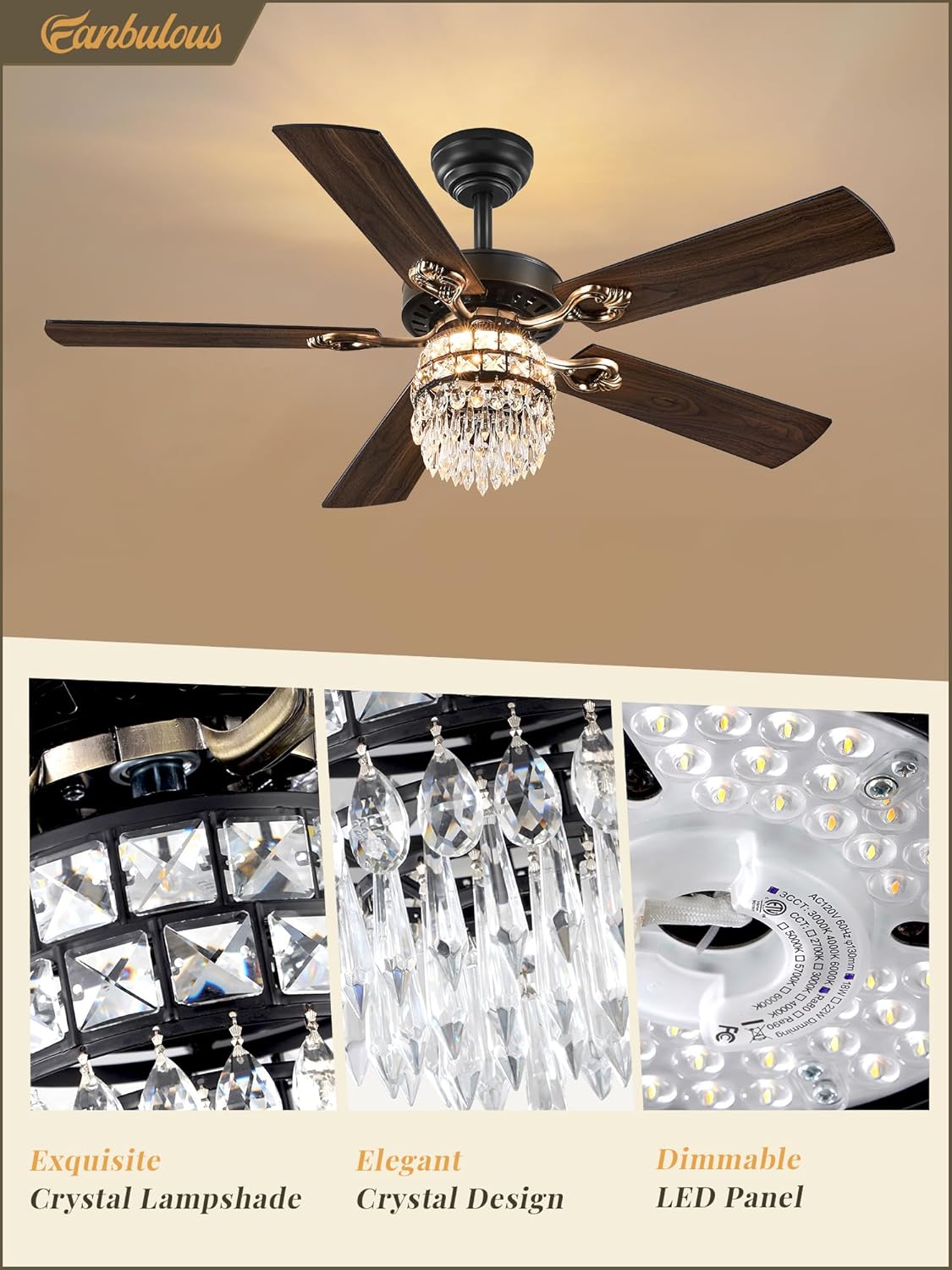
This image provides a close-up of the crystal lampshade, showcasing the intricate crystal design and the integrated dimmable LED panel, emphasizing the product's decorative elements.
Step 6: Final Assembly
Secure the canopy to the ceiling, ensuring it covers all wiring connections neatly. Once all components are securely installed, restore power at the circuit breaker.

This diagram shows the overall dimensions of the 48-inch ceiling fan and highlights the ease of installation, including the estimated one-hour installation time and detailed instructions.
Operating Instructions
Using Your Fanbulous Ceiling Fan
Your Fanbulous ceiling fan is operated via a multi-function remote control. Ensure batteries are installed correctly in the remote before use.
- Power On/Off: Toggles the fan and light on or off.
- Fan Speed (1-6): Adjusts fan speed from a gentle breeze (speed 1) to powerful cooling (speed 6).
- Light On/Off & Color Temperature (3CCT): Toggles the light and cycles through three color temperatures: warm light (3000K), natural light (4500K), and cool white light (6000K).
- Dimming (10%-100%): Adjusts the brightness of the LED light from 10% to 100%.
- Timer (1H/4H/8H): Sets the fan to turn off automatically after 1, 4, or 8 hours.
- Forward/Reverse Rotation: Changes the direction of the fan blades. Use for summer (downward airflow for cooling) or winter (upward airflow for warm air circulation).
- Mute: Silences remote control beeps.

This image illustrates the remote control for the Fanbulous ceiling fan, labeling buttons for power, fan speed (1-6), light on/off, color temperature adjustment, dimming, anti-theft mode, forward/reverse rotation, and timer settings (1H, 4H, 8H).
Reversible DC Motor Function
The integrated DC motor allows for reversible blade rotation, providing comfort in all seasons:
- Summer Mode (Downward Airflow): Blades rotate counter-clockwise, creating a direct cooling breeze.
- Winter Mode (Upward Airflow): Blades rotate clockwise, circulating warm air trapped near the ceiling, helping to distribute heat more evenly.

This image visually explains the reversible function of the DC motor, showing downward airflow for cooling in summer and upward airflow for circulating warm air in winter, enhancing year-round comfort.
Maintenance
Care and Cleaning
- Always turn off the power at the circuit breaker before performing any cleaning or maintenance.
- Clean the fan housing and blades with a soft, damp cloth. Do not use abrasive cleaners, solvents, or harsh chemicals, as these can damage the finish.
- Dust the crystal components gently with a soft, dry cloth. For deeper cleaning, apply a mild glass cleaner to a cloth and wipe the crystals, avoiding direct spray onto electrical components.
- Periodically check all connections and screws for tightness. Retighten as necessary to ensure safe operation.
Troubleshooting
Common Issues and Solutions
| Problem | Possible Cause | Solution |
|---|---|---|
| Fan does not start | No power supply to the fan | Check the circuit breaker, wall switch, and ensure all wiring connections are secure. |
| Fan wobbles excessively | Loose blades, unbalanced blades, or loose mounting | Ensure all blade screws and mounting bracket screws are tight. Use a blade balancing kit if necessary. |
| Light does not work | Loose wiring, LED panel issue | Check the light kit wiring connections. Confirm power is supplied to the light. |
| Remote control not working | Dead batteries, signal interference | Replace the remote control batteries. Ensure there are no obstructions between the remote and the fan's receiver. |
| Fan is noisy | Loose screws, motor issue, or obstruction | Tighten all screws on the fan and mounting bracket. Ensure no objects are touching the blades. |

This infographic highlights the quiet operation of the fan's DC motor, indicating a noise level of 30dB, which is comparable to a whisper, ensuring an undisturbed environment for sleep or relaxation.
Product Specifications
| Feature | Detail |
|---|---|
| Brand | Fanbulous |
| Model Name | F-OG48BK-1D01 |
| Size | 48 Inch |
| Color | Black |
| Style | Farmhouse |
| Light Source Type | LED |
| Wattage | 50 watts (Fan), 22 watts (LED) |
| Voltage | 120 Volts |
| Brightness | 2400 lumen |
| Color Temperature | 3000K (Warm), 4500K (Natural), 6000K (Cool White) |
| Control Method | Remote |
| Motor Type | DC |
| Item Weight | 15.34 pounds |
| Product Dimensions | 48 x 48 x 20.47 inches |
| Assembly Required | Yes |
Warranty Information and Customer Support
Fanbulous products are designed for quality and durability. For specific warranty details, please refer to the warranty card included with your purchase or contact our customer support directly.
If you encounter any issues, have questions regarding your Fanbulous ceiling fan, or require technical assistance, please do not hesitate to contact our customer service team for prompt and efficient support.
For further assistance, visit the Fanbulous Store on Amazon.