
FiiO RR11
FiiO RR11 Portable HiFi FM Stereo Radio Receiver User Manual
Model: RR11
Introduction
This manual provides detailed instructions for the FiiO RR11 Portable HiFi FM Stereo Radio Receiver. It covers essential information regarding product setup, operation, maintenance, and troubleshooting to ensure optimal performance and longevity of your device. Please read this manual thoroughly before using the product.

Figure 1: FiiO RR11 Portable HiFi FM Stereo Radio Receiver (Silver model).

Figure 2: The RR11 features an ultra-thin aluminum alloy design, blending retro and modern aesthetics.
1. Setup
1.1 Package Contents
Before proceeding with setup, verify that all items are present in the package:
- FiiO RR11 Portable HiFi FM Stereo Radio Receiver
- Cable (USB Type-C)
- Earphone (Retro-style earbuds)
1.2 Charging the Device
The RR11 is powered by a built-in 300mAh lithium battery. To charge the device:
- Connect the provided USB Type-C cable to the charging port on the RR11.
- Connect the other end of the cable to a compatible USB power adapter (not included) or a computer's USB port.
- The device can be used while charging. A full charge provides over 8.5 hours of continuous operation in radio mode, and over 17.5 hours in AMP mode.

Figure 3: Illustration of battery life and dual power supply capability.
1.3 Antenna Configuration
The RR11 utilizes both headphone cables and a built-in PCB signal gain antenna for FM reception.
- For optimal FM reception, ensure headphones are connected to the 3.5mm audio jack, as they act as an external antenna.
- The internal high-performance PCB antenna provides enhanced reception, allowing for clear signals even without headphones acting as an antenna.

Figure 4: Internal PCB signal gain antenna for improved radio reception.
2. Operating Instructions
2.1 Power On/Off
Locate the power button on the device. Press and hold to power on or power off the RR11.
2.2 FM Radio Tuning
The RR11 features an analog PVR tuning wheel for precise station selection.
- Rotate the tuning knob (located at the top/side) to scan through FM frequencies.
- The frequency display will indicate the current station.
- The device supports a wide range of FM bands:
- 87-108MHz FM: Standard frequency band
- 76-90MHz FM: Japan frequency band
- 64-87MHz FM: School campus frequency band

Figure 5: Close-up view of the analog tuning knob for precise frequency adjustment.

Figure 6: Analog PVR tuning wheel for tactile frequency selection.

Figure 7: The RR11 supports various FM frequency bands for diverse listening.
2.3 Sound Effects (BASS+3D)
The RR11 features a custom DDB analog sound effect and amplification chip to enhance your listening experience.
- Activate the BASS+3D sound effects using the dedicated controls (refer to device layout for button location).
- This feature provides a richer bass response and a more immersive 3D soundstage.
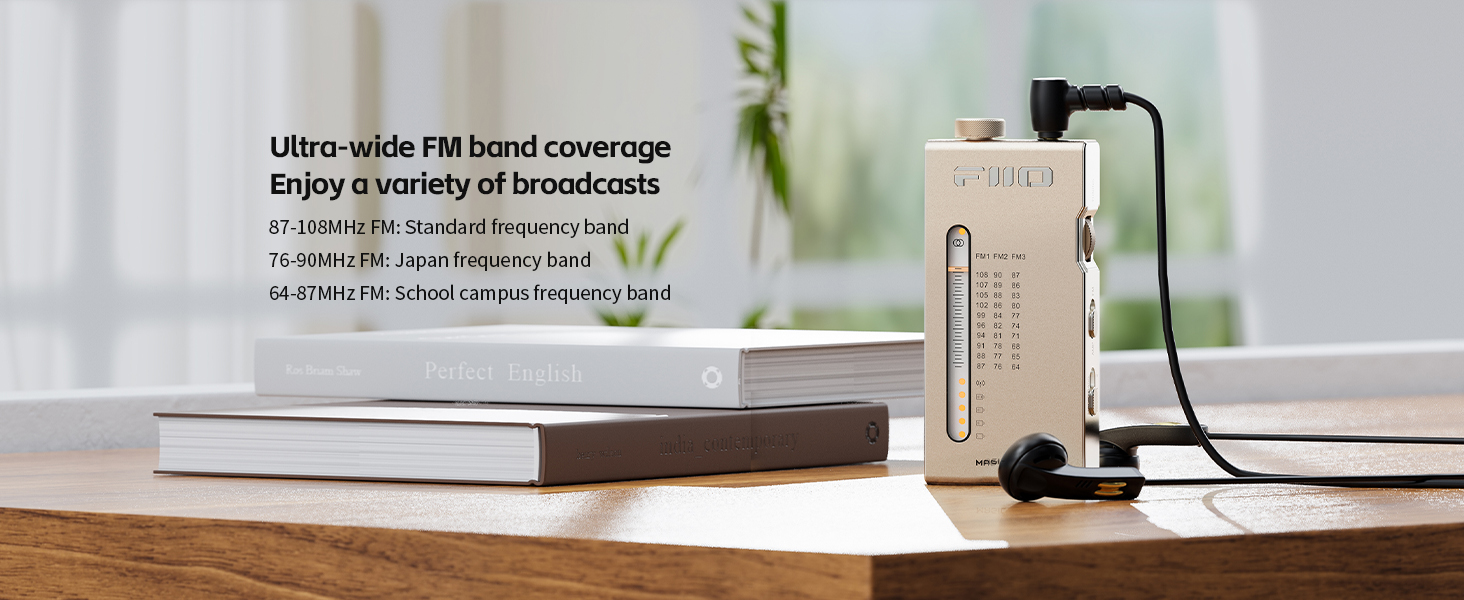
Figure 8: The BASS+3D sound effects chip enhances audio immersion.
2.4 Headphone Amplifier Functionality
The RR11 can also function as a compact headphone amplifier (DAC) when connected to a source device.
- Use the provided digital-to-analog conversion cable (USB Type-C to Type-C) to connect the RR11 to your smartphone or other audio source.
- The RR11 will boost the output power and apply its DDB analog sound effects to the audio from your source device.

Figure 9: The RR11 can function as a headphone amplifier when connected to a digital source.
3. Maintenance
3.1 Cleaning
- Wipe the device with a soft, dry cloth.
- Do not use liquid cleaners or abrasive materials, as they may damage the finish or internal components.
3.2 Battery Care
- To preserve battery life, avoid fully discharging the battery frequently.
- Store the device in a cool, dry place when not in use for extended periods.
4. Troubleshooting
| Problem | Possible Cause | Solution |
|---|---|---|
| No power / Device does not turn on | Battery is depleted. | Charge the device using the provided USB Type-C cable. |
| Weak or no FM reception |
|
|
| Sound distortion or static |
|
|
| Headphone amplifier function not working |
|
|
5. Specifications
| Feature | Detail |
|---|---|
| Model | RR11 |
| Dimensions (L x W x H) | 83.2mm x 39.4mm x 13mm (3.31 x 1.57 x 0.51 inches) |
| Weight | 6.4 ounces |
| FM Frequency Range | 64MHz-108MHz |
| FM Chip | Silicon Labs Si4831 |
| Sound Effects | BASS+3D (Custom DDB analog sound effect chip) |
| Battery | 300mAh Nonstandard Battery (included) |
| Battery Life | Over 8.5 hours (Radio mode), Over 17.5 hours (AMP mode) |
| Connectivity | Auxiliary (3.5mm headphone jack), USB Type-C (for DAC/charging) |
| Included Components | Cable (USB Type-C), Earphone |
| Special Features | Portable, Lightweight, Analog PVR Tuning, Built-in PCB Antenna, Headphone Amplifier Function |

Figure 10: The specialty Silicon Labs Si4831 FM radio chip ensures clear and stable reception.

Figure 11: Detailed circuit diagram illustrating the RR11's HiFi-grade audio design.
6. Warranty and Support
6.1 Warranty Information
For detailed warranty information, please refer to the warranty card included with your product or visit the official FiiO website. Warranty terms and conditions may vary by region.
6.2 Customer Support
If you encounter any issues not covered in this manual or require further assistance, please contact FiiO customer support through their official website or the retailer from whom you purchased the product. Provide your product model (RR11) and a detailed description of the issue for faster service.
Official FiiO Website: www.fiio.com
Related documentsRR11


Ask a question about this manual
Ask about setup, troubleshooting, compatibility, parts, safety, or missing instructions. Manuals+ will review the question and use this page’s manual context to help answer it.