
AWithZ H2
AWithZ 18650 Battery Spot Welder (Model H2) User Manual
Integrated Design with 1.5" Digital Display, 90 Adjustable Power Levels, Auto/Manual Dual Pulse Modes
1. Safety Information
Please read all safety instructions carefully before operating the AWithZ Spot Welder. Failure to follow these instructions may result in electric shock, fire, or serious injury.
- Always wear appropriate personal protective equipment, including safety glasses, when operating the spot welder.
- Ensure the work area is well-ventilated and free from flammable materials.
- Do not operate the device with wet hands or in damp conditions.
- Avoid touching the welding pins during operation, as they become extremely hot.
- Only weld compatible materials as specified in this manual. Welding incompatible materials can be dangerous.
- Keep the device out of reach of children.
- If the device overheats (reaches 60°C), it will automatically shut down. Allow it to cool before resuming operation.
- Use only the provided charging cable and power adapter.
2. Product Overview
The AWithZ H2 Spot Welder is a compact, integrated tool designed for welding various battery types and thin metal sheets. It features a 1.5-inch digital display for easy parameter adjustment and monitoring.
2.1 Key Features
- Integrated Design: Power supply and welding pen are combined for one-handed operation.
- 1.5-inch Digital Display: Shows temperature, mode, preheat time, trigger time, and power level.
- 90 Adjustable Power Levels: Allows precise control for different materials and thicknesses.
- Auto/Manual Dual Pulse Modes: Provides flexibility for various welding tasks.
- Overheat Protection: Automatic shutdown at 60°C to prevent damage.
- Replaceable Welding Pins: Ensures longevity and consistent performance.
2.2 Package Contents
- AWithZ H2 Spot Welder Unit
- Nickel Sheet Roll
- Sandpaper
- Type-C Charging Cable
- Spare Welding Needles
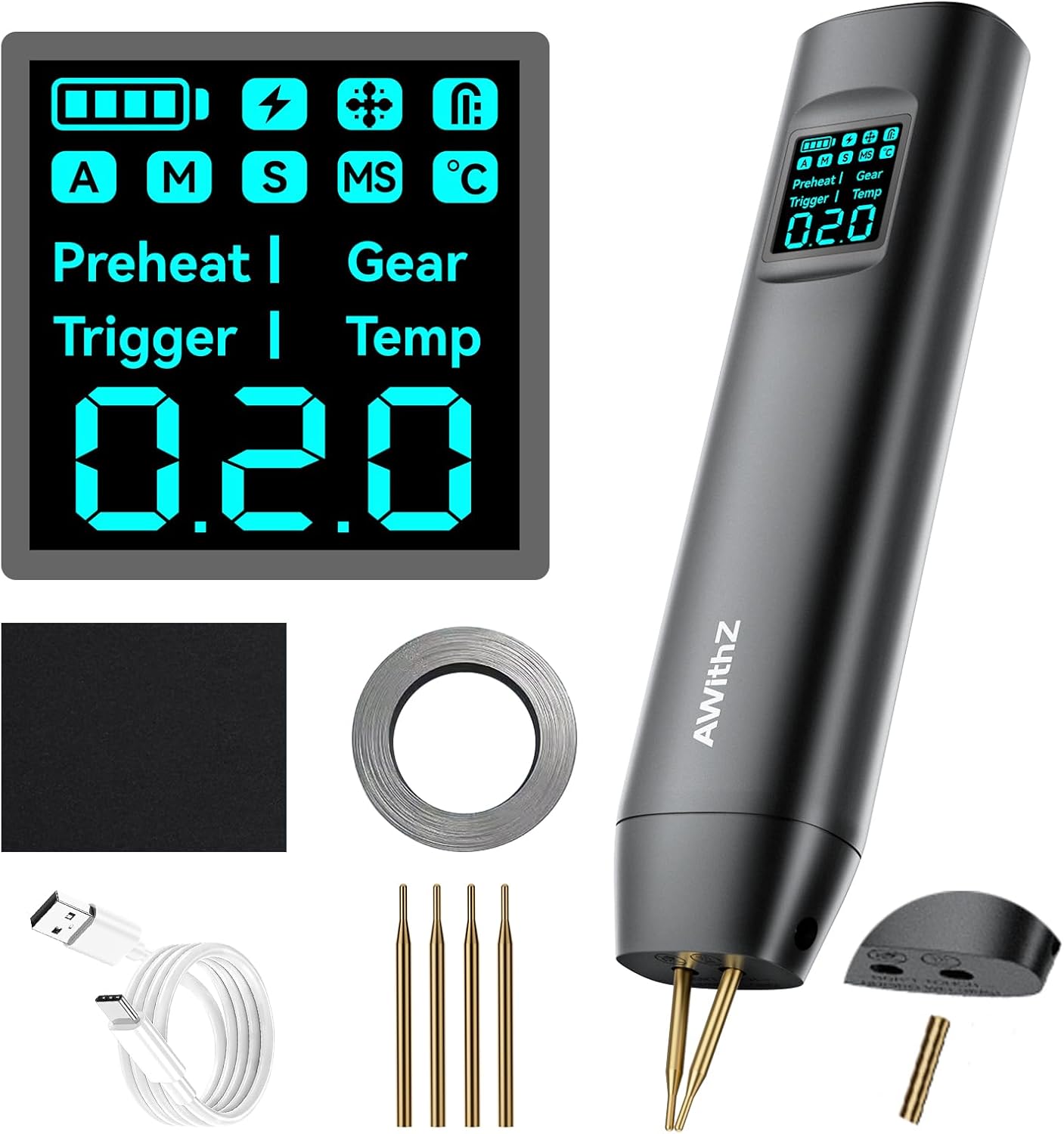
Image 2.1: The AWithZ H2 Spot Welder with its complete set of accessories, including nickel strip, sandpaper, charging cable, and spare welding tips.

Image 2.2: Key features of the AWithZ H2 Spot Welder, including interchangeable soldering pins, adjustable pin spacing, and strong dual pulse technology.

Image 2.3: The high-definition display screen showing 90-level adjustment, preheating and trigger time adjustment, automatic/manual dual mode, and real-time temperature monitoring.
3. Setup
3.1 Charging the Device
Before first use, fully charge the spot welder using the provided Type-C charging cable and a compatible USB power adapter (not included). The display will indicate charging status.
3.2 Preparing for Welding
- Clean Surfaces: Ensure the nickel strips and battery terminals are clean and free of oil, dirt, or oxidation. Use the included sandpaper to lightly abrade surfaces if necessary, then wipe with alcohol. Clean surfaces are crucial for strong welds.
- Adjust Welding Pins: The welding pins can be adjusted for spacing. Loosen the fixing screws on both sides, adjust the pins to the desired width for your application, and then tighten the screws securely.

Image 3.1: Overview of the AWithZ H2 Spot Welder, showing the display and control buttons (1: Power/Mode, 2: Adjustment Up, 3: Adjustment Down).
4. Operating Instructions
4.1 Power On/Off
Press and hold the power button (labeled '1' in Image 3.1) for a few seconds to turn the device on or off.
4.2 Navigating the Display and Settings
The 1.5-inch digital display provides real-time information and allows for parameter adjustments. Use the adjustment buttons (labeled '2' and '3' in Image 3.1) to navigate menus and change values.
- Mode Selection: Toggle between Auto and Manual welding modes.
- Preheat Time: Adjust the preheat duration for optimal welding.
- Trigger Time: Set the pulse duration for the weld.
- Power Level: Select from 90 adjustable power levels (0.1 to 9.9) to match material thickness.
- Language: Change the display language.
- Sound: Enable or disable audible feedback.
- Display Brightness: Adjust screen illumination.
- Auto-Off Time: Set the duration after which the device automatically powers off due to inactivity.
4.3 Welding Procedure
- Select Mode: Choose either Auto or Manual mode based on your preference and application.
- Adjust Power: Set the power level according to the thickness of the nickel strip and the battery type. Start with a lower setting and increase gradually if welds are weak. The device supports welding nickel-plated sheets from 0.1mm to 0.2mm.
- Position: Place the nickel strip firmly onto the battery terminal. Position the welding pins squarely on the nickel strip, ensuring both pins make good contact.
- Weld:
- Auto Mode: The device will automatically detect contact and trigger the weld pulse.
- Manual Mode: Press the manual trigger button (located on the side) to initiate the weld pulse.
- Inspect: After welding, gently test the strength of the weld. If it's weak, increase the power level and re-weld a new spot.

Image 4.1: Illustration of the 99 adjustable power levels, demonstrating how different settings are applied to various material thicknesses for optimal welding.

Image 4.2: Visual guide demonstrating correct welding pin placement and material compatibility for effective spot welds, contrasting with incorrect methods.
4.4 Supported Materials and Battery Types
The AWithZ H2 Spot Welder is suitable for:
- Cylindrical lithium batteries (e.g., 18650, 21700, 26650, 32650)
- Mobile phone batteries
- Button batteries
- Nickel-metal hydride batteries
- Nickel-cadmium batteries
- Thin nickel-plated sheets (0.1mm - 0.2mm)
- Stainless steel sheets

Image 4.3: Examples of welding applications, including cylindrical batteries (18650, 26650, 32650) and mobile phone batteries, along with compatible nickel sheet thicknesses.
5. Maintenance
5.1 Cleaning Welding Pins
Regularly inspect the welding pins for any residue or oxidation. Clean them gently with fine sandpaper or a wire brush to ensure good electrical contact and consistent weld quality.
5.2 Replacing Welding Pins
If the welding pins become worn or damaged, they can be replaced:
- Loosen the fixing screws of the welding pins on both sides using a screwdriver.
- Remove the old soldering pins by pulling them out in the direction of the pin.
- Install new soldering pins, ensuring they are fully seated.
- Adjust the spacing of the new pins as needed.
- Tighten the fixing screws securely on both sides.
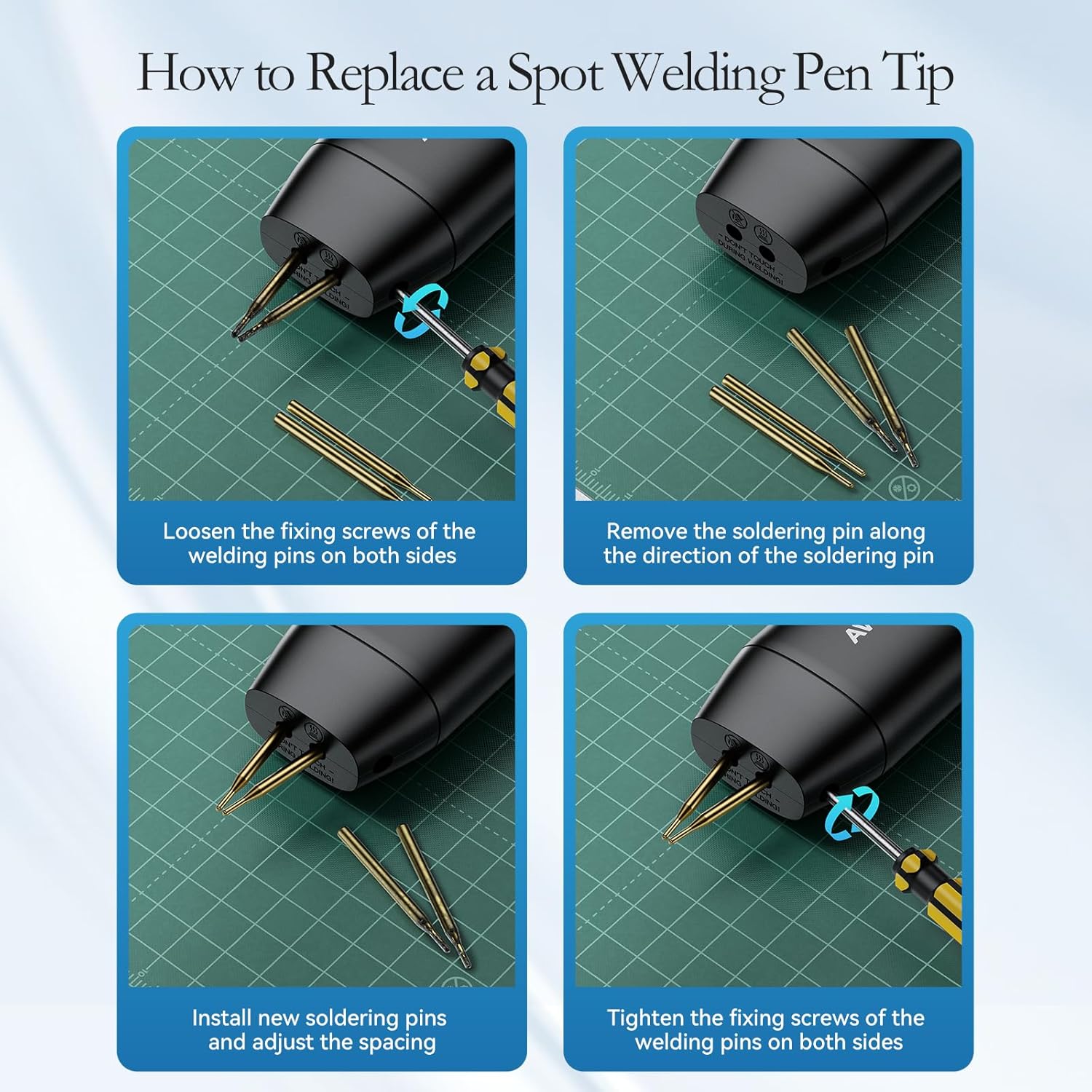
Image 5.1: Step-by-step guide on how to replace the spot welding pen tips, including loosening screws, removing old pins, installing new pins, adjusting spacing, and tightening screws.
5.3 Storage
Store the spot welder in a cool, dry place away from direct sunlight and moisture. Ensure the device is turned off before storage.
6. Troubleshooting
- Weak Welds:
- Ensure battery terminals and nickel strips are clean.
- Increase the power level setting.
- Apply firm and even pressure to both welding pins.
- Check if welding pins are worn and replace if necessary.
- No Weld/No Spark:
- Verify the device is charged and powered on.
- Ensure both welding pins are making good contact with the nickel strip.
- Check if the device is in the correct mode (Auto or Manual).
- Device Shuts Down Automatically:
- The device has an internal temperature detector and will shut down if it reaches 60°C to prevent damage. Allow it to cool down before resuming operation.
- Display Not Working:
- Ensure the device is charged and powered on.
- If the issue persists, contact customer support.
7. Specifications
| Specification | Detail |
|---|---|
| Brand | AWithZ |
| Model Number | H2 |
| Item Weight | 9.6 ounces (approx. 272g) |
| Product Dimensions | 3.94 x 1.18 x 3.94 inches (approx. 10 x 3 x 10 cm) |
| Power Source | Battery Powered |
| Wattage | 1800 milliamp_hours |
| Battery Type | Lithium Polymer (included) |
| Special Feature | Lightweight, Digital Display, Adjustable Power |
8. Warranty and Support
For warranty information or technical support, please refer to the product packaging or contact AWithZ customer service directly. Keep your purchase receipt for warranty claims.
Related documentsH2


Ask a question about this manual
Ask about setup, troubleshooting, compatibility, parts, safety, or missing instructions. Manuals+ will review the question and use this page’s manual context to help answer it.