
Introduction
Thank you for choosing the Perlegear PGIPE01 Camera Tripod. This manual provides essential information for the safe and effective use of your new tripod. Please read it thoroughly before operation and retain it for future reference. This 60-inch portable and height-adjustable travel tripod is designed for versatility, supporting both phones and cameras with a maximum load of 13.2 lbs.
Product Features
- Wide Height Adjustment & Portable Design: Smoothly adjust the tripod height from 18.5 inches to 60 inches. It folds down to a compact 19.69 inches and weighs only 1.5 lbs, making it highly portable for travel.
- Stable & Durable Construction: Crafted with a strong, rustproof aluminum structure and non-slip rubber feet, ensuring dependable support for devices up to 13.2 lbs.
- Universal Compatibility: Features a 1/4-inch camera mounting screw and an expanding phone holder (fits phones from 2.3 inches to 3.35 inches wide), compatible with DSLRs, action cameras, camcorders, projectors, speakers, ring lights, and most smartphones.
- Multi-Angle Shooting: The professional tripod allows for 360-degree panoramic and 160-degree tilt shooting. The phone holder also rotates 360 degrees for any orientation.
Setup Instructions
1. Unfolding the Tripod
To unfold the tripod, gently pull the legs outwards until they are fully extended and stable. Ensure all leg locks are securely fastened.

Image: The Perlegear PGIPE01 tripod demonstrating its adjustable height settings, ranging from a compact 18.5 inches to a maximum of 60 inches, with a detailed view of the leg locking mechanism.
2. Adjusting Height
Loosen the quick-release leg locks on each leg section. Extend the legs to your desired height, then firmly close the locks to secure them. The central column can also be extended by twisting the screw knob at its base for additional height.
3. Attaching Your Device
The tripod head features a 1/4-inch universal screw mount. For cameras, simply screw your camera onto this mount. For smartphones, utilize the integrated flip-up phone holder. Pull the phone holder upwards from the handle to reveal the clamp, then place your phone securely within it.
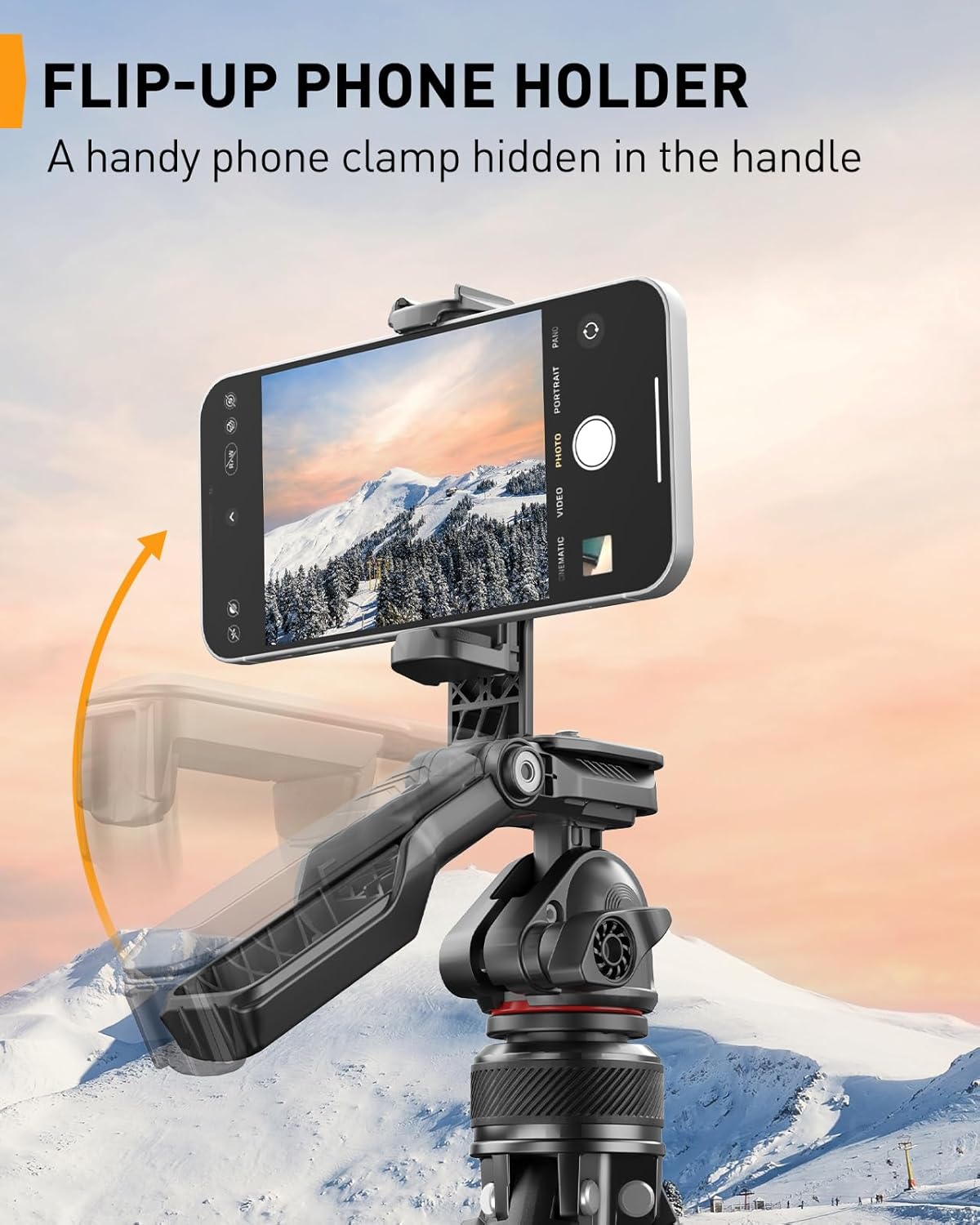
Image: A close-up of the Perlegear PGIPE01 tripod's handle, illustrating how the integrated phone holder flips up and expands to securely grip a smartphone.

Image: An illustration of the Perlegear PGIPE01 tripod's broad compatibility, showing it can be used with smartphones (fitting 2.3-3.35 inches wide), DSLR cameras, action cameras, camcorders, projectors, and ring lights via its 1/4-inch screw mount.
4. Quick Release Plate
The tripod head includes a quick-release plate for fast attachment and detachment of your camera. Press the orange button to release the plate, attach it to your camera, and then slide it back into the tripod head until it clicks securely.
Video: An official Perlegear video demonstrating the operation of the PGIPE01 tripod, including unfolding, height adjustment, and attaching devices. This video provides a visual guide to the setup process.
Operating Instructions
1. Adjusting Angles
The tripod head allows for 360-degree panoramic rotation and 160-degree tilt. Loosen the appropriate knobs on the tripod head to adjust the angle, then tighten them to secure your device in position. The phone holder itself can also be rotated 360 degrees independently.

Image: The Perlegear PGIPE01 tripod illustrating its capability for multiple shooting angles, including 360-degree panoramic and 160-degree tilt for cameras, and 160-degree tilt, 360-degree rotation, and 360-degree panoramic for phones.
Maintenance
To ensure the longevity of your Perlegear PGIPE01 tripod, follow these maintenance guidelines:
- Regularly clean the tripod with a soft, dry cloth to remove dust and debris.
- Avoid exposing the tripod to extreme temperatures or harsh chemicals.
- Ensure all locking mechanisms are free of obstructions and operate smoothly.
- Store the tripod in a dry, cool place when not in use.
Troubleshooting
If you encounter any issues with your Perlegear PGIPE01 tripod, please refer to the following common solutions:
- Tripod instability: Ensure all leg locks are fully tightened and the tripod is placed on a flat, stable surface.
- Device not secure: Verify that the 1/4-inch screw is tightly fastened to your camera or that your phone is correctly seated and clamped in the phone holder. Check that the quick-release plate is fully engaged.
- Difficulty adjusting angles: Loosen the tilt and pan knobs sufficiently before attempting to adjust the angle. Do not force adjustments.
If problems persist, please contact Perlegear customer support for assistance.
Specifications
| Feature | Specification |
|---|---|
| Model Name | PGIPE01 |
| Brand | Perlegear |
| Maximum Height | 153 Centimeters (approx. 60 inches) |
| Minimum Height (Folded) | 18.5 inches (approx. 47 cm) |
| Item Weight | 0.94 Kilograms (approx. 2.07 pounds) |
| Weight Limit | 13 Pounds (approx. 6 kg) |
| Material | Aluminum, Plastic |
| Color | Black |
| Compatible Devices | Camcorder, Camera, Projector, Smartphone |
| Tripod Head Type | Ball Heads |
Warranty and Support
Perlegear products are designed for durability and performance. For specific warranty information or technical support, please refer to the warranty card included with your purchase or visit the official Perlegear website. Our customer service team is available to assist you with any questions or concerns.