
SANNCE N98PBM0-54EW
SANNCE 5MP PoE Security Camera System User Manual
Brand: SANNCE
Model: N98PBM0-54EW
Product Overview
The SANNCE 5MP PoE Security Camera System provides comprehensive surveillance for your property. This system includes an 8-channel 6MP Surveillance NVR and four 5MP HD weatherproof dome cameras, designed for reliable day and night monitoring. Featuring H.265 video compression, smart IR LED, and app push alerts, it offers efficient storage and remote access capabilities.

Figure 1: SANNCE 5MP PoE Security Camera System components.
Key features include:
- 5MP Super HD Resolution: Equipped with a 1/3" Progressive Scan CMOS sensor, providing 5MP (2880x1620) crystal-clear vision. Advanced image technologies like BLC/3D DNR/HLC ensure clear and detailed footage.
- Smart Human/Vehicle Detection: Utilizes an upgraded AI algorithm for accurate human and vehicle detection, significantly reducing false alarms from environmental factors.
- Wide Area Coverage & Clear Night Vision: Features a 2.8mm wide-angle lens for broader coverage and 2 IR supplement lights for up to 100ft night vision. Built-in high-sensitivity pickup supports clear audio recording.
- High Efficiency Compression & PoE Power Supply: S+265/H.265 coding technology saves up to 75% recording space. Supports PoE IEEE 802.3 af/at, allowing data and power transmission over a single internet cable for easy installation.
- Remote Access & Multi-function: View monitoring anytime, anywhere via smartphone, client software, or web page. Includes smart playback, P2P remote access, and multi-language menu. Features like zone alarm, video mask, and local encryption enhance security.
What's in the Box
The SANNCE 5MP PoE Security Camera System package includes the following items:

Figure 2: Complete contents of the SANNCE 5MP PoE Security Camera System package.
- 1x NVR (Network Video Recorder)
- 4x Dome Cameras
- 1x Power Adapter
- 1x USB Mouse
- 1x User Manual for NVR
- 4x User Manual for Camera
- 4x Drill Template
- 4x Wall Sticker
- 4x Waterproof Lid
- 4x Mounting Screw Bags
- 1x 1.8M HDMI Cable
- 1x 1M Network Cable
- 2x 18M Network Cable
- 2x 30M Network Cable
Setup Guide
Follow these steps for the initial setup of your SANNCE PoE Security Camera System.
1. System Connection
Connect the NVR and cameras as shown in the video below. The PoE (Power over Ethernet) technology simplifies installation by allowing both power and data to be transmitted over a single network cable.
Video 1: How to connect the PoE CCTV system. This video demonstrates connecting the NVR to your network, attaching the USB mouse, connecting to a monitor via HDMI, and connecting the cameras to the NVR's PoE ports, followed by powering on the system.
- Connect one end of a network cable to the NVR's LAN port and the other end to a network port on your router or switch that has internet access.
- Insert network cables into the PoE ports of the NVR and connect the other end to each camera. (The package includes 18-meter and 30-meter network cables. Choose based on distance.)
- Connect the USB mouse to a USB port on the NVR.
- Insert the HDMI cable into the HDMI port of the NVR and connect the other end to your monitor.
- Connect the power cord to the power adapter, then insert the power adapter's plug into the NVR's power port. Finally, insert the other plug into a power strip to power on the system.

Figure 3: PoE (Power over Ethernet) connection diagram, illustrating how a single cable provides both data and power to the camera from the NVR.
2. NVR Initial Setup
After connecting the hardware, you will need to configure the NVR for first-time use. The system will guide you through a quick setup wizard.
- Upon first boot, select your preferred language. English is the default. The NVR supports English, German, French, Italian, and Spanish.
- Set an account password to activate the NVR. It is recommended to fill in the password reminder. The device cannot work without activation.
- Set the unlocking mode (e.g., pattern lock).
- Fill in your email address and security questions. This will facilitate verification and password reset if you forget your password.
- Configure network settings. Default settings are usually sufficient for most home networks.
- Format the hard drive when using it for the first time. If there is no hard drive in the NVR, you can directly click "Next".
- New cameras will be automatically recognized and configured for the IP channels.
- Scan the QR code of the APP to download it, then use the APP to scan the device ID QR code to add the device for mobile monitoring.
- After completing the above settings, you can preview the video feed and configure additional functions.
Operating the System
Smart Detection Features
The SANNCE system incorporates advanced AI algorithms for intelligent detection, minimizing false alarms and improving monitoring accuracy.

Figure 4: Illustration of AI-powered human and vehicle detection, highlighting how the system differentiates between relevant and irrelevant motion.
- Human Detection: Identifies human shapes, reducing alerts caused by pets or swaying branches.
- Vehicle Detection: Recognizes vehicles, useful for monitoring driveways or parking areas.
- Motion Detection 2.0: Focuses on relevant activities, enhancing the efficiency of your security alerts.
Remote Access and Playback
Access your security footage and live view from anywhere using the dedicated mobile application or web interface.
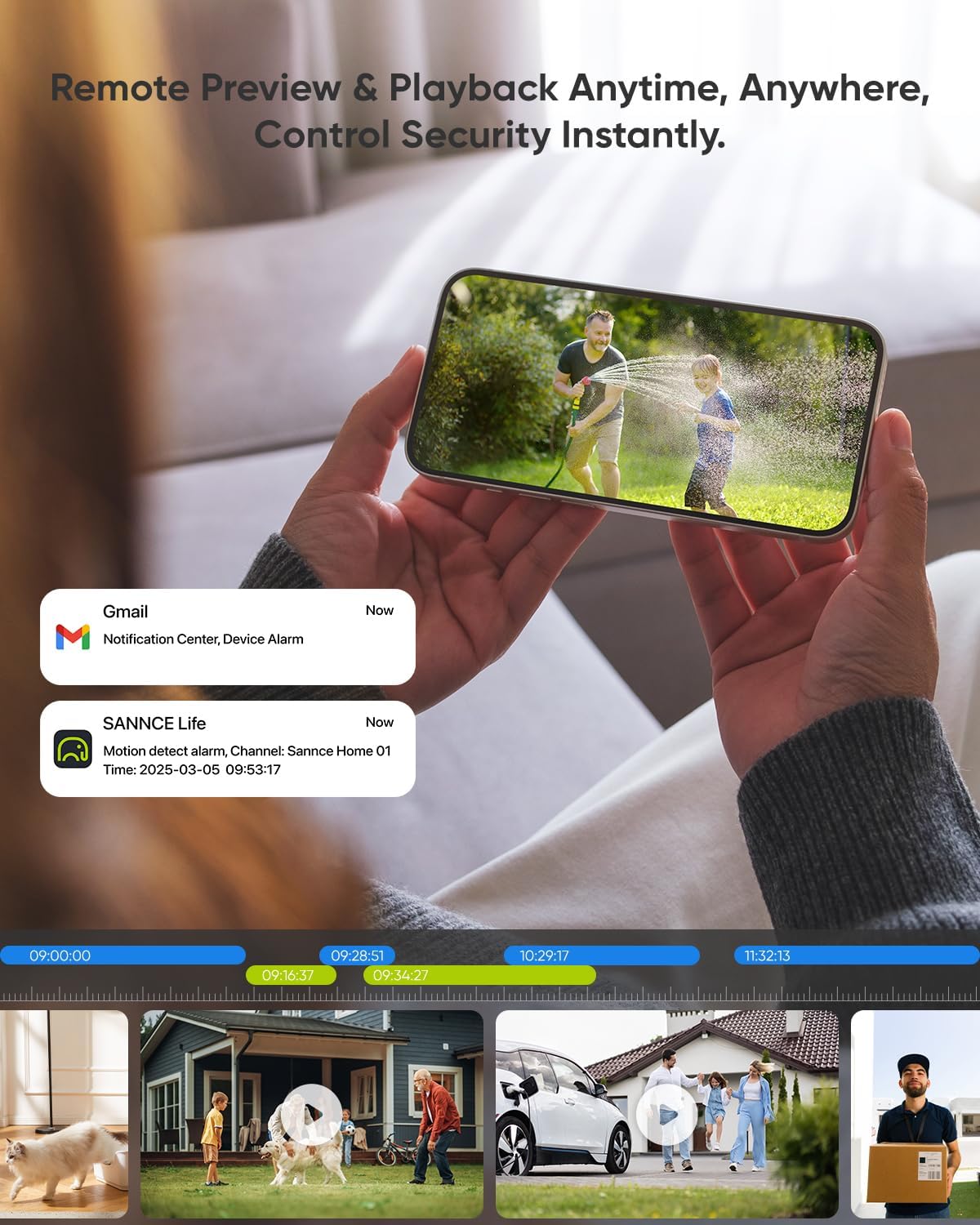
Figure 5: Remote access interface on a smartphone, showing live view and playback options, along with push notifications for motion alerts.
- Download the SANNCE Life app from your smartphone's app store.
- Scan the device ID QR code from the NVR's setup wizard to add your system to the app.
- Enjoy live viewing, playback of recorded footage, and receive instant push notifications for detected events.
Camera Placement and Coverage
The dome cameras are designed for wide coverage and durability in various weather conditions.

Figure 6: Diagram illustrating the wide coverage area provided by the 2.8mm wide-angle lens of the dome camera.

Figure 7: The IP67 weatherproof rating ensures the camera's resilience against high and low temperatures, making it suitable for outdoor installation.
- The 2.8mm wide-angle lens provides a broad field of view, covering more monitoring area.
- Cameras are IP67 weatherproof, resistant to high (+60°C/+140°F) and low (-30°C/-22°F) temperatures, suitable for various extreme weather conditions.
- Infrared (IR) LEDs provide clear night vision up to 100 feet, ensuring 24/7 monitoring.
Maintenance
Regular maintenance ensures the longevity and optimal performance of your SANNCE security system.
- Clean Lenses: Periodically wipe camera lenses with a soft, damp cloth to remove dust and smudges that can affect image clarity.
- Check Cables: Ensure all network and power cables are securely connected and free from damage.
- Software Updates: Check for and install firmware updates for the NVR and cameras to ensure the latest features and security patches. Refer to the SANNCE website or app for update instructions.
- Hard Drive Health: Monitor the NVR's hard drive health through the system settings. Consider replacing the hard drive if errors or degradation are detected.
- Backup Recordings: Regularly back up important recordings to an external storage device or cloud service.
Troubleshooting
Here are some common issues and their potential solutions:
| Problem | Possible Cause | Solution |
|---|---|---|
| No video display on monitor. | Loose HDMI/VGA cable, NVR not powered on, monitor input not selected correctly. | Check cable connections. Ensure NVR is powered. Select correct input source on monitor. |
| Cameras not showing video. | Network cable issue, camera not powered (PoE), NVR port issue, camera not added/configured. | Check network cable connections to NVR and camera. Verify PoE indicator lights on NVR. Ensure cameras are properly added in NVR settings. |
| Cannot access system remotely. | No internet connection, incorrect network settings, app not configured correctly. | Verify NVR has internet access. Check network settings (DHCP enabled). Re-scan device ID in the mobile app. |
| False alarms from motion detection. | Sensitivity too high, environmental factors (trees, animals, light changes). | Adjust motion detection sensitivity. Utilize human/vehicle detection. Configure detection zones to exclude irrelevant areas. |
For further assistance, please refer to the full user manual or contact SANNCE customer support.
Specifications
| Feature | Detail |
|---|---|
| Brand | SANNCE |
| Connectivity Technology | PoE |
| Video Capture Resolution | 2K (5MP cameras, NVR supports 6MP) |
| Special Feature | PoE Support |
| Number of Channels | 8 |
| Power Source | Corded Electric |
| Item dimensions L x W x H | 15.67 x 11.81 x 9.81 inches |
| Recommended Uses For Product | Security Surveillance |
| Compatible Devices | Ip Camera |
| Signal Format | Digital |
| Other camera features | Ip Security Camera System |
| Low light technology | Ir |
| Night Vision Range | 100 Feet |
| Antenna Type | Fixed |
| Recording Mode | Continuous |
| Optical Sensor Technology | CMOS |
| Total USB Ports | 2 |
| Hardware Interface | USB |
| Video Input | Ip Camera |
| Viewing Angle | 110 Degrees |
| Manufacturer | SANNCE |
| Product Dimensions | 15.67 x 11.81 x 9.81 inches |
| Item Weight | 13 pounds |
| Item model number | N98PBM0-54EW |
| Date First Available | March 12, 2025 |
Warranty and Support
SANNCE products come with a standard manufacturer's warranty. For specific warranty details, please refer to the warranty card included in your package or visit the official SANNCE website.
For technical support, troubleshooting assistance, or any inquiries regarding your SANNCE 5MP PoE Security Camera System, please contact SANNCE customer service through their official channels. Contact information can typically be found in the full user manual or on the SANNCE website.
You can also visit the SANNCE Store on Amazon for more product information and support resources.
Related documentsN98PBM0-54EW

Ask a question about this manual
Ask about setup, troubleshooting, compatibility, parts, safety, or missing instructions. Manuals+ will review the question and use this page’s manual context to help answer it.