Introduction
Welcome and thank you for choosing the HTC Wireless Earbuds TWS6 5.3. This manual provides detailed instructions to help you set up, operate, and maintain your earbuds for optimal performance. Please read this manual thoroughly before using your device.
Package Contents
Please verify that all items are present in your package:
- 2 x HTC Earbuds
- 1 x USB-C Charging Cable
- 1 x Charging Case
- 2 Pairs x Rubber Eartips (S/L)
- 1 x Quick Start Guide (physical document)

Product Overview
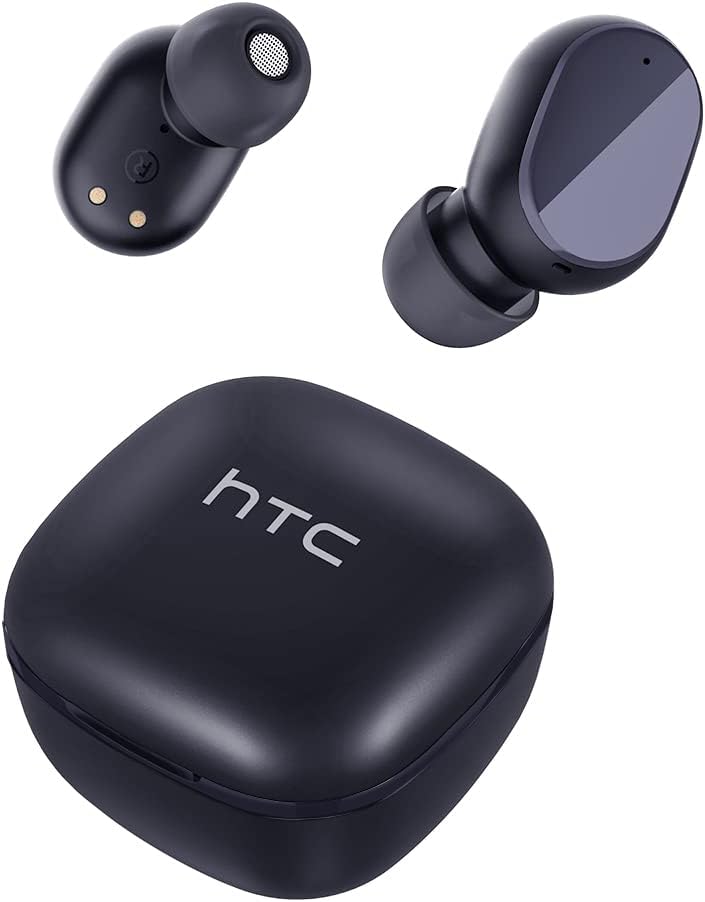
Familiarize yourself with the components of your HTC TWS6 earbuds.

Setup
Charging the Earbuds and Case
Before first use, fully charge the earbuds and charging case.
- Place the earbuds into the charging case.
- Connect the USB-C cable to the charging port on the case and a power source.
- The indicator light on the case will show charging status.
- A full charge provides approximately 5 hours of playback for earbuds and up to 22 hours with the charging case.

Bluetooth Pairing
Follow these steps to pair your earbuds with your device:
- Open the charging case. The earbuds will automatically enter pairing mode.
- On your device (smartphone, tablet, etc.), enable Bluetooth.
- Search for "HTC TWS6" in the list of available Bluetooth devices.
- Select "HTC TWS6" to connect. A voice prompt will confirm successful pairing.

Wearing the Earbuds
For optimal sound quality and comfort, choose the correct eartip size and wear the earbuds properly.
- Select the eartips (S, M, L) that best fit your ears.
- Gently insert each earbud into your ear canal.
- Rotate slightly to ensure a secure and comfortable fit.
Operating Instructions
Smart Touch Controls
The HTC TWS6 earbuds feature intuitive touch controls:
- Play/Pause Music: Single tap on either earbud.
- Next Track: Double tap on the right earbud.
- Previous Track: Double tap on the left earbud.
- Volume Up: Triple tap on the right earbud.
- Volume Down: Triple tap on the left earbud.
- Answer/End Call: Single tap on either earbud.
- Reject Call: Press and hold either earbud for 2 seconds.
- Activate Voice Assistant: Press and hold either earbud for 3 seconds.

Power On/Off
The earbuds automatically power on when removed from the charging case and power off when placed back into the case and the lid is closed.
To manually power on, press and hold the touch area for 3 seconds. To manually power off, press and hold the touch area for 5 seconds.
Maintenance and Care
Cleaning
Regularly clean your earbuds and charging case to ensure optimal performance and hygiene.
- Use a soft, dry, lint-free cloth to wipe the earbuds and charging case.
- Remove eartips and clean them with mild soap and water, then dry thoroughly before reattaching.
- Do not use abrasive cleaners or solvents.
Water Resistance (IPX5)
The HTC TWS6 earbuds are IPX5 sweatproof, meaning they are resistant to splashes and sweat.
Note: They are not designed for submersion in water. Avoid exposing them to heavy rain, showering, or swimming. Ensure the charging port is dry before charging.

Storage
When not in use, store the earbuds in their charging case to protect them and keep them charged.
Store in a cool, dry place away from extreme temperatures.
Troubleshooting
| Problem | Solution |
|---|---|
| Earbuds not pairing | Ensure earbuds are charged. Turn off and on Bluetooth on your device. Forget "HTC TWS6" from your device's Bluetooth list and re-pair. |
| Only one earbud working | Place both earbuds back into the charging case, close the lid, then open it again. Ensure both earbuds are charged. |
| Low volume or poor sound quality | Adjust volume on your device. Clean eartips and earbud mesh. Try different eartip sizes for a better seal. |
| Charging issue | Check USB-C cable and power adapter. Ensure charging contacts on earbuds and case are clean and dry. |
| Earbuds disconnect frequently | Ensure your device is within the Bluetooth range (approx. 10 meters/33 feet) and there are no significant obstructions. |
If issues persist, please contact customer support.
Specifications
| Feature | Detail |
|---|---|
| Model Name | TWS6 |
| Bluetooth Version | 5.3 |
| Connectivity Technology | Wireless |
| Wireless Communication Technology | Bluetooth |
| Battery Life (Earbuds) | 5 Hours |
| Total Playtime (with Case) | 22 Hours |
| Charging Time (Case) | Approximately 5 Hours |
| Water Resistance Level | IPX5 (Sweatproof) |
| Control Method | Touch |
| Microphone | Yes (with ENC) |
| Compatible Devices | Android and iOS Smartphones, Gaming Devices |
| Material | Plastic |
| Item Weight | 3.17 ounces |
| UPC | 734257974554 |
| Noise Control | Adaptive Noise Cancellation |
| Audio Driver Type | Dynamic Driver |
| Impedance | 199.99 Ohm |
Warranty and Support
HTC provides a 360-day warranty extension for this product, as detailed in the product information.
For technical assistance, warranty claims, or any inquiries, please contact HTC customer support.
Customer Support: Refer to the contact information provided in your product packaging or visit the official HTC website for the most up-to-date support options.


