
1. Introduction
Thank you for choosing the HOOBRO End Table and C-Shaped End Table Bundle. This manual provides essential instructions for the assembly, operation, and maintenance of your new furniture. Please read this guide thoroughly before assembly and retain it for future reference.
This bundle includes two versatile tables designed to enhance your living space: a 3-tier end table with an integrated charging station and a C-shaped end table also featuring a charging station and a storage pouch.
2. Safety Instructions
- General Safety: Ensure all parts are present and undamaged before assembly. Do not use if any parts are missing or broken.
- Assembly: Assemble on a soft, clean surface to prevent scratches. Follow the assembly steps carefully. Do not overtighten screws.
- Stability: Place tables on a level surface. Do not stand or sit on the tables. Distribute weight evenly on shelves and tabletops.
- Electrical Safety (Charging Stations):
- Only connect the charging station to a properly grounded electrical outlet.
- Do not overload the outlets. Refer to the specifications for maximum load.
- Keep liquids away from the charging station to prevent electric shock.
- Do not use if the power cord or plug is damaged.
- Unplug the charging station from the wall outlet when not in use for extended periods or during electrical storms.
- Children and Pets: Keep small parts and packaging materials away from children and pets.
3. Package Contents
Please verify that all components for both the 3-tier End Table and the C-Shaped End Table are present before beginning assembly. While specific part numbers are not listed here, typical contents include:
- Tabletop panels (for both tables)
- Metal frame components (legs, support bars)
- Shelves (for 3-tier end table)
- Integrated charging stations with power cords
- Fabric storage pouch (for C-shaped end table)
- Assembly hardware (screws, bolts, Allen wrench)
- Adjustable feet
4. Assembly Instructions
Follow the included graphical assembly guide for detailed, step-by-step instructions. The general process for both tables involves:
- Unpack and Identify: Carefully unpack all components and identify each part against the parts list in your separate assembly guide.
- Assemble Frame: Attach the metal frame components using the provided hardware. Ensure all connections are secure but do not fully tighten screws until the table is mostly assembled.
- Install Shelves/Panels: For the 3-tier end table, install the shelves. Note that the middle shelf and mesh rack are adjustable and can be exchanged. For the C-shaped end table, attach the tabletop to the frame.
- Integrate Charging Station: Secure the charging station into its designated slot on the tabletop.
- Attach Storage Pouch (C-Shaped Table): Secure the fabric storage pouch to the side of the C-shaped table frame.
- Final Tightening: Once all components are in place, fully tighten all screws.
- Adjust Feet: Adjust the leveling feet on the bottom of the table legs to ensure stability on uneven floors.

Figure 4.1: Dimensions and weight capacity for the 3-tier end table. Note the 80lb top capacity, 45lb middle shelf capacity, and 11lb bottom shelf capacity.

Figure 4.2: Dimensions for the C-shaped end table, showing its compact design suitable for sliding under sofas.
5. Operating Instructions
5.1 Using the 3-Tier End Table Charging Station (Model BB112BZ01)
The 3-tier end table is equipped with a charging station featuring 2 standard AC outlets and 2 USB ports. The power cord is approximately 59 inches (4.9 feet) long.
- Plug the table's power cord into a wall outlet.
- Connect your devices to the AC outlets (120V/12A max) or USB ports (5V/2A max).
- Ensure devices are compatible with the provided power specifications.
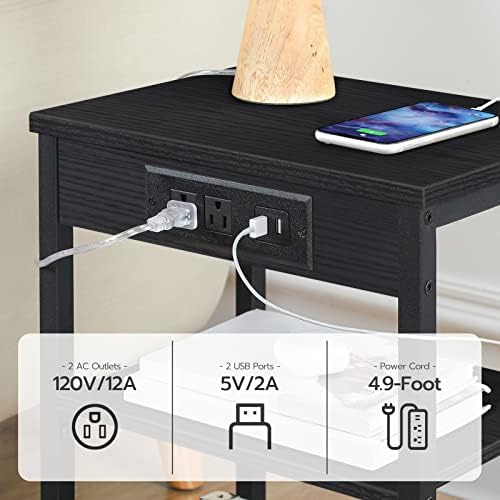
Figure 5.1: Detail of the 3-tier end table's charging station, indicating 2 AC outlets (120V/12A) and 2 USB ports (5V/2A).
5.2 Using the C-Shaped End Table Charging Station (Model BB70USF01)
The C-shaped end table includes a charging station with 1 standard AC outlet, 1 USB port, and 1 Type-C port. The power cord is approximately 59 inches (4.9 feet) long.
- Plug the table's power cord into a wall outlet.
- Connect your devices to the AC outlet (120V/12A max), USB port (5V/2A max), or Type-C port (5V/2A max).
- Ensure devices are compatible with the provided power specifications.

Figure 5.2: Detail of the C-shaped end table's charging station, showing 1 AC outlet (120V/12A), 1 USB port (5V/2A), and 1 Type-C port (5V/2A).
5.3 Using the Storage Pouch (C-Shaped Table)
The C-shaped end table features a 2-tier fabric storage pouch. This pouch is detachable and can be used to organize small items such as remote controls, magazines, or electronic devices.

Figure 5.3: The C-shaped end table showcasing its detachable 2-tier storage pouch for organizing small items.
6. Maintenance
- Cleaning: Wipe surfaces with a soft, damp cloth. Avoid harsh chemicals or abrasive cleaners that may damage the finish.
- Dusting: Regularly dust the tables to prevent buildup.
- Electrical Components: Keep the charging stations clean and free of dust. Do not attempt to disassemble or repair the electrical components yourself.
- Hardware: Periodically check all screws and bolts to ensure they remain tight. Retighten if necessary.
- Avoid Overloading: Do not exceed the specified weight capacities for the tabletops and shelves.
7. Troubleshooting
- Table is Wobbly:
- Ensure all screws are fully tightened.
- Adjust the leveling feet on the bottom of the legs to compensate for uneven floors.
- Charging Station Not Working:
- Check if the power cord is securely plugged into both the table and the wall outlet.
- Verify that the wall outlet is functional by plugging in another device.
- Ensure the device you are trying to charge is properly connected and compatible with the charging station's output.
- Avoid overloading the outlets. Unplug some devices if too many are connected.
- Missing Parts or Damaged Components:
- Do not proceed with assembly. Contact HOOBRO customer support for assistance.
8. Specifications
8.1 3-Tier End Table (Model BB112BZ01)
- Dimensions: 15"L x 11"W x 21.7"H (38cm L x 28cm W x 55cm H)
- Weight Capacity:
- Top Surface: 80 lbs (36 kg)
- Middle Shelf: 45 lbs (20 kg)
- Bottom Mesh Shelf: 11 lbs (5 kg)
- Charging Station:
- AC Outlets: 2 (120V/12A)
- USB Ports: 2 (5V/2A)
- Power Cord Length: 59 inches (4.9 feet)
8.2 C-Shaped End Table (Model BB70USF01)
- Dimensions: 15.7"L x 10"W x 28"H (40cm L x 25.5cm W x 71cm H)
- Charging Station:
- AC Outlet: 1 (120V/12A)
- USB Port: 1 (5V/2A)
- Type-C Port: 1 (5V/2A)
- Power Cord Length: 59 inches (4.9 feet)
- Additional Features: Detachable 2-tier storage pouch
9. Warranty and Support
HOOBRO products are designed for quality and durability. For any questions, concerns, or to report missing or damaged parts, please contact HOOBRO customer support. Please have your model number (BB112BZ01-BB70USF01) and purchase information ready when contacting support.
For the most up-to-date warranty information and contact details, please refer to the official HOOBRO website or your purchase documentation.