1. Introduction
This manual provides essential instructions for the safe and efficient operation, setup, and maintenance of your Sihao B31 L1800-DTF Transfer Printing Machine. Please read this manual thoroughly before using the printer to ensure optimal performance and longevity of the device.

Image 1.1: Sihao B31 L1800-DTF Printer with printed examples.
This image displays the Sihao B31 L1800-DTF printer, a direct-to-film transfer printing machine. The printer is shown with a film being fed through, featuring a colorful design. Surrounding the printer are examples of items that can be customized, including a t-shirt, cap, and shoes, all showcasing vibrant printed graphics. This illustrates the printer's capability for creating custom apparel and accessories.
2. Product Overview and Features
The Sihao B31 L1800-DTF printer is designed for direct-to-film transfer printing, offering a versatile solution for customizing various textile products. Key features include an advanced ink system and flexible media feeding options.
2.1 Wide Range of Applications
This DTF printer supports printing on a diverse array of materials and products, making it suitable for various customization needs.

Image 2.1: Application scenarios for the DTF printer.
This image illustrates the broad applicability of the DTF printer, showcasing various items that can be customized. Examples include bags, caps, shoes, cushions, t-shirts, wallets, hoodies, and toys, each featuring unique printed designs. This highlights the printer's versatility for different product types and materials.
2.2 Advanced Ink System
The printer incorporates a sophisticated ink management system designed to ensure smooth ink flow and minimize nozzle blockages, particularly for white ink.
- White Ink Mixing System: Actively mixes white ink to prevent pigment settling.
- White Ink Circulation System: Continuously circulates white ink to maintain consistency and prevent clogging.
- Vacuum Suction Platform: Ensures stable film placement and optimal print quality.

Image 2.2: Three Advanced Ink System.
This diagram details the printer's advanced ink system, highlighting three key components: a white ink mixing system, a white ink circulation system, and a vacuum suction platform. These features work in conjunction to ensure consistent ink delivery, prevent white ink sedimentation, and maintain print stability for high-quality output.
2.3 Two Feeding Modes
The printer supports both sheet film and roll film printing, providing flexibility for different production volumes and film types.
- Sheet Film Feeding: For individual film sheets.
- Roll Film Feeding: For continuous printing using film rolls.

Image 2.3: Sheet and Roll Film Feeding Modes.
This image illustrates the two distinct feeding modes supported by the printer: sheet film feeding and roll film feeding. The left side shows the printer set up to accept individual film sheets, while the right side displays the printer with a roll feeder attached, accommodating continuous film rolls. This dual capability enhances the printer's adaptability to various printing tasks.
3. Setup Instructions
Follow these steps to set up your Sihao B31 L1800-DTF printer.
- Unpacking: Carefully remove the printer and all accessories from the packaging. Retain packaging for future transport or storage.
- Placement: Place the printer on a stable, level surface in a well-ventilated area, away from direct sunlight and heat sources.
- Power Connection: Connect the power cable to the printer and then to a grounded electrical outlet.
- Ink Installation: Install the ink cartridges into their designated slots. Ensure correct color placement.
- Film Feeder Setup: Depending on your printing needs, configure the printer for either sheet or roll film feeding as described in Section 2.3.
- Software Installation: Install the necessary printer drivers and RIP (Raster Image Processor) software on your computer. Refer to the software installation guide for detailed instructions.
- Initial Power On: Power on the printer and follow any on-screen prompts for initial setup, such as print head alignment or ink priming.
4. Operating Instructions
This section outlines the general process for creating DTF transfers using your printer.

Image 4.1: DTF Printing Process Steps.
This image provides a visual, step-by-step guide to the DTF printing process. It begins with "Mirror Print" (1) from a computer, followed by printing onto film (implied by the printer image, 2). The next steps are "Shaking Powder" (3) onto the wet print, "Melt the Powder" (4) using heat, and finally "Transfer Onto T-shirt" (5) with a heat press, concluding with a "Cool Peel" to reveal the finished design. This sequence demonstrates the complete workflow from design to garment application.
- Prepare Design: Create or select your design using appropriate graphic software. Ensure the design is mirrored before printing.
- Print to Film: Load the DTF film into the printer (either sheet or roll mode). Send the mirrored design to the printer. The printer will print the color layers first, followed by a white ink layer on top.
- Apply Adhesive Powder: Immediately after printing, while the ink is still wet, evenly sprinkle DTF adhesive powder over the printed design on the film. Ensure full coverage.
- Cure Powder: Gently shake off excess powder. Cure the powder by heating the film. This can be done using a heat press (hovering without contact) or a curing oven, typically at 248°F (120°C) for 1-3 minutes, until the powder melts and forms a smooth, glossy layer.
- Heat Press Transfer: Place the cured film onto the desired garment. Use a heat press at 284-320°F (140-160°C) for 6-15 seconds, applying firm pressure.
- Cool Peel: Allow the garment and film to cool completely before carefully peeling off the film.
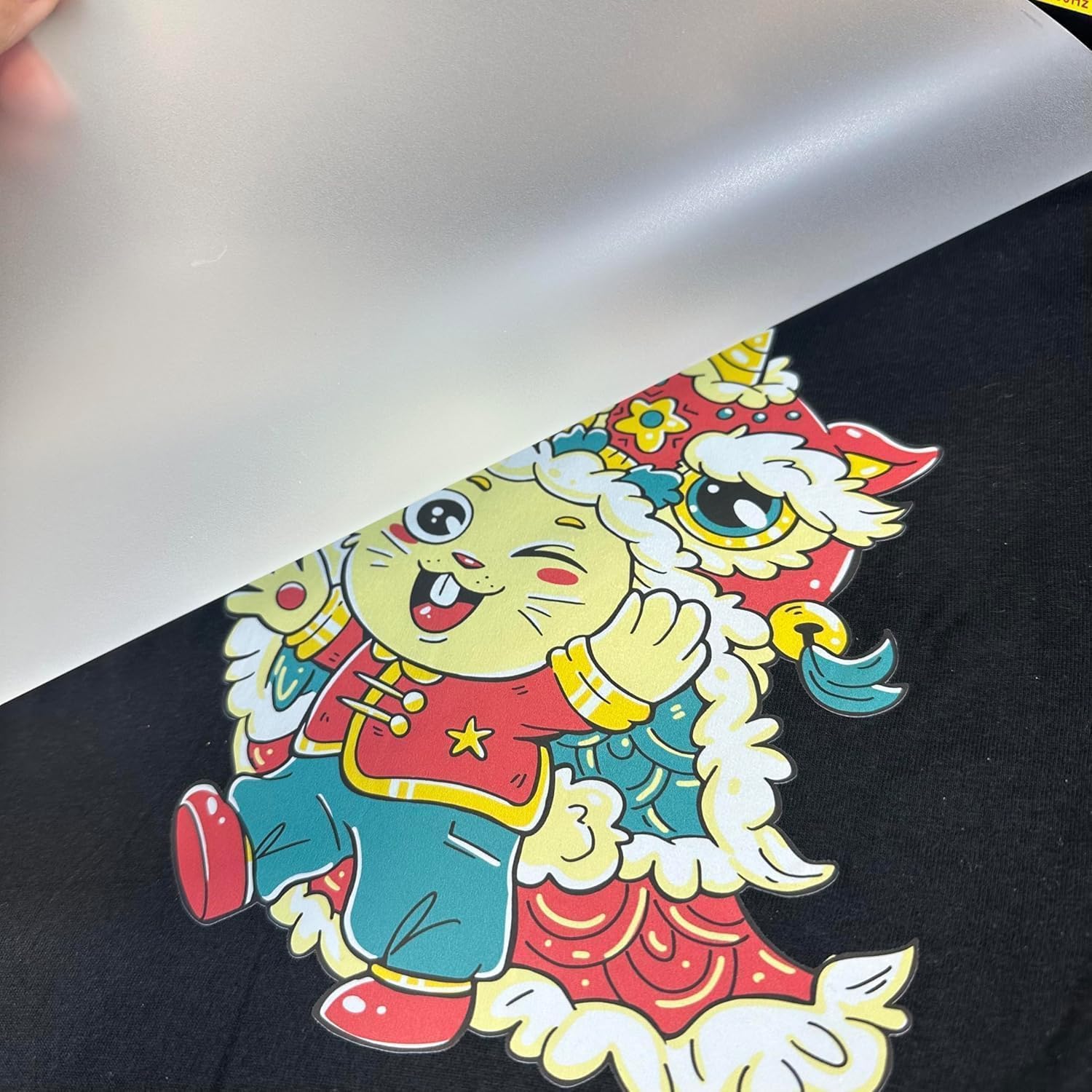
Image 4.2: DTF Film Cool Peel.
This close-up image shows the final step of the DTF transfer process: the cool peel. A clear DTF film is being carefully lifted from a vibrant, cartoon-like design that has been successfully transferred onto a dark fabric. The image emphasizes the clean separation of the film, leaving the detailed graphic firmly adhered to the material.
5. Maintenance
Regular maintenance is crucial for the longevity and optimal performance of your DTF printer.
- White Ink Circulation: Ensure the white ink circulation system is always active when the printer is on to prevent pigment settling and nozzle clogging.
- Print Head Cleaning: Perform routine print head cleaning cycles as recommended by the printer software or when print quality degrades.
- Wiper Blade Cleaning: Regularly inspect and clean the wiper blade to remove any accumulated ink or debris.
- Capping Station Maintenance: Keep the capping station clean to ensure a proper seal for the print head, preventing ink from drying out.
- Exterior Cleaning: Wipe down the exterior of the printer with a soft, damp cloth. Avoid using harsh chemicals.
- Ink Level Monitoring: Monitor ink levels regularly and refill as needed to prevent air from entering the ink lines.
6. Troubleshooting
This section provides solutions to common issues you might encounter.
| Problem | Possible Cause | Solution |
|---|---|---|
| Poor Print Quality / Streaks | Clogged nozzles, low ink, incorrect print settings. | Perform print head cleaning. Check ink levels. Verify print settings in software. |
| White Ink Settling | White ink circulation system off or malfunctioning. | Ensure white ink circulation is active. If issue persists, consult support. |
| Film Not Feeding Correctly | Improper film loading, incorrect feeder setting. | Re-load film correctly. Ensure sheet/roll feeder is set appropriately. |
| Transfer Not Adhering | Insufficient heat/pressure, incorrect curing, expired powder. | Verify heat press temperature and pressure. Ensure powder is fully cured. Check powder shelf life. |
For issues not covered here, please contact customer support.
7. Specifications
Detailed technical specifications for the Sihao B31 L1800-DTF Printer.
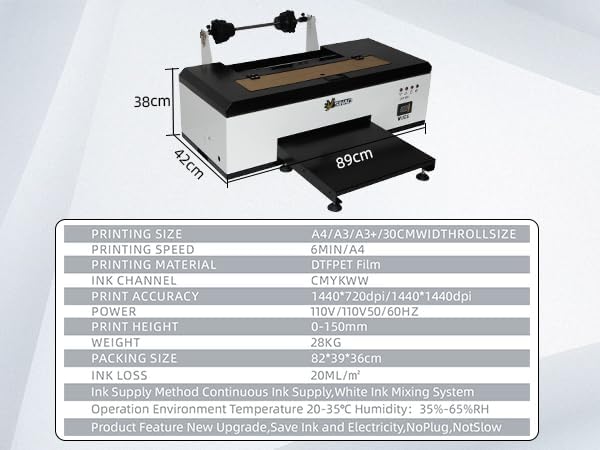
Image 7.1: Printer Specifications.
This image presents a comprehensive table outlining the technical specifications of the DTF printer. It includes details such as printing size (A4/A3/A3+/30CM width roll size), printing speed (6 min/A4), printing material (DTF PET Film), ink channels (CMYKWW), print accuracy (1440*720dpi/1440*1440dpi), power requirements, print height range (0-150mm), weight (28KG), packing size (82*39*36cm), ink loss (20ML/m²), ink supply method (Continuous Ink Supply, White Ink Mixing System), and recommended operation environment (Temperature 20-35°C, Humidity 35%-65%RH). It also notes product features like "New Upgrade, Save Ink and Electricity, No Plug, Not Slow".
| Specification | Detail |
|---|---|
| Model Name | B31 L1800-DTF |
| Printing Technology | DTF |
| Print Media | Glossy film |
| Max Input Sheet Capacity | 250 |
| Maximum Color Print Resolution | 600 dpi |
| Maximum Black and White Print Resolution | 600 dpi |
| Sheet Size | 18 inches |
| Product Dimensions | 26"D x 26"W x 20"H |
| Connectivity Technology | USB |
| Ink Color | White (CMYKWW implied by image) |
| Additional Printer Functions | Print Only |
| Duplex Printing | No (Simplex) |
| Maximum Media Size | 18 x 20 inches |
8. Warranty and Support
The Sihao B31 L1800-DTF Printer comes with a limited warranty. For specific terms and conditions, please refer to the warranty card included with your product or contact Sihao customer service.
For technical assistance, troubleshooting, or warranty claims, please contact Sihao customer support through their official channels. Contact information can typically be found on the manufacturer's website or in the product packaging.