
iRobot J955920
iRobot® Roomba® j9+ Self-Emptying Robot Vacuum
Model: J955920
Brand: iRobot
Introduction
The iRobot Roomba j9+ is a self-emptying robot vacuum designed for comprehensive floor cleaning. It features enhanced suction power and adjustable cleaning settings to effectively remove dirt and pet hair from various floor types, including carpets. The integrated iRobot OS, with its Dirt Detective feature, intelligently adapts cleaning routines based on past performance, prioritizing areas that require more attention. This ensures a more thorough clean where it's needed most. This model also includes advanced object recognition to navigate around common household obstacles and a P.O.O.P. (Pet Owner Official Promise) guarantee for pet waste avoidance.

Image: The Roomba j9+ robot vacuum positioned next to its Clean Base Automatic Dirt Disposal unit. A smartphone screen showing the iRobot app is visible in the background, illustrating the smart control capabilities.
Setup Guide
1. Unboxing and Placement
- Carefully remove all components from the packaging.
- Place the Clean Base charging station against a wall in an open, uncluttered area. Ensure there are no obstacles within 1.5 feet (0.5 meters) of either side of the base and 4 feet (1.2 meters) in front of it.
- Plug the Clean Base power cord into a wall outlet.
2. Initial Charge
- Place the Roomba robot onto the Clean Base charging contacts. The light ring on the robot will pulse white to indicate charging.
- Allow the robot to fully charge before its first use (approximately 3 hours).
3. Connecting to the iRobot Home App
- Download the iRobot Home app from your device's app store.
- Open the app and follow the on-screen instructions to connect your Roomba j9+ to your home Wi-Fi network. This step is crucial for accessing smart features, scheduling, and software updates.
- Ensure the robot's software is updated to the latest version for optimal performance and feature access.
Operating Instructions
Starting a Cleaning Job
- Press the CLEAN button on the robot or use the iRobot Home app to start a cleaning cycle.
- The robot will automatically navigate and clean your home.
Dirt Detective Technology
The Roomba j9+ utilizes Dirt Detective, powered by iRobot OS, to learn from previous cleaning missions. It identifies high-traffic or consistently dirty areas and automatically adjusts its cleaning intensity and frequency for those specific zones. This ensures a more thorough clean where it's needed most.
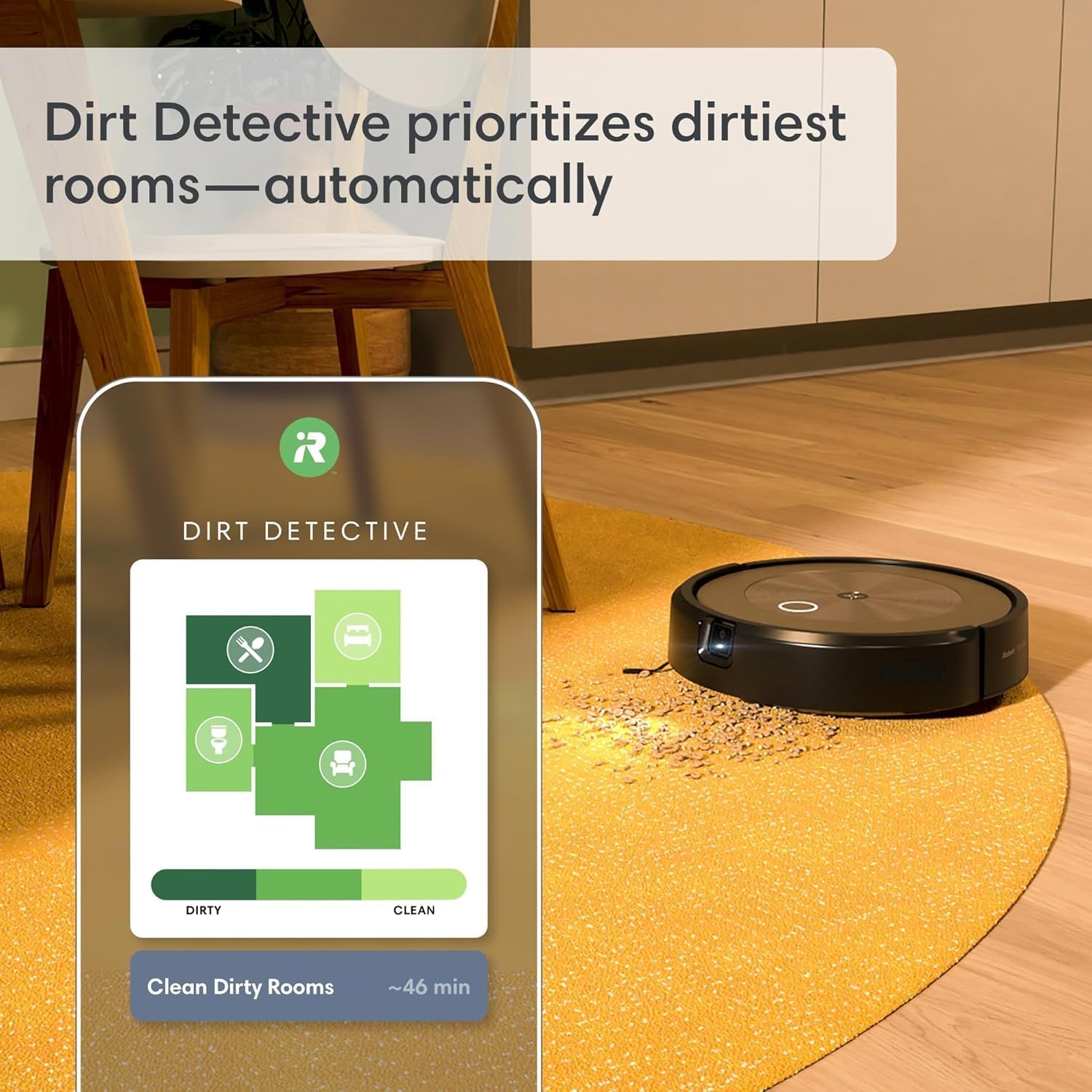
Image: The Dirt Detective feature displayed on a screen, showing a map of a home with areas color-coded by their dirt level, indicating how the robot prioritizes cleaning. The Roomba j9+ is seen cleaning a floor area.
PrecisionVision Navigation and Object Avoidance
Equipped with PrecisionVision Navigation, the Roomba j9+ can identify and avoid common obstacles such as pet waste, charging cables, shoes, and socks. This intelligent navigation minimizes interruptions and ensures a complete cleaning cycle without user intervention.

Image: The Roomba j9+ robot vacuum demonstrating its object detection and avoidance capabilities, showing it intelligently maneuvering around obstacles such as pet toys and power cords on a wooden floor.
Mopping Functionality (Smart Scrub)
The Smart Scrub technology provides a back-and-forth scrubbing motion with sufficient pressure to tackle dried spills on hard floors. The mop pad automatically retracts when the robot detects carpeted areas, preventing wetting of rugs and carpets.

Image: The Roomba j9+ robot vacuum operating on a tiled bathroom floor, demonstrating its ability to clean in various household environments.
Maintenance
Clean Base Automatic Dirt Disposal
The Clean Base automatically empties the robot's dustbin into an enclosed bag, holding up to 60 days of debris. This significantly reduces the frequency of manual emptying.

Image: A detailed view of the Clean Base, illustrating how the robot docks and automatically empties its contents into the disposable bag within the station, providing up to 60 days of hands-free operation.
Cleaning Components
Regular cleaning of the robot's components ensures optimal performance. This includes:
- Dual Multi-Surface Rubber Brushes: These brushes are designed to prevent hair tangles and should be cleaned regularly by removing any accumulated hair or debris.
- Edge-Sweeping Brush: Check and clean this brush periodically to ensure it effectively sweeps debris from edges and corners.
- Filter: The cartridge filter should be tapped clean after each use and replaced every few months, depending on usage.
- Sensors: Wipe the robot's sensors with a clean, dry cloth to maintain accurate navigation.

Image: An annotated diagram of the Roomba j9+'s underside, detailing its key cleaning mechanisms: (1) edge-sweeping brush, (2) dual multi-surface rubber brushes, and (3) power-lifting suction, part of the AeroForce Cleaning System.
Troubleshooting
If your Roomba j9+ encounters an issue, consult the iRobot Home app for specific error messages and troubleshooting steps. Common issues and general solutions include:
- Robot not charging: Ensure the Clean Base is plugged in and the robot is properly aligned with the charging contacts. Clean the charging contacts on both the robot and the base.
- Poor cleaning performance: Check and clean the brushes, filter, and dustbin. Ensure the Clean Base bag is not full.
- Navigation issues: Clean the robot's sensors. Ensure there are no new obstacles or changes in the environment that might confuse the robot.
- Robot stuck: Clear any tangled cords or debris from the wheels and brushes.
- Wi-Fi connectivity issues: Restart your router and the robot. Ensure the robot is within range of your Wi-Fi network.
For persistent issues, refer to the comprehensive troubleshooting section within the iRobot Home app or visit the official iRobot support website.
Specifications
| Feature | Detail |
|---|---|
| Brand | iRobot |
| Model Name | iRobot® Roomba® j9+ Self-Emptying Robot Vacuum |
| Model Number | J955920 |
| Special Feature | Self-Emptying |
| Color | Black |
| Product Dimensions | 3.4"L x 13.3"W x 13.3"H |
| Included Components | Docking Station (Clean Base) |
| Filter Type | Cartridge |
| Battery Life | 180 minutes |
| Power Source | Battery Powered |
| Control Method | App |
| Item Weight | 23.2 pounds |
Warranty and Support
For detailed warranty information, please refer to the documentation included with your product or visit the official iRobot website. iRobot provides customer support for product inquiries, technical assistance, and warranty claims.
It is recommended to register your product upon purchase to facilitate warranty service and receive important updates.
Online Support: Visit www.irobot.com/support
Phone Support: Contact iRobot Customer Care (details available on their website).
Related documentsJ955920


Ask a question about this manual
Ask about setup, troubleshooting, compatibility, parts, safety, or missing instructions. Manuals+ will review the question and use this page’s manual context to help answer it.