
Introduction
The WADFOW WLAP5322 Cordless Angle Grinder is a versatile and powerful tool designed for various cutting, grinding, and polishing tasks. Featuring a brushless motor, it delivers high-speed performance and extended runtime compared to traditional brushed motors. This tool is engineered with user safety and convenience in mind, offering double insulation protection and efficient heat dissipation. Its cordless design provides freedom of movement, making it suitable for both professional and DIY applications involving metal and wood.
Safety Instructions
Always follow basic safety precautions when using power tools to reduce the risk of fire, electric shock, and serious injury. Keep this manual for future reference.
- Wear Personal Protective Equipment (PPE): Always wear safety goggles, hearing protection, and gloves. A dust mask is recommended for dusty operations.
- Work Area Safety: Keep your work area clean and well-lit. Cluttered or dark areas invite accidents. Do not operate power tools in explosive atmospheres, such as in the presence of flammable liquids, gases, or dust.
- Electrical Safety: Avoid body contact with earthed or grounded surfaces. Do not expose power tools to rain or wet conditions.
- Tool Use and Care: Do not force the power tool. Use the correct power tool for your application. Disconnect the battery pack from the power tool before making any adjustments, changing accessories, or storing power tools.
- Battery Pack Use and Care: Recharge only with the charger specified by the manufacturer. Do not use battery packs with power tools for which they are not designed.
- Maintenance: Have your power tool serviced by a qualified repair person using only identical replacement parts.
Components Included
Your WADFOW WLAP5322 Cordless Angle Grinder package typically includes the following items:
- 1 x WADFOW WLAP5322 Cordless Angle Grinder
- 2 x 20V 4.0Ah Lithium-Ion Batteries
- 1 x Battery Charger
- 1 x Auxiliary Handle
- 1 x Grinding Disc (115mm / 4-1/2")
- 1 x Protective Guard
- 1 x Carrying Case
- 1 x User Manual
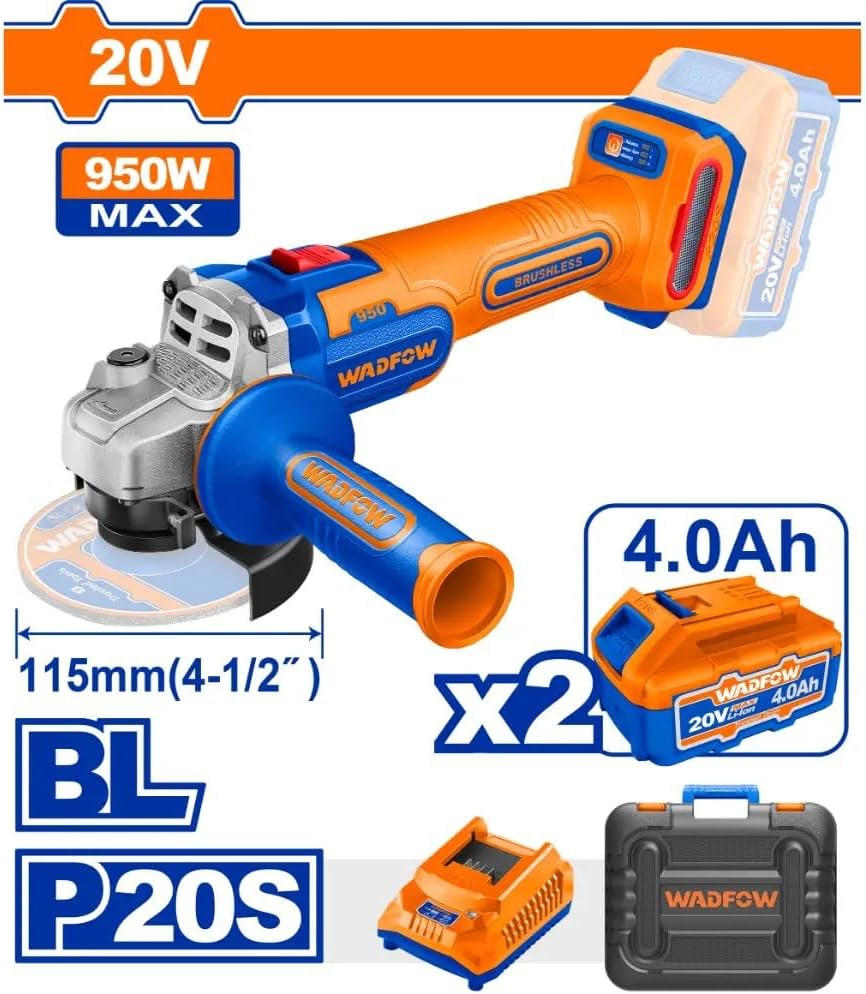
Image: The WADFOW WLAP5322 Cordless Angle Grinder shown with its included accessories: two 20V 4.0Ah batteries, a battery charger, and a durable carrying case. The grinder itself features a 115mm (4-1/2") disc and an auxiliary handle.
Specifications
| Feature | Specification |
|---|---|
| Model Number | WLAP5322 |
| Brand | WADFOW |
| Power Source | Battery Powered (20V) |
| Max Power | 950W |
| Motor Type | Brushless |
| Disc Diameter | 115mm (4-1/2") |
| Battery Type | Lithium-Ion (2 x 4.0Ah included) |
| Material | Metal |
| Package Dimensions | 39.6 x 32 x 14 cm |
| Weight | 4.67 kg (package) |
| Country of Origin | China |
Setup
- Charge Batteries: Before first use, fully charge both 20V 4.0Ah Lithium-Ion batteries using the provided charger. Ensure the charger is connected to a suitable power outlet and the battery is correctly inserted.
- Attach Auxiliary Handle: Screw the auxiliary handle into one of the threaded holes on the grinder's gear housing. Choose a position that provides comfortable and secure grip for your application.
- Install Protective Guard: Position the protective guard over the spindle housing. Ensure it is securely fastened and adjusted to protect against sparks and debris during operation. Never operate the grinder without the protective guard.
- Mount Grinding/Cutting Disc:
- Press and hold the spindle lock button.
- Place the inner flange onto the spindle.
- Place the desired 115mm (4-1/2") grinding or cutting disc onto the inner flange. Ensure the disc is correctly seated.
- Thread the outer flange onto the spindle and tighten it firmly using the spanner wrench.
- Release the spindle lock button.
- Insert Battery: Slide a fully charged battery pack into the battery port on the rear of the grinder until it clicks securely into place.
Operating Instructions
- Starting the Tool: Ensure the work piece is securely clamped. Hold the grinder firmly with both hands. Press the ON/OFF switch to start the tool.
- Working with the Grinder:
- Allow the disc to reach full speed before contacting the workpiece.
- Apply light, even pressure. Do not force the tool, as this can cause kickback or damage the disc/motor.
- For cutting, use a cutting disc and make shallow passes. For grinding, use a grinding disc and maintain a slight angle to the surface.
- Always direct sparks away from yourself and others.
- Stopping the Tool: Release the ON/OFF switch to stop the tool. Wait for the disc to come to a complete stop before setting the tool down.
Maintenance
- Cleaning: Regularly clean the ventilation openings of the tool to prevent overheating. Use a soft brush or compressed air to remove dust and debris. Do not use water or chemical cleaners.
- Disc Inspection: Before each use, inspect grinding and cutting discs for cracks, chips, or wear. Replace damaged discs immediately.
- Battery Care: Store batteries in a cool, dry place away from direct sunlight. Do not store fully discharged batteries for extended periods.
- Storage: When not in use, store the angle grinder and its accessories in the provided carrying case, in a dry, secure location out of reach of children.
Troubleshooting
| Problem | Possible Cause | Solution |
|---|---|---|
| Tool does not start | Battery not charged or improperly inserted. | Ensure battery is fully charged and correctly inserted until it clicks. |
| Reduced power or runtime | Battery charge low; battery nearing end of life. | Recharge battery. If problem persists, consider replacing the battery pack. |
| Excessive vibration | Disc improperly installed or damaged. | Check disc for proper seating and damage. Replace if necessary. |
| Overheating | Ventilation openings blocked; continuous heavy use. | Clean ventilation openings. Allow tool to cool down during prolonged use. |
Warranty and Support
WADFOW products are manufactured to high-quality standards. For warranty information, technical support, or service inquiries, please refer to the warranty card included with your product or visit the official WADFOW website. Keep your purchase receipt as proof of purchase.
For further assistance, please contact WADFOW customer service.