
1. Introduction
This user manual provides comprehensive instructions for the AYA NEO Pocket EVO Android Gaming Handheld Console. The Pocket EVO is designed to deliver a premium portable gaming experience, featuring a high-refresh-rate OLED display, powerful Snapdragon G3x Gen 2 gaming platform, and professional-grade controls. Please read this manual thoroughly to ensure proper use and maintenance of your device.
2. Product Overview
2.1 Device Components and Controls
The AYA NEO Pocket EVO features an intuitive layout with professional-grade controls designed for optimal gaming performance.
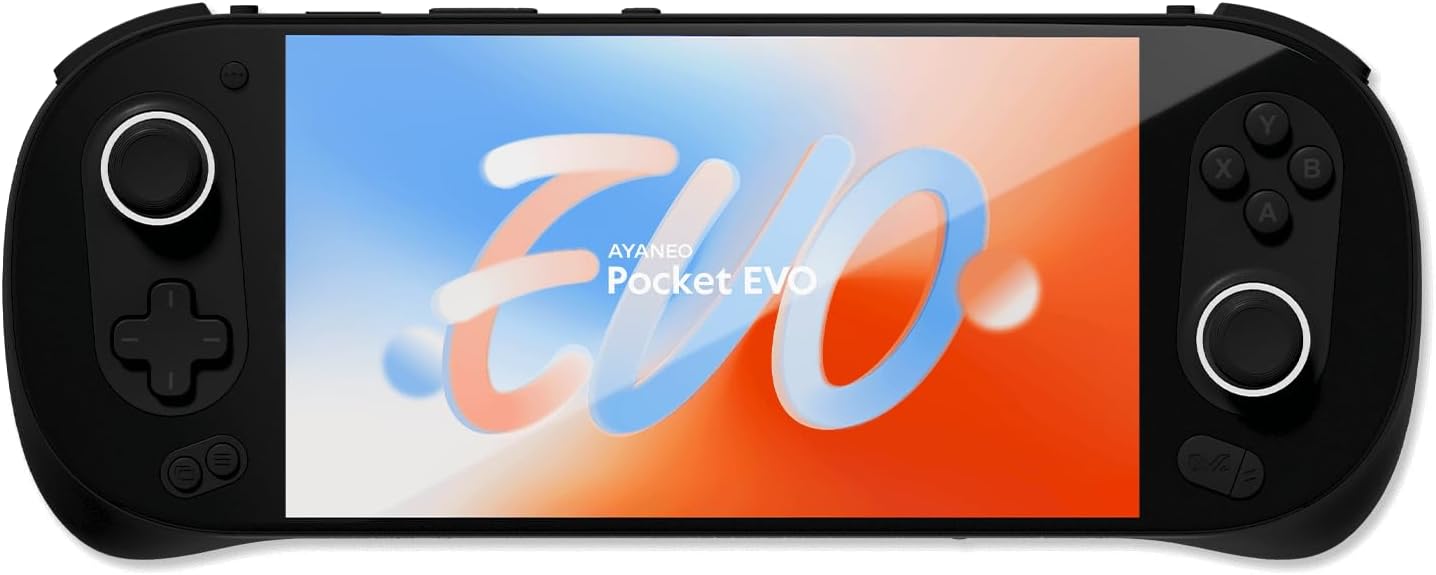
Figure 2.1: Front view of the AYA NEO Pocket EVO, showcasing the 7-inch OLED display and integrated controls on both sides.
- 7-inch 1080p OLED Display: A vibrant screen with 120Hz refresh rate and HDR support for immersive visuals.
- Hall Effect Joysticks and Triggers: Provide precise and responsive input with 250Hz return rates, minimizing drift and dead zones.
- D-Pad: Located on the left side for directional input.
- Face Buttons (A, B, X, Y): Standard gaming buttons on the right side.
- Shoulder Buttons (L1, R1) and Triggers (L2, R2): Located on the top edge for additional control.
- USB 3.2 Gen 2 Type-C Port: For charging, data transfer, and external connectivity.
- MicroSD Card Slot: For expandable storage.
- Active Cooling System: Integrated x86-level cooling technology to maintain optimal performance during extended gaming sessions.

Figure 2.2: Detailed view of the Hall Sensing Joysticks and triggers, highlighting the professional-grade control features.
The device also features customizable RGB lighting and a comprehensive vibration system with four distinct feedback modes (body, sound, controller, and button) to enhance gaming immersion.
3. Setup
3.1 Initial Charging
Before first use, fully charge your AYA NEO Pocket EVO.
- Connect the provided USB Type-C cable to the device's USB-C port.
- Connect the other end of the cable to a compatible power adapter (not always included, refer to packaging) and plug it into a power outlet.
- The device's charging indicator will illuminate. Charging is complete when the indicator changes color or turns off (refer to device specific LED behavior).
3.2 Powering On/Off
- To Power On: Press and hold the Power button (usually located on the top edge) for a few seconds until the screen illuminates.
- To Power Off: Press and hold the Power button until a power-off menu appears on the screen, then select "Power Off". Alternatively, a quick press of the power button will put the device into sleep mode.
3.3 Network Connection
Connect your Pocket EVO to a Wi-Fi network to access online features, download games, and update software.
- From the home screen, navigate to "Settings".
- Select "Network & Internet".
- Turn on Wi-Fi and select your desired network from the list.
- Enter the Wi-Fi password if prompted, then tap "Connect".
4. Operating Instructions
4.1 Navigating the System
The AYA NEO Pocket EVO runs on Android 13 and utilizes the AYASpace system and AYAHome launcher for an optimized user experience.
- AYASpace: A dedicated application for managing device settings, performance modes, and game library.
- AYAHome Launcher: Provides an intuitive interface for quick access to your installed games and applications.
- Use the joysticks and D-pad for navigation, and the face buttons for selection and confirmation.
4.2 Gaming
The Pocket EVO supports native Android games, cloud gaming, and emulation.
- Launching Games: Access your game library through the AYAHome launcher or directly from the Android app drawer.
- Controller Mapping: For games that do not natively support controllers, the Pocket EVO offers a quick key mapping feature.

Figure 4.1: The Quick Key Mapping feature allows users to assign physical button inputs to on-screen touch controls for enhanced compatibility with various games.
- Access the mapping tool from the quick settings menu during gameplay.
- Drag and drop virtual buttons onto the screen and assign them to physical controls.
- Adjust button transparency and save multiple configurations for different games.
- Performance Modes: Utilize the one-touch Turbo switch for multi-scene performance mode adjustments, optimizing power and performance for different gaming scenarios.
4.3 Storage Expansion
Expand your device's storage using a MicroSD card.
- Locate the MicroSD card slot on the device.
- Gently insert the MicroSD card until it clicks into place.
- The device will recognize the new storage, which can then be used for games, media, and other files.
5. Maintenance
5.1 Cleaning the Device
To maintain the appearance and functionality of your Pocket EVO:
- Use a soft, lint-free cloth to wipe the screen and body.
- For stubborn smudges, slightly dampen the cloth with water or a screen cleaner.
- Avoid using harsh chemicals, abrasive materials, or excessive moisture.
5.2 Battery Care
The device is equipped with an 8600mAh battery. To prolong battery life:
- Avoid extreme temperatures.
- Do not fully discharge the battery regularly.
- Use the provided or recommended charging accessories.
5.3 Cooling System
The active cooling system ensures optimal performance.
- Ensure ventilation vents are not obstructed during use.
- Regularly check for dust accumulation in the vents and gently clean if necessary using compressed air.
6. Troubleshooting
This section addresses common issues you might encounter with your AYA NEO Pocket EVO.
| Problem | Possible Cause | Solution |
|---|---|---|
| Device does not power on. | Low battery; system crash. | Charge the device for at least 30 minutes. Perform a hard reset by holding the power button for 10-15 seconds. |
| Screen is unresponsive or frozen. | Software glitch; application crash. | Restart the device. If unresponsive, perform a hard reset. |
| Wi-Fi connection issues. | Incorrect password; router issue; device Wi-Fi module issue. | Verify Wi-Fi password. Restart your router. Toggle Wi-Fi off and on on the device. |
| Games run slowly or lag. | Performance mode not optimized; background apps; overheating. | Switch to a higher performance mode in AYASpace. Close unnecessary background applications. Ensure vents are clear and device is not overheating. |
| Controls are not responding correctly. | Software issue; calibration needed; game compatibility. | Restart the device. Check controller calibration settings in AYASpace. Use the key mapping feature for incompatible games. |
7. Specifications
Key technical specifications for the AYA NEO Pocket EVO:
| Feature | Detail |
|---|---|
| Display | 7-inch 1080p OLED, 120Hz Refresh Rate, HDR, 800 nits brightness |
| Processor | Qualcomm Snapdragon G3x Gen 2 Gaming Platform (3.36 GHz) |
| RAM | 8GB LPDDR5X (8533 MT/s) |
| Storage | 128GB UFS 3.1 (Expandable via MicroSD) |
| Operating System | Android 13 |
| Controls | Hall Effect Joysticks & Triggers (250Hz return rate), D-Pad, Face Buttons, Shoulder Buttons |
| Battery | 8600mAh, PD Fast Charging Support (Average Battery Life: 5 Hours) |
| Connectivity | Wi-Fi (802.11ax), Bluetooth 5.3, USB 3.2 Gen 2 Type-C (10Gbps) |
| Dimensions (LxWxH) | 10.24 x 3.94 x 0.67 inches (260.5 x 100 x 17mm) |
| Weight | 1.05 pounds (478 Grams) |
| Cooling System | x86-level active cooling with extensive heat dissipation fins |
8. Warranty and Support
8.1 Product Warranty
The AYA NEO Pocket EVO comes with a manufacturer's warranty. Please refer to the warranty card included in your product packaging or visit the official AYA NEO website for detailed warranty terms and conditions. Keep your proof of purchase for warranty claims.
8.2 Customer Support
For technical assistance, troubleshooting, or general inquiries, please contact AYA NEO customer support through their official channels.
- Official Website: www.ayaneo.com (Please check the official website for the most up-to-date contact information and support resources.)
- Online Resources: FAQs, driver downloads, and software updates may be available on the official support page.