
Introduction
This instruction manual provides comprehensive guidance for the safe and effective use of your DARKBEAM UV Flashlight, Model B97-365. This powerful 365nm ultraviolet flashlight is designed for various detection and inspection tasks, including mineral identification, pet urine detection, uranium glass verification, resin curing, and security code authentication. Please read this manual thoroughly before operating the device to ensure optimal performance and longevity.
Product Overview
Included Components
The DARKBEAM UV Flashlight B97-365 package includes the following items:
- B97 6xLED (quad-core) UV 365nm flashlight (battery pre-inserted)
- UV protective glasses
- Cloth holster
- Hand strap
- USB-C charging cable
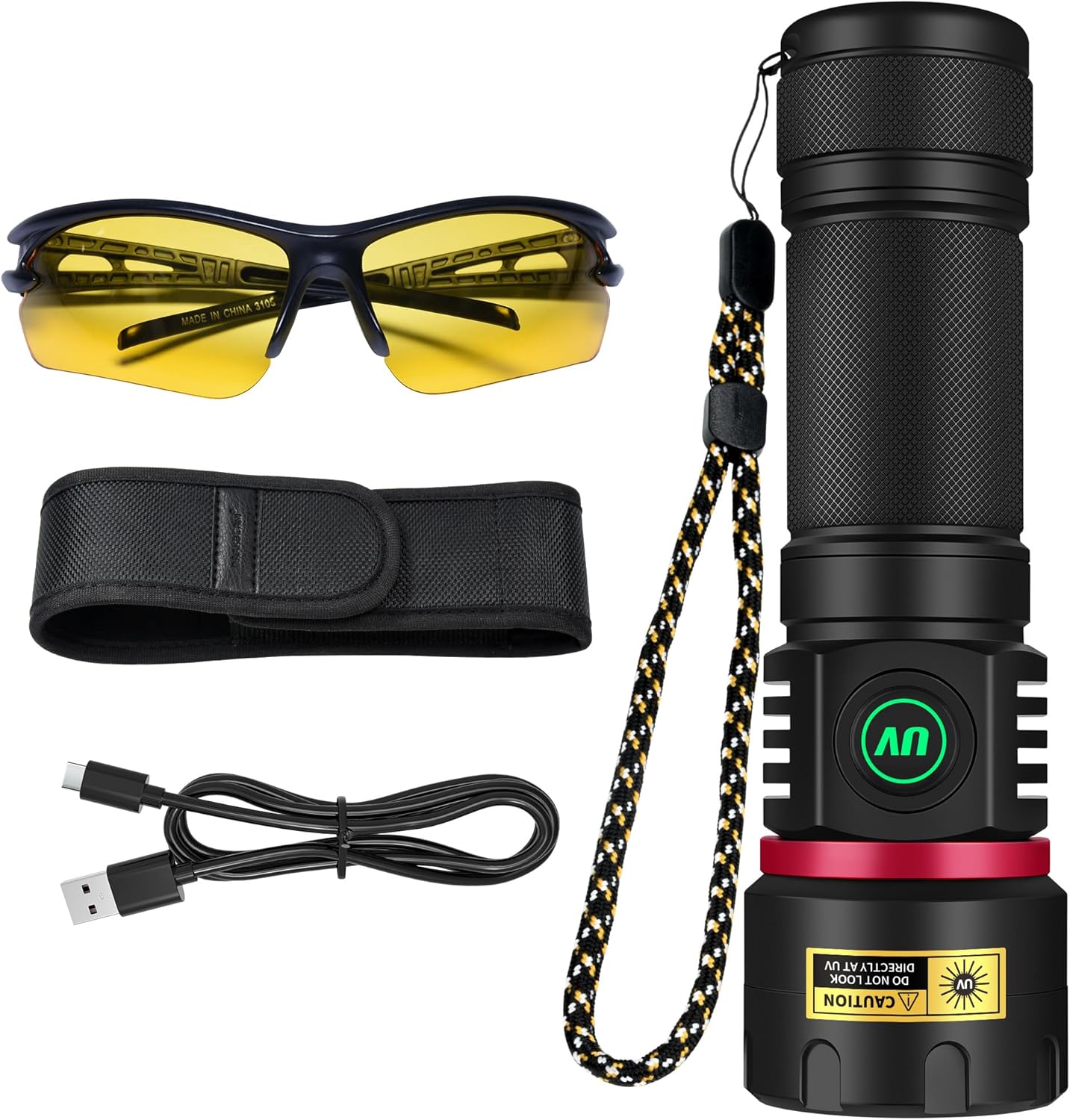
Image: All components included with the DARKBEAM UV Flashlight B97-365, laid out for clear identification.
Key Features
- High Intensity & Power: Equipped with 6 quad-core P50 UV LEDs, providing 80W power and 8040mW radiant intensity for effective detection.
- Professional Filtered 365nm UV Light: Features a hard toughened black filter optical lens to block visible light, emitting purer invisible UV365 light for enhanced detection of fluorescent agents, security codes, and minerals.
- Adjustable Brightness: Offers infinitely adjustable brightness from 20% to 100% via a long-press function, allowing precise control for various applications.
- USB-C Rechargeable & Power Bank Function: Built-in high-capacity rechargeable battery provides 4-6 hours runtime. USB-C direct charging and USB output for emergency power supply to other devices.
- Durable & Portable Design: Constructed from high-quality aluminum alloy with IPX65 waterproof rating, ensuring durability against rain, snow, shock, and dust. Compact size (5.9"D x 1.8"W x 1.4"H) and lightweight (10.8 oz) for easy handling.
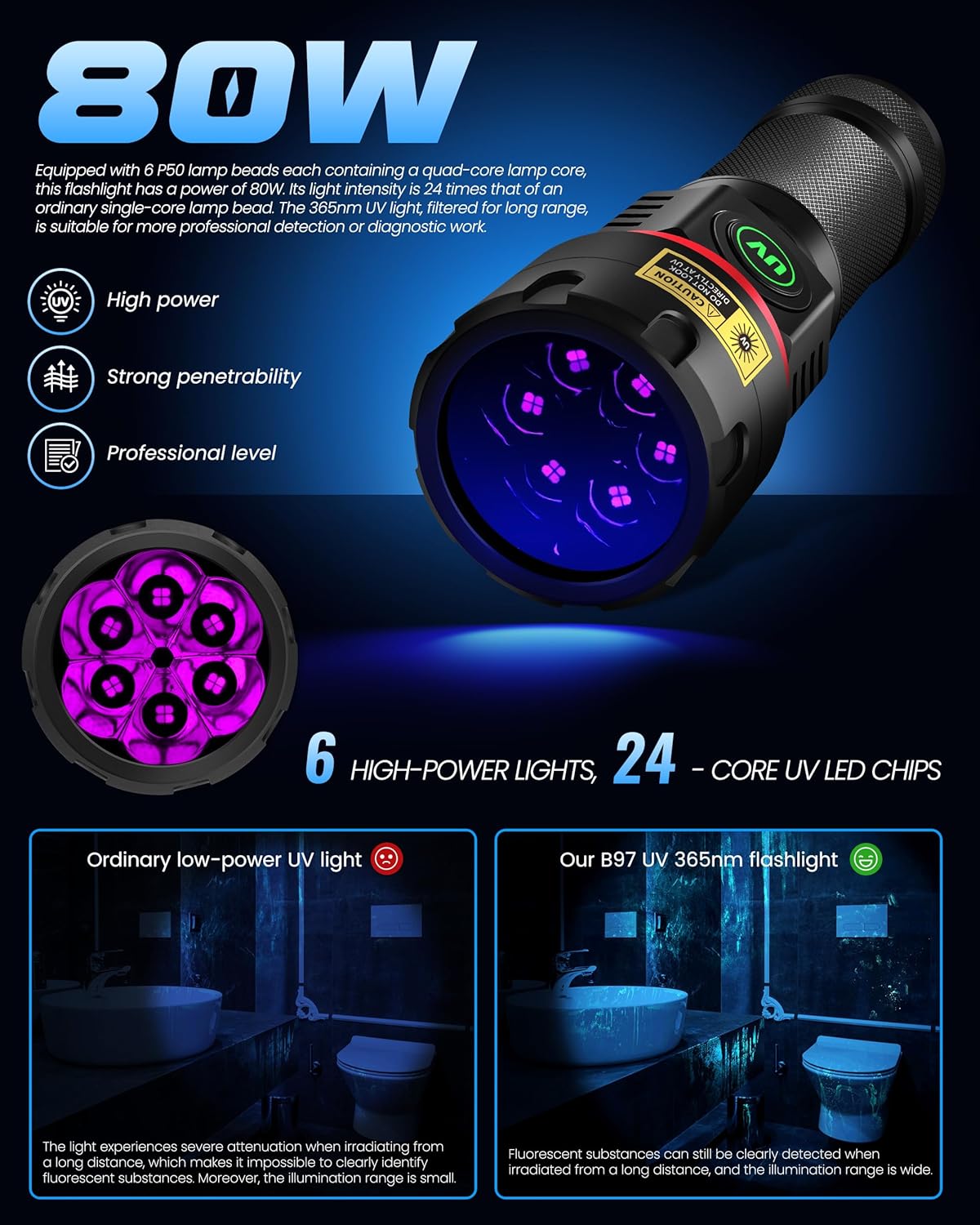
Image: Visual representation of the flashlight's 80W power and its 6 high-power, 24-core UV LED chip configuration.

Image: Detail of the UV black filter lens, which filters out visible light, and the flashlight's excellent heat dissipation design.

Image: Illustration of the flashlight's IPX65 rating, highlighting its resistance to water, snow, shock, and dust.
Setup
Initial Charging
Your DARKBEAM UV Flashlight comes with a pre-inserted rechargeable battery. For optimal performance, it is recommended to fully charge the flashlight before its first use.
- Locate the USB-C charging port on the flashlight.
- Connect the provided USB-C cable to the flashlight's charging port.
- Connect the other end of the USB-C cable to a compatible USB power source (e.g., wall adapter, computer USB port, power bank) with an output within 5V/2A.
- The power indicator light on the switch will turn RED during charging.
- Once fully charged, the indicator light will turn GREEN. Disconnect the cable.
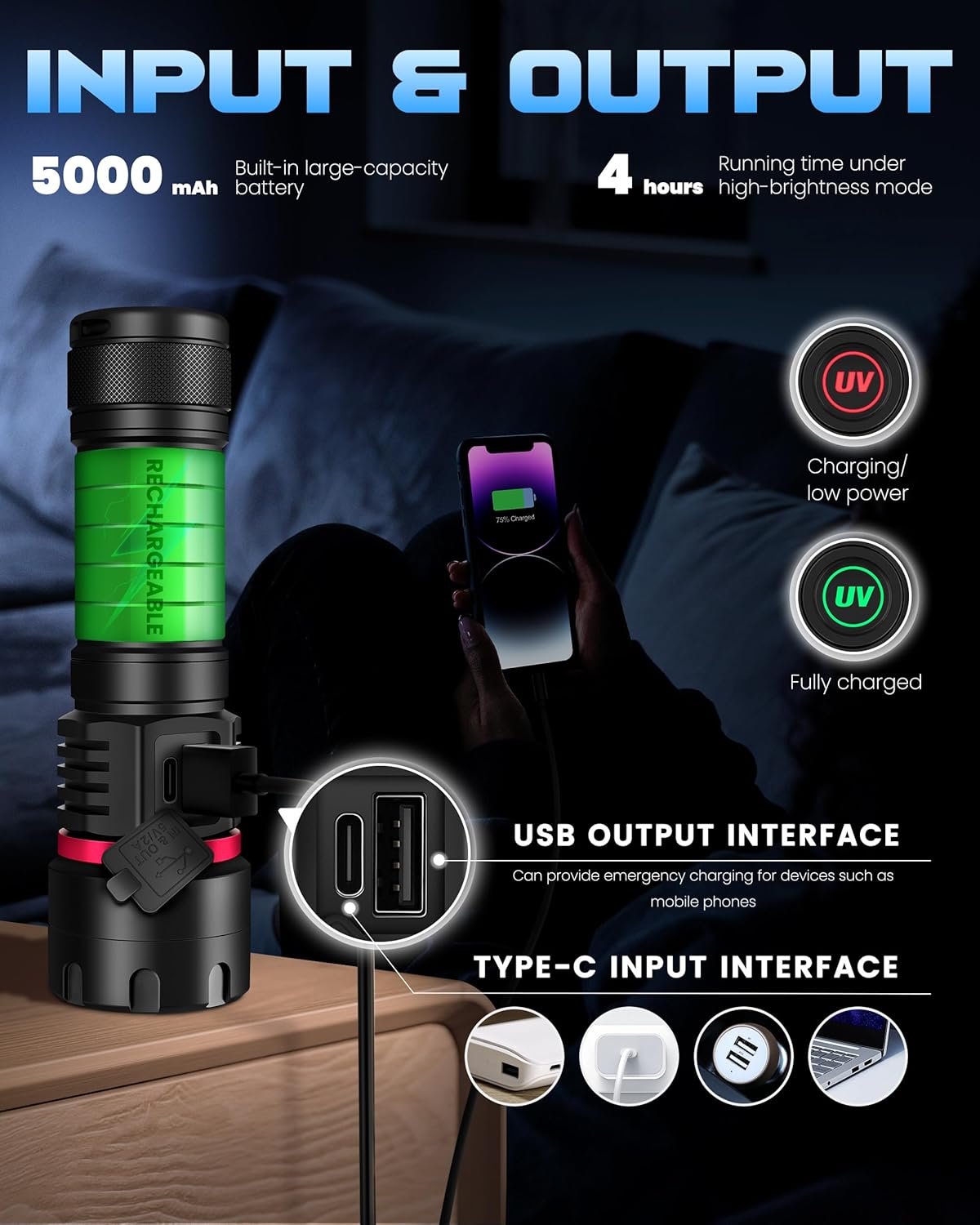
Image: Illustration of the flashlight's USB-C input for charging and its USB output for emergency power supply to other devices.
Safety Precautions
- DO NOT LOOK DIRECTLY AT UV LIGHT: Direct exposure to UV light can cause eye damage. Always use the provided UV protective glasses when operating the flashlight.
- Keep out of reach of children.
- Do not disassemble the flashlight.
- Avoid exposing the flashlight to extreme temperatures or direct sunlight for prolonged periods.
- Ensure the charging port cover is securely closed when not charging to maintain waterproof integrity.
Operating Instructions
Power On/Off and Brightness Adjustment
The flashlight features a multi-gear switch design for easy operation.
- To Turn On/Off: Press the power switch once to turn the flashlight on or off.
- Brightness Adjustment (Stepless Dimming): While the flashlight is on, press and hold the power switch. The brightness will gradually adjust from 20% to 100%. Release the switch at your desired brightness level.
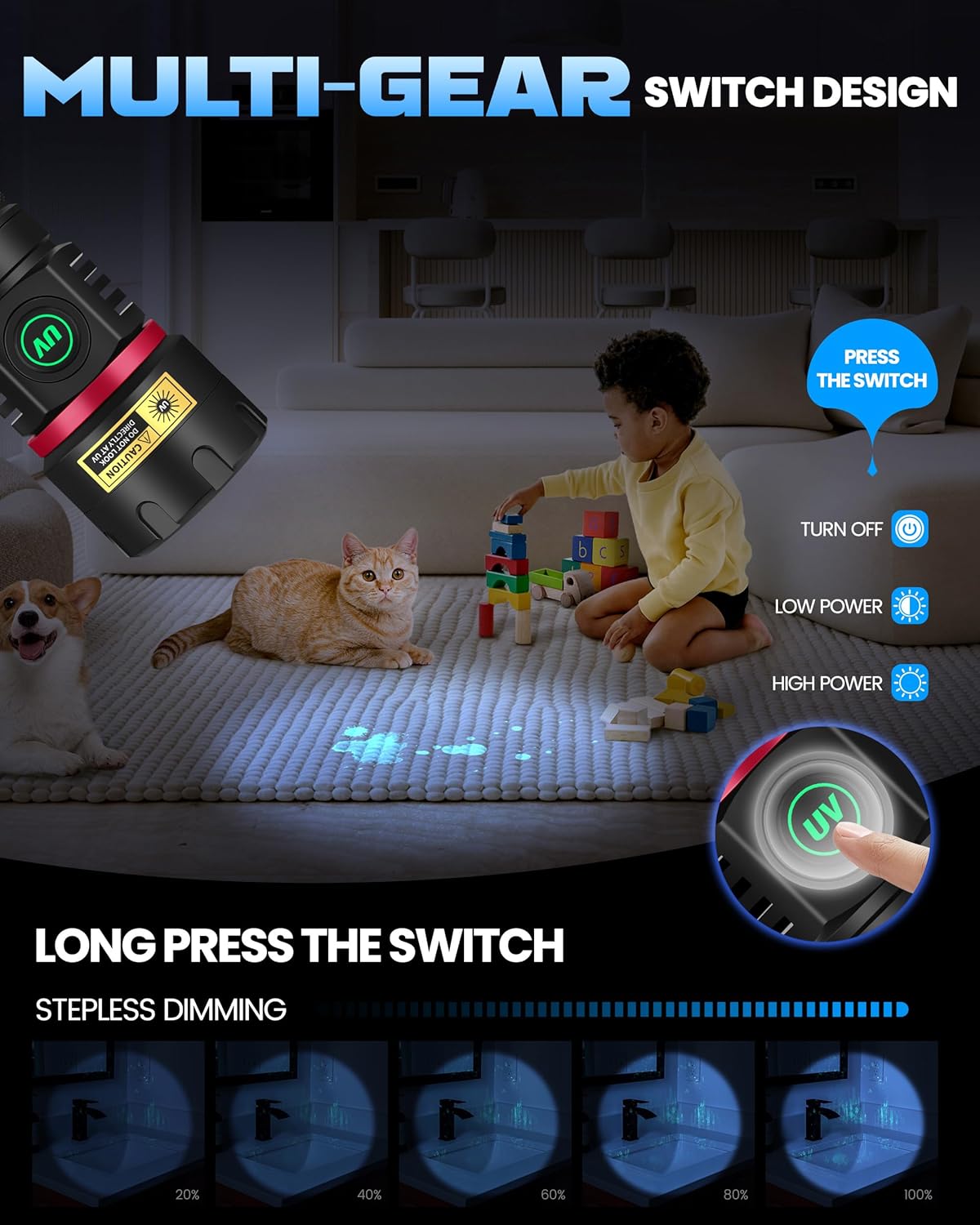
Image: Visual guide to the flashlight's multi-gear switch, demonstrating how to turn it on/off and use the stepless dimming feature by long-pressing the switch.
Applications
The DARKBEAM UV Flashlight is versatile and can be used for a variety of purposes:
- Mineral and Rock Identification: Ideal for searching for fluorescent minerals and uranium glass.
- Pet Urine and Stain Detection: Helps reveal hidden pet stains on carpets, rugs, and furniture.
- Currency and Document Verification: Detects security features on banknotes, passports, and other official documents.
- Resin Curing: Suitable for curing UV-sensitive resins in 3D printing or nail art.
- Leak Detection: Can be used with fluorescent dyes to detect leaks in HVAC systems, automotive fluids, or plumbing.
- Hotel Room Inspection: Identify unhygienic spots or hidden stains.
- Cat Ringworm Detection: Aids in identifying fungal infections on pets.

Image: Examples of the wide applicability of the UV flashlight, demonstrating its use for detecting cat ringworm, fluorescent agents, identifying ores, verifying currency, and discovering hidden stains.
Emergency Power Supply (USB Output)
The flashlight can also function as an emergency power bank:
- Connect your electronic device (e.g., smartphone) to the USB-A output port on the flashlight using a compatible USB cable.
- The flashlight will begin charging your device.
Maintenance
Cleaning
- Wipe the flashlight body with a soft, damp cloth.
- For the lens, use a lens cleaning cloth and solution to avoid scratches.
- Do not use abrasive cleaners or solvents.
Storage
- Store the flashlight in a cool, dry place away from direct sunlight.
- If storing for an extended period, ensure the battery is partially charged (around 50%) to preserve battery health. Recharge every 3-6 months.
Battery Care
- Avoid fully discharging the battery frequently.
- Do not overcharge the battery; disconnect once the indicator turns green.
- If the flashlight will not be used for a long time, charge it periodically to maintain battery life.
Troubleshooting
| Problem | Possible Cause | Solution |
|---|---|---|
| Flashlight does not turn on. | Battery is depleted. | Charge the flashlight using the provided USB-C cable. Check if the indicator light turns RED. |
| Flashlight does not charge. | Charging cable or adapter issue; port obstruction. | Ensure the USB-C cable is properly connected. Try a different USB power source or cable. Check the charging port for debris. |
| Light is dim or inconsistent. | Low battery; brightness setting too low. | Recharge the flashlight. Long-press the power switch to increase brightness. |
| USB output not charging devices. | Flashlight battery too low; incorrect cable. | Ensure the flashlight is sufficiently charged. Use a compatible USB-A cable for your device. |
Specifications
| Feature | Detail |
|---|---|
| Model Number | B97-365 |
| Light Source Type | UV (365nm) |
| LEDs | 6x Quad-core P50 UV LEDs |
| Power | 80W |
| Radiant Intensity | 8040mW |
| Brightness Adjustment | 20%-100% Stepless Dimming |
| Power Source | Battery Powered (Rechargeable Lithium Ion) |
| Battery Capacity | 5000mAh (Built-in) |
| Runtime (High Brightness) | 4-6 hours |
| Charging Port | USB-C Input (5V/2A max) |
| Output Port | USB-A Output (Emergency Power Supply) |
| Material | Aluminum Alloy |
| Water Resistance Level | IPX65 (Waterproof, Snowproof, Shockproof, Dustproof) |
| Product Dimensions | 5.9"D x 1.8"W x 1.4"H |
| Item Weight | 10.8 Ounces |
Warranty and Support
For warranty information or technical support, please contact DARKBEAM customer service through the retailer where the product was purchased or visit the official DARKBEAM website. Please have your model number (B97-365) and purchase details ready when contacting support.
Online Resources:
