
Introduction
Thank you for choosing the VSYSTO F3KNT Motorcycle Dash Cam. This device is designed to enhance your riding safety and record your journeys with high-definition video. It features dual 1080P cameras, a 4-inch waterproof touch screen, GPS, WiFi connectivity, and various riding support functions. Please read this manual thoroughly before use to ensure proper installation and operation.

Image: Overview of the VSYSTO F3KNT Motorcycle Dash Cam highlighting its main features like 4-inch screen, loop recording, waterproof design, WiFi, G-sensor, 140-degree wide angle, tail light, speed warning, selfie mode, night vision, and GPS.
Package Contents
Please check the package for the following items:
- Main Unit (4-inch display)
- Front Camera
- Rear Camera
- GPS Module
- Wired Remote Control
- Charging Cable (USB and Type-C)
- Mounting Brackets and Accessories
- User Manual

Image: Detailed view of all included components and a diagram illustrating how they connect to the main unit.
Setup Instructions
1. Installation
Mount the main unit securely on your motorcycle's handlebar using the provided bracket. Ensure the screen is visible and accessible. Install the front and rear cameras in positions that provide a clear, unobstructed view of the road. Connect the GPS module, wired remote control, and cameras to the main unit as shown in the connection diagram.

Image: Step-by-step installation guide for mounting the main unit on a bicycle handlebar, showing screw points, SD card slot, and Type-C port.
2. Initial Power On and Charging
The device is powered by a built-in 5000mAh rechargeable battery. Before first use, fully charge the device using the provided USB or Type-C cable. A full charge typically takes about 4 hours. Connect the charging cable to the Type-C port on the side of the main unit and to a 5V 2A power source (e.g., mobile battery or charger). Caution: Do not use chargers with input voltage exceeding 5V to avoid damaging the recorder.

Image: Illustration of the two charging methods: Type-C cable for direct connection to a computer for charging and file transfer, and USB cable for charging via a power bank.
3. SD Card Insertion
Insert a microSD card (up to 512GB, not included) into the designated slot on the main unit. Ensure the card is inserted correctly until it clicks into place. The device supports loop recording, which will automatically overwrite the oldest files when the card is full.
4. WiFi Connection
To connect your dash cam to your smartphone via WiFi:
- Turn on the main unit.
- On your smartphone, search for the WiFi network named "VSYSTO-F3K-XXXXX" and enter the password to connect.
- Download and open the "WiFi Camera" app.
- You can now view the camera feed, record, and take photos. Tap the icon on the top right to switch between front and rear camera views.

Image: Visual guide demonstrating the steps to connect the dash cam to a smartphone via WiFi using the dedicated app.
Operating Instructions
1. Basic Recording
Once powered on, the dash cam will automatically begin recording. Videos are saved to the microSD card.
- Loop Recording: The device continuously records video in segments (1, 2, 3, or 5 minutes, configurable in settings). When the memory card is full, the oldest files are automatically overwritten.
- Emergency Recording: In the event of a sudden impact or collision, the built-in G-sensor will trigger emergency recording, locking the current video file to prevent it from being overwritten. You can also manually trigger emergency recording by pressing the OK button on the wired remote control.

Image: Visual explanation of loop recording, emergency recording triggered by G-sensor or remote, and the speed warning function.
2. Driving Support and Backup Modes
The wired controller allows you to access various driving support modes and the backup mode.
- Driving Support Mode: Press the down button on the wired controller to cycle through different display screens, showing real-time data such as current speed, time, calories burned, distance traveled; altitude, longitude, latitude, and atmospheric pressure; short-term and long-term memory of driving speed and distance; and current time and date.
- Backup Mode: When reversing, the display will show guidelines to assist with accurate and safe parking.
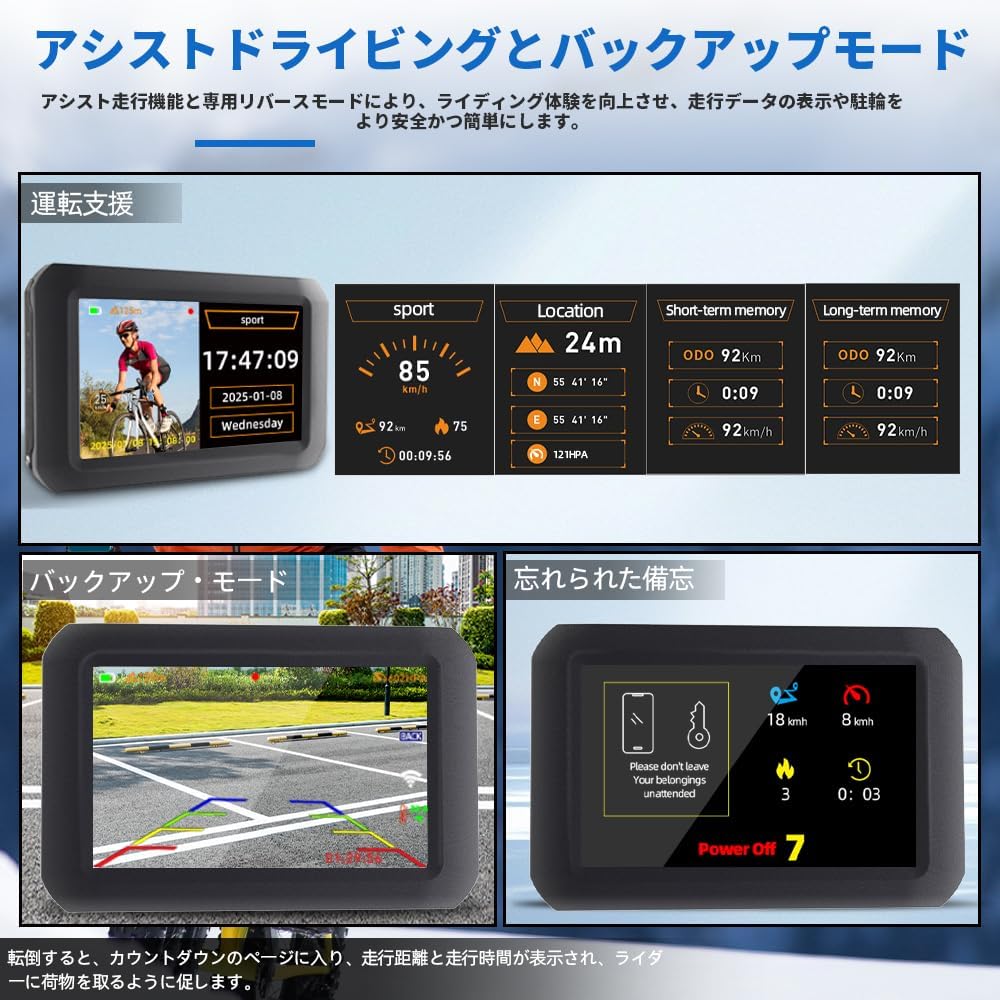
Image: Screenshots of the driving assist mode displaying various metrics like speed, time, distance, and the backup mode with parking guidelines.
3. Remote Control Functions
The handlebar-mounted wired remote control provides convenient access to key functions:
- Up Button: Switch camera display modes.
- OK Button: Enter emergency recording mode, turn recorder on/off.
- Down Button: Switch camera display modes.
- Function Button: Enter emergency recording mode, turn recorder on/off.

Image: Close-up view of the multifunction wired remote control, detailing the functions of each button for camera switching, emergency recording, and power control.
4. Night Vision
The F3KNT is equipped with advanced night vision technology for clear recording in low-light conditions:
- Front Camera: Features starlight night vision for enhanced clarity in dimly lit environments.
- Rear Camera: Utilizes infrared night vision for improved visibility behind the motorcycle.

Image: Comparison of starlight night vision (front camera) and infrared night vision (rear camera) performance in dark conditions.
5. Colorful Tail Light
The integrated tail light offers six different light modes to improve visibility and safety, especially during night riding. Use the remote control to switch between modes.

Image: Display of the various colorful light modes available for the tail light, enhancing visibility and safety for night riders.
6. Speed Warning
You can set an overspeed alarm value. If your riding speed exceeds the preset value, the recorder will issue an alarm to promote safer riding habits.

Image: Illustration of the speed warning feature, showing an alarm notification on the screen when the set speed limit is exceeded.
7. Selfie Mode
The front camera features a 360-degree rotatable mount, allowing it to be used as a selfie camera to capture your riding moments.

Image: Demonstration of the selfie mode, showing the front camera rotated to face the rider, capturing a self-portrait while riding.
Maintenance
1. Cleaning
Wipe the main unit and camera lenses with a soft, damp cloth. Do not use harsh chemicals or abrasive cleaners. Ensure all ports are dry before charging or connecting accessories. Note: Do not wash the device with high-pressure water, as this may damage the recorder.

Image: The VSYSTO F3KNT dash cam and its components submerged in water, illustrating its full body waterproof design suitable for various weather conditions.
2. SD Card Management
Regularly format your microSD card to maintain optimal recording performance and prevent data corruption. Back up important video files to your computer or smartphone before formatting. You can transfer files directly by connecting the main unit to a computer via the Type-C cable, or wirelessly via the "WiFi Camera" app.
Troubleshooting
- Device does not power on: Ensure the battery is charged. Connect the device to a power source and try again.
- Recording issues: Check if the microSD card is inserted correctly and has sufficient free space. Format the SD card if necessary. Ensure the cameras are properly connected.
- Poor video quality: Clean the camera lenses. Ensure the cameras are securely mounted and not vibrating excessively.
- WiFi connection failure: Ensure the dash cam's WiFi is enabled. Restart both the dash cam and your smartphone. Check your phone's WiFi settings to ensure it's connected to the correct VSYSTO network.
- GPS signal not found: Ensure the GPS module is properly connected and has a clear view of the sky. Avoid areas with heavy overhead obstruction.
Specifications
| Brand | VSYSTO |
| Model Name | F3KNT |
| Video Resolution | 1080p (Front & Rear) |
| Screen Size | 4 inches IPS Touch Screen |
| Lens Angle | 140° Wide Angle |
| Night Vision | Starlight (Front), Infrared (Rear) |
| Connectivity | WiFi, GPS |
| Storage | MicroSD card up to 512GB |
| Battery | 5000mAh Rechargeable Lithium-Ion |
| Continuous Recording Time | Up to 3 hours |
| Charging Interface | USB, Type-C |
| Waterproof Rating | Main Unit: IP65, Cameras & Accessories: IP67 |
| Control Method | App, Wired Remote Control |
| Item Weight | 800 grams |
Warranty Information
The VSYSTO F3KNT Motorcycle Dash Cam comes with a 1-year manufacturer's warranty from the date of purchase. This warranty covers defects in materials and workmanship under normal use. It does not cover damage caused by misuse, accidents, unauthorized modifications, or improper installation. Please retain your proof of purchase for warranty claims.
Support
For further assistance, technical support, or inquiries regarding your VSYSTO F3KNT Motorcycle Dash Cam, please refer to the official VSYSTO website or contact their customer service. You can often find FAQs, firmware updates, and additional resources online.
Manufacturer Name: Shenzhen V-SYS Tech


