
Introduction
This manual provides comprehensive instructions for the OLEVS Men's Automatic Watch, model SLD-S-G6701-BL. Please read this manual carefully to ensure proper use, maintenance, and longevity of your timepiece.

Image: Front view of the OLEVS Men's Automatic Watch, showcasing its blue skeletonized dial, tourbillon, and stainless steel bracelet.
Product Overview
The OLEVS Automatic Watch is a sophisticated timepiece featuring a self-winding mechanical movement with a visible tourbillon. It combines luxury design with practical functionalities.
Key Features:
- Automatic movement with skeletonized tourbillon (45 hours power reserve).
- Visible tourbillon and skeletonized dial with cubic zirconia and Roman numerals.
- No batteries required; powered by wrist movement.
- Durable 361 stainless steel bracelet, wear-resistant and water/sweat-proof.
- Multifunctional display: integrated calendar function (date, weekday, month).
- Luminous hands for low-light visibility.
- 30M water resistance (suitable for rain/swimming, not for sauna/diving).
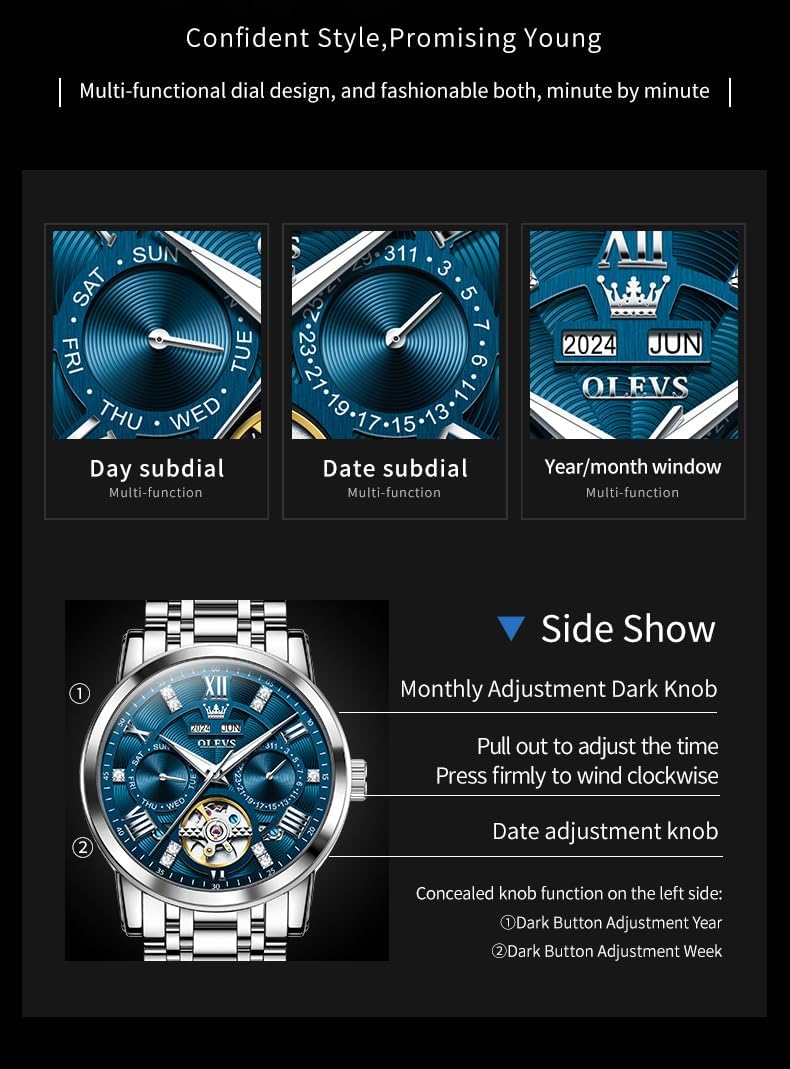
Image: Detailed view of the watch dial highlighting the day, date, and year/month subdials, along with an illustration of the crown and concealed adjustment buttons.
Setup and Initial Operation
Winding the Watch
As an automatic mechanical watch, it requires initial winding if it has stopped.
- Pull out the crown to position 1 (time setting position).
- Rotate the crown clockwise approximately 30-40 times to build up power reserve.
- Push the crown back in. The watch will then continue to wind itself with wrist movement.
Setting the Time
- Pull the crown out to position 1.
- Rotate the crown to set the hour and minute hands.
- Push the crown back to its original position.
Setting the Calendar Functions
The watch features day, date, and month/year displays.
Day Subdial Adjustment
The day subdial (e.g., SUN, MON) is typically adjusted by a concealed button on the left side of the watch case. Use a small, pointed tool (like the included watch adjuster pin) to gently press this button until the correct day is displayed.
Date Subdial Adjustment
The date subdial (1-31) is adjusted using the main crown. Pull the crown out to position 1 and rotate it counter-clockwise to advance the date.
Month/Year Window Adjustment
The month/year window (e.g., JUN 2023) is also adjusted by a concealed button, usually located on the left side of the watch case, similar to the day adjustment. Press gently with a pointed tool to advance the month and year.
Important: Avoid adjusting the date or day between 9 PM and 3 AM, as this can damage the movement. If adjustment is needed during this period, first set the time outside this window, adjust the date/day, then reset the time.
Maintenance and Care
Water Resistance
Your OLEVS watch is rated for 30 meters (3 ATM) water resistance. This means it is suitable for daily use, such as hand washing, rain, and accidental splashes. It is also suitable for short periods of swimming.
Caution: Do not operate the crown or buttons while the watch is wet or submerged. Not suitable for hot water activities like showering or sauna, or for diving. Prolonged exposure to water or steam can compromise the seals.

Image: The OLEVS watch with water droplets, emphasizing its 30-meter water resistance.
Cleaning
To clean your watch, wipe the case and bracelet with a soft, dry cloth. For stubborn dirt, a slightly damp cloth can be used, followed by immediate drying. Avoid using chemical cleaners or abrasive materials.
Storage
When not wearing the watch, store it in a cool, dry place away from direct sunlight and strong magnetic fields.
Bracelet Adjustment
The stainless steel bracelet can be adjusted by adding or removing links. It is recommended to have this done by a professional watchmaker or use the included watch adjuster tool carefully.

Image: The OLEVS watch presented in its white gift box, highlighting its suitability as a gift.
Troubleshooting
Watch Not Running or Stopping Frequently
- Ensure the watch is fully wound. If it has stopped, manually wind it by rotating the crown 30-40 times.
- Wear the watch regularly. Automatic watches rely on wrist movement to stay wound. If worn infrequently, it may stop.
- If the issue persists after winding and wearing, there might be an internal mechanical problem. Contact customer service.
Time is Inaccurate
- Mechanical watches may have slight variations in accuracy. A deviation of +/- 20-40 seconds per day is generally considered acceptable for automatic watches.
- Ensure the watch is fully wound. Low power reserve can affect accuracy.
- Avoid exposing the watch to strong magnetic fields (e.g., speakers, refrigerators, certain electronic devices), as magnetism can affect the movement's accuracy.
Calendar Not Changing Correctly
- Ensure you are not attempting to adjust the calendar between 9 PM and 3 AM.
- Verify that the crown is fully pushed in after setting the time.
- If the issue persists, contact customer service.
Specifications
| Feature | Detail |
|---|---|
| Model Number | SLD-S-G6701-BL |
| Movement | Automatic Mechanical with Tourbillon |
| Case Material | Stainless Steel |
| Bracelet Material | 361 Stainless Steel |
| Water Resistance | 30 Meters (3 ATM) |
| Clasp Type | Double Locking Foldover Clasp |
| Package Dimensions | 4.53 x 4.33 x 2.95 inches |
| Item Weight | 14.96 ounces |
Warranty and Support
OLEVS offers a 30-day free return period for this product.
For any questions or assistance during use, please contact OLEVS customer service.
You can reach customer service via email at customerservice@olvs.com.
Please provide your model number (SLD-S-G6701-BL) and a detailed description of your issue when contacting support.
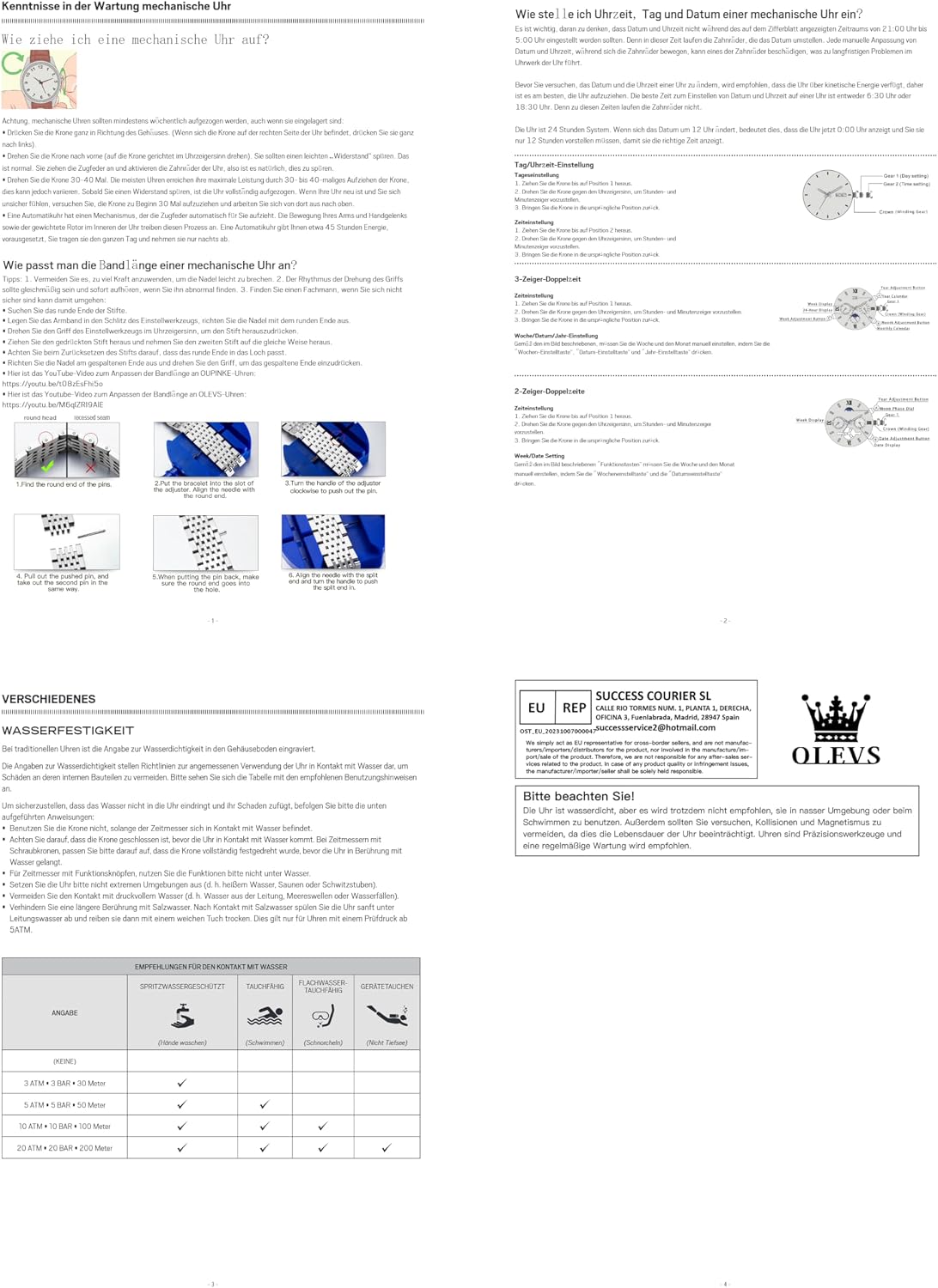
Image: OLEVS brand information, including the logo and contact details, often found in the product packaging or manual.


