
1. Important Safety Instructions
Read all safety warnings and instructions carefully before operating the ONEVAN Cordless Electric Tiller. Failure to follow these instructions may result in electric shock, fire, and/or serious injury.
- Personal Protective Equipment: Always wear eye protection (safety glasses), ear protection, protective gloves, and sturdy footwear when operating the tiller.
- Work Area Safety: Keep the work area clean and well-lit. Do not operate the tiller in wet or damp conditions. Keep children and bystanders away while operating the tool.
- Electrical Safety: Ensure batteries are charged in a dry, well-ventilated area. Avoid contact with skin and eyes when handling batteries. Do not expose batteries to water or extreme temperatures.
- Tool Use and Care: Do not force the tool. Use the correct tool for your application. Ensure the tool is properly maintained. Do not leave the tool running unattended.
- Battery Safety: Use only the specified charger and batteries. Do not short-circuit battery terminals. Dispose of batteries properly.
2. Product Overview
The ONEVAN Cordless Electric Tiller is designed for efficient soil cultivation in gardens. It features a powerful motor, durable steel blades, and a cordless design for ease of use.

Figure 2.1: Overview of the ONEVAN Cordless Electric Tiller, showing the ergonomic handle, safety switch, adjustable auxiliary hand, 360 RPM powerful motor, durable steel tines, replaceable head, 2x 4.0Ah batteries, and 1.5A fast charger.
Key Components:
- Ergonomic Handle: For comfortable grip and control.
- Safety Switch: Prevents accidental starting.
- Adjustable Auxiliary Hand: Provides additional support and comfort.
- Powerful Motor: Delivers up to 360 RPM for efficient tilling.
- Durable Steel Tines: Four blades with 12 teeth each for effective soil turning.
- Replaceable Head: Allows for easy maintenance and part replacement.
- 20V 4.0Ah Li-ion Batteries (x2): Provides cordless power and extended runtime.
- 1.5A Fast Charger: For quick battery recharging.
3. Assembly and Setup
Follow these steps to assemble your tiller before first use.
- Handle Assembly: Attach the main handle to the tiller body. Ensure all connections are secure.
- Auxiliary Handle Adjustment: Install the adjustable auxiliary handle. Adjust its position along the shaft to a comfortable height for your posture. The handle can be adjusted from 45 cm to 77.5 cm.
- Battery Charging: Before initial use, fully charge both 20V 4.0Ah Li-ion batteries using the provided 1.5A fast charger. Charging typically takes 1 to 2 hours per battery.
- Battery Installation: Once charged, insert the batteries into the designated battery slots on the tiller until they click into place.

Figure 3.1: The adjustable auxiliary handle can be positioned for optimal comfort and reduced fatigue during use.

Figure 3.2: The 20V 4000mAh Li-ion battery features multiple protection mechanisms including over heating, over charge, over voltage, over current, and over discharge protection.
4. Operation
Ensure you have read and understood the safety instructions before operating the tiller.
- Starting the Tiller:
- Hold the main handle firmly with one hand and the auxiliary handle with the other.
- Engage the safety switch, then press the power trigger to start the motor.
- Tilling Technique:
- Guide the tiller slowly and steadily over the soil. The tiller is designed for a tilling width of 230 mm (9.5 inches) and a depth of 160 mm (6.7 inches).
- Allow the powerful 550W motor and 360 RPM blades to do the work. Do not push down excessively.
- For deeper cultivation, make multiple passes over the same area, gradually increasing depth.
- Stopping the Tiller: Release the power trigger to stop the motor. Always remove the battery when not in use or before performing any maintenance.
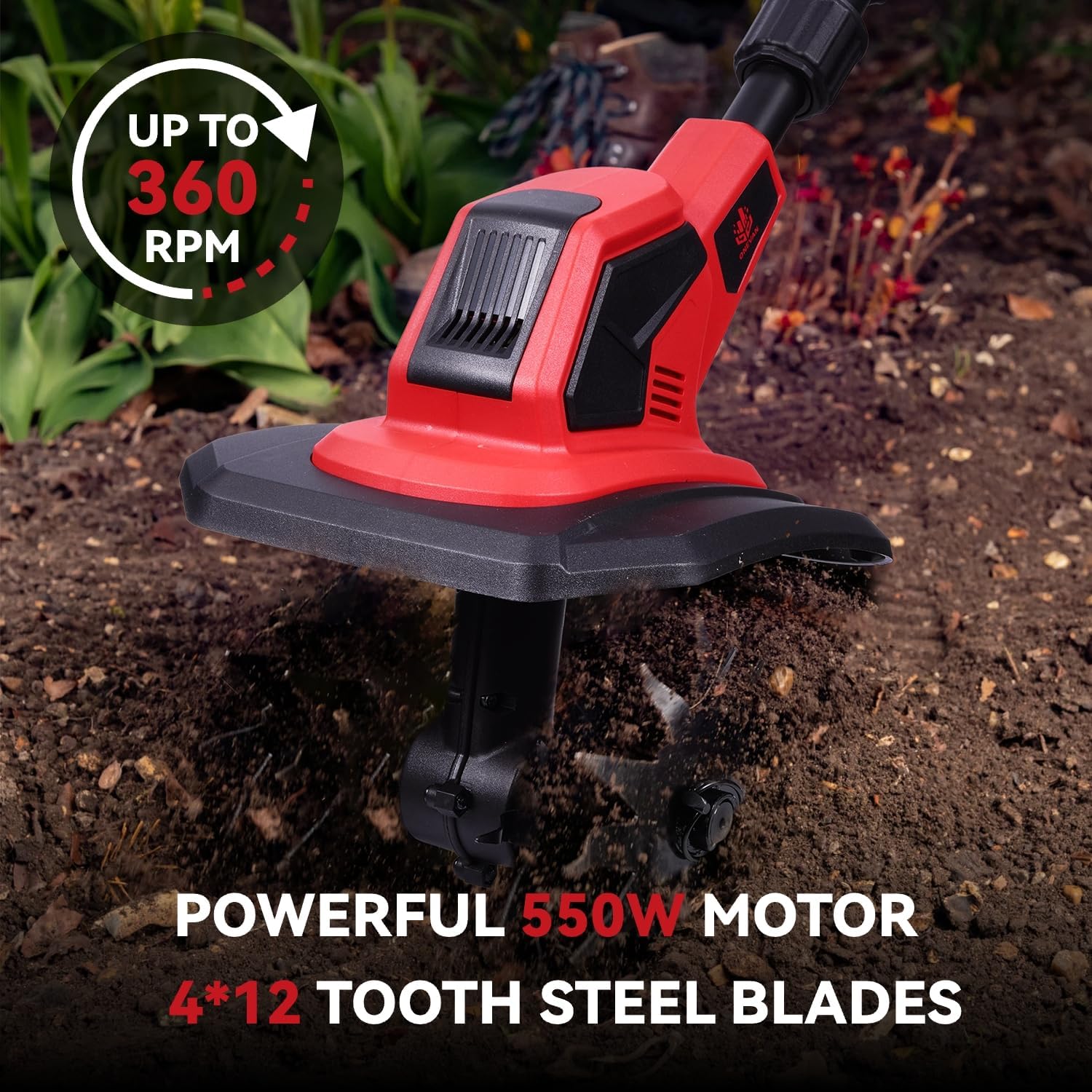
Figure 4.1: The tiller in action, highlighting its powerful 550W motor and 360 RPM rotation speed, equipped with 4x12 tooth steel blades for effective soil preparation.

Figure 4.2: Illustration of the tiller's working dimensions, demonstrating a 230mm (9.5 inch) tilling width and a 160mm (6.7 inch) tilling depth.
5. Maintenance
Regular maintenance ensures the longevity and optimal performance of your tiller.
- Cleaning Blades: After each use, remove the battery and carefully clean any soil, debris, or tangled weeds from the steel tines.
- Detachable Steel Gears: The tiller features detachable steel gears for easy cleaning and removal of stuck weeds. To detach, follow the instructions in Figure 5.1.
- Battery Care: Store batteries in a cool, dry place. Do not store fully discharged batteries for extended periods. Charge them periodically if not in use.
- General Inspection: Periodically check all screws and fasteners for tightness. Inspect the power cord of the charger for any damage.
- Storage: Store the tiller in a dry, secure location, out of reach of children.
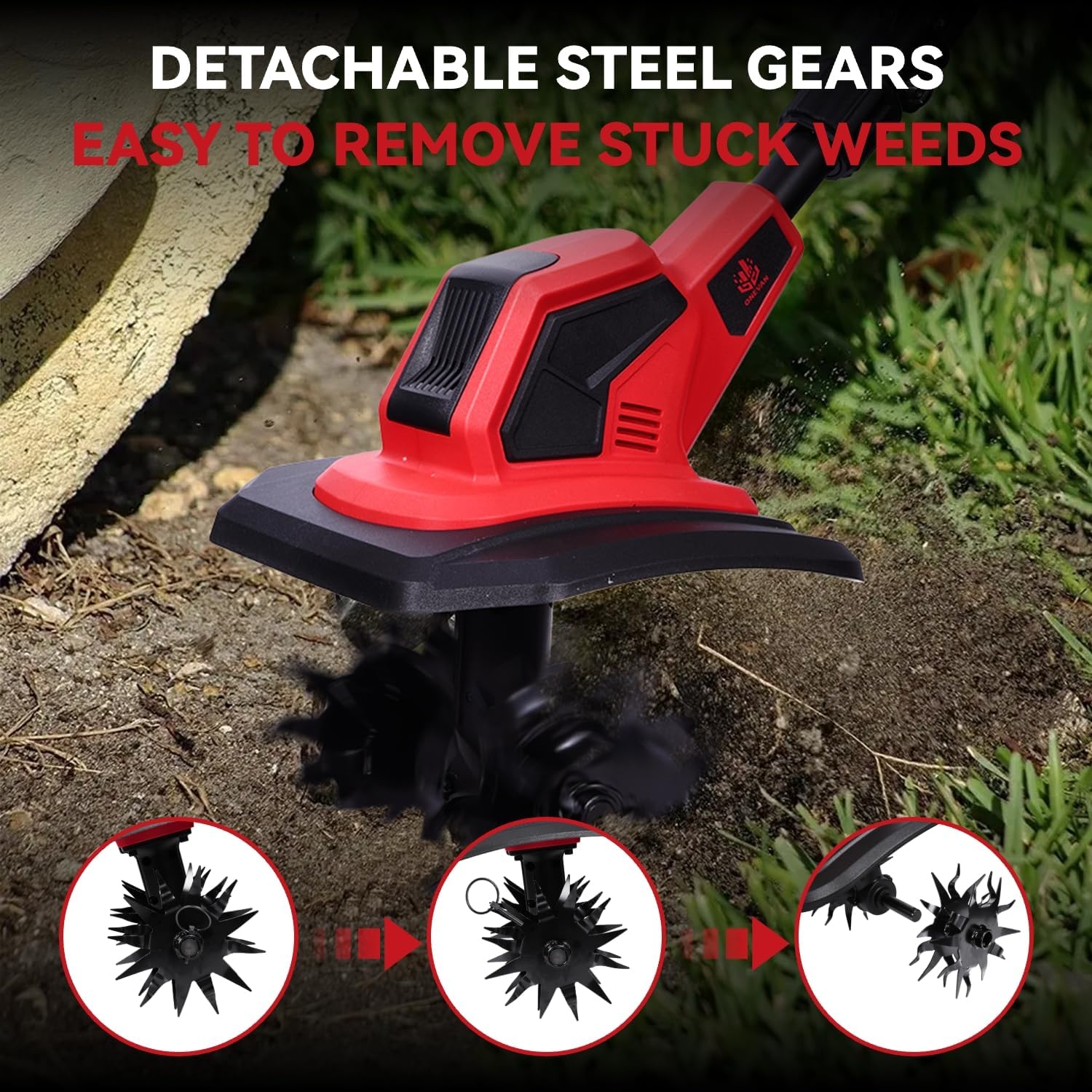
Figure 5.1: The detachable steel gears allow for convenient removal of stuck weeds and thorough cleaning of the tines.
6. Troubleshooting
If you encounter issues with your ONEVAN Cordless Electric Tiller, refer to the following common troubleshooting tips:
- Tiller Not Starting:
- Ensure the battery is fully charged and correctly inserted.
- Check if the safety switch is engaged before pressing the power trigger.
- Reduced Performance:
- The battery might be low; recharge it.
- Blades might be clogged with excessive soil or weeds; clean them thoroughly.
- Ensure the soil is not excessively hard or rocky for the tiller's capacity.
- Unusual Noise or Vibration:
- Immediately stop the tiller and remove the battery.
- Inspect the blades for damage or foreign objects.
- Check all connections and fasteners for tightness.
If the problem persists after attempting these solutions, please contact ONEVAN customer support for further assistance.
7. Specifications
| Feature | Specification |
|---|---|
| Brand | ONEVAN |
| Model Number | 4C0023 |
| Motor Power | 550 W |
| No-load Rotation Speed | 360 RPM |
| Tilling Depth | 160 mm (6.7 inches) |
| Tilling Width | 230 mm (9.5 inches) |
| Telescopic Handle Length | 45 cm to 77.5 cm |
| Battery Type | 20V Li-ion |
| Battery Capacity | 2 x 4000 mAh (4.0 Ah) |
| Charger Input Voltage | 18-21 V / 2 A |
| Charging Time | 1-2 hours |
| Runtime | Over 60 minutes |
| Product Dimensions (L x W x H) | 45 x 25 x 35 cm |
| Weight | 6.97 kg |
8. Warranty and Support
For warranty information, technical support, or replacement parts, please contact ONEVAN customer service. Keep your purchase receipt as proof of purchase.
Refer to the official ONEVAN website or your retailer for the most up-to-date contact information and warranty terms.
Additional safety information may be available in the "Informations de sécurité (PDF)" document provided with your product or accessible via the product listing.


