
UGREEN CM309
UGREEN Audio Bluetooth 5.0 Adapter CM309 User Manual
Model: CM309
Introduction
The UGREEN Audio Bluetooth 5.0 Adapter CM309 is designed to provide a high-quality wireless audio experience. It allows you to stream music from your Bluetooth-enabled devices to car audio systems or 3.5mm speakers via USB and AUX connections. With its built-in microphone, it also supports hands-free calling, ensuring convenience and safety. This adapter offers stable connectivity and crystal-clear sound without the need for complex software installation.
Safety Information
- Keep the device away from water, fire, and high temperatures.
- Do not attempt to disassemble or repair the device yourself.
- Use only compatible power sources.
- Avoid exposing the device to direct sunlight for extended periods.
- Dispose of the device responsibly according to local regulations.
Package Contents
- UGREEN Audio Bluetooth 5.0 Adapter CM309
- User Manual
Product Overview
The UGREEN CM309 adapter is a compact device designed for seamless audio streaming. It features a USB connector for power and an integrated 3.5mm AUX cable for audio output. A small LED indicator shows the connection status, and a built-in microphone allows for hands-free communication.
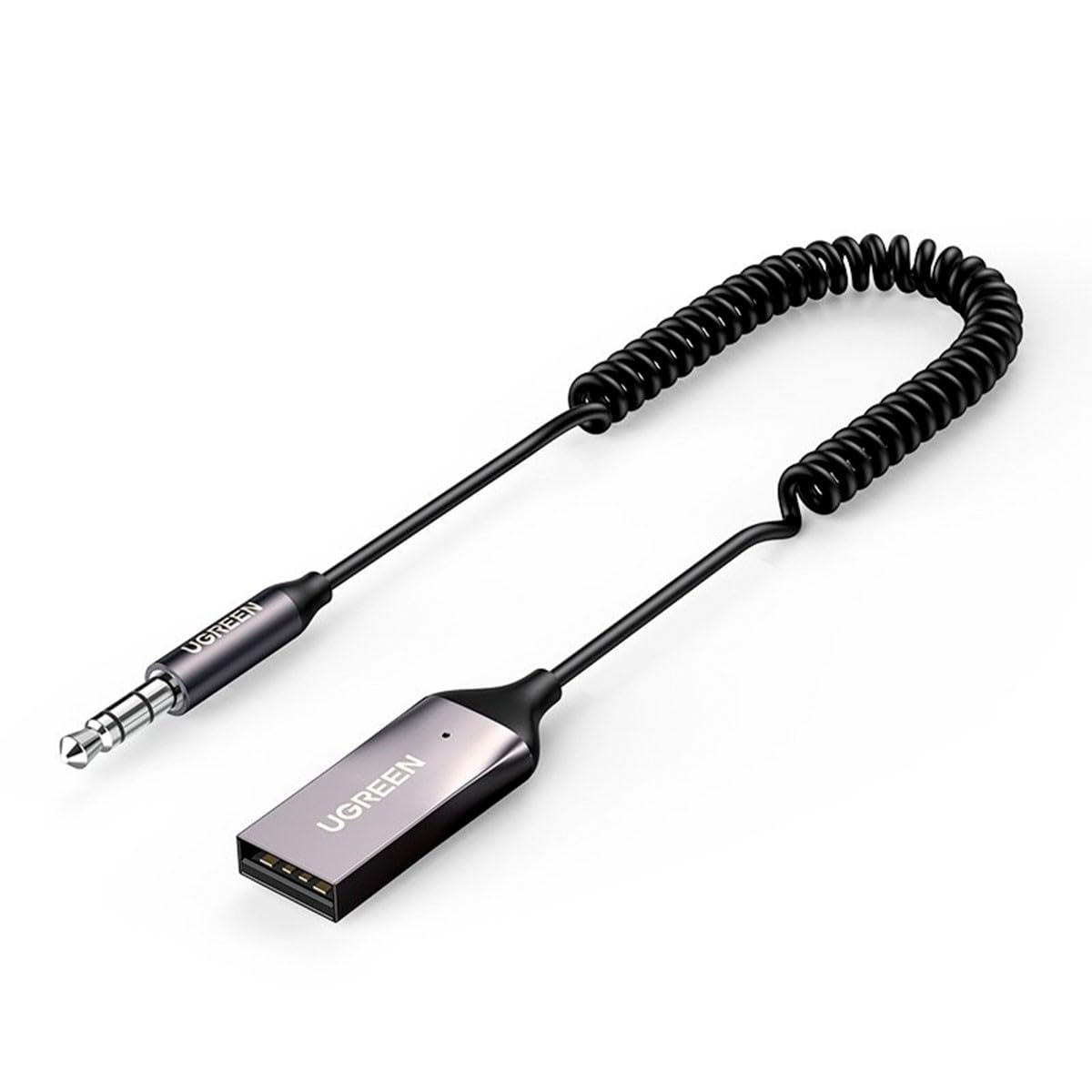
Image 1: UGREEN Audio Bluetooth 5.0 Adapter CM309. This image shows the compact design of the adapter, highlighting its USB connector and integrated 3.5mm AUX cable.
Setup
1. Connecting the Adapter
- Power Connection: Insert the USB connector of the CM309 adapter into a USB port (e.g., car charger, car USB port, power bank, or USB wall adapter) for power supply. The LED indicator will light up, indicating the adapter is powered on.
- Audio Connection: Plug the 3.5mm AUX cable from the CM309 adapter into the 3.5mm AUX input port of your car audio system or speaker.
2. Pairing with a Bluetooth Device
- Once powered on, the adapter will automatically enter pairing mode. The LED indicator will flash, signifying it is ready to connect.
- On your smartphone or other Bluetooth-enabled device, go to the Bluetooth settings.
- Search for available devices and select "UGREEN-CM309" (or similar name) from the list.
- Once successfully paired, the LED indicator will turn solid, and you will hear a confirmation tone (if supported by your audio system).
Operating Instructions
Playing Music
- After successful pairing, open your preferred music application on your Bluetooth device.
- Start playing music. The audio will be transmitted wirelessly to your car stereo or connected speaker.
- Adjust the volume using your Bluetooth device or the audio system's controls.
Hands-Free Calling
- When a call comes in, the music will pause automatically.
- Answer the call using your phone's controls. Your voice will be picked up by the adapter's built-in microphone, and the caller's voice will be heard through your audio system.
- End the call using your phone's controls. Music playback will resume automatically.
Maintenance
- Cleaning: Use a soft, dry cloth to clean the adapter. Do not use liquid cleaners or aerosols.
- Storage: When not in use, store the adapter in a cool, dry place, away from direct sunlight and extreme temperatures.
- Handling: Avoid pulling on the cables forcefully or bending them sharply to prevent damage.
Troubleshooting
No Power/LED Off
- Ensure the USB connector is fully inserted into a working USB port.
- Try a different USB port or power source.
Cannot Pair with Device
- Make sure the adapter is in pairing mode (LED flashing).
- Ensure Bluetooth is enabled on your device and it is within range (typically 10 meters).
- Forget previously paired devices on your phone and try pairing again.
- Restart both the adapter (by unplugging and replugging) and your Bluetooth device.
No Audio Output
- Verify that the 3.5mm AUX cable is securely connected to both the adapter and the audio system's AUX input.
- Ensure your car stereo or speaker system is set to the correct AUX input source.
- Check the volume levels on both your Bluetooth device and the audio system.
- Confirm that the adapter is successfully paired and connected to your Bluetooth device.
Specifications
| Feature | Detail |
|---|---|
| Model Number | CM309 |
| Bluetooth Version | 5.0 |
| Input | USB (for power), Auxiliary (for audio input from device) |
| Output | 3.5mm AUX (for audio output to speaker/car stereo) |
| Special Features | Built-in Microphone for Hands-Free Calls |
| Compatible Devices | Desktop computer, Game console, Headphones |
| Dimensions (LxWxH) | 10 x 10 x 10 mm |
| Weight | 1 Kilogram |
Warranty and Support
UGREEN products come with a standard warranty. For detailed warranty information, technical support, or customer service inquiries, please refer to the official UGREEN website or contact their customer support directly. Please retain your proof of purchase for warranty claims.
Related documentsCM309


Ask a question about this manual
Ask about setup, troubleshooting, compatibility, parts, safety, or missing instructions. Manuals+ will review the question and use this page’s manual context to help answer it.