
1. Introduction
This instruction manual provides detailed information on the operation, maintenance, and safety precautions for the VIHELM HT632 Wood Moisture Meter. Please read this manual thoroughly before using the device to ensure accurate measurements and safe operation. This meter is designed to measure moisture content in wood, building materials like concrete, cement, and brick, as well as ambient temperature and relative humidity.
2. Product Overview
2.1 Components and Display
Familiarize yourself with the various parts of the HT632 moisture meter, which features an HD color screen for clear readings:
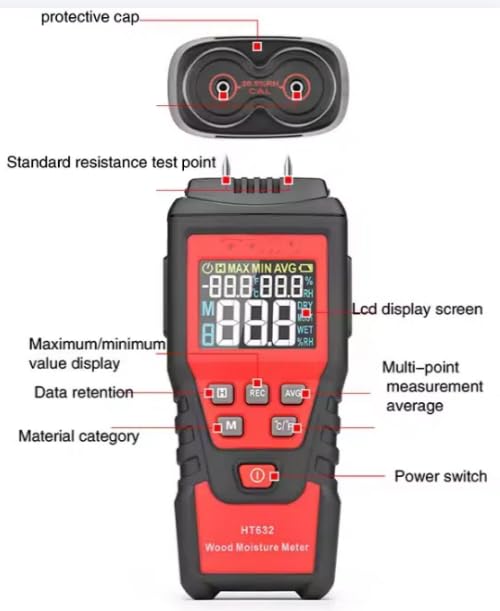
Image 2.1: Labeled diagram of the HT632 meter, showing the protective cap, standard resistance test points, LCD display screen, maximum/minimum value display, data retention button, material category button, multi-point measurement average button, and power switch.
- Protective Cap: Covers the measurement pins when not in use.
- Standard Resistance Test Points: Used for self-calibration or checking sensor functionality.
- LCD Display Screen: Shows measurement readings, units, and various indicators with an HD color display.
- Maximum/Minimum Value Display (H button): Toggles between current, maximum, and minimum recorded values.
- Data Retention (REC button): Holds the current measurement on the display.
- Material Category (M button): Selects the material type for accurate moisture measurement (e.g., different wood types, concrete).
- Multi-point Measurement Average (AVG button): Calculates the average of multiple measurements.
- Power Switch (Red button): Turns the device on and off.
- Temperature Unit Switch (C/F button): Toggles between Celsius and Fahrenheit.
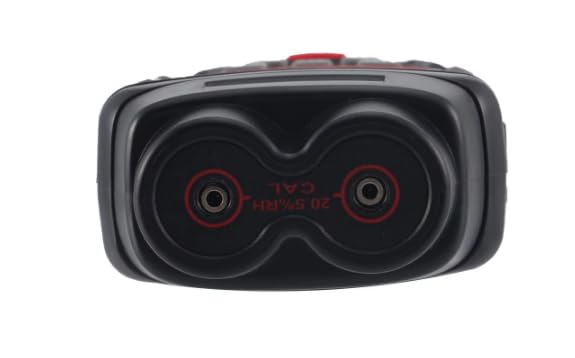
Image 2.2: Bottom view of the HT632 meter, highlighting the two measurement pins and the calibration points (20.5% RH CAL) for humidity.
3. Setup
3.1 Battery Installation
The VIHELM HT632 requires three (3) 1.5V AAA batteries for operation. Batteries are not included with the product.
- Locate the battery compartment on the back of the device.
- Slide open the battery compartment cover.
- Insert three 1.5V AAA batteries, ensuring correct polarity (+/-) as indicated inside the compartment.
- Close the battery compartment cover securely.

Image 3.1: A collage demonstrating the meter, its battery compartment with AAA batteries, and examples of materials like wood and bricks that can be measured.
3.2 Initial Power On
After installing batteries, press the red power switch button to turn on the device. The LCD display will illuminate.
4. Operating Instructions
4.1 Power On/Off
- To turn on: Press the red power switch button.
- To turn off: Press and hold the red power switch button for a few seconds, or allow the automatic shutdown feature to engage after a period of inactivity.
4.2 Moisture Measurement
- Remove the protective cap from the measurement pins.
- Press the 'M' button to select the appropriate material category (e.g., different wood groups, concrete, brick). Refer to the device's internal settings or a separate material chart for specific categories.
- Carefully insert the two measurement pins into the material to be tested. Ensure good contact.
- Read the moisture content percentage (%) displayed on the LCD screen.
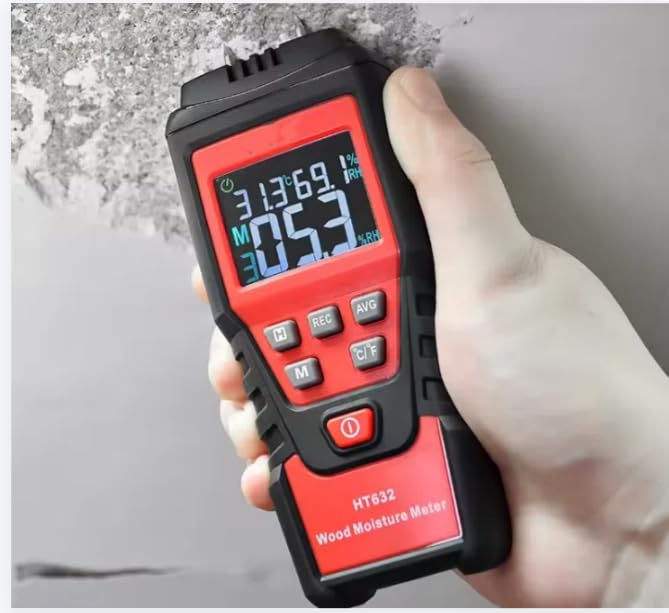
Image 4.1: The HT632 meter in use, measuring moisture content in a wall surface. The digital display shows the current readings.
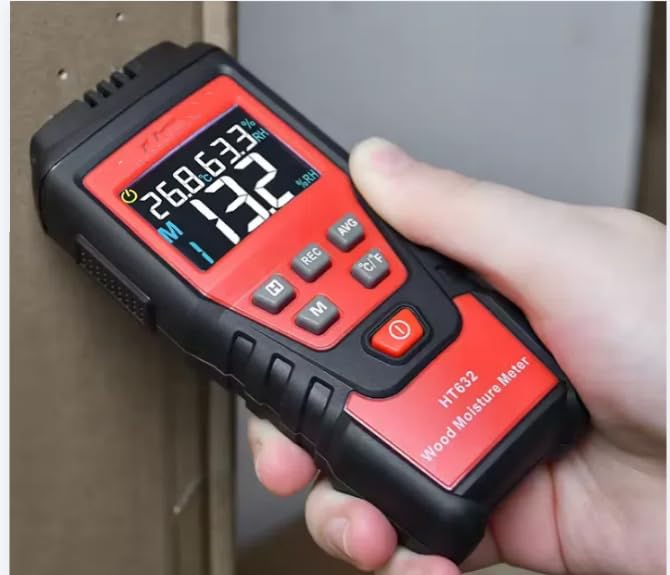
Image 4.2: The HT632 meter measuring moisture content in a piece of wood. The display shows the moisture percentage and ambient conditions.
4.3 Ambient Temperature and Relative Humidity
The meter also displays ambient temperature and relative humidity automatically. These readings are typically shown on the upper part of the LCD screen.
- To change temperature units: Press the 'C/F' button to switch between Celsius (°C) and Fahrenheit (°F).
4.4 Data Hold (REC)
Press the 'REC' button to freeze the current readings on the display. Press 'REC' again to release the hold and resume live measurements.
4.5 Maximum/Minimum Value (H)
Press the 'H' button to cycle through the current, maximum, and minimum moisture readings recorded during the current measurement session.
4.6 Multi-point Measurement Average (AVG)
To calculate the average moisture content over several points:
- Take multiple moisture readings at different points on the material.
- Press the 'AVG' button. The meter will display the calculated average of the recorded measurements.
5. Maintenance
5.1 Cleaning
- Wipe the meter's body with a soft, dry cloth.
- Do not use abrasive cleaners or solvents.
- Ensure the measurement pins are clean and free of debris after each use.
5.2 Storage
- Always replace the protective cap over the measurement pins when the meter is not in use to prevent damage and injury.
- Store the device in a cool, dry place, away from direct sunlight and extreme temperatures.
- If storing for an extended period, remove the batteries to prevent leakage.
5.3 Calibration
The HT632 features standard resistance test points for checking sensor functionality. For precise calibration, refer to the specific instructions in the full product manual or contact customer support. The device also has a 20.5% RH calibration point indicated on the bottom for humidity sensor checks.
6. Troubleshooting
- Meter does not turn on: Check battery installation and ensure batteries are not depleted. Replace if necessary.
- Inaccurate readings:
- Ensure pins are fully inserted into the material.
- Verify the correct material category is selected using the 'M' button.
- Clean the measurement pins if they appear dirty or corroded.
- Check if the meter requires calibration.
- Low Battery Indication: Replace the AAA batteries promptly when the low battery icon appears on the display.
7. Specifications
The following table outlines the technical specifications of the VIHELM HT632 Wood Moisture Meter:
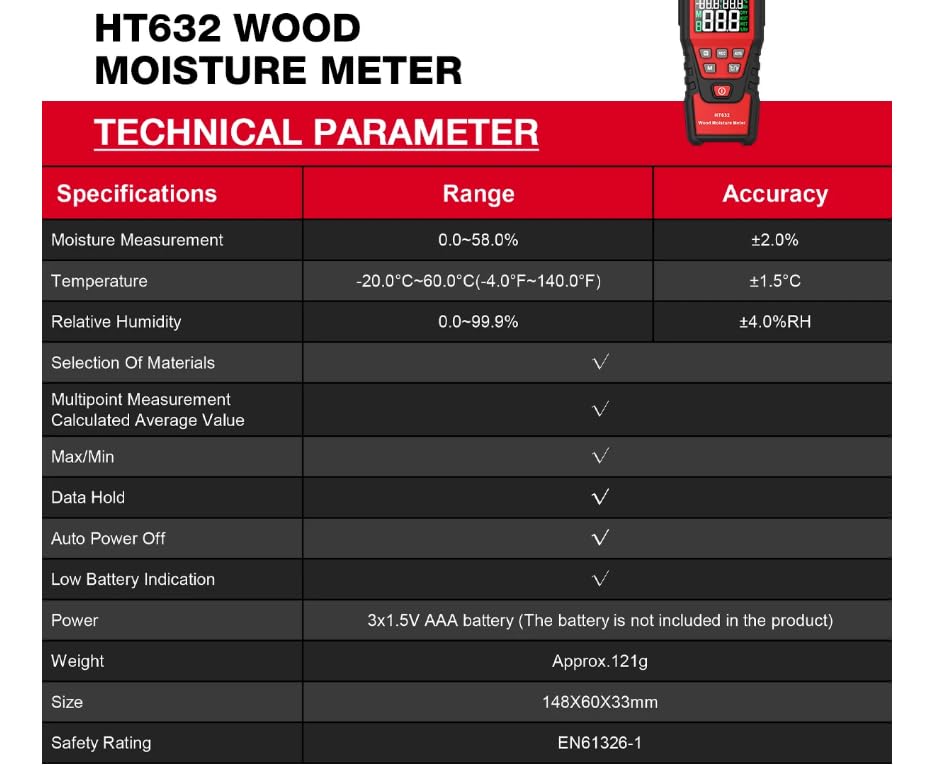
Image 7.1: Technical parameter table detailing measurement ranges and accuracy for moisture, temperature, and relative humidity, along with other features.
| Specification | Range | Accuracy |
|---|---|---|
| Moisture Measurement | 0.0 - 58.0% | ±2.0% |
| Temperature | -20.0°C ~ 60.0°C (-4.0°F ~ 140.0°F) | ±1.5°C |
| Relative Humidity | 0.0 - 99.9%RH | ±4.0%RH |
| Selection Of Materials | Yes | |
| Multipoint Measurement Calculated Average Value | Yes | |
| Max/Min Function | Yes | |
| Data Hold | Yes | |
| Auto Power Off | Yes | |
| Low Battery Indication | Yes | |
| Power Supply | 3 x 1.5V AAA battery (not included) | |
| Weight | Approx. 121g | |
| Dimensions (L x W x H) | 180mm x 60mm x 33mm | |
| Safety Rating | EN61326-1 | |
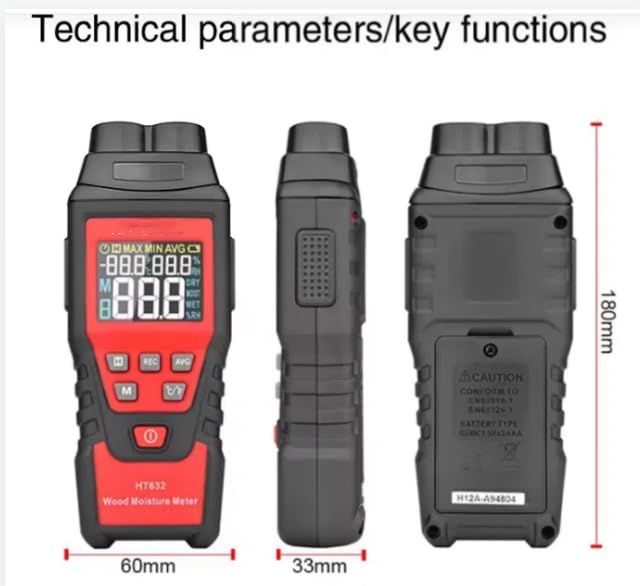
Image 7.2: Front, side, and back views of the HT632 meter with key dimensions labeled: 180mm height, 60mm width, and 33mm depth.
8. What's in the Box
- VIHELM HT632 Wood Moisture Meter (x1)
- Protective Cap (pre-installed)
- Instruction Manual (this document)

Image 8.1: The HT632 meter shown with its protective cap and a small pouch/manual, representing the typical contents.
9. Warranty and Support
For warranty information, technical support, or service inquiries, please refer to the contact details provided with your purchase documentation or visit the official VIHELM website. Keep your purchase receipt as proof of purchase for warranty claims.