
1. Introduction
The YAREMYEYE TM100 Multi-Channel Audio Isolator is designed to eliminate ground loop noise and interference in audio systems. It features a full metal, shielded enclosure to minimize external electromagnetic interference. This passive device requires no external power supply and offers a variety of conventional audio interfaces, including XLR, 6.35mm (1/4") TRS, 3.5mm AUX, and RCA ports, ensuring versatile connectivity in diverse environments.
Its signal-loss-free operation makes it suitable for a wide range of applications, such as computers, car audio systems, video cameras, electronic musical instruments, and home stereo setups. The TM100 is ideal for large-scale outdoor performances, audio engineering with lightning protection, multimedia conferencing, home HIFI stereo, entertainment venues, and exhibition halls.

Figure 1: The TM100 Ground Loop Noise Isolator shown in various professional and home audio environments, including sound systems, studios, stages, and streaming setups.
2. Product Overview and Features
The TM100 Audio Isolator provides essential functions and features for optimal audio signal integrity:
- Complete Physical-Electrical Isolation: Achieves full electrical isolation between the inputs and outputs of both audio channels, preventing ground loops.
- Flexible Interface Switching: Allows seamless switching between various input and output interfaces (XLR, TRS, RCA, AUX) and between balanced and unbalanced signals.
- Noise and Hum Elimination: Effectively isolates and removes current hum and noise generated by systems not connected to a common ground.
- Equipment Protection: Ensures safe signal transmission by electrically isolating equipment, protecting it from potential damage caused by voltage differences to ground (e.g., fire, static electricity).
3. Technical Specifications
| Parameter | Value |
|---|---|
| Dimensions (L*W*H) | 7.76 x 7.72 x 1.85 inches (19.7 x 19.6 x 4.7 cm) |
| Main Functions | Physical isolation, balanced/unbalanced signal conversion |
| Application | Mode switching with ground switch |
| Frequency Response | 20Hz - 20KHz |
| Harmonic Distortion | ≤0.002% @ 1KHz |
| Signal Loss | <0.7dB (ref 1kHz 1V rms) |
| Input Impedance | 600 ohms / 10 kilohms (AC impedance) |
| Output Impedance | 600 ohms / 10 kilohms (AC impedance) |
| Isolation Voltage | AC50Hz-60Hz 0V-1500V |
| Insulation Resistance | DC1000V 100 ohm |
| Input Connectors | 2x XLR, 2x 1/4" TRS, 2x RCA, 1x 3.5mm AUX |
| Output Connectors | 2x XLR, 2x 1/4" TRS, 2x RCA, 1x 3.5mm AUX |
| Item Weight | 9.6 ounces (272 grams) |

Figure 2: Physical dimensions of the TM100 unit.
4. Understanding Audio Interference
Ground loop interference, also known as ground hum, is a common issue in audio applications. It primarily occurs when there is a voltage difference between the ground points of two interconnected audio devices. This difference creates a current loop through the audio cable's shielding, leading to audible hum, buzzing, or distortion in the audio signal. This phenomenon is more pronounced with longer audio cables and can, in severe cases, damage audio equipment.
5. Working Principle
The TM100 Audio Isolator operates by creating independent electrical loops for the input and output signals. The input audio source forms a loop with the isolator's input, and similarly, the isolator's output forms a loop with the connected load. This design ensures that there is no physical electrical connection between the ground planes of the audio equipment before and after the isolator. The device utilizes low-frequency electrical signals and specialized coil matching with low magnetic conductivity materials to transmit the original audio signal without loss or distortion. This process effectively balances the signal, inhibits noise, blocks interference, and optimizes the audio signal.
6. Setup and Connections
The TM100 isolator is a passive device and does not require a power supply. Follow these steps for proper connection:
- Identify Input and Output: The TM100 has clearly labeled input and output sections for two channels (A and B).
- Connect Audio Source to Input: Connect your audio source (e.g., computer, instrument, mixer) to the desired input ports (XLR, 1/4" TRS, RCA, or 3.5mm AUX) on the TM100. Ensure that the A-terminal input corresponds to the A-terminal output, and the B-terminal input corresponds to the B-terminal output. The left and right channels do not need to be distinguished at this stage.
- Connect Output to Audio Receiver: Connect the output ports of the TM100 to your audio receiving device (e.g., amplifier, speakers, headphones).
- Ground Lift Switch: The device includes a 'GND LIFT' switch. If you experience hum, try toggling this switch to break the ground connection between the input and output, which can often resolve ground loop issues.

Figure 3: Detailed view of the TM100's input and output connectors.
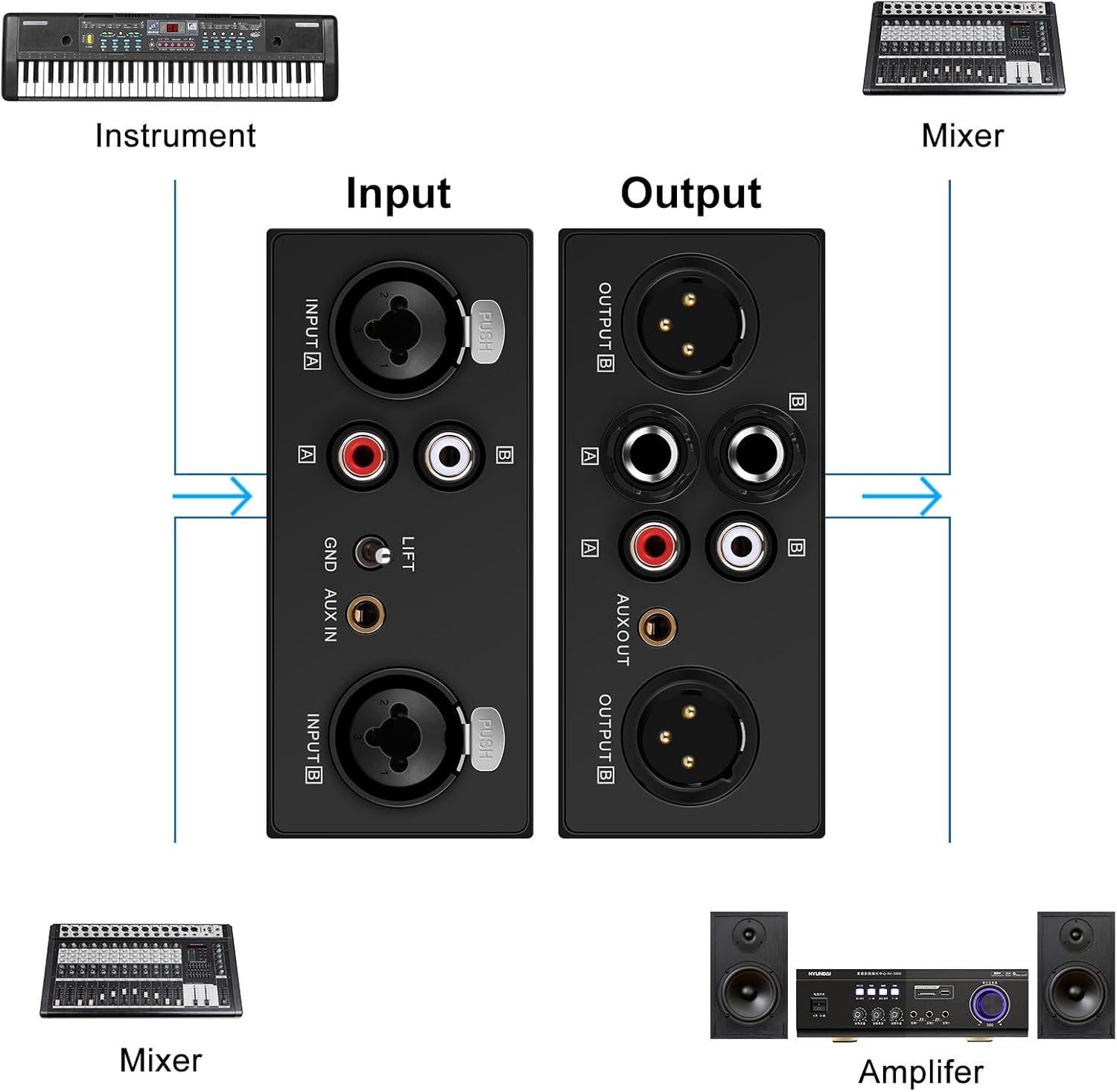
Figure 4: Example connections for instruments, mixers, and amplifiers.
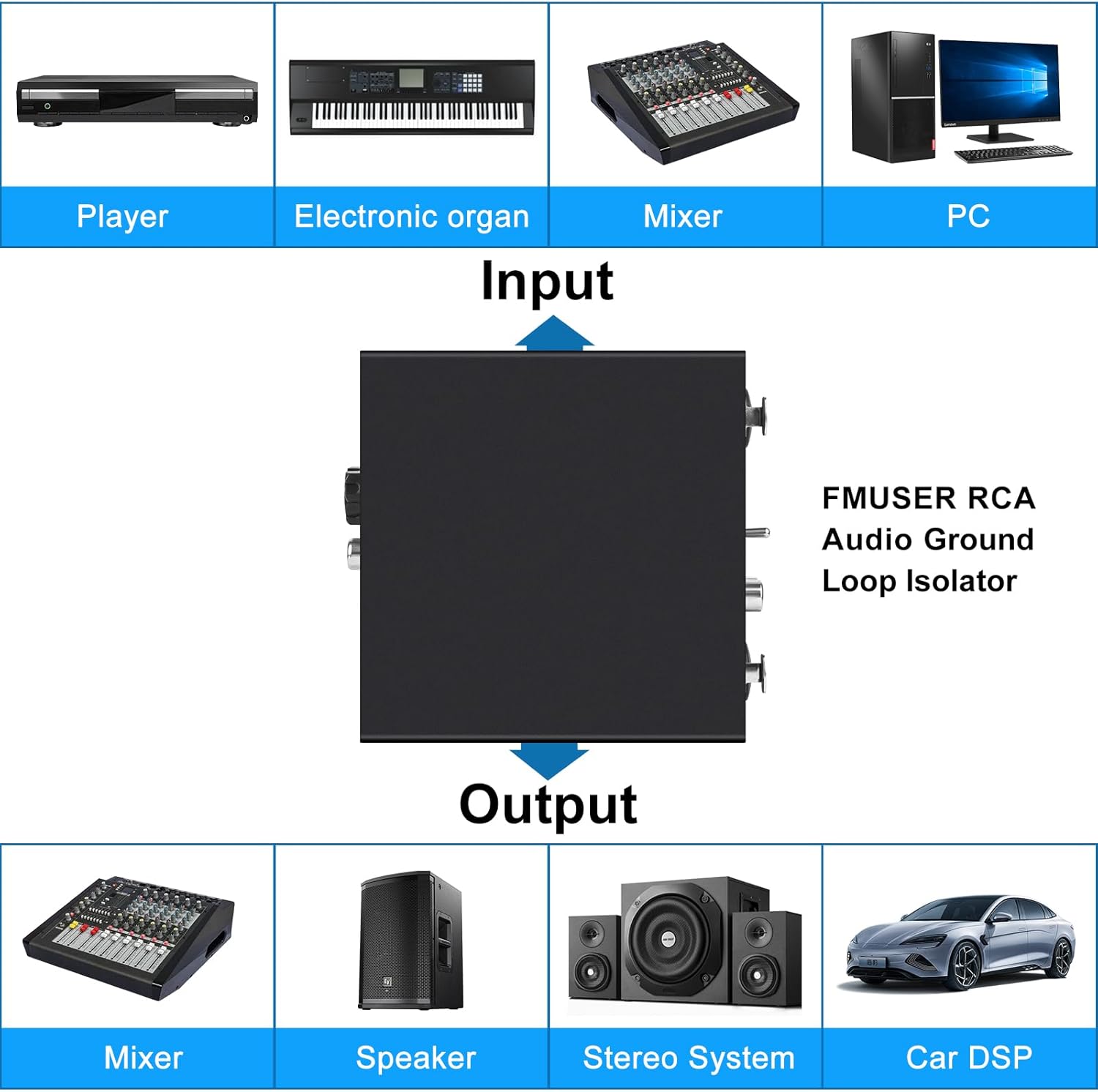
Figure 5: Common input and output devices compatible with the TM100.
7. Operation
Once connected, the TM100 operates automatically as a passive device. No power supply or complex configuration is required. Simply ensure your audio signal lines are correctly connected to the corresponding input and output channels (A to A, B to B). The device will then provide electrical isolation and filter out ground loop noise.
Application Examples:

Figure 6: Connecting a wireless microphone receiver to a mixing console via the TM100.

Figure 7: Linking a computer to an audio system with the TM100.

Figure 8: Diverse applications including conferencing and monitoring.
8. Maintenance
The YAREMYEYE TM100 is a robust and passive device designed for minimal maintenance. To ensure its longevity and optimal performance:
- Cleaning: Wipe the exterior with a soft, dry cloth. Avoid using harsh chemicals or abrasive cleaners.
- Storage: Store the device in a cool, dry place away from direct sunlight and extreme temperatures.
- Handling: Handle with care to prevent physical damage to the connectors or casing.
9. Troubleshooting
If you encounter issues while using the TM100, consider the following:
- Persistent Hum/Buzz:
- Ensure all audio cables are securely connected.
- Verify that the A-terminal input is connected to the A-terminal output, and B to B.
- Toggle the 'GND LIFT' switch on the unit. This switch is specifically designed to break ground loops.
- Test with different audio cables to rule out faulty cabling.
- Confirm that the noise is indeed a ground loop and not another type of interference (e.g., RF interference, faulty equipment).
- No Audio Signal:
- Check all cable connections at both the source, the TM100, and the receiving device.
- Ensure the correct input and output ports are being used on the TM100.
- Bypass the TM100 temporarily to confirm that the source and receiving equipment are functioning correctly independently.
10. Warranty Information
The YAREMYEYE TM100 Multi-Channel Ground Loop Noise Isolator comes with a 1-year manufacturer's warranty. This warranty covers defects in materials and workmanship under normal use. Please retain your proof of purchase for warranty claims.
11. Support
For further assistance, technical support, or warranty inquiries, please contact YAREMYEYE customer service through the official brand store or your point of purchase.
Visit the YAREMYEYE Store on Amazon.