
Redroad W15 Pro

Redroad W15 Pro Wet Dry Vacuum Cleaner User Manual
Model: W15 Pro
1. Introduction
Thank you for choosing the Redroad W15 Pro Wet Dry Vacuum Cleaner. This manual provides essential information for the safe and efficient operation, maintenance, and troubleshooting of your device. Please read it thoroughly before first use and retain it for future reference.
2. Safety Information
To reduce the risk of fire, electric shock, or injury, always follow basic safety precautions when using an electrical appliance. This includes:
- Read all instructions before using the appliance.
- Do not use outdoors or on wet surfaces.
- Do not allow to be used as a toy. Close attention is necessary when used by or near children.
- Use only as described in this manual. Use only manufacturer's recommended attachments.
- Do not use with damaged cord or plug. If appliance is not working as it should, has been dropped, damaged, left outdoors, or dropped into water, return it to a service center.
- Do not pull or carry by cord, use cord as a handle, close a door on cord, or pull cord around sharp edges or corners. Do not run appliance over cord. Keep cord away from heated surfaces.
- Do not unplug by pulling on cord. To unplug, grasp the plug, not the cord.
- Do not handle plug or appliance with wet hands.
- Do not put any object into openings. Do not use with any opening blocked; keep free of dust, lint, hair, and anything that may reduce air flow.
- Keep hair, loose clothing, fingers, and all parts of body away from openings and moving parts.
- Turn off all controls before unplugging.
- Use extra care when cleaning on stairs.
- Do not use to pick up flammable or combustible liquids, such as gasoline, or use in areas where they may be present.
- Do not pick up anything that is burning or smoking, such as cigarettes, matches, or hot ashes.
- Do not use without dust bag and/or filters in place.
3. Product Overview & Package Contents
The Redroad W15 Pro is a versatile wet and dry vacuum cleaner designed for efficient floor cleaning. It features a self-propelled system, 180° lie-flat design for reaching under furniture, and an automatic self-cleaning and hot-air drying function for the brush roll.

Figure 3.1: Redroad W15 Pro components. Includes main unit, handle, charging dock, two roller brushes, a cleaning brush, two replacement filters, and the instruction manual.
Package Contents:
- Main unit x 1
- Handle x 1
- Charging dock x 1
- Roller brush x 2
- Cleaning brush x 1
- Replacement filter x 2
- Instructions x 1
4. Setup
4.1 Assembly
- Insert the handle into the main unit until it clicks securely into place.
- Ensure the clean water tank and dirty water tank are correctly installed.
- Place the main unit onto the charging dock.
4.2 Initial Charging
Before first use, fully charge the Redroad W15 Pro. Connect the charging dock to a power outlet. The LED display on the vacuum will indicate charging status. A full charge typically takes several hours.
4.3 Filling the Clean Water Tank
Open the clean water tank and fill it with clean water. For optimal cleaning, you may add a small amount of non-foaming floor cleaning solution suitable for wet vacuums. Do not exceed the MAX fill line.
5. Operating Instructions
5.1 Power On/Off
Press the power button on the handle to turn the device on or off.
5.2 Cleaning Modes
The Redroad W15 Pro offers multiple cleaning modes for various needs:

Figure 5.1: The LED display indicating different cleaning modes: Dry, Wash, and Max.
- Dry Mode: For vacuuming dry debris and light dust.
- Wash Mode: For wet mopping and vacuuming liquid spills and wet messes.
- Max Mode: Provides maximum suction power for stubborn stains and heavy-duty cleaning. Activate by pressing the MAX button on the handle.
5.3 Self-Propelled System
The vacuum features a self-propelled system that assists movement, making cleaning less strenuous. Simply guide the vacuum, and it will move forward with minimal effort.

Figure 5.2: The self-propulsion system provides an effortless cleaning experience.
5.4 Cleaning Under Furniture (180° Lie-Flat Design)
The 180° lie-flat design allows the vacuum to reach under low furniture, such as beds and sofas, with ease. This design ensures thorough cleaning in hard-to-reach areas.

Figure 5.3: The 180° lie-flat design allows access to hidden and low areas.
5.5 Edge Cleaning
The vacuum is designed with edge cleaning technology to clean close to walls and corners, minimizing missed spots.
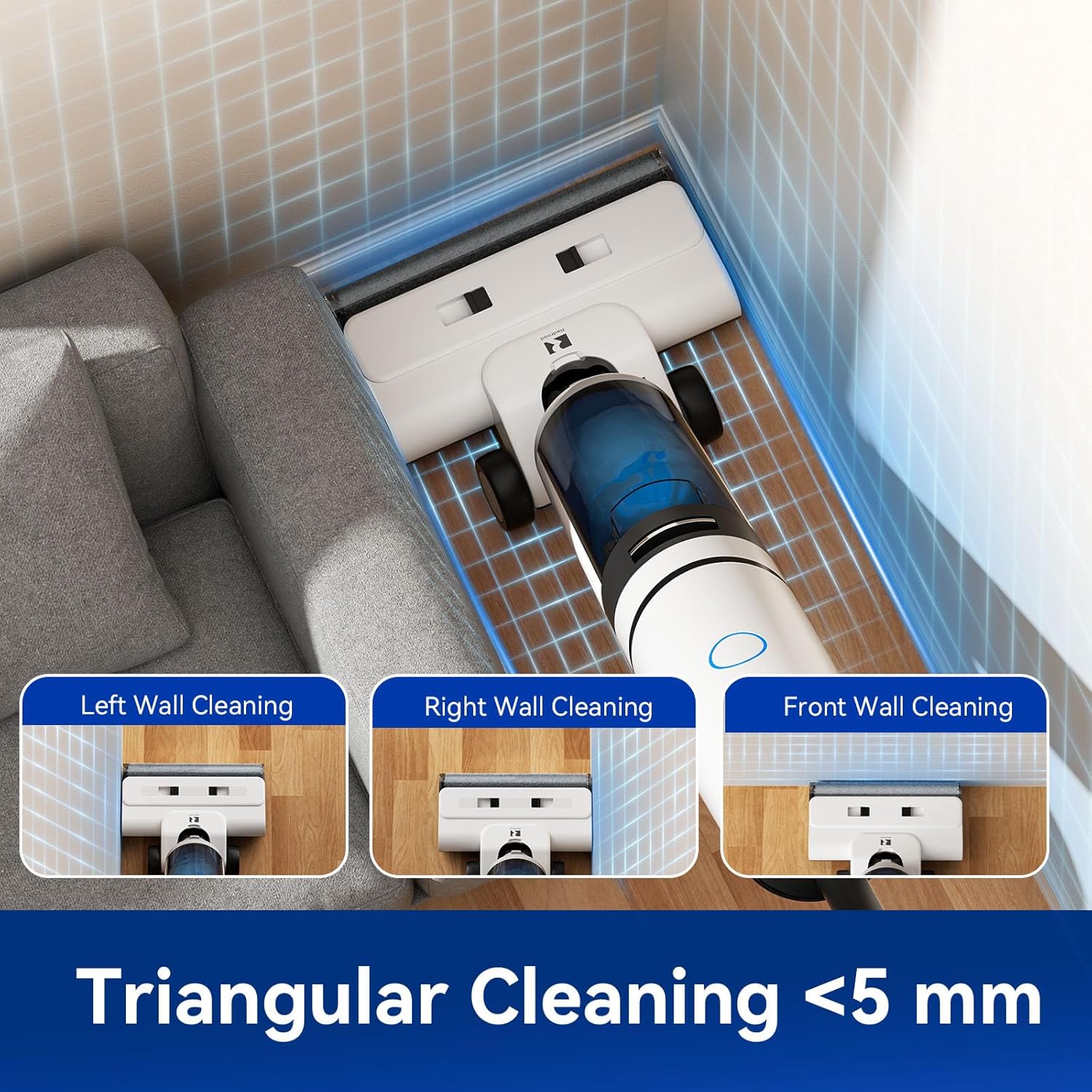
Figure 5.4: The triangular cleaning head allows for cleaning within 5mm of edges.
5.6 Smart LED Digital Display & Voice Prompts
The integrated LED display provides real-time information on battery life, current cleaning mode, and water levels. Voice prompts guide you through operations and alert you to important statuses, such as low battery or full dirty water tank.

Figure 5.5: Voice alerts provide important operational feedback.
5.7 Video Demonstration
Video 5.1: An official product video demonstrating the Redroad W15 Pro's wet and dry vacuuming capabilities, 180° lie-flat design, and self-cleaning function. This video highlights the ease of use and effective cleaning performance.
6. Maintenance
6.1 One-Touch Self-Cleaning & Hot-Air Drying
After each use, place the vacuum on its charging dock and initiate the self-cleaning cycle. This process automatically rinses the brush roll with 100°C hot water and then dries it with 85°C warm air to prevent odors and bacterial growth.

Figure 6.1: The self-cleaning system effectively dissolves stains and deep-cleans the brush roller, followed by hot air drying for an odor-free brush.
6.2 Cleaning the Dirty Water Tank
Empty and rinse the dirty water tank after each use to prevent odors and maintain hygiene. Ensure it is completely dry before re-installing.
6.3 Brush Roll Maintenance
The brush roll features an anti-tangle serrated scraper to prevent hair from tangling. Periodically check the brush roll for any trapped debris or hair and remove it using the provided cleaning brush.

Figure 6.2: The anti-tangle serrated scraper helps keep the brush roll free from hair tangles.
6.4 Filter Maintenance
The HEPA filter should be cleaned regularly. Remove the filter, tap out loose debris, and rinse under running water. Allow it to air dry completely before re-installing. Replace filters as needed to maintain optimal performance.
7. Troubleshooting
If you encounter issues with your Redroad W15 Pro, please refer to the following common troubleshooting steps:
- No Power: Ensure the device is fully charged and correctly placed on the charging dock. Check the power adapter and outlet.
- Poor Suction: Check if the dirty water tank is full or if the clean water tank is empty. Ensure the brush roll and filter are clean and free of blockages.
- Water Leaking: Verify that both the clean and dirty water tanks are properly installed and sealed. Check for any cracks or damage to the tanks.
- Unusual Noise: Inspect the brush roll for any foreign objects or tangles. Ensure all components are securely assembled.
- Voice Prompts Not Working: Check the device settings for voice prompt volume or language.
If the problem persists, please contact customer support for assistance.
8. Specifications
| Feature | Specification |
|---|---|
| Brand | Redroad |
| Model | W15 Pro |
| Special Features | Cordless, Lightweight, Low Noise, Self-Propelled, Wet/Dry, 180° Lie-Flat, Self-Cleaning, Hot Drying |
| Suction Power | 22,000 Pa |
| Filter Type | HEPA Filter |
| Clean Water Tank Capacity | 650 ml |
| Dirty Water Tank Capacity | 700 ml |
| Battery Life | Up to 45 minutes |
| Noise Level | 68 Decibels |
| Product Dimensions | 13.78"L x 10.24"W x 29.13"H |
| Item Weight | 17.51 pounds |
| Power Levels | 2 |
| Indoor/Outdoor Usage | Indoor |
9. Warranty and Support
The Redroad W15 Pro Wet Dry Vacuum Cleaner comes with a 2-year extended warranty. Redroad is committed to providing excellent customer service.

Figure 9.1: Redroad offers a 2-year product warranty, 24/7 online support, and a 100% hassle-free satisfaction guarantee.
For technical support or warranty claims, please contact Redroad customer service. You can typically find contact information on the official Redroad website or through your purchase platform.
Related documentsW15 Pro


Ask a question about this manual
Ask about setup, troubleshooting, compatibility, parts, safety, or missing instructions. Manuals+ will review the question and use this page’s manual context to help answer it.