
Euker 5K-MC
Euker 5000 BTU Window Air Conditioner Instruction Manual
Model: 5K-MC
Product Overview
This manual provides essential information for the safe and efficient operation of your Euker 5000 BTU Window Air Conditioner. Please read all instructions carefully before installation and use.

Image: Front view of the Euker 5000 BTU Window Air Conditioner, showcasing its compact design and mechanical controls.
Setup and Installation
Your Euker 5000 BTU Window Air Conditioner is designed for easy installation in standard double-hung windows. The unit includes all necessary mounting accessories.
Window Requirements:
- Window Width: 23 inches to 34 inches
- Minimum Window Height: 14.5 inches
Installation Steps (General):
- Unpack the air conditioner and all accessories.
- Attach the side panels to the unit.
- Place the unit into the window opening, ensuring it is securely seated.
- Extend the side panels to fill the window gap and secure them.
- Install the support brackets and debris guards as instructed in the detailed user manual.
- Apply window seal foam to prevent air leakage.

Image: Components of the easy installation kit, including the remote control, top foam sealer, bubble level, and support brackets, alongside the air conditioner unit with its dimensions for window fitting.
Operating Instructions
The Euker 5000 BTU Window Air Conditioner features user-friendly mechanical controls for simple operation.
Control Panel:
The unit is equipped with two rotary knobs:
- Temperature Knob: Adjusts the cooling intensity with 7 distinct settings.
- Mode Knob: Selects between cooling and fan-only operations, and fan speeds.

Image: A close-up view of the air conditioner's mechanical control panel, showing the temperature and mode selection knobs.
Air Direction:
The air vents can be manually adjusted to direct airflow in two directions, allowing for customized cooling distribution within the room.
Operating Modes:
- Cool Mode: Provides active cooling to lower room temperature.
- Fan Mode: Circulates air without cooling, useful for ventilation.
- Sleep Mode: Operates at a reduced noise level (approximately 40dB) for quiet overnight comfort. This mode often adjusts temperature gradually to maintain comfort while saving energy.

Image: Illustration of the air conditioner's sleep mode, showing a gradual temperature adjustment over an 8-hour period for quiet and comfortable sleep, with a noise level of 40dB.
Noise Level:
The unit incorporates SilenceWrap™ Technology in its compressor design, resulting in a quiet operation with noise levels typically below 50dB, ensuring minimal disturbance.
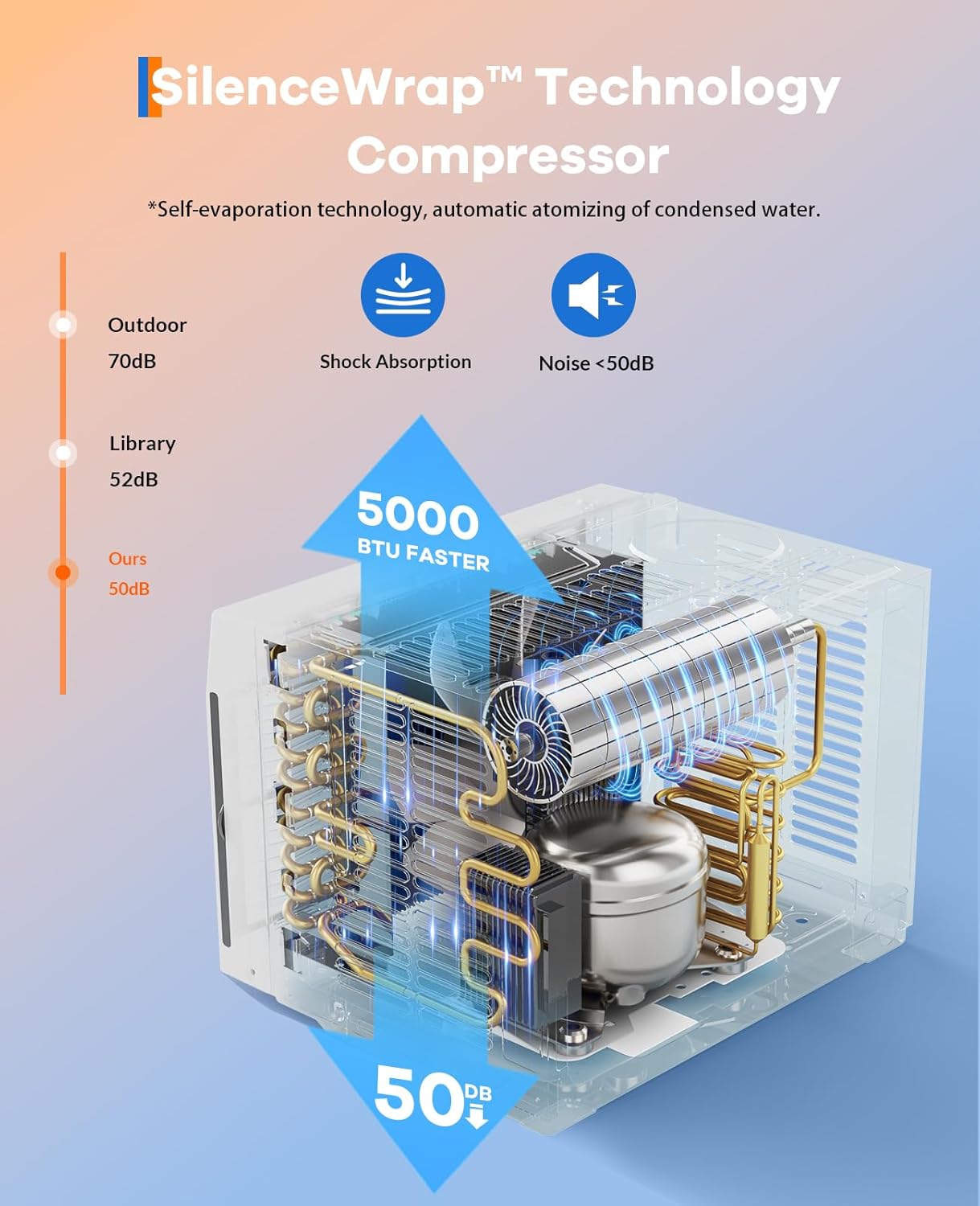
Image: Diagram illustrating the SilenceWrap™ Technology compressor, highlighting features like shock absorption and self-evaporation, contributing to a noise level below 50dB.
Maintenance
Regular maintenance ensures optimal performance and longevity of your air conditioner.
Filter Cleaning:
The air conditioner features a removable, washable filter for easy maintenance. Cleaning the filter regularly helps maintain air quality and cooling efficiency.
- Gently pull the front handle to remove the filter.
- Wash the filter with warm, soapy water. Rinse thoroughly.
- Allow the filter to air dry completely before reinserting.
- Slide the dry filter back into its position until it clicks securely.

Image: A visual guide demonstrating the removal and cleaning of the detachable filter, showing it being rinsed under a faucet.
General Cleaning:
Wipe the exterior of the unit with a soft, damp cloth. Do not use harsh chemicals or abrasive cleaners.
Troubleshooting
If you encounter issues with your air conditioner, refer to the following common problems and solutions:
| Problem | Possible Cause | Solution |
|---|---|---|
| Unit does not turn on | No power, tripped circuit breaker, loose plug | Check power supply, reset breaker, ensure plug is secure. |
| Insufficient cooling | Dirty air filter, blocked air intake/outlet, room too large, window not sealed | Clean filter, clear obstructions, ensure proper room size, seal window gaps. |
| Excessive noise | Loose parts, unit not level, fan obstruction | Check for loose components, ensure unit is level, remove any fan obstructions. |
| Water leakage | Unit not level, drain plug blocked | Ensure unit is slightly tilted outwards for drainage, check and clear drain plug. |
For issues not listed here, or if problems persist, please contact customer support.
Specifications
Key technical specifications for the Euker 5000 BTU Window Air Conditioner (Model 5K-MC):
| Feature | Detail |
|---|---|
| Brand | Euker |
| Model Number | 5K-MC |
| Cooling Capacity | 5000 BTU |
| Recommended Room Size | Up to 150 sq.ft |
| Power Supply | 115V/60Hz |
| Control Type | Mechanical Knob |
| Temperature Settings | 7 adjustable |
| Fan Speeds | 2 |
| Air Direction | 2-Way Adjustable |
| Noise Level | 50 dB (typical) |
| Filter Type | Removable, Washable |
| Item Weight | 41.4 pounds |
| Product Dimensions (D x W x H) | 17.91 x 14.84 x 15.04 inches |
| Special Features | Fast Cooling, Auto Restart |

Image: Visual representation of the air conditioner's powerful cooling performance, indicating its ability to cool areas up to 150 square feet with 5000 BTU cooling efficiency.

Image: Comparison showing the Euker 5000 BTU unit's 25% energy saving, with a CEER rating of 12.0 compared to a traditional window AC's 8.0 CEER.

Image: Illustration detailing the efficiency of the 12W DC Motor, claiming 40% more air volume, 40% less noise distractions, and 80% more energy saving.
Warranty Information
For detailed warranty information, please refer to the warranty card included with your product or contact Euker customer support. Protection plans may also be available for extended coverage.
Customer Support
If you require assistance, have questions, or need to report a problem, please contact Euker customer support through the official website or the contact information provided in your product packaging.
For online resources, visit the Euker Store on Amazon.
Related documents5K-MC


Ask a question about this manual
Ask about setup, troubleshooting, compatibility, parts, safety, or missing instructions. Manuals+ will review the question and use this page’s manual context to help answer it.