
AOSHIDA C200 PRO
SMSL C200PRO Headphone Amplifier User Manual
Model: C200 PRO
1. Introduction
The SMSL C200PRO is a versatile HiFi MQA DAC and Headphone Amplifier designed to deliver exceptional audio performance. Featuring an ES9039Q2M DAC chip and XMOS XU-316, it supports high-resolution audio up to PCM 32bit/768kHz and DSD512. With multiple input options including USB Type C, Optical, Coaxial, and Bluetooth, and various output choices like 4.4mm/6.35mm headphone jacks and RCA/TRS, the C200PRO is suitable for a wide range of audio setups, from gaming consoles to professional desktop systems. Its low-noise design and comprehensive features ensure a pure and powerful listening experience.
2. What's in the Box

Figure 2.1: Contents of the SMSL C200PRO package.
Please check the package contents upon unboxing:
- 1x SMSL C200PRO Unit
- 1x USB Cable (Type A to C)
- 1x Bluetooth Antenna
- 1x Remote Control
- 1x AC Power Cable
- 1x User Manual
- 1x SMSL Card
If any items are missing or damaged, please contact AOSHIDA customer support.
Video 2.1: Unboxing the SMSL C200 PRO Headphone Amplifier, showing all included accessories and the main unit.
3. Product Overview
3.1 Front Panel

Figure 3.1: Front panel of the SMSL C200PRO.
- 6.35mm Headphone Jack: Standard headphone output.
- 4.4mm Headphone Jack: Balanced headphone output for enhanced audio quality.
- Multi-function Knob: Controls power, volume, input/output modes, and display brightness.
- Display Screen: Shows current settings, input, and sampling rate.
3.2 Rear Panel

Figure 3.2: Rear panel of the SMSL C200PRO.
- AC Power Input: Connects to the included AC power cable.
- Bluetooth Antenna Port: Connect the provided Bluetooth antenna for wireless connectivity.
- Optical Input: Digital audio input.
- USB Input (Type C): Connects to computers, tablets, or gaming consoles.
- Coaxial Input: Digital audio input.
- RCA Outputs: Analog audio outputs for connecting to amplifiers or powered speakers.
- TRS Outputs: Balanced analog audio outputs.

Figure 3.3: Detailed input and output connections.
4. Setup
Follow these steps for initial setup of your SMSL C200PRO:
- Power Connection: Connect the included AC power cable to the AC Power Input on the rear panel and plug it into a wall outlet.
- Bluetooth Antenna: Screw the provided Bluetooth antenna into the Bluetooth Antenna Port on the rear panel.
- Input Connection:
- USB: Connect your computer, PS5/Switch, or other USB audio source to the USB Type C input using the provided USB cable.
- Optical/Coaxial: Connect your CD/DVD player, TV, or other digital audio source to the Optical or Coaxial input.
- Bluetooth: For wireless connection, ensure the Bluetooth antenna is attached.
- Output Connection:
- Headphones: Plug your headphones into either the 6.35mm or 4.4mm headphone jack on the front panel.
- Speakers/Amplifier: Connect the RCA or TRS outputs on the rear panel to your powered speakers or a separate amplifier.
- Power On: Long press the multi-function knob on the front panel to power on the device.
Video 4.1: Demonstrating various connections for the SMSL C200PRO, including power, RCA, and USB.

Figure 4.2: Comprehensive connection diagram.
5. Operating Instructions
5.1 Multi-function Knob & Remote Control
The C200PRO features a sensitive multi-function knob and comes with a full-function remote control for convenient operation.
- Power On/Off: Long press the knob (or the power button on the remote) to turn the device on or off.
- Volume Adjustment: Rotate the knob clockwise to increase volume, counter-clockwise to decrease. On the remote, use the volume +/- buttons.
- Menu Navigation: Short press the knob (0.5-1 second) to enter the menu. Short press again to cycle through menu options. Rotate the knob to adjust settings within a menu. Press and hold for 2 seconds to return to the main interface.
- Input/Output Switching: Use the knob or the remote to switch between different input sources (USB, Optical, Coaxial, Bluetooth) and output modes (Headphone Out, Line Out).
- Display Brightness: Adjust the display brightness via the menu.
- Mute: Press the mute button on the remote to mute/unmute audio. The volume display will flash when muted.
- FN Button (Remote): Short press for output switching. Long press to turn off the screen.
Video 5.1: Demonstrating remote control and knob operations for the SMSL C200PRO.
5.2 USB Modes (U1.1 & U2.0)
The C200PRO supports two USB modes:
- U1.1 Mode: Supports all USB devices without requiring a driver. Ideal for gaming consoles like PS4, PS5, and Switch. Supports PCM up to 96kHz.
- U2.0 Mode: Requires driver installation when connecting to a Windows system. Supports high-standard sampling rates (up to PCM 32bit/768kHz, DSD512).
Note: When switching between U2.0 mode and U1.1 mode, please restart the machine for the change to take effect.
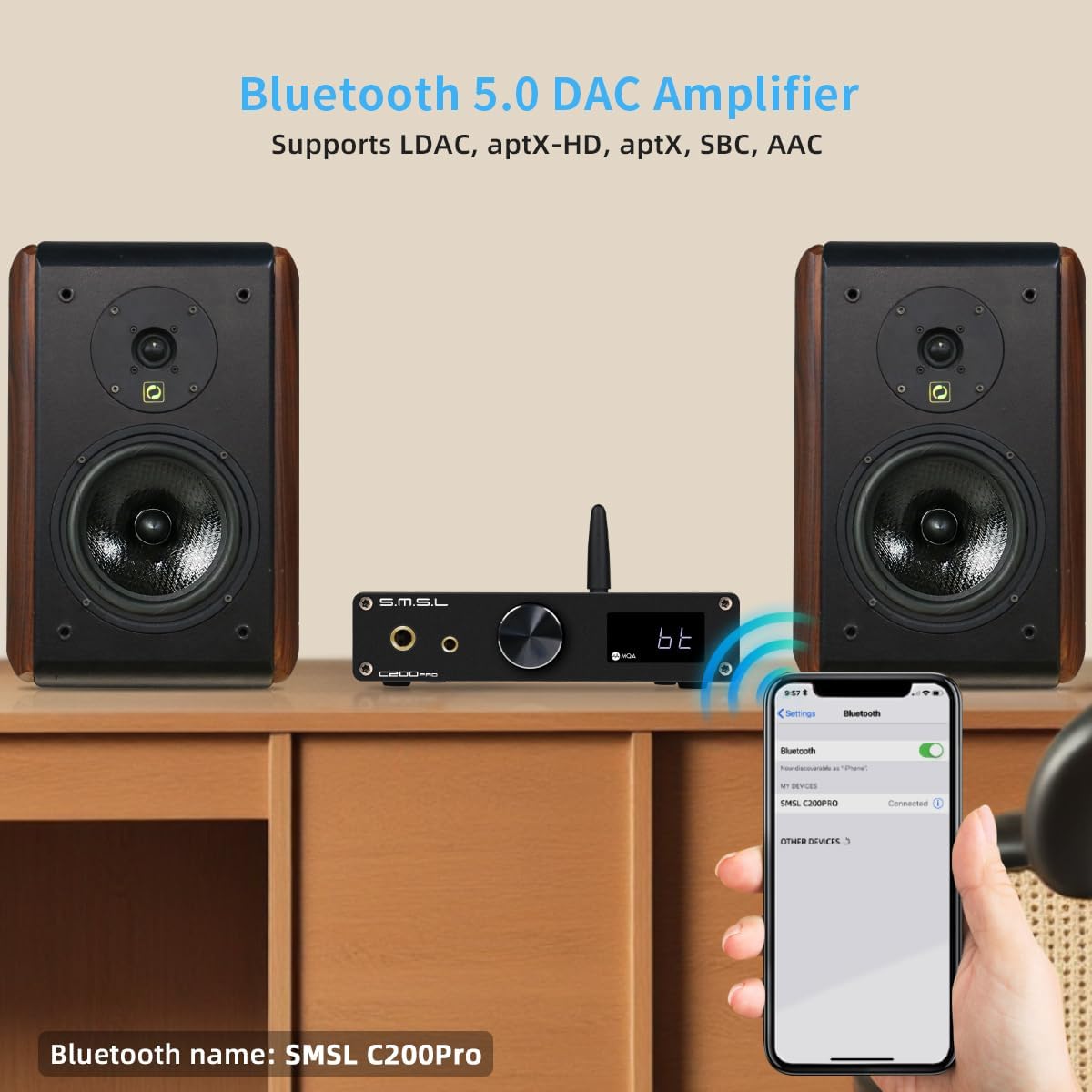
Figure 5.2: USB mode selection for gaming and PC.
5.3 Bluetooth Connectivity
The C200PRO features advanced Bluetooth connectivity with a Qualcomm Bluetooth chip, supporting various high-quality audio codecs:
- LDAC: 24bit/96kHz (990kbps/660kbps/330kbps)
- APTX-HD: 24bit/48kHz (576kbps)
- APTX: 16bit/44.1kHz (352kbps)
- SBC: 16bit/44.1kHz (328kbps)
- AAC: 16bit/44.1kHz (320kbps)
To connect via Bluetooth, select the Bluetooth input on the device. The Bluetooth name is "SMSL C200Pro".

Figure 5.3: Bluetooth specifications and pairing.
5.4 MQA Decoding
The C200PRO supports full MQA decoding and MQA-CD playback, allowing you to experience Master Quality Authenticated sound as intended by the artist.

Figure 5.4: MQA decoding capabilities.
5.5 DPLL Settings
The DPLL (Digital Phase-Locked Loop) setting helps to reduce clock jitter. DPLL values range from 1 to 9. A lower value indicates less clock jitter, which is generally preferred for optimal sound quality.
If you experience sound interruptions or instability, especially when using a TV as the signal source, you can increase the DPLL value to resolve the issue.
6. Specifications

Figure 6.1: Detailed technical parameters.
| Feature | Detail |
|---|---|
| Product Dimensions | 5.71 x 5.47 x 1.26 inches |
| Item Weight | 1.1 pounds |
| Item Model Number | C200 PRO |
| Manufacturer | SMSL |
| Country of Origin | China |
| Input | USB (optical fiber/coaxial)/Bluetooth |
| Output | 6.35mm headphone/4.4mm headphone/TRS/RCA |
| Output Amplitude | TRS: 5Vrms, RCA: 2.5Vrms |
| HPA Output Power | 16Ω: 3W x 2, 32Ω: 1.5W x 2, 150Ω: 350mW x 2, 300Ω: 170mW x 2, 600Ω: 85mW x 2 |
| HPA Gain | +9.5dB |
| THD+N | Line Out: 0.00006% (-123.5dB), Headphone Out: 0.00009% (-120dB) |
| Dynamic Range | TRS: 129dB, RCA: 126dB, HPA: 125dB |
| SNR | TRS: 129dB, RCA: 126dB, HPA: 125dB |
| Output Impedance | Line Output: 100Ω, Headphone Output: Near 0Ω |
| USB Transmission | USB1.1 & USB2.0 (Asynchronization) |
| USB Compatibility | Windows 7/8/8.1/10/11 (Need driver), Android, Mac OS, Linux (Driverless) |
| Bit Depth | USB: 1bit, 16-32bit; Optical/Coaxial: 1bit, 16-24bit |
| Sampling Rate | USB: PCM 44.1-768kHz, DSD 2.8224-22.5792MHz; Optical/Coaxial: PCM 44.1-192kHz, DSD DSD64(DoP) |
| Bluetooth Specifications (5.1) | LDAC: 24bit/96kHz (990kbps/660kbps/330kbps); aptX-HD: 24bit/48kHz (576kbps); aptX: 16bit/44.1kHz (352kbps); SBC: 16bit/44.1kHz (328kbps); AAC: 16bit/44.1kHz (320kbps) |
| Power Consumption | <25W |
| Standby Power | <0.5W |
7. Maintenance
To ensure the longevity and optimal performance of your SMSL C200PRO, follow these maintenance guidelines:
- Cleaning: Use a soft, dry cloth to wipe the exterior of the unit. Avoid using abrasive cleaners, solvents, or chemical sprays, as they may damage the finish.
- Ventilation: Ensure the unit has adequate ventilation. Do not block the ventilation holes or place the unit in an enclosed space that could lead to overheating.
- Storage: When not in use for extended periods, store the unit in a cool, dry place away from direct sunlight and extreme temperatures.
- Handling: Handle the unit with care. Avoid dropping it or subjecting it to strong impacts.
8. Troubleshooting
If you encounter any issues with your SMSL C200PRO, please refer to the following common problems and solutions:
| Problem | Possible Cause | Solution |
|---|---|---|
| No power | Power cable not connected properly; Power outlet issue. | Ensure the AC power cable is securely plugged into the unit and the wall outlet. Try a different outlet. |
| No sound output | Incorrect input/output selected; Volume too low; Cables not connected; Muted. | Check if the correct input source is selected. Verify the output mode (headphone/line out). Increase volume. Ensure all audio cables are securely connected. Check if the device is muted. |
| Sound interruptions or instability (especially with TV source) | High clock jitter. | Adjust the DPLL setting in the menu. Increase the DPLL value (1-9) to improve stability. |
| USB connection issues (Windows PC) | Driver not installed for U2.0 mode. | Ensure the correct driver is installed for Windows when using U2.0 mode. Restart the device after switching USB modes. |
| Bluetooth pairing issues | Device not in pairing mode; Antenna not connected; Out of range. | Ensure the C200PRO is set to Bluetooth input. Check if the Bluetooth antenna is securely attached. Move the device closer to the audio source. |
9. Warranty & Support
The SMSL C200PRO is manufactured by SMSL and distributed by AOSHIDA. For warranty information and technical support, please refer to the SMSL Card included in your package or contact AOSHIDA Audio-US directly through their Amazon store page or official website.
Additional protection plans may be available for purchase through Amazon. Please check the product listing for details.
Manufacturer: SMSL
Brand: AOSHIDA
Ask a question about this manual
Ask about setup, troubleshooting, compatibility, parts, safety, or missing instructions. Manuals+ will review the question and use this page’s manual context to help answer it.