
Soundcore A3878
soundcore V40i Open-Ear Headphones User Manual
Model: A3878 | Brand: Soundcore
1. Product Overview
The soundcore V40i Open-Ear Headphones are designed for comfort and situational awareness, delivering rich audio while keeping you connected to your surroundings. Featuring an innovative open-ear design, adjustable ear hooks, and advanced audio technology, these headphones provide a unique listening experience.
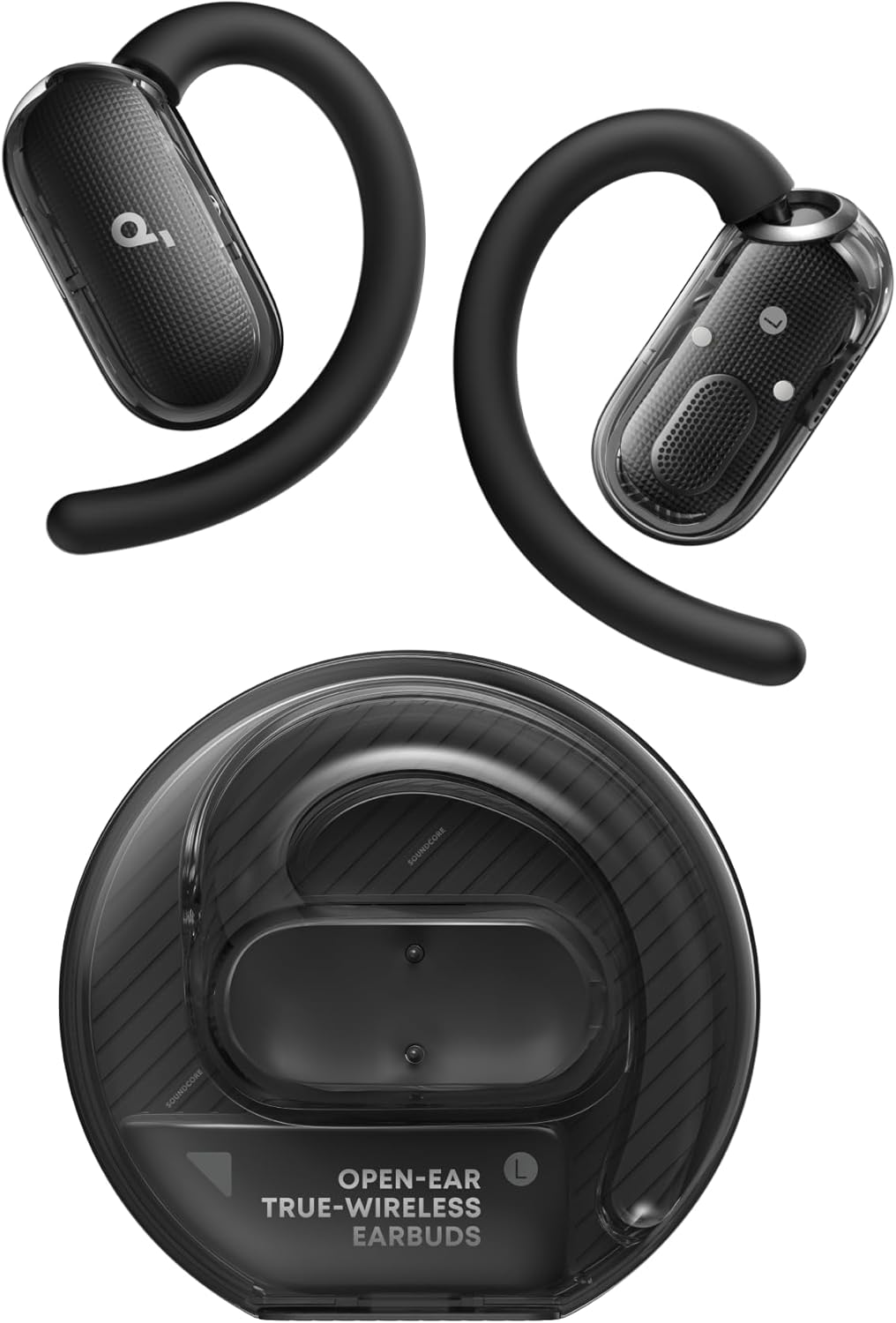
Image: soundcore V40i Open-Ear Headphones and their transparent charging case.
Key Features:
- Sleek, Future-Ready Design: Features a clear case with powerful magnets for secure storage and a light bar for status indication.
- Open-Ear Comfort: Designed to free you from in-ear pressure, ensuring breathable comfort and awareness of surroundings.
- Adjustable Ear Hooks: Innovative 4-level adjustable ear hooks provide a tailored and comfortable fit for various ear sizes.
- Enhanced Bass: Adjustable ear hooks bring sound closer to the ear canal, delivering richer and more powerful bass.
- Powerful Sound: Equipped with 16 × 13mm drivers, a high-elastic diaphragm, and an hourglass-shaped chamber for loud volume and punchy bass.
- Crystal-Clear Calls: Four microphones and advanced AI technology work together to filter out noise for clear voice transmission.
- IP55 Water and Dust Resistance: Built to withstand workouts, sports, and outdoor adventures.
2. What's in the Box
Ensure all the following items are present in your package:
- soundcore V40i Open-Ear Headphones (Left and Right)
- Charging Case
- USB-C Cable
- Quick Start Guide & Safety Card

Image: Illustration of the soundcore V40i headphones, charging case, and USB-C cable.
3. Setup
3.1 Charging
Before first use, fully charge the headphones and the charging case.
- Connect the charging case to a power source using the provided USB-C cable.
- The light bar on the case indicates charging status.
- A full charge takes approximately 2.5 hours for both the headphones and the case.
- The headphones provide up to 6 hours of playtime on a single charge, extended to 21 hours with the charging case.

Image: Visual representation of 6 hours playtime per charge and 21 hours with the charging case.
3.2 Pairing with Your Device
- Open the charging case. The headphones will automatically enter pairing mode.
- On your device (smartphone, tablet, laptop), enable Bluetooth.
- Search for "soundcore V40i" in the list of available Bluetooth devices and select it to connect.
- A voice prompt will confirm successful connection.
The V40i supports Bluetooth 5.4 and Multipoint Connection, allowing seamless switching between two connected devices without re-pairing.

Image: Diagram showing the soundcore V40i connected to multiple devices via Bluetooth.
4. Operating Your Headphones
4.1 Wearing the Headphones
Adjust the ear hooks to find the most comfortable and secure fit. The V40i offers 4 adjustable positions:
- LV1 and LV2: Best suited for small to medium-sized ears.
- LV3 and LV4: More comfortable for medium to large-sized ears.

Image: Diagram illustrating the four adjustable positions of the ear hooks for optimal fit.

Image: Visual guide on how to properly wear the soundcore V40i headphones for a secure and comfortable fit.
4.2 Touch Controls
The V40i features intuitive touch controls. Functions can be customized via the soundcore app.
- Music Playback: Double-tap the left earbud to skip to the next track. Double-tap the right earbud to play/pause.
- Call Management: Double-tap to answer calls. Press and hold for 2 seconds to reject calls.
- Volume Control: Adjustable via the connected device or through the soundcore app.
- Voice Assistant: Activate your device's voice assistant with a few taps (customizable).

Image: Diagram showing the touch control area on the earbud and common touch gestures for music and calls.
4.3 Soundcore App
Download the soundcore app for enhanced control and customization:
- Tailor your listening experience with 22 EQ presets.
- Create custom sound profiles.
- Customize touch controls.
- Receive firmware updates.

Image: Screenshot of the soundcore app interface showing options for custom sound profiles and EQ settings.
5. Audio Features
5.1 Powerful Sound Delivery
The V40i headphones are engineered for robust audio performance:
- 16 × 13mm Drivers: Large drivers with a high-elastic diaphragm deliver striking bass and full volume.
- Hourglass-Shaped Chamber: Amplifies diaphragm vibrations for punchier and fuller bass.
- Directional Acoustics: Precisely channels sound into your ear canal, minimizing leakage and boosting bass.

Image: Illustration highlighting the 16x13mm racetrack diaphragm and powerful sound delivery.

Image: Cross-section view of the earbud showing the hourglass-shaped chamber and sound amplification.
5.2 AI-Enhanced Clear Calls
Experience crystal-clear calls even in noisy environments:
- Equipped with 4 microphones.
- Advanced AI algorithm filters out background noise, ensuring your voice is heard clearly.
Image: A person using the soundcore V40i headphones in a public setting, demonstrating clear call functionality.
6. Maintenance
To ensure the longevity and optimal performance of your soundcore V40i headphones, follow these maintenance guidelines:
- Cleaning: Regularly wipe the headphones and charging case with a soft, dry, lint-free cloth. Avoid using harsh chemicals or abrasive materials.
- Storage: When not in use, store the headphones in their charging case to protect them from dust and damage.
- Water Exposure: While IP55 rated for water and sweat resistance, avoid submerging the headphones in water. Dry them thoroughly if they get wet.
- Temperature: Do not expose the headphones or case to extreme temperatures (hot or cold) or high humidity.

Image: Illustration showing the IP55 water and dust resistance of the soundcore V40i headphones.
7. Troubleshooting
If you encounter any issues with your soundcore V40i headphones, please refer to the official troubleshooting guide for detailed solutions:
Download Troubleshooting Guide (PDF)
Common Issues and Quick Solutions:
- No Power: Ensure the headphones and charging case are fully charged.
- Cannot Pair: Make sure Bluetooth is enabled on your device and the headphones are in pairing mode. Try resetting the headphones if necessary (refer to the full guide).
- Sound Issues: Check volume levels on both the headphones and your device. Ensure the headphones are properly seated in your ears.
- Call Quality: Ensure microphones are not obstructed. Try moving to an area with less background noise.
8. Specifications
| Feature | Detail |
|---|---|
| Model Name | soundcore V40i |
| Model Number | A3878 |
| Connectivity Technology | Wireless (Bluetooth 5.4) |
| Bluetooth Range | 10 Meters |
| Audio Driver Type | Dynamic Driver (16 × 13mm) |
| Frequency Response | 20 Hz to 20 KHz |
| Sensitivity | 128 dB |
| Impedance | 16 Ohm |
| Battery Life (Earbuds) | 6 Hours |
| Battery Life (with Case) | 21 Hours |
| Charging Time | 2.5 Hours |
| Water Resistance Level | IP55 (Waterproof) |
| Item Weight | 69 Grams (2.43 ounces) |
| Product Dimensions | 2.42 x 1.26 x 2.29 inches |
| Manufacturer | Anker |
9. Warranty and Support
For detailed warranty information and customer support, please refer to the official Soundcore website or the comprehensive User Guide provided with your product.
You can also find additional support and FAQs on the Soundcore official support pages.
Related documentsA3878


Ask a question about this manual
Ask about setup, troubleshooting, compatibility, parts, safety, or missing instructions. Manuals+ will review the question and use this page’s manual context to help answer it.