
1. Introduction
This manual provides detailed instructions for the installation, operation, and maintenance of your Genérico A28 Dual Lens Outdoor WiFi Security Camera Kit. Please read this manual thoroughly before using the product to ensure proper functionality and safety. Keep this manual for future reference.
2. Product Overview
2.1 Key Features
- Dual Lens System: Features one fixed lens and one 360° rotatable lens for comprehensive coverage without blind spots.
- Full HD 1080p Resolution: Provides clear and detailed images both day and night.
- Infrared and White LED Night Vision: Equipped with 4 super white LEDs and 4 infrared LEDs for adjustable night vision in various lighting conditions.
- Intelligent Motion Detection: Detects human movement and sends alarm notifications to your device.
- Two-Way Audio: Built-in microphone and speaker allow for communication with individuals near the camera.
- IP66 Weatherproof Rating: Designed for outdoor use, resistant to water, extreme heat, and cold.
- Stable Wi-Fi Connectivity: Connects to a 2.4GHz Wi-Fi network for easy installation and remote access.
- Remote Access: View camera footage from anywhere in the world after initial setup.

Image: The Genérico A28 camera highlighting its dual lenses and key features such as 4MP resolution per lens, Wi-Fi connectivity, HD viewing, two-way audio, night vision, vertical and horizontal rotation, SD card support, waterproof design, alarm detection, and remote monitoring.

Image: A diagram illustrating the dual lens system of the A28 camera. The upper lens is fixed for general viewing, while the lower lens rotates to track movement.
2.2 Package Contents
The Genérico A28 Dual Lens Outdoor WiFi Security Camera Kit includes the following components:
- 1x HD Outdoor Camera with Dual Lenses
- 1x Fixing Kit (screws and wall plugs)
- 1x Power Supply for Camera
- 1x User Manual

Image: A detailed diagram showing the camera's features (2 antennas, 4 infrared LEDs, 4 white LEDs, 4MP lens, microphone, SD card slot, reset button) and the list of included items: camera, fixing kit, power supply, and user manual.
3. Setup
3.1 Mounting the Camera
- Choose a suitable outdoor location for ceiling mounting, ensuring a clear field of view and access to a power source.
- Use the provided fixing kit to securely mount the camera to the chosen surface.
3.2 Power Connection
- Connect the provided power supply to the camera's power input.
- Plug the power supply into a standard electrical outlet (110V or 220V).
3.3 Wi-Fi Connection and App Setup
- Download the recommended mobile application (refer to the included manual for app name) from your smartphone's app store.
- Register an account and log in.
- Follow the in-app instructions to add your camera. This typically involves scanning a QR code on the camera or connecting to the camera's temporary Wi-Fi hotspot.
- Connect the camera to your home's 2.4GHz Wi-Fi network. Ensure your Wi-Fi signal is strong at the camera's location.
- Once connected, the camera will be accessible remotely via the app.
4. Operating Instructions
4.1 Live View and Remote Access
Open the mobile application on your smartphone to view live footage from your camera. You can access the camera feed from any location with an internet connection.
4.2 Dual Lens Control
- The upper lens provides a fixed, wide-angle view of the area.
- Use the controls within the app to rotate the lower lens horizontally (up to 355°) and vertically (up to 90°) to adjust your viewing angle and track movement.
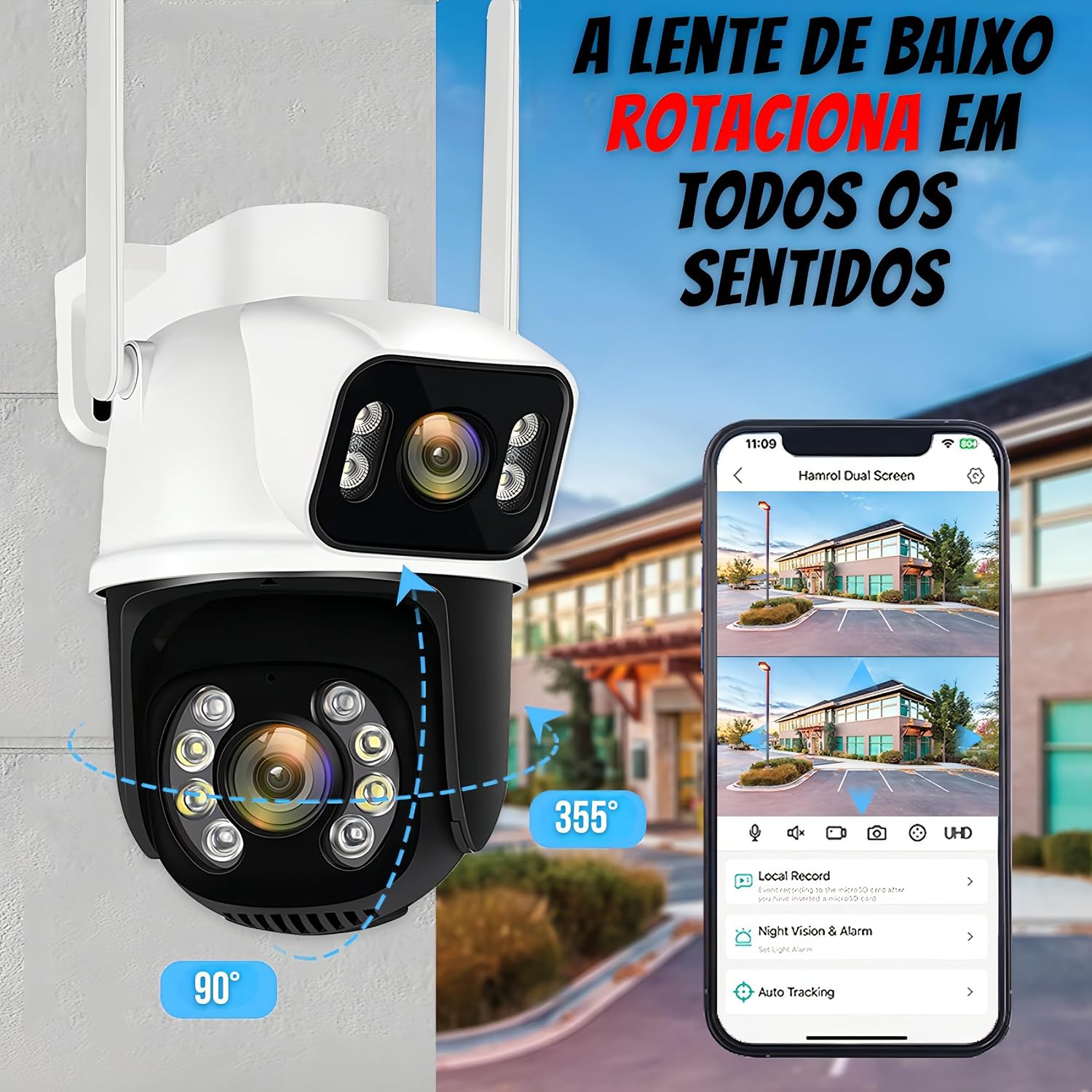
Image: A visual representation of the A28 camera's lower lens rotation capabilities, showing 355 degrees of horizontal movement and 90 degrees of vertical movement.
4.3 Motion Detection and Alerts
Enable motion detection in the app settings. When human movement is detected, the camera will send an alert notification to your smartphone. You can adjust sensitivity settings within the app.
4.4 Two-Way Audio
To use the two-way audio feature, tap the microphone icon in the live view interface of the app. You can speak into your phone, and your voice will be transmitted through the camera's speaker. You will also hear audio from the camera's microphone.

Image: An illustration demonstrating the two-way audio function. A user speaks into a smartphone, which transmits audio to the camera's speaker, allowing communication with a person near the camera.
4.5 Night Vision Modes
The camera automatically switches to night vision in low-light conditions. You can typically choose between infrared (black and white) or full-color night vision (using the white LEDs) through the app settings, depending on your preference and environment.
4.6 Video Recording and Storage
The camera supports local storage via an SD card (not included). Insert a compatible SD card into the designated slot. Recordings can be viewed and managed through the mobile application. The video capture format is AVI.
5. Maintenance
5.1 Cleaning
Regularly clean the camera lenses and housing with a soft, damp cloth to ensure clear image quality. Do not use harsh chemicals or abrasive materials.
5.2 Weather Protection
The camera has an IP66 rating, making it resistant to dust and water jets. While designed for outdoor use, avoid directing high-pressure water streams directly at the camera.

Image: The A28 camera highlighting its IP66 protection grade, indicating its suitability for outdoor environments and resistance to water, extreme cold, extreme heat, and pollution.
6. Troubleshooting
- Camera not connecting to Wi-Fi: Ensure your Wi-Fi network is 2.4GHz. Check Wi-Fi signal strength at the camera's location. Restart your router and the camera.
- No image or poor image quality: Check power connection. Ensure lenses are clean. Verify network connection.
- Motion detection not working: Check app settings to ensure motion detection is enabled and sensitivity is adjusted correctly. Ensure there are no obstructions in the camera's view.
- Two-way audio issues: Check microphone and speaker permissions in your phone's app settings. Ensure volume levels are adequate.
- Remote access failure: Ensure your smartphone has a stable internet connection. Verify the camera is connected to Wi-Fi.
- Camera unresponsive: Try resetting the camera using the reset button (refer to the included manual for exact location).
7. Specifications
| Feature | Specification |
|---|---|
| Model Number | A28 |
| Brand | Genérico |
| Connectivity Technology | Wireless (Wi-Fi 2.4GHz) |
| Power Source | Wired Electric (110V, 220V) |
| Water Resistance Level | IP66 (Waterproof) |
| Environment | Outdoor |
| Mounting Type | Ceiling Mount |
| Video Capture Resolution | 1080p |
| Video Format | AVI |
| Special Features | 2-Way Audio, Motion Detection, Night Vision (Infrared & White LEDs), Dual Lens (Fixed & 360° Rotational) |
| Item Dimensions (L x W x H) | 17 x 11 x 11 cm |
| Viewing Angle | 360 Degrees (for rotating lens) |
| Batteries Required | No |
8. Warranty and Support
For warranty information and technical support, please refer to the specific warranty card included with your product or contact the seller/manufacturer directly. Keep your purchase receipt as proof of purchase.