
1. Introduction
This manual provides detailed instructions for the proper setup, operation, and maintenance of your Daakro AK45 Home Audio Amplifier. Please read this manual thoroughly before using the device to ensure optimal performance and safety. The AK45 is a 2-channel stereo amplifier designed for passive speakers, featuring Bluetooth 5.4 connectivity, multiple input options, and adjustable audio controls.

Figure 1: Daakro AK45 Home Audio Amplifier and Remote Control
2. Product Overview
2.1 Front Panel Controls

Figure 2: Front Panel Layout
- Power Switch: Toggles the amplifier on or off.
- USB/SD Input: Ports for connecting USB flash drives or SD cards for media playback.
- Treble Control: Adjusts the high-frequency audio output (±12dB).
- Bass Control: Adjusts the low-frequency audio output (±12dB).
- Mic Volume Control: Adjusts the volume level for connected microphones.
- Mic Inputs (MIC1, MIC2): Two 1/4" (6.5mm) jacks for connecting microphones.
- Master Volume Control: Adjusts the overall output volume (0-32dB).
- Mode Button: Cycles through input sources (Bluetooth, RCA, USB, SD, FM).
- Playback Controls: Buttons for previous track, play/pause, next track.
- LED Display: Shows current mode, volume level, and track information.
2.2 Rear Panel Connections
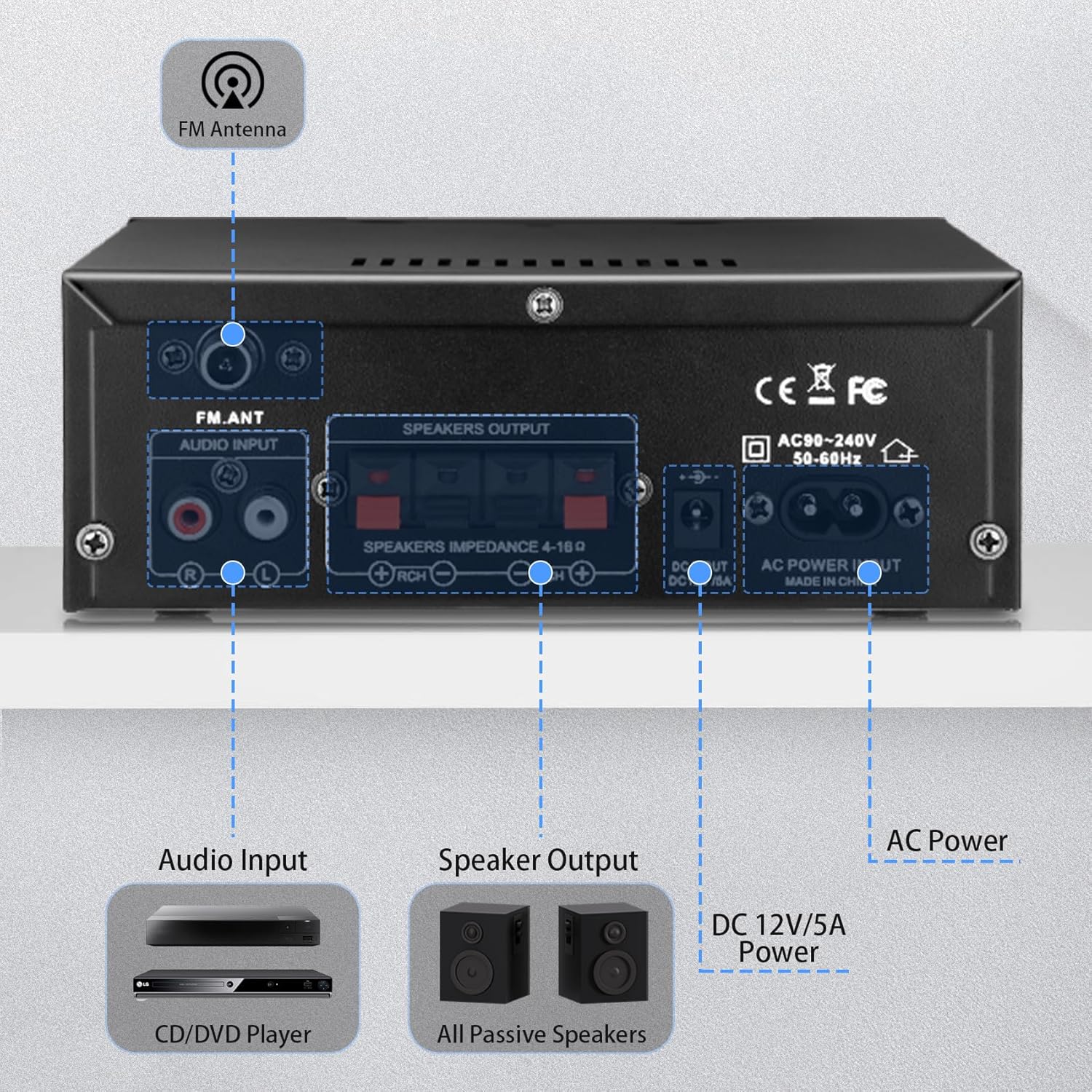
Figure 3: Rear Panel Connections
- FM Antenna Input: Connects the included FM antenna for radio reception.
- Audio Input (RCA): Red and white RCA jacks for connecting external audio sources like CD players or tape decks.
- Speaker Output: Terminals for connecting passive speakers (4-16Ω impedance). Ensure correct polarity (+ to + and - to -).
- DC 12V/5A Power Input: Connects to a 12V/5A DC power adapter (not included).
- AC Power Input: Connects the included AC power cable (AC90-240V, 50-60Hz).
2.3 Remote Control
The included remote control allows for convenient operation of the amplifier from a distance. Functions include power on/off, mode selection, volume adjustment, track control, and EQ settings (if available).
Figure 4: Remote Control
Note: Remove the isolation plastic sheet from the battery compartment of the remote control before first use.
3. Setup
- Connect Speakers: Connect your passive speakers to the 'SPEAKERS OUTPUT' terminals on the rear panel. Ensure the positive (+) terminal of the amplifier connects to the positive (+) terminal of the speaker, and the negative (-) terminal connects to the negative (-). The amplifier supports speakers with an impedance of 4-16Ω.
- Connect Audio Sources:
- RCA Input: Use an RCA cable to connect devices like CD players or tape decks to the 'AUDIO INPUT' jacks.
- USB/SD Card: Insert a USB flash drive or SD card into the respective slots on the front panel.
- Bluetooth: For Bluetooth connection, ensure the amplifier is powered on and in Bluetooth mode.
- Connect FM Antenna: Attach the included FM antenna to the 'FM_ANT' connector on the rear panel for improved radio reception.
- Connect Microphones: If using microphones, plug them into the 'MIC1' or 'MIC2' 1/4" jacks on the front panel.
- Power Connection: Connect the AC power cable to the 'AC POWER INPUT' on the rear panel and then to a wall outlet. Alternatively, if using a DC power source, connect a 12V/5A DC adapter to the 'DC 12V/5A' input.
4. Operating Instructions
4.1 Powering On/Off
Press the 'POWER' switch on the front panel to turn the amplifier on or off. The LED display will illuminate when the unit is powered on.
4.2 Selecting Input Mode
Press the 'MODE' button on the front panel or remote control to cycle through the available input sources: Bluetooth (BLUE), RCA (AUX), USB, SD, and FM radio.
4.3 Bluetooth Pairing
- Switch the amplifier to Bluetooth mode using the 'MODE' button. The LED display will show 'BLUE'.
- On your device (smartphone, tablet, computer), enable Bluetooth and search for available devices.
- Select 'AK45' from the list of devices to pair. A confirmation sound will indicate successful pairing.
Note: Maintain a distance of within 30ft/10m between the device and amplifier without obstructions for optimal Bluetooth performance. For TV or PC connections, keep the distance within 15ft/5m.

Figure 5: Bluetooth 5.4 Connectivity
4.4 Adjusting Audio Levels
- Master Volume: Rotate the large 'VOLUME' knob on the front panel or use the volume buttons on the remote control to adjust the overall sound level.
- Treble/Bass: Use the 'TREBLE' and 'BASS' knobs to fine-tune the high and low frequencies according to your preference.
- Mic Volume: Adjust the 'MIC/VOL' knob to control the volume of connected microphones.
4.5 USB/SD Card Playback
When a USB drive or SD card is inserted, the amplifier will automatically switch to USB/SD mode and begin playing compatible audio files. Use the playback controls (previous, play/pause, next) on the front panel or remote to manage your music.
4.6 Microphone Usage
Connect up to two microphones to the 'MIC1' and 'MIC2' inputs. Adjust the 'MIC/VOL' knob to control microphone volume. This feature is suitable for home karaoke or public address applications.
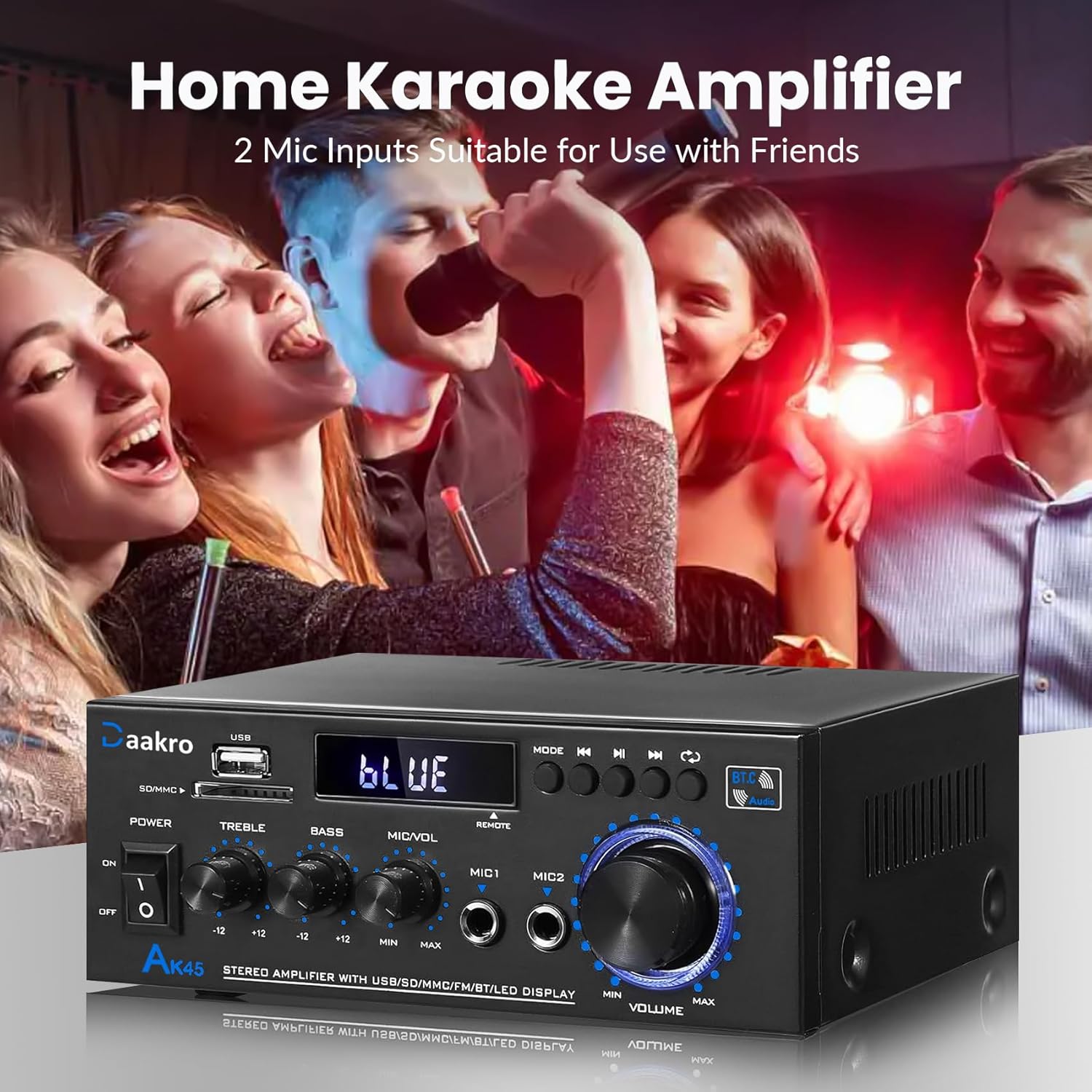
Figure 6: Home Karaoke Application
5. Maintenance
- Cleaning: Use a soft, dry cloth to clean the exterior of the amplifier. Avoid using liquid cleaners or solvents, as they may damage the finish or internal components.
- Ventilation: Ensure the amplifier has adequate ventilation. Do not block the ventilation openings on the top or sides of the unit.
- Storage: When not in use for extended periods, store the amplifier in a cool, dry place away from direct sunlight and extreme temperatures.
- Power Disconnection: Always disconnect the power cable from the wall outlet before performing any cleaning or maintenance.
6. Troubleshooting
- No Power:
- Check if the power cable is securely connected to both the amplifier and the wall outlet.
- Ensure the power switch on the front panel is in the 'ON' position.
- Verify the wall outlet is functioning by plugging in another device.
- No Sound:
- Confirm that speakers are correctly connected to the 'SPEAKERS OUTPUT' terminals with correct polarity.
- Check that the correct input mode is selected (Bluetooth, RCA, USB, SD, FM).
- Increase the 'MASTER VOLUME' knob and ensure it is not at minimum.
- Verify that the audio source device is playing and its volume is turned up.
- Ensure passive speakers are used, as the AK45 is not compatible with active speakers.
- Bluetooth Connection Issues:
- Ensure the amplifier is in Bluetooth mode ('BLUE' on display).
- Delete 'AK45' from your device's Bluetooth list and attempt to re-pair.
- Reduce the distance between your device and the amplifier, and remove any obstructions.
- Restart both the amplifier and your Bluetooth device.
- Poor Sound Quality (Distortion, Low Volume):
- Check speaker connections for loose wires or incorrect polarity.
- Adjust 'TREBLE' and 'BASS' controls.
- Ensure the audio source is providing a clean signal.
- Verify that the speaker impedance is within the supported 4-16Ω range.
- The amplifier uses an upgraded TPA3116 chip for clear audio.

Figure 7: TPA3116D2 Chip for Enhanced Audio Performance
- USB/SD Card Not Reading:
- Ensure the USB drive or SD card is inserted correctly.
- Check that the files on the USB/SD card are in a compatible audio format.
- Try a different USB drive or SD card.
- Remote Control Not Working:
- Ensure the isolation plastic sheet has been removed from the battery compartment.
- Replace the battery in the remote control.
- Point the remote directly at the amplifier's front panel sensor.
7. Specifications
- Model: AK45
- Output Power: 50W + 50W (Theoretical, at 24V/5A, 4-8Ω impedance)
- Amplifier Chip: TPA3116
- Bluetooth Version: 5.4 (QCC3040 core)
- Input Interfaces: 1x RCA, 2x 1/4" Microphone, 1x USB, 1x SD Card Slot, Bluetooth 5.4, FM Radio
- Speaker Impedance: 4-16Ω (Passive Speakers Only)
- Frequency Response: 20Hz - 20kHz
- Tone Control: Treble ±12dB, Bass ±12dB
- Power Supply: AC90-240V, 50-60Hz (or DC 12V/5A)
- Dimensions: 8.78 x 8.31 x 3.7 inches
- Item Weight: 1.94 pounds
7.1 Output Power vs. Power Supply and Impedance

Figure 8: Power Output Table
| Power Supply | Speaker Impedance | Max Output Power |
|---|---|---|
| 9V | 4Ω | 15W |
| 6Ω | 12W | |
| 8Ω | 10W | |
| 12V | 4Ω | 20W |
| 6Ω | 15W | |
| 8Ω | 12W | |
| 18V | 4Ω | 30W |
| 6Ω | 20W | |
| 8Ω | 15W | |
| 22V | 4Ω | 40W |
| 6Ω | 30W | |
| 8Ω | 20W | |
| 24V | 4Ω | 50W |
| 6Ω | 40W | |
| 8Ω | 30W |
8. What's in the Box
Upon opening your Daakro AK45 Home Audio Amplifier package, you should find the following items:
- 1x Daakro AK45 Home Audio Amplifier Unit
- 1x Remote Controller
- 1x AC Power Cable
- 1x FM Antenna
- 1x Instruction Manual (this document)
Figure 9: Package Contents
9. Warranty and Support
Daakro is committed to providing high-quality audio equipment and customer satisfaction.
- Warranty: This product comes with a 30-day warranty from the date of purchase.
- Customer Service: We offer 24-hour online customer service to assist with any inquiries or issues you may encounter.
- Satisfaction Guarantee: We strive for 100% customer satisfaction.
For support, please refer to the contact information provided with your purchase or visit the official Daakro store on Amazon.