
Mintakawa 500C-DIY-2
Mintakawa Automatic Cat Litter Box User Manual
Model: 500C-DIY-2
Introduction
Welcome to the user manual for your new Mintakawa Automatic Cat Litter Box. This self-cleaning litter box is designed to provide a convenient, hygienic, and quiet solution for cat owners. Featuring APP control, weight monitoring, and easy maintenance, it is suitable for medium-sized cats and kittens, helping to maintain a clean and peaceful home environment.

Image: The Mintakawa Automatic Cat Litter Box in light grey, featuring a spacious interior for cats and a digital display. An accompanying smartphone screen illustrates the mobile application's monitoring capabilities, including cat weight and usage records. A litter mat and cleaning accessories are also visible.
Setup and Assembly
This version of the Mintakawa Automatic Cat Litter Box requires assembly. The assembly process typically takes approximately 90 minutes. Please review the included instruction manual and any available video guides before beginning to ensure a smooth setup.
Assembly Steps:
- Unpack all components and verify against the parts list in the included manual.
- Follow the step-by-step instructions to connect the main body base with the drum components.
- Secure all handles, the waste bin, and the upper/lower parts of the drum as indicated.
- Ensure all connections are firm and stable before proceeding.
- Place the assembled unit on a horizontal, hard floor surface. Avoid soft surfaces like carpets to ensure proper leveling and operation.
- Add cat litter to the drum, ensuring it does not exceed the MAX fill line.

Image: An exploded diagram illustrating the various components of the Mintakawa Automatic Cat Litter Box, including the upper lid, waste bin, drum parts, handles, toilet guide bracket, and main body base, providing a visual guide for assembly.
For those who prefer a pre-assembled unit, a no-assembly version of this product is also available from Mintakawa.
Operating Instructions
Powering On and Initial Setup:
- Connect the power adapter to the litter box and a power outlet.
- The unit will perform an initial self-check.
- Press the "M" key to select the function of leveling the cat litter.
- Press the "D" key to perform the cleaning operation.
Smartphone App Connectivity:
The Mintakawa Automatic Cat Litter Box supports 2.4GHz Wi-Fi and Bluetooth connectivity for seamless integration with its companion app. This allows for remote control and monitoring of your cat's activities.
- Download the official Mintakawa app from your smartphone's app store.
- Follow the in-app instructions to pair your device via Wi-Fi or Bluetooth.
- Once connected, you can track your cat's weight, toilet duration, and litter box visits in real-time. This feature is particularly useful for monitoring your cat's health and detecting any changes in their habits.

Image: The Mintakawa Automatic Cat Litter Box highlighting its APP Remote Control capabilities, including features like One Press Clean, Cat Weight Tracking, 2.4G WiFi connectivity, and Data Detection, all manageable via a smartphone application.

Image: A smartphone screen displaying the Mintakawa app interface, showing detailed data points such as cat weight, toilet time, and toileting time, emphasizing the product's focus on monitoring cat health.
Quiet Operation:
The litter box operates at a low noise level, typically under 35 dB, comparable to a soft whisper or a humming refrigerator. This ultra-quiet operation ensures a calm and comfortable environment for both your cats and your household, even when the cleaning cycle is active in the same room.
Maintenance and Cleaning
Regular cleaning of your Mintakawa Automatic Cat Litter Box is essential for hygiene and optimal performance. The thoughtful design makes upkeep simple and efficient.
Waste Bin Emptying:
- To empty the waste bin, locate the access point, typically at the top or side of the unit.
- Remove the waste bag and dispose of it properly.
- Replace with a new trash bag, ensuring it is securely placed.

Image: The Mintakawa Automatic Cat Litter Box shown with arrows indicating how the drum can be easily lifted from the base for cleaning, emphasizing its "Easy Disassembly" feature.
Drum Cleaning:
- The drum is fully water-washable. To clean, simply lift the drum from the base.
- Thoroughly wash the drum with water. Ensure it is completely dry before re-installing it.
- The double-layer polymer fabric lining is designed to be scratch-resistant and anti-stick, making cleaning easier and preventing leakage.
- When placing the drum back on the base, it will automatically return to its original position.
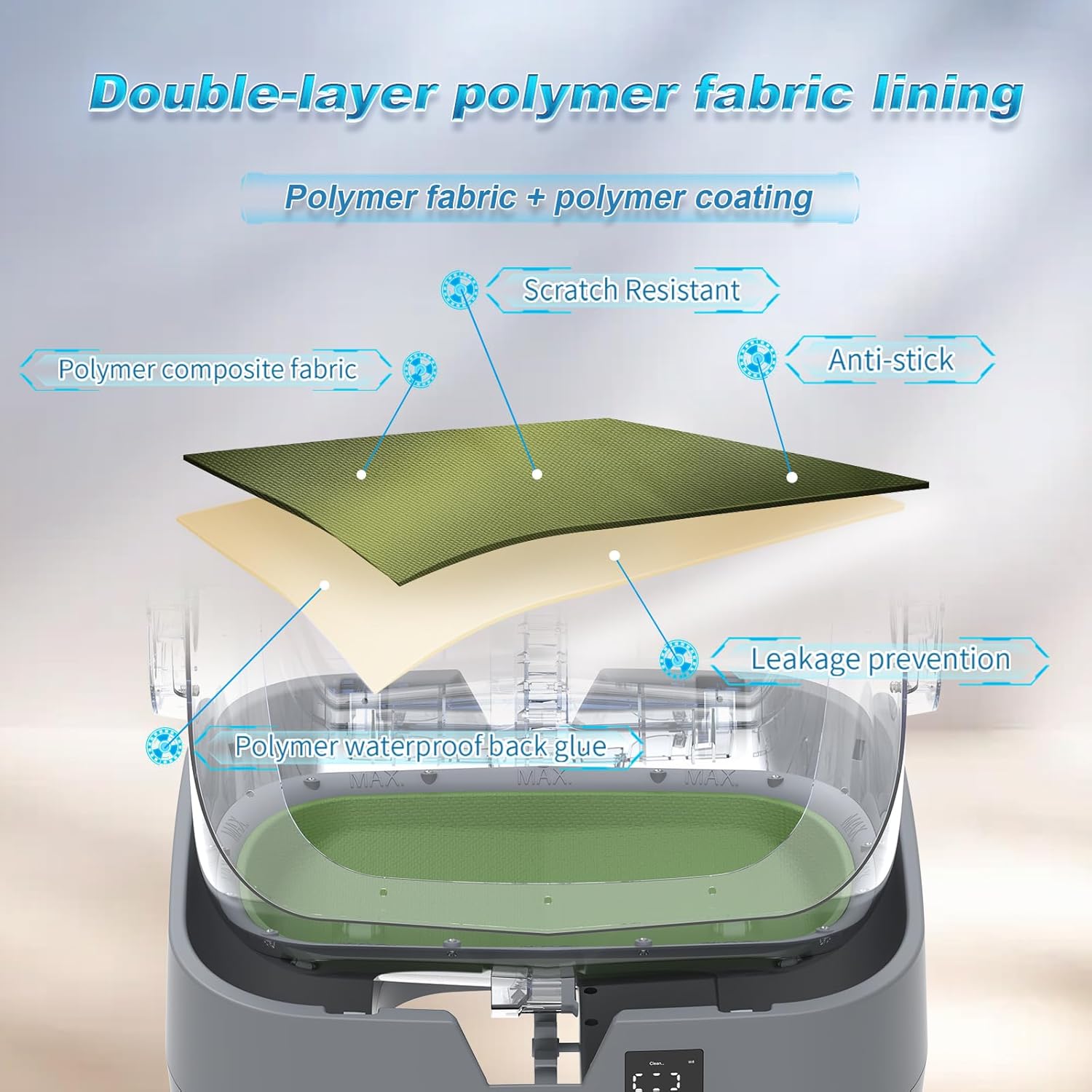
Image: A detailed diagram illustrating the double-layer polymer fabric lining within the litter box drum, highlighting its key features: polymer composite fabric, polymer coating, scratch resistance, anti-stick properties, and polymer waterproof back glue for leakage prevention.
Product Specifications
| Feature | Detail |
|---|---|
| Brand | Mintakawa |
| Model Name | 500C-DIY-2 |
| Item Weight | 22.3 pounds |
| Product Dimensions (LxWxH) | 18.23" x 19.84" x 22.44" |
| Material | Polypropylene (PP) |
| Color | Light Grey |
| Litter Box Type | Automated Self-Cleaning Litter Box |
| Connectivity | 2.4GHz Wi-Fi, Bluetooth |
| Noise Level | Under 35 dB |
| Assembly | Required (approx. 90 mins) |
| Suitable For | Kittens and Medium Cats (3.5lb-20lb) |

Image: The Mintakawa Automatic Cat Litter Box showcasing its semi-enclosed design, with key dimensions (height, width, depth) labeled to illustrate its size and suitability for cats weighing between 3.5 lbs and 20 lbs.
Troubleshooting
If you encounter any issues with your Mintakawa Automatic Cat Litter Box, please refer to the following common troubleshooting steps:
Common Issues and Solutions:
- Unit Not Powering On:
- Ensure the power adapter is securely plugged into both the unit and a working electrical outlet.
- Check if the power outlet is functional by plugging in another device.
- App Connectivity Issues:
- Verify your Wi-Fi network is 2.4GHz. The device does not support 5GHz networks.
- Ensure your smartphone is connected to the same Wi-Fi network during initial pairing.
- Restart both the litter box and your smartphone.
- Try re-pairing the device through the app's setup process.
- Cleaning Cycle Not Initiating/Completing:
- Check if the waste bin is full and needs emptying.
- Ensure the drum is properly seated and locked into place.
- Verify that no obstructions (e.g., large clumps, toys) are preventing the drum from rotating freely.
- Confirm that the cat weight sensor is not being triggered by an object or cat inside the box.
- Unusual Noises During Operation:
- Inspect the drum for any foreign objects or excessive litter buildup that might be causing friction.
- Ensure the unit is placed on a flat, stable surface.
- Odor Issues:
- Ensure regular emptying of the waste bin.
- Perform thorough cleaning of the drum and interior as per the Maintenance section.
- Consider using high-quality clumping cat litter.
If these steps do not resolve the issue, please refer to the full troubleshooting guide in your printed manual or contact Mintakawa customer support.
Warranty and Support
Mintakawa stands behind the quality of its products. For detailed information regarding your product's warranty coverage, please refer to the warranty card included with your purchase or visit the official Mintakawa website.
For technical support, product inquiries, or assistance with any issues not covered in this manual, please contact Mintakawa Customer Service:
- Website: Visit the Mintakawa Store on Amazon
- Email: Refer to your product packaging or official website for contact email.
- Phone: Refer to your product packaging or official website for contact number.
Please have your model number (500C-DIY-2) and purchase date ready when contacting support.
Ask a question about this manual
Ask about setup, troubleshooting, compatibility, parts, safety, or missing instructions. Manuals+ will review the question and use this page’s manual context to help answer it.