1. Introduction
Thank you for choosing the Gens Ace IMARS D300 Smart Dual Lipo Battery Charger. This advanced charger is designed for efficient and safe charging of various battery types, featuring G-Tech smart technology for automatic parameter recognition and enhanced safety. Please read this manual thoroughly before use to ensure proper operation and maximize the lifespan of your batteries and charger.
2. Important Safety Instructions
- Always operate the charger in a well-ventilated area, away from flammable materials.
- Never leave the charger unattended during operation.
- Ensure correct battery type and cell count settings are selected if not using G-Tech smart batteries. Incorrect settings can lead to battery damage or fire.
- Do not charge damaged, swollen, or leaking batteries.
- Keep the charger away from moisture, dust, and direct sunlight.
- Use only original or approved accessories and cables.
- Children should be supervised to ensure they do not play with the appliance.
- Disconnect power immediately if any abnormal behavior or smell is detected.
3. Package Contents
Verify that all items listed below are included in your package:
- Gens Ace iMars D300 Dual Charger
- AC Input Cable
- XT60-T adapter (x2)
- XT60-EC3 adapter (x2)
- XT60-EC5 adapter (x2)
- Type-A Data Cable
- User Manual
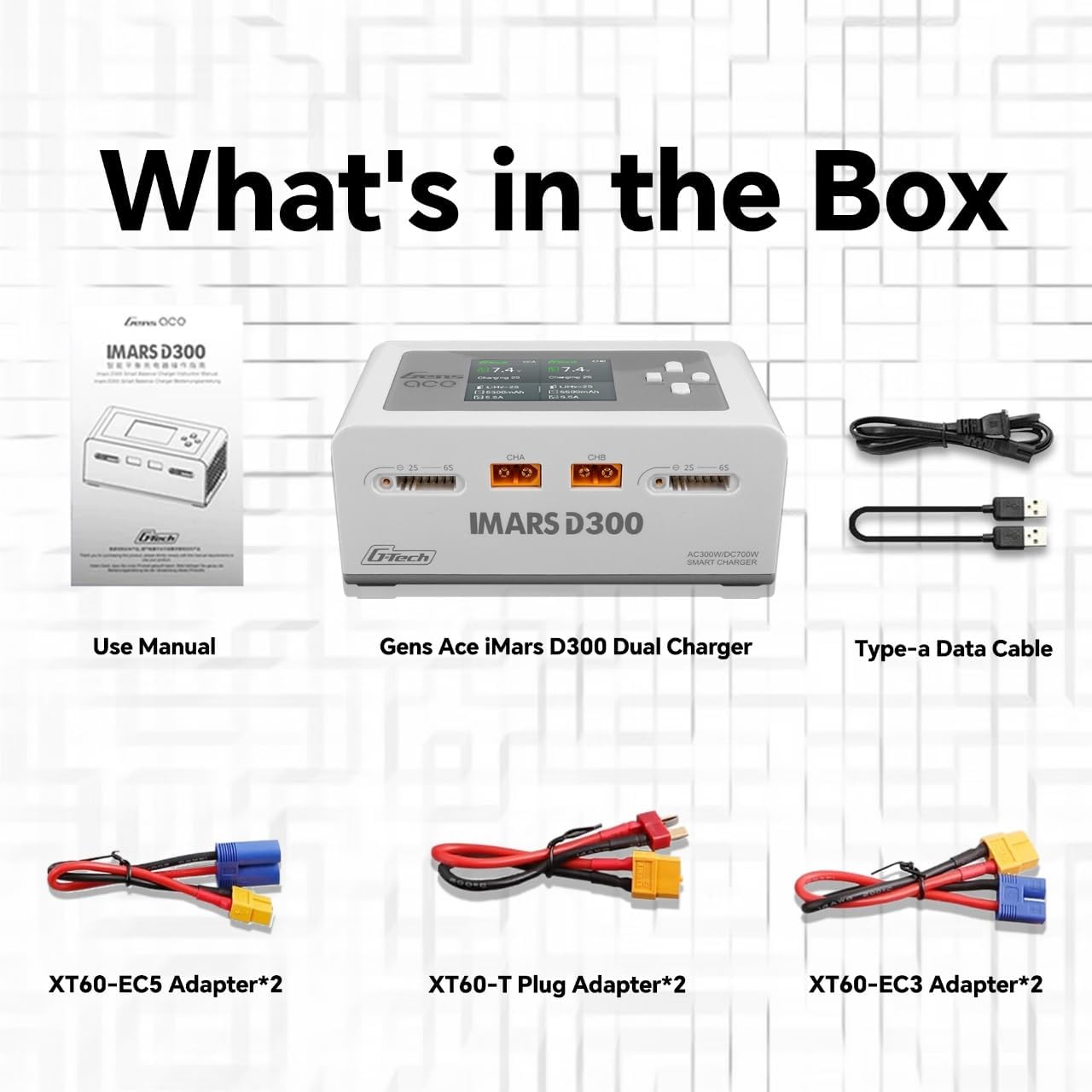
Image: Contents of the Gens Ace iMars D300 package, including the charger, various adapter cables, AC input cable, Type-A data cable, and user manual.
4. Product Overview
The Gens Ace IMARS D300 is a high-performance dual-channel smart charger designed for a wide range of RC batteries. It integrates advanced G-Tech technology for intelligent battery management.
4.1 Key Features
- G-Tech Smart Chip: Automatically identifies G-Tech smart battery parameters and initiates charging, stopping when fully charged.
- Dual Channel Charging: Two independent charging ports (CHA and CHB) allow simultaneous charging of different battery types.
- High Power Output: Max AC charging power of 300W (2 channels) and max DC charging power of 350W per channel (700W total).
- Versatile Operating Modes: Supports Charge, Discharge, Balance, Storage, ExtDischarge, SyncCharging, and Digital Power Supply modes.
- Wide Battery Compatibility: Compatible with LiPo/Li-ion/LIHV/LiFe (1-6S) and NiMH/Cd (1-16S) batteries.
- Intuitive Display: Features a 2.4-inch IPS LCD for clear information display and easy operation.
- Enhanced Safety: Incorporates advanced G-Tech safety features and UL94-V0 Flame Retardant Grade materials.
- Built-in DC Power Source: Can be used to power other USB-A compatible devices.

Image: Front view of the Gens Ace iMars D300 Smart Dual Lipo Battery Charger, showing the dual charging ports, balance ports, and LCD screen.
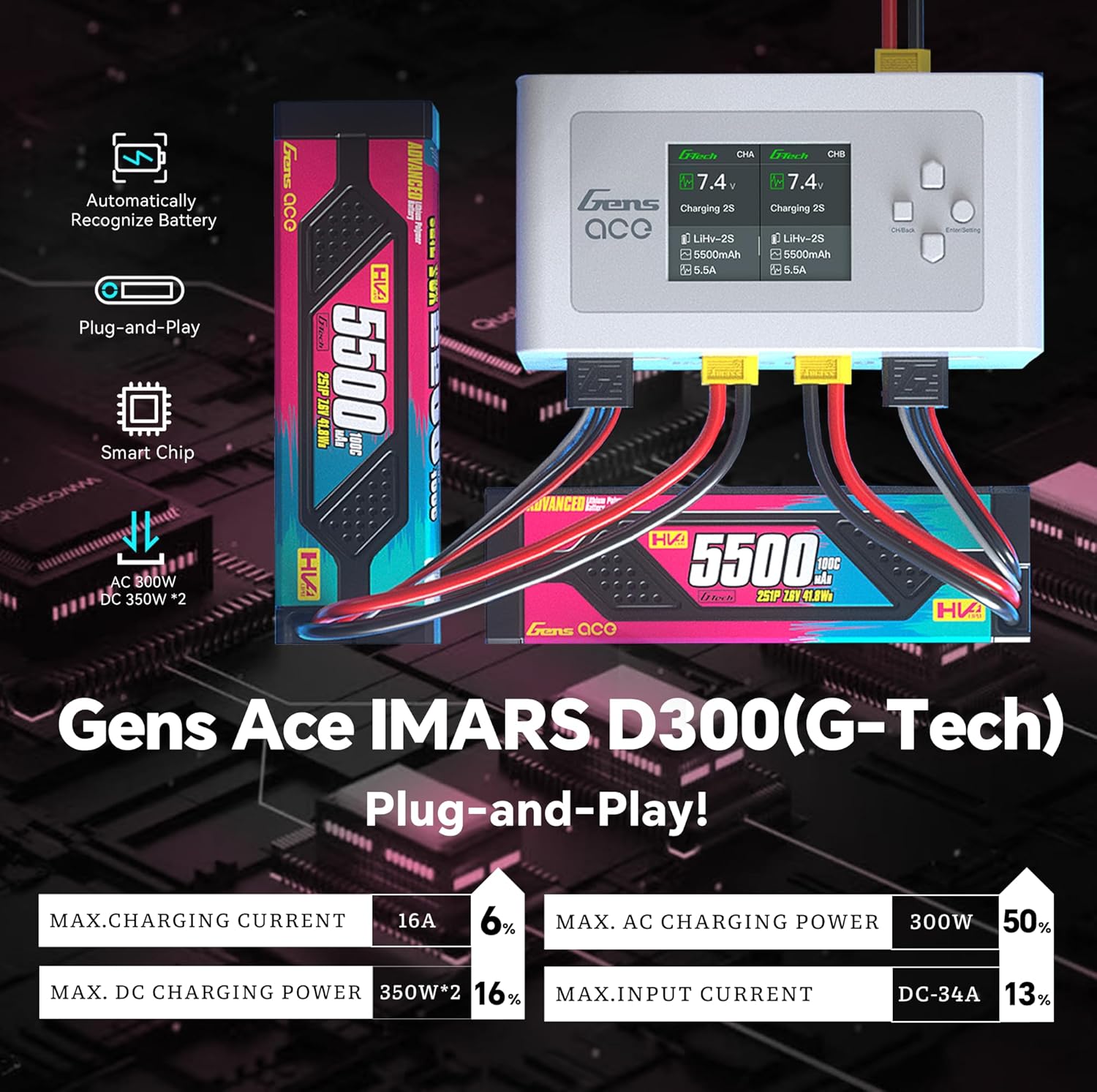
Image: The Gens Ace iMars D300 charger connected to G-Tech smart batteries, illustrating automatic battery recognition and key power specifications like 16A max charging current and 300W AC / 350W*2 DC charging power.

Image: The Gens Ace iMars D300 charger showcasing its compatibility with multiple battery chemistries such as LiFe, LIPO, LiHV, G-TECH, NiMH/NiCd, and LI-ION.
5. Setup and First Use
5.1 Power Connection
- Connect the provided AC input cable to the AC input port on the side of the charger.
- Plug the other end of the AC cable into a suitable wall outlet (AC100-240V).
- Alternatively, for DC input (DC7-30V), connect a compatible DC power source to the DC input port.
- The charger will power on, and the display will illuminate.
5.2 Connecting Batteries
- Identify the main discharge connector and the balance connector of your battery.
- Connect the battery's main discharge connector to either the CHA or CHB port on the charger. Use the appropriate adapter if necessary (e.g., XT60-T, XT60-EC3, XT60-EC5).
- Connect the battery's balance connector to the corresponding balance port (2S-6S) next to the main charging port. Ensure the balance plug is inserted correctly.
- For G-Tech smart batteries, the charger will automatically recognize the battery type and parameters upon connection.
- For non-G-Tech batteries, you will need to manually set the battery type, cell count, and charging current via the charger's interface.
6. G-Tech Smart Features
The IMARS D300 charger is equipped with G-Tech smart technology, simplifying the charging process and enhancing safety, especially when used with Gens Ace G-Tech smart batteries.
- Automatic Recognition: When a G-Tech smart battery is connected, the charger automatically detects its type, cell count, capacity, and recommended charging parameters.
- Plug & Play: With G-Tech batteries, manual settings are largely eliminated. Simply connect the battery, confirm the smart charge prompt, and the charger handles the rest.
- Optimized Charging: The G-Tech system optimizes charging parameters to prolong battery life and ensure efficient charging.
- Enhanced Safety: Built-in safety features monitor the battery throughout the charging cycle, providing a higher level of protection.
Video: This video demonstrates the G-Tech smart chip technology, showing how the charger automatically recognizes battery parameters and initiates charging. It highlights the ease of use and intelligent features of the IMARS D300.
Video: This video illustrates the G-Tech smart chip's function in automatically recognizing battery cycles, individual cell voltage, and capacity, streamlining the charging process for G-Tech batteries. It also shows the charger's compatibility with both G-Tech and standard batteries.
7. Operating Modes
The IMARS D300 offers seven distinct operating modes to cater to various battery maintenance needs:
- Charge: Standard charging mode to fully charge the battery.
- Discharge: Discharges the battery to a set voltage.
- Balance: Balances the voltage of individual cells within a multi-cell battery pack during charging.
- Storage: Charges or discharges the battery to a specific voltage level suitable for long-term storage, preserving battery health.
- ExtDischarge: External discharge mode (requires external discharge device, not included).
- SyncCharging: Allows synchronized charging across both channels for identical battery packs.
- Digital Power Supply: The charger can function as a stable DC power supply for other devices.
8. Specifications
| Feature | Specification |
|---|---|
| Input Voltage | AC100-240V / DC7-30V |
| Output Voltage | DC 1-30V |
| Max. Charging Power | AC 300W (2 channels) / DC 350W*2 (700W total) |
| Max. Discharging Power | 15W*2 (Main port 6W*2, Balance port 9W*2) |
| Charge Current | 0.1-16A*2 |
| Discharge Current | 0.1-3A*2 |
| Cell Balancing | 1-6S |
| Supported Battery Chemistries | LiPo/Li-ion/LIHV/LiFe 1-6S; NiMH/Cd 1-16S |
| Display | 2.4 inch IPS LCD |
| Product Dimensions | 7.5 x 6.4 x 3 inches (19.05 x 16.26 x 7.62 cm) |
| Item Weight | 1 pound (0.45 kg) |
| Manufacturer | Gens Ace |
9. Troubleshooting
- Charger not powering on: Ensure the AC input cable is securely connected to both the charger and a live power outlet. Check the power source.
- Battery not recognized (non-G-Tech): Verify that the battery type and cell count are manually set correctly in the charger's menu.
- Charging error message: Check all connections (main and balance ports) for secure contact. Inspect the battery for any visible damage. Refer to the charger's display for specific error codes or messages.
- Slow charging: Ensure the charging current is set appropriately for your battery's capacity. Check the power input (AC vs. DC) and ensure it meets the charger's requirements for optimal performance.
10. Warranty and Support
For warranty information, technical support, or service inquiries, please contact Gens Ace customer support through their official website or the retailer where the product was purchased. Keep your proof of purchase for warranty claims.
For additional resources and product updates, visit the official Gens Ace website.


