
1. Introduction
This manual provides detailed instructions for the proper use and maintenance of your Oakcastle HIFI500 Remote Control. This remote is designed as a replacement or spare for the Oakcastle HIFI500 audio system, ensuring seamless control over its functions. Please read this manual thoroughly before use to ensure optimal performance and longevity of your remote control.
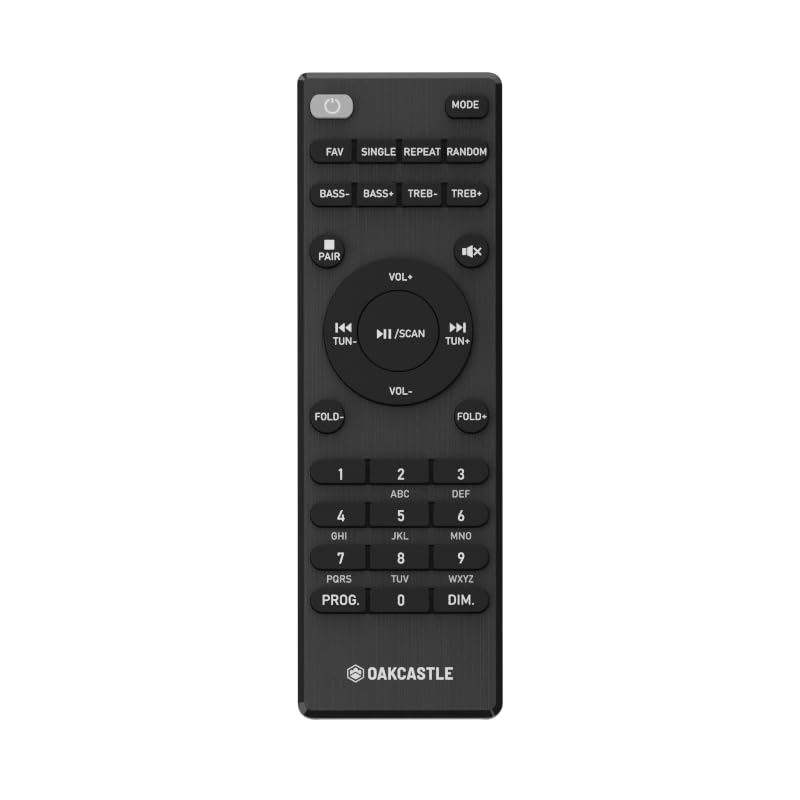
Figure 1.1: Front view of the Oakcastle HIFI500 Remote Control. This image displays the compact design and button layout, including power, volume, source selection, and playback controls, typical for operating the HIFI500 audio system.
2. Setup
2.1. Battery Installation
The Oakcastle HIFI500 Remote Control requires two AAA batteries (not included) for operation. Follow these steps to install the batteries:
- Locate the battery compartment on the back of the remote control.
- Press down on the tab and slide the battery cover downwards to open it.
- Insert two AAA batteries, ensuring the positive (+) and negative (-) terminals align correctly with the markings inside the compartment.
- Slide the battery cover back into place until it clicks securely.
Note: Always use new batteries and dispose of old batteries responsibly. Do not mix old and new batteries, or different types of batteries.
2.2. Initial Use
Once batteries are installed, the remote control is ready for use with your Oakcastle HIFI500 audio system. Point the remote directly at the infrared (IR) receiver on your HIFI500 system. No additional pairing is typically required for this replacement remote.
3. Operating the Remote Control
The Oakcastle HIFI500 Remote Control provides full functionality for your HIFI500 audio system. Below is a general guide to common button functions:
- Power Button (⏻): Turns the HIFI500 system on or off.
- Volume Up/Down (Vol+ / Vol-): Adjusts the audio output level.
- Mute (🔇): Temporarily silences the audio output.
- Source/Input (Source): Cycles through available audio inputs (e.g., CD, FM, Bluetooth, AUX).
- Playback Controls (▶ / ⏸ / ⏹ / ⏪ / ⏩): Controls media playback (Play, Pause, Stop, Rewind, Fast Forward) for compatible sources like CD or USB.
- Navigation Buttons (▲ / ▼ / ◀ / ▶): Used to navigate menus and selections on the HIFI500 system display.
- OK/Enter Button: Confirms selections.
- Numeric Keypad (0-9): For direct input of radio frequencies, track numbers, or other numerical data.
Refer to your Oakcastle HIFI500 audio system's main user manual for specific functions and advanced operations.
4. Maintenance
4.1. Cleaning
To clean your remote control, gently wipe the surface with a soft, dry cloth. For stubborn dirt, slightly dampen the cloth with water or a mild, non-abrasive cleaner. Avoid using harsh chemicals, solvents, or abrasive materials, as these can damage the remote's finish or internal components.
4.2. Battery Replacement
Replace batteries when the remote's response becomes sluggish or stops working. Follow the battery installation steps outlined in Section 2.1. Always replace both batteries simultaneously with new ones.
4.3. Storage
When not in use for extended periods, it is recommended to remove the batteries from the remote control to prevent leakage, which can cause damage. Store the remote in a cool, dry place away from direct sunlight and extreme temperatures.
5. Troubleshooting
If you encounter issues with your Oakcastle HIFI500 Remote Control, please refer to the following common problems and solutions:
- Remote not responding:
- Check if the batteries are correctly installed with the correct polarity.
- Replace the batteries with new ones.
- Ensure there are no obstructions between the remote control and the HIFI500 system's IR receiver.
- Make sure you are within the effective range and pointing the remote directly at the HIFI500 system.
- Intermittent function:
- This often indicates low battery power. Replace the batteries.
- Ensure the remote's IR emitter is clean and free from dirt or smudges.
If the problem persists after trying these solutions, please contact Oakcastle customer support.
6. Specifications
| Feature | Specification |
|---|---|
| Model | HIFI500 Remote Control |
| Brand | Oakcastle |
| Connectivity Technology | Infrared (IR) |
| Power Source | 2 x AAA Batteries (not included) |
| Max Number of Supported Devices | 1 (Oakcastle HIFI500 Audio System) |
| Special Feature | Lightweight |
| Item Weight | 2.82 ounces (approx. 80 grams) |
| Package Dimensions | 8 x 3.2 x 2.5 inches (approx. 20.3 x 8.1 x 6.3 cm) |
| Manufacturer | MAJORITY |
7. Warranty and Support
7.1. Warranty Information
This Oakcastle HIFI500 Remote Control is covered by a manufacturer's warranty. Please refer to the warranty card included with your original Oakcastle HIFI500 audio system or visit the official Oakcastle website for detailed warranty terms and conditions. Keep your proof of purchase for warranty claims.
7.2. Customer Support
For technical assistance, troubleshooting beyond this manual, or warranty inquiries, please contact Oakcastle customer support. You can typically find contact information, including phone numbers, email addresses, and support portals, on the official Oakcastle website.
Please have your product model (HIFI500 Remote Control) and purchase details ready when contacting support.


