
Tuanzi D9
Tuanzi D9 Smart Watch with Built-in Headphones User Manual
Model: D9
Introduction
This manual provides comprehensive instructions for the setup, operation, and maintenance of your Tuanzi D9 Smart Watch with Built-in Headphones. Please read this manual thoroughly before using the device to ensure proper functionality and to maximize your user experience.
What's in the Box
- 1 x D9 Smartwatch with Earbuds
- 1 x Silicone Case
- 1 x Charging Cable
- 1 x User Manual (this document)
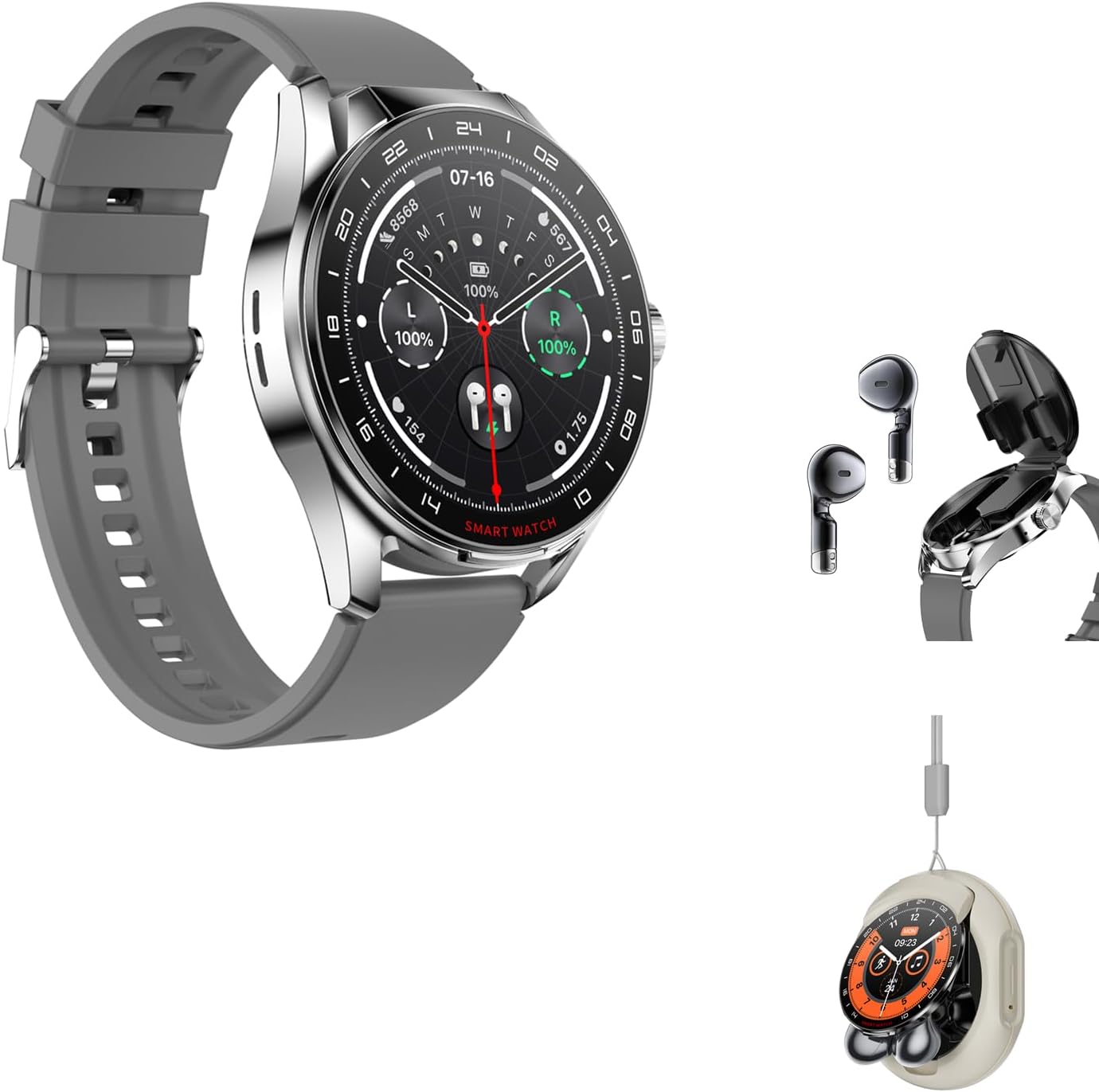
Image: Contents of the Tuanzi D9 Smart Watch package, including the smartwatch, earbuds, and charging cable.
Setup
Charging the Device
Before first use, fully charge your D9 Smart Watch. Connect the charging cable to the charging port on the back of the watch and plug the USB end into a compatible power adapter (not included) or a computer's USB port.
- The watch display will indicate charging status.
- A full charge typically takes approximately 2 hours.
Image: The D9 Smart Watch connected to its charging cable.
Pairing with Your Smartphone
The D9 Smart Watch is compatible with iOS (12 and above), Android (7.0 and above), and HarmonyOS. To unlock full functionality, pair your watch with your smartphone via the dedicated application.
- Download the App: Search for "FaceLink" in your smartphone's app store (Apple App Store for iOS, Google Play Store for Android).
- Enable Bluetooth: Ensure Bluetooth is enabled on your smartphone.
- Open the App: Launch the FaceLink app and follow the on-screen instructions to create an account or log in.
- Add Device: Within the app, navigate to the "Add Device" or "Pair Device" section.
- Select D9: The app will scan for nearby devices. Select "D9" from the list of available devices.
- Confirm Pairing: A pairing request will appear on both your phone and the watch. Confirm the pairing on both devices.
Once successfully paired, the watch will synchronize time, date, and other settings with your phone.
Operating Instructions
Basic Navigation
The D9 Smart Watch features a 1.46-inch HD touch screen for intuitive navigation.
- Swipe Up/Down: Scroll through menus and notifications.
- Swipe Left/Right: Access different widgets or quick settings.
- Tap: Select an item or confirm an action.
- Press Side Button: Return to the home screen or power on/off the device (long press).

Image: The D9 Smart Watch's 1.46-inch HD touch screen displaying the time and other information.
Using the Built-in Headphones
The D9 Smart Watch integrates Bluetooth headphones directly into its design for convenient audio and calls.
- Accessing Headphones: Gently open the watch's side compartment to retrieve the earbuds.
- Automatic Pairing: The earbuds will automatically connect to the watch (and your paired phone) once removed from their compartment.
- Wearing: Insert the earbuds into your ears. Ensure a comfortable and secure fit.
- Controls: The earbuds feature touch controls for various functions.

Image: The D9 Smart Watch with its integrated earbuds visible in their storage compartment.

Image: A detailed guide to the touch functions of the D9 Smart Watch earbuds.
Health and Fitness Tracking
The D9 Smart Watch offers comprehensive health and fitness monitoring features.
- Heart Rate Monitoring: The watch continuously monitors your heart rate. View real-time data on the watch or detailed trends in the app.
- Sleep Monitoring: Tracks deep, light, and REM sleep stages to provide insights into your sleep quality.
- Breathing Exercises: Guided breathing exercises are available to help reduce stress and improve focus.
- Activity Tracking: Records steps, distance, and calorie consumption.
- Multiple Sports Modes: Select specific modes for various indoor and outdoor activities for accurate data collection.

Image: Visual representation of the D9 Smart Watch's health tracking features: heart rate, sleep, and breathing exercises.
Note: The measurement results of this product are for reference only and are not intended for any medical purpose or basis. Please follow your doctor's instructions and do not self-diagnose and treat based on these measurement results.
Additional Features
- Bluetooth Calling: Make and receive calls directly from your watch using the built-in microphone and speaker, or through the earbuds.
- Music Playback: Control music playing on your phone or utilize the watch's external music playback feature.
- Message Reminders: Receive notifications for calls, texts, and app alerts.
- Weather Updates: Get real-time weather information.
- AI Voice Assistant: Activate your phone's voice assistant directly from the watch.
- Customizable Watch Faces: Personalize your watch with a variety of pre-installed faces or create your own.
- Alarms & Reminders: Set alarms and reminders for important events.

Image: Overview of various functions available on the D9 Smart Watch, such as music control, voice assistant, and notifications.
Maintenance
Cleaning Your Device
- Wipe the watch screen and body with a soft, lint-free cloth.
- For stubborn spots, slightly dampen the cloth with water. Avoid using harsh chemicals or abrasive materials.
- Clean the charging contacts periodically with a dry cotton swab to ensure good connection.
- For the earbuds, gently wipe them with a dry, soft cloth. Ensure no moisture enters the speaker or microphone openings.
Storage
When not in use for extended periods, store the D9 Smart Watch in a cool, dry place away from direct sunlight and extreme temperatures. Ensure the device is partially charged before storing to preserve battery health.
Battery Care
- Avoid fully discharging the battery frequently.
- Do not expose the device to temperatures below 0°C (32°F) or above 45°C (113°F).
- Use only the provided charging cable.
Troubleshooting
| Problem | Possible Cause | Solution |
|---|---|---|
| Watch does not turn on. | Low battery. | Charge the watch for at least 30 minutes. |
| Cannot pair with smartphone. | Bluetooth is off; App not running; Watch not in pairing mode; Interference. | Ensure Bluetooth is on. Restart the app and watch. Try pairing again. Move away from other Bluetooth devices. |
| Earbuds not connecting. | Earbuds not properly seated in watch; Low earbud battery. | Ensure earbuds are fully inserted into their compartment for charging. Re-insert and try again. |
| Inaccurate health data. | Watch not worn correctly; Sensor dirty. | Ensure the watch is snug on your wrist. Clean the heart rate sensor on the back of the watch. |
| Notifications not received. | App permissions not granted; Notifications disabled in app/phone settings. | Check app permissions for notifications. Ensure notifications are enabled in both the FaceLink app and your phone's system settings. |
Specifications
| Feature | Detail |
|---|---|
| Model Name | D9 |
| Brand | Tuanzi |
| Screen Size | 1.46 Inches |
| Display Type | HD Touch Screen (360*360 resolution) |
| Shape | Round |
| Connectivity Technology | Bluetooth |
| Battery Capacity | 240 Milliamp Hours (Nonstandard Battery) |
| Operating System Compatibility | iOS 12 and above, Android 7.0 and above, HarmonyOS 3 and above |
| Companion App | FaceLink |
| Special Features | Activity Tracker, Built-in Headphones, Bluetooth Calling, Heart Rate Monitor, Sleep Monitor, Music Player, AI Voice Assistant |
| GPS | GPS Via Smartphone |
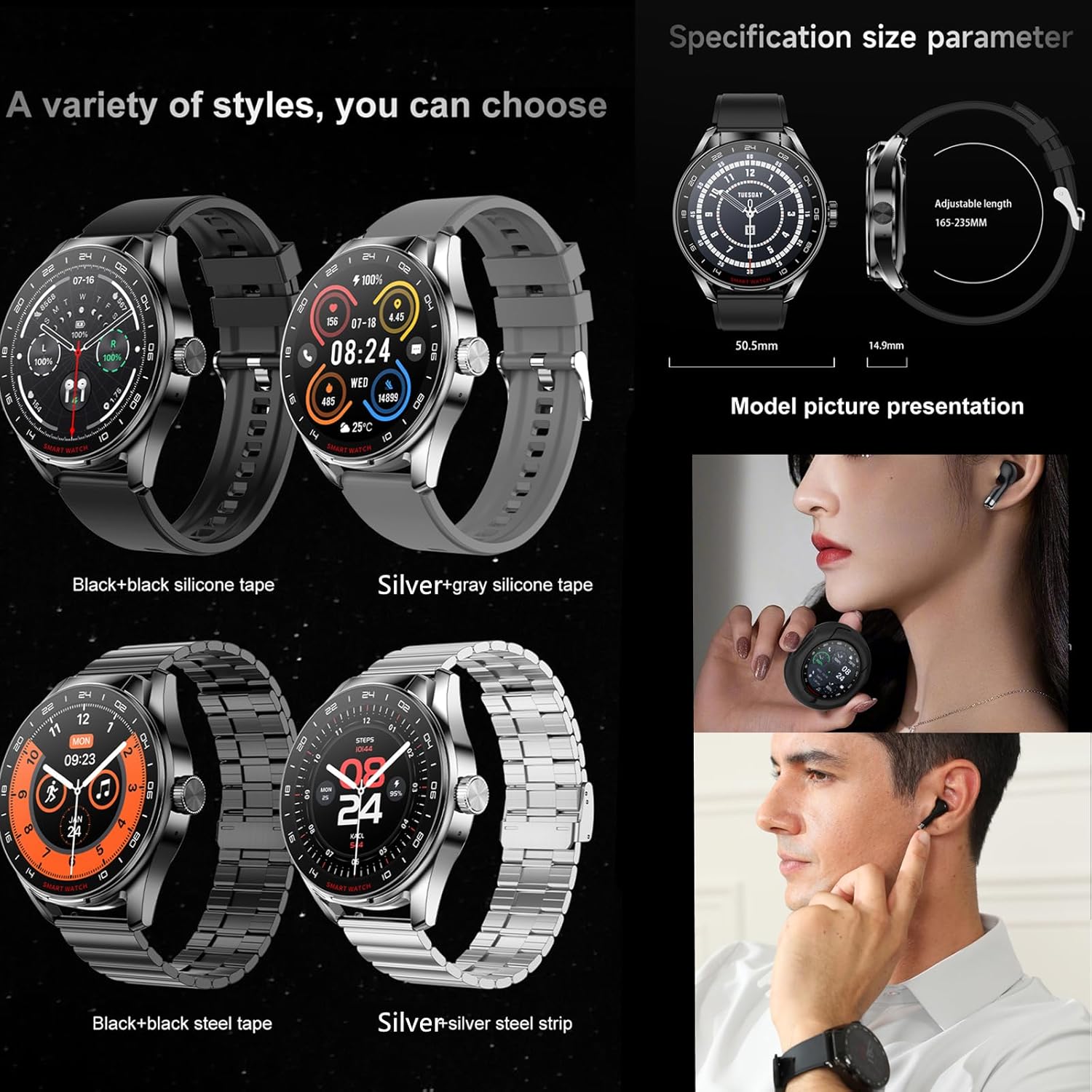
Image: D9 Smart Watch dimensions and available styles (Black+black silicone, Silver+gray silicone, Black+black steel, Silver+silver steel).
Warranty and Support
Warranty Information
For information regarding the product warranty, please refer to the warranty card included with your purchase or contact Tuanzi customer support. Standard return policy is 30 days from purchase.
Customer Support
If you encounter any issues or have questions not covered in this manual, please contact Tuanzi customer support through the following channels:
- Online Support: Visit the official Tuanzi store on Amazon: Tuanzi Store
- Refer to the contact information provided on the product packaging or the official Tuanzi website.
Ask a question about this manual
Ask about setup, troubleshooting, compatibility, parts, safety, or missing instructions. Manuals+ will review the question and use this page’s manual context to help answer it.