
1. Introduction
This manual provides comprehensive instructions for the assembly, operation, and maintenance of your TVON Rolling TV Stand with Power Outlet. Please read this manual thoroughly before installation and use to ensure safe and optimal performance of the product. This stand is designed to accommodate most 13-50 inch televisions weighing up to 55 lbs, with VESA patterns ranging from 75x75mm to 200x200mm.

Image: The TVON Rolling TV Stand, featuring a television mounted on the stand, a media shelf, and an integrated power strip with a power cord extending to an outlet.
2. Safety Information
- Weight Capacity: Do not exceed the maximum weight capacity of 55 lbs (25 kg) for the TV mount and 11 lbs (5 kg) for the media shelf. Overloading can cause instability and potential injury.
- TV Size and VESA Compatibility: Ensure your television is between 13 and 50 inches and has a VESA mounting pattern compatible with 75x75mm to 200x200mm. Refer to your TV's manual for VESA specifications.
- Assembly: Follow all assembly instructions carefully. Incorrect assembly can lead to product failure or injury. If you encounter difficulties, contact customer support.
- Stability: Always ensure the stand is on a stable, level surface. When using the wheels, lock them to prevent accidental movement. If using fixed feet, ensure they are properly adjusted for balance.
- Power Strip: The integrated power strip is rated for 125V/12A. Do not overload the power strip. Use the one-touch off switch for childproofing and to cut power when not in use.
- Children and Pets: Keep children and pets away from the stand during assembly and ensure the TV is securely mounted to prevent tipping.
- Material: The stand is constructed from alloy steel. Avoid using harsh chemicals for cleaning that may damage the finish.
3. Setup and Assembly
The TVON Rolling TV Stand is designed for straightforward assembly. All necessary tools and clear instructions are included with the product. Please refer to the detailed assembly guide provided in your product packaging for step-by-step instructions.
3.1. Compatibility Check
Before beginning assembly, verify that your television is compatible with the stand:
- TV Size: 13 to 50 inches
- TV Weight: Maximum 55 lbs (25 kg)
- VESA Pattern: Minimum 75x75mm, Maximum 200x200mm (Width x Height)

Image: A diagram illustrating how to check TV compatibility, including VESA measurements (width x height), supported TV sizes (13-50 inches), and maximum weight (55 lbs).
3.2. Component Overview
Familiarize yourself with the main components of the TV stand:
- Base with choice of mobile wheels or fixed leveling feet.
- Vertical support pole with height adjustment mechanism.
- TV mounting bracket (VESA compatible).
- Adjustable media shelf.
- Integrated power strip with 6.5ft power cord.
- Cable management clips.
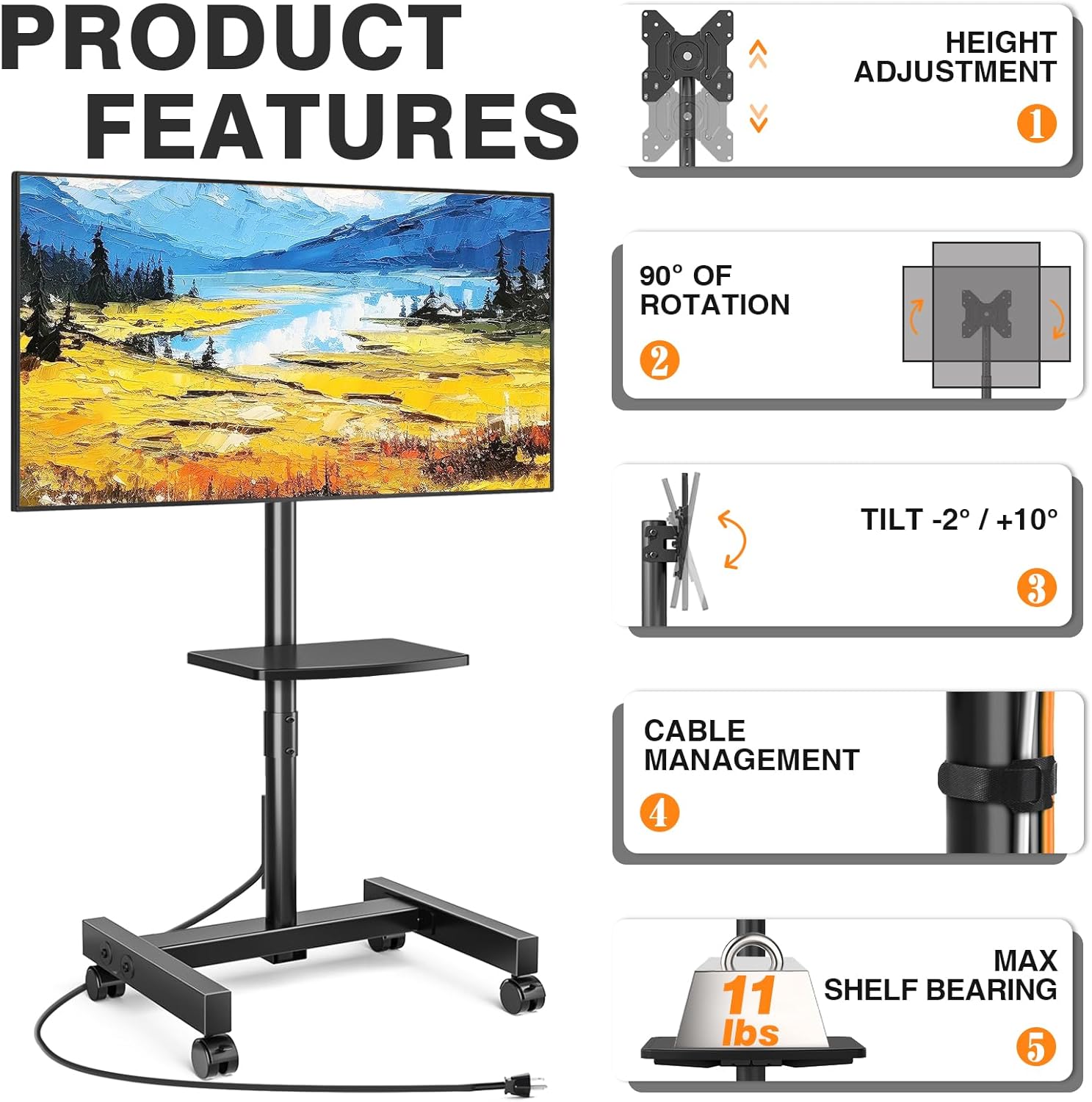
Image: A diagram highlighting key product features: height adjustment, 90-degree rotation, -2 to +10 degree tilt, cable management, and the 11 lbs maximum shelf bearing capacity.
3.3. Base Installation (Mobile or Fixed)
The stand offers two options for the base: mobile feet with wheels or stable leveling feet. Choose the option that best suits your needs during assembly.
- Mobile Feet: Attach the flexible wheels to the base. Ensure all wheels are securely fastened. The wheels feature a 360-degree swivel and a lockable mechanism for stability.
- Fixed Feet: Attach the stable leveling feet to the base. These feet can be adjusted to maintain balance on uneven surfaces.

Image: A comparison showing the two base options: 'A' a rolling TV stand with 360-degree lockable wheels, and 'B' a floor TV stand with stable leveling feet for fixed placement.
3.4. Power Strip Installation
The power strip is integrated into the stand's design for convenience. It features 4 AC outlets (125V/12A), a thickened 16AWG pure copper wire, a 6.5ft extension cord, and a master switch for safety.

Image: A detailed view of the multifunction power strip, highlighting its 125V/12A 4 AC outlets, thickened wire, master switch, and 6.5ft power cord.
4. Operating Instructions
4.1. Height Adjustment
The TV stand offers 6 levels of height adjustment, with each level providing a 1.6-inch (50mm) change. The total height range for the center of the TV is approximately 44.2 to 52 inches.
- To adjust the height, locate the adjustment pins on the vertical support pole.
- Carefully lift the TV and mounting bracket assembly to relieve pressure on the pins.
- Remove the pins, adjust the TV to the desired height level, and reinsert the pins securely. Ensure both pins are fully engaged before releasing the TV.
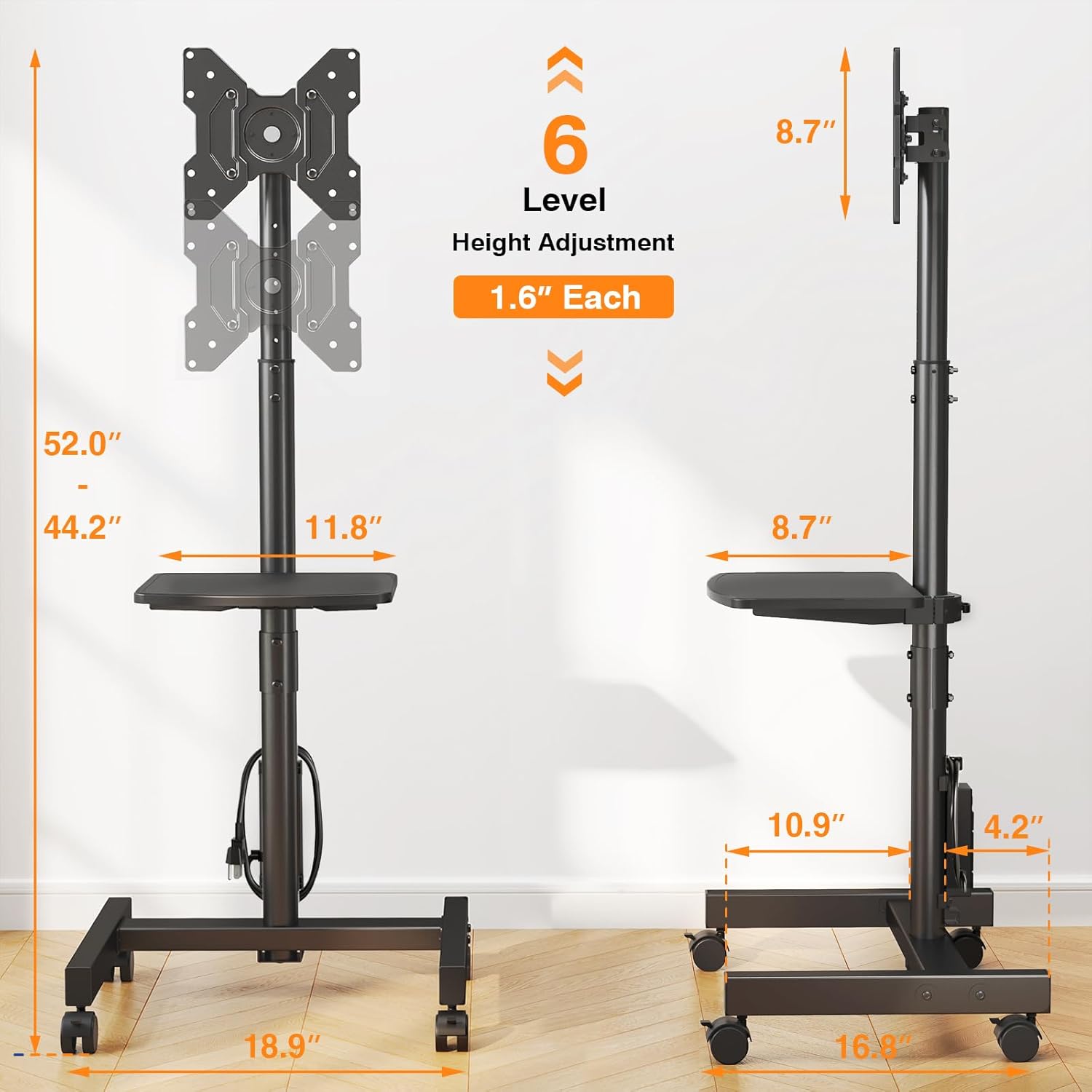
Image: A diagram illustrating the 6-level height adjustment feature, showing the stand's dimensions and the 1.6-inch increment per level, with a total height range from 44.2 to 52 inches.
4.2. Tilt Adjustment
The TV mount allows for a tilt range of +10 degrees (upward) to -2 degrees (downward) to optimize viewing angles and reduce glare.
- Loosen the tilt adjustment knobs or bolts located on the side of the TV mounting bracket.
- Carefully adjust the TV to the desired tilt angle.
- Tighten the knobs or bolts firmly to secure the TV in position.

Image: A close-up diagram illustrating the tilt adjustment mechanism, showing the TV mount tilting from +10 degrees to -2 degrees.
4.3. Rotation (Portrait to Landscape)
The TV mount supports 90-degree rotation, allowing you to switch between landscape and portrait orientations.
- Ensure the TV is securely mounted and there is sufficient clearance for rotation.
- Carefully rotate the TV to the desired orientation (90 degrees clockwise or counter-clockwise).
- The mount is designed to hold the TV securely in both landscape and portrait positions.

Image: A diagram illustrating the stand's flexibility, showing a TV rotating 90 degrees, tilting from +10 to -2 degrees, and offering 6 height levels.
4.4. Using the Media Shelf
The media shelf is height-adjustable and can swivel 360 degrees. It is designed to hold devices such as set-top boxes, game consoles, or remote controls, with a maximum weight capacity of 11 lbs.

Image: A close-up of the flexible AV shelf, highlighting its height-adjustable, easy-to-remove, and 360-degree swivel features, with a radio and books placed on it.
4.5. Mobility and Stability
When using the mobile feet, unlock the wheels to move the stand. Lock the wheels once the stand is in the desired position to ensure stability. If using fixed feet, ensure they are adjusted to provide a stable and level base.
5. Maintenance
- Cleaning: Use a soft, dry cloth to clean the stand. For stubborn marks, a slightly damp cloth with mild soap can be used, followed by drying. Avoid abrasive cleaners or solvents.
- Periodic Checks: Regularly check all bolts, screws, and connections to ensure they remain tight and secure. Re-tighten if necessary.
- Cable Management: Ensure cables are neatly routed through the cable management system to prevent snagging or damage.
6. Troubleshooting
- Stand is Wobbly:
- Ensure all assembly bolts are securely tightened.
- If using wheels, ensure they are locked.
- If using fixed feet, adjust them to level the stand on uneven surfaces.
- Verify that the TV weight does not exceed 55 lbs and is centered on the mount.
- TV Does Not Fit:
- Re-check your TV's VESA pattern against the stand's compatibility (75x75mm to 200x200mm).
- Confirm your TV size is between 13 and 50 inches.
- Ensure your TV weight is within the 55 lbs limit.
- Power Strip Not Working:
- Check if the master switch on the power strip is in the 'ON' position.
- Ensure the power cord is fully plugged into a functional wall outlet.
- Verify that the total power draw of connected devices does not exceed 12A.
7. Specifications
| Brand | TVON |
| Model | B0DZNWD6NV |
| Material | Alloy Steel |
| Color | BLACK |
| Product Dimensions | 18.86 x 16.77 x 52.05 inches (L x W x H) |
| Item Weight | 12.58 pounds |
| Mounting Type | Floor Mount |
| Movement Type | Rotate, Swivel, Tilt |
| Compatible TV Sizes | 13-50 inches |
| Maximum TV Weight | 55 lbs (25 kg) |
| VESA Compatibility | 75x75mm to 200x200mm |
| Height Adjustment | 6 levels (1.6 inches/level), Total 44.2-52 inches |
| Tilt Angle | +10° to -2° |
| Rotation | 90° (Portrait to Landscape) |
| Media Shelf Capacity | 11 lbs (5 kg) |
| Power Strip | 125V/12A, 4 AC Outlets, 16AWG Wire, 6.5ft Cord |
8. Warranty and Support
For warranty information and customer support, please refer to the documentation included with your product or visit the official TVON website. Keep your purchase receipt for warranty claims.