1. Introduction
The OLIGHT Sphere C is a versatile and portable smart night light designed to provide ambient lighting for various settings. Featuring USB-C charging, app control, and a magnetic base, it offers customizable illumination for daily use, special occasions, or as a practical light source.

Image 1.1: Two OLIGHT Sphere C units showcasing their vibrant color capabilities and app control.
2. What's in the Box
- Sphere C x 2
- User Manual x 1
3. Product Features
- Universal USB-C Multi-Purpose Light: The Sphere C utilizes a common USB-C port for charging, eliminating the need for specialized cables. It functions as a night light, bedside light, nursery light, or table lamp, suitable for various environments.
- Superior Magnetic Base Stability: Equipped with an upgraded magnetic base, the Sphere C allows for effortless and secure attachment to metal surfaces, enabling convenient hands-free use.
- Smart App Customization: Control brightness, switch between various lighting modes, and monitor power levels via a dedicated smartphone application. The app also offers interactive features such as group control, music rhythm synchronization, and a countdown timer for automated operation.
- Secure & Long-Lasting Battery: The Sphere C features a 700mAh battery, providing up to 3 hours of illumination in bright mode and up to 40 hours in soft white light mode. An automatic sleep mode activates after 30 minutes of inactivity to conserve power.
- Durable Design: The Sphere C is IP56 dust and water-resistant, and 1.5m impact-resistant, ensuring durability for both indoor and outdoor use.
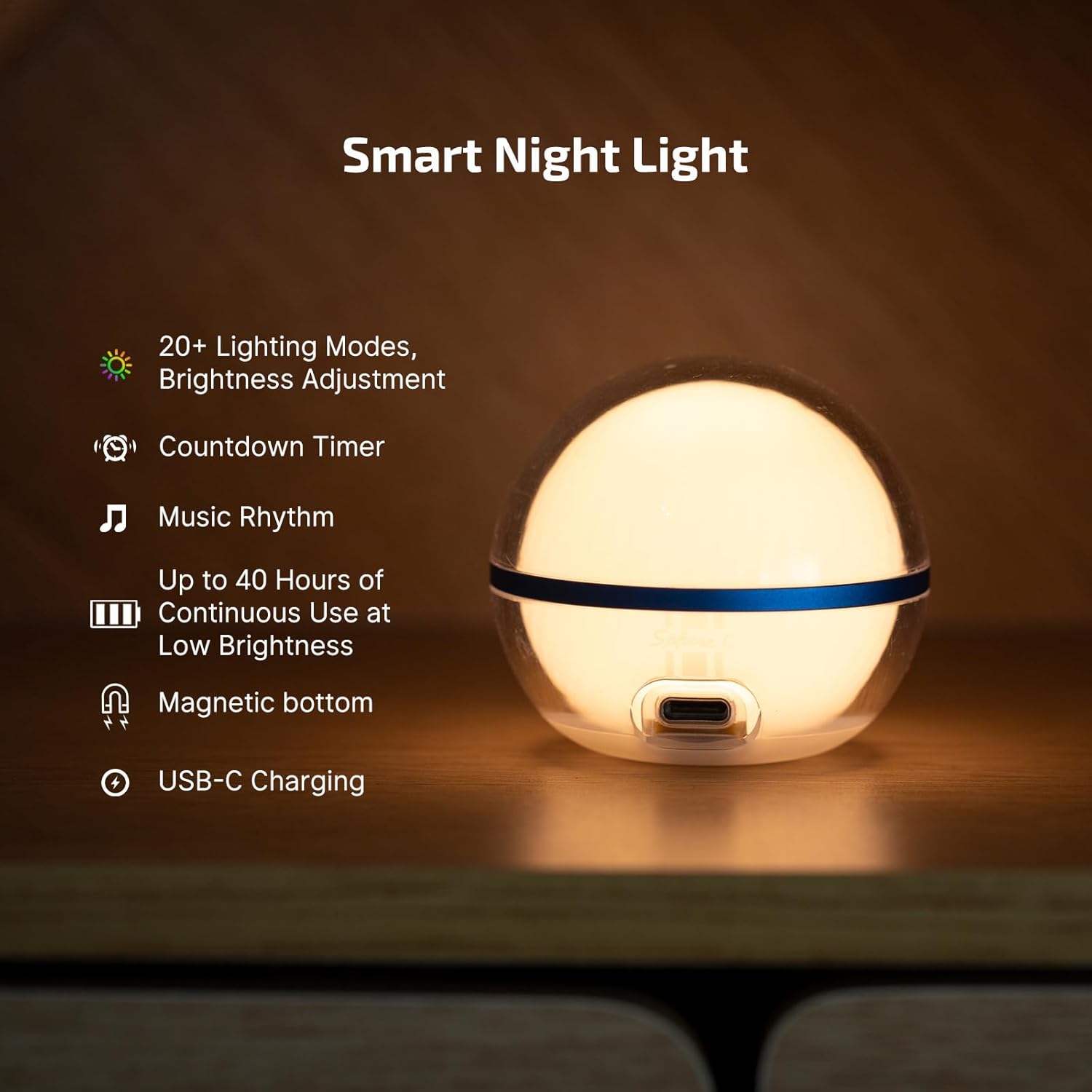
Image 3.1: Key features of the OLIGHT Sphere C Smart Night Light.
4. Setup
4.1 Initial Charging
Before first use, fully charge your Sphere C night light using a standard USB-C cable (not included). The charging port is located at the bottom of the device.

Image 4.1: Universal USB-C charging for the Sphere C.
4.2 App Download and Pairing
Download the official OLIGHT app from your smartphone's app store. Enable Bluetooth on your device and follow the in-app instructions to pair your Sphere C night light(s). For optimal performance when controlling multiple Sphere C units, it is recommended to keep them within 5 inches of each other.
5. Operation
5.1 Manual Control
The Sphere C can be operated directly using the button on its base:
- Single Press: Turns the light ON.
- Double Press: Turns the light OFF.
- Hold: Activates stepless dimming, allowing you to adjust brightness smoothly.
- Press to Cycle: Cycles through 7 lighting modes: white light, red light, red flash, and four replaceable colorful modes.

Image 5.1: Manual control functions of the Sphere C.
5.2 App Control
For advanced customization and control, use the OLIGHT smartphone application:
- Brightness Adjustment: Precisely adjust the light output from 1% to 100%.
- Mode Selection: Choose from over 20 lighting modes categorized as General, Nature, Festive, and Atmosphere.
- Music Rhythm: Synchronize the light effects with your music.
- Interactive Features: Utilize group control for multiple units, set countdown timers, and configure auto-off timers for worry-free sleep.
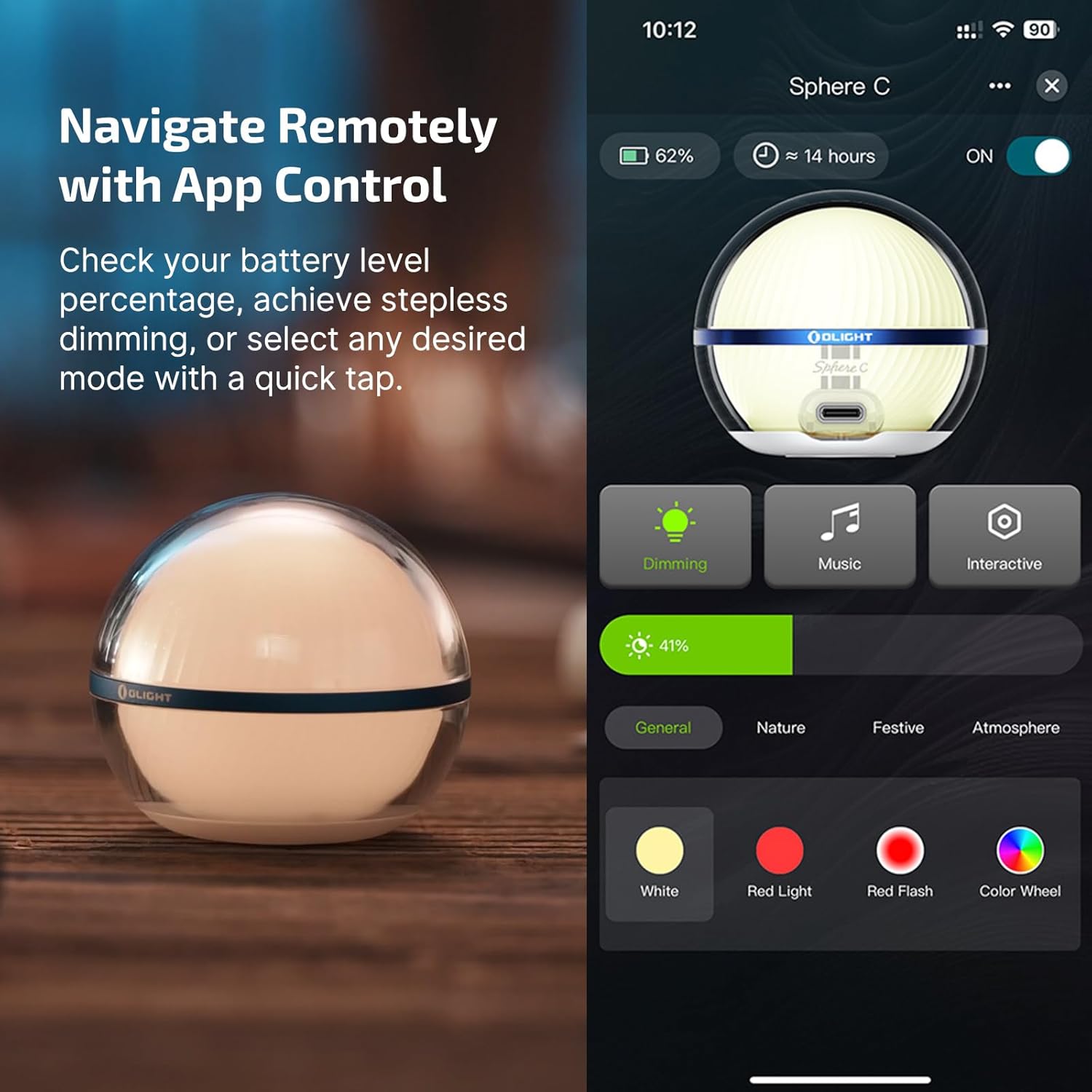
Image 5.2: App control interface for the OLIGHT Sphere C.
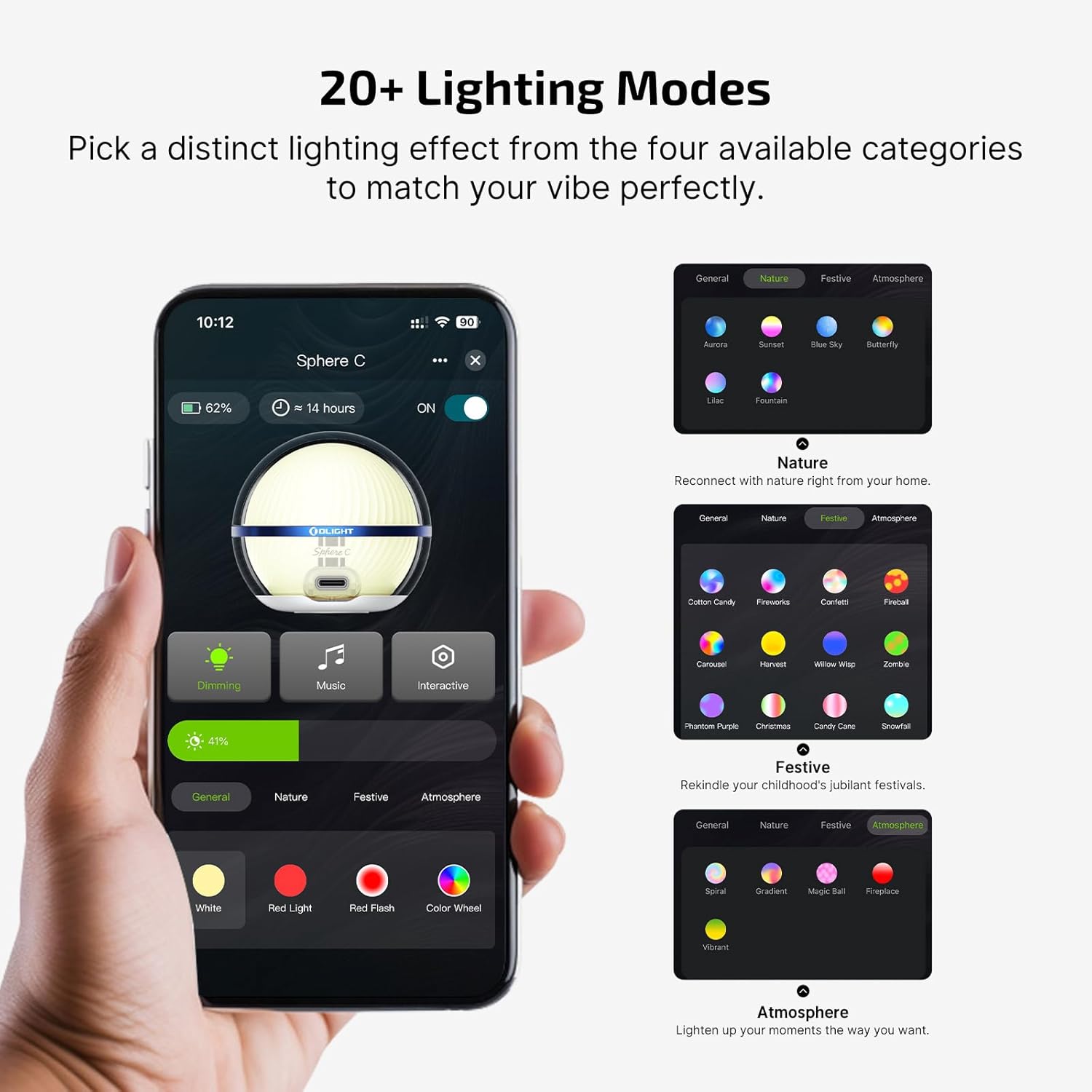
Image 5.3: Overview of the 20+ lighting modes available via the app.
5.3 Usage Scenarios
The portable and versatile design of the Sphere C makes it suitable for numerous applications:
- Home: Use as a night light in bedrooms, a bedside lamp, or for ambient lighting in living rooms and dining rooms.
- Outdoor: Ideal for camping, tent lighting, or creating a festive atmosphere for outdoor parties.
- Emergency: Provides a reliable light source during power outages.
Video 5.1: Official product video demonstrating various uses of the Sphere C Rechargeable Smart Night Light.
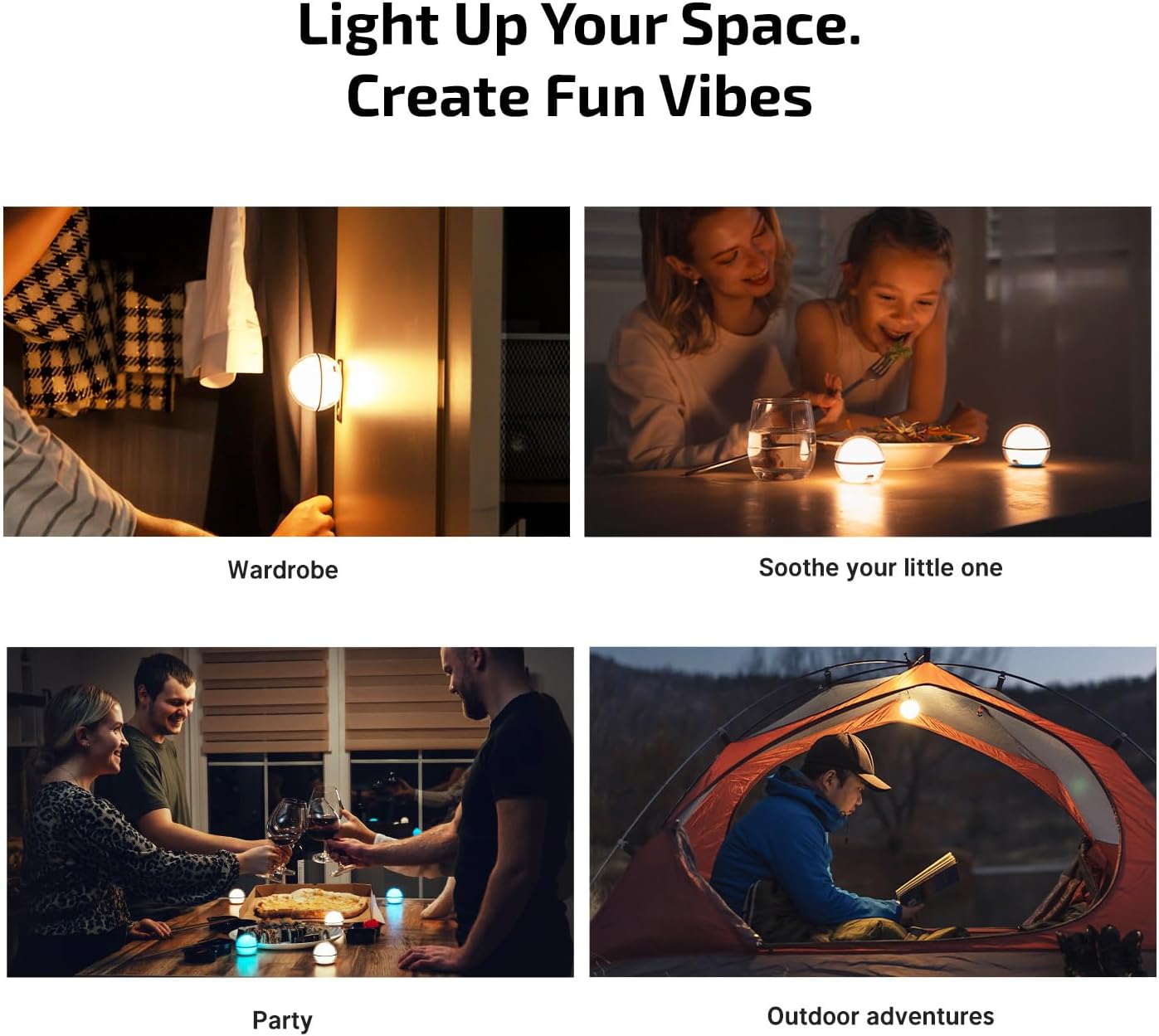
Image 5.4: Diverse applications of the Sphere C in various environments.
6. Charging
The OLIGHT Sphere C is equipped with a USB-C charging port for convenient power replenishment. Simply connect a compatible USB-C cable (not included) to the port located on the base of the device. The internal 700mAh Lithium Polymer battery provides extended usage times.
7. Maintenance
To ensure the longevity and optimal performance of your Sphere C night light, follow these maintenance guidelines:
- Cleaning: Wipe the device with a soft, damp cloth. Avoid using harsh chemicals or abrasive materials.
- Storage: Store the Sphere C in a cool, dry place when not in use.
- Water Resistance: The device is IP56 dust and water-resistant. While it can withstand splashes and dust, avoid submerging it in water.
- Impact Resistance: The Sphere C is designed to be 1.5m impact-resistant. Handle with care to prevent damage.
8. Troubleshooting
- Device Not Responding: Ensure the device is charged. If the battery is low, connect it to a USB-C power source.
- App Connectivity Issues: Verify that Bluetooth is enabled on your smartphone and the Sphere C is within range. Try restarting the app or re-pairing the device.
- Multiple Units App Control: When controlling multiple Sphere C units via the app, keep them within 5 inches of each other for reliable connection.
- Olink Compatibility: Note that the Sphere C is not compatible with Olink systems.
9. Specifications
| Feature | Detail |
|---|---|
| Model Name | O-SPHERE-C-300000 |
| Brand | OLIGHT |
| Lamp Type | Night Light |
| Product Dimensions | 2.26"D x 2.26"W x 2.64"H |
| Item Weight | 3.2 ounces (0.2 Pounds) |
| Material | Polycarbonate |
| Base Material | Metal |
| Finish Type | Polished |
| Shade Color | White |
| Shade Material | Polycarbonate |
| Light Source Type | LED |
| Brightness | 75 Lumens (Light Output Maximum) |
| Light Color | Colorful, Warm White |
| Number of Light Sources | 20 |
| Power Source | Battery Powered (1 Lithium Polymer battery included) |
| Voltage | 5 Volts (DC) |
| Is Cordless? | Yes |
| Control Method | App |
| Switch Type | Remote (via app) |
| Indoor/Outdoor Usage | Indoor, Outdoor |
| Water Resistance Level | Waterproof (IP56) |
| Special Feature | Color Changing, Dust Resistant, Lightweight, Rechargeable |
10. Warranty and Support
For warranty information and customer support, please refer to the documentation included with your product or visit the official OLIGHT website. Protection plans may be available for purchase separately.


