
iScooter i10-28Miles, 650W, 25MPH
iScooter i10 Electric Scooter User Manual
Model: i10-28Miles, 650W, 25MPH
1. Introduction
Welcome to the iScooter i10 Electric Scooter user manual. This guide provides essential information for the safe and efficient operation, maintenance, and troubleshooting of your new electric scooter. The i10 is designed for commuting and short trips, offering a robust 650W motor, a 28-mile cruising range, and a top speed of 25 MPH.
Please read this manual thoroughly before your first ride to ensure optimal performance and safety.
2. Safety Guidelines
Your safety is paramount. Always adhere to the following guidelines:
- Always wear a helmet and appropriate safety gear (knee pads, elbow pads) when riding.
- Perform a pre-ride check: ensure brakes are functional, tires are properly inflated, and all components are secure.
- Obey all local traffic laws and regulations.
- Do not ride in adverse weather conditions (heavy rain, snow, ice).
- The maximum load capacity for the i10 scooter is 264 lbs. Do not exceed this limit.
- Avoid riding on uneven or slippery surfaces.
- Keep both hands on the handlebars while riding.
- The i10 scooter is certified to UL2272 and UL2271 standards.
3. What's in the Box
Upon opening your iScooter i10 package, you should find the following components:
- iScooter i10 Electric Scooter (main unit)
- Power Adapter/Charger
- User Manual (this document)
- Assembly Tools (Allen wrench, screws)
- Storage Bag
- Spare Inner Tube
Below is an image of the iScooter i10 Electric Scooter and its accessories.

Image: iScooter i10 Electric Scooter with charger, tools, storage bag, and manual.
4. Setup and Assembly
The iScooter i10 comes largely pre-assembled. Follow these steps for quick setup:
- Unboxing: Carefully remove the scooter and all accessories from the packaging.
- Unfold the Scooter: Lift the handlebar stem until it locks into place. Ensure the folding mechanism is securely latched.
- Attach the Handlebar: Connect the handlebar unit to the stem. Ensure the cables are not pinched. Use the provided screws and Allen wrench to secure the handlebar firmly.
- Initial Charge: Before your first ride, fully charge the scooter's battery. Refer to the 'Charging Operation' section for details.
For a visual guide on unboxing and initial setup, please watch the official i10 Unboxing Video:
Video: Official i10 Unboxing Video, demonstrating the unpacking and initial assembly process of the iScooter i10 Electric Scooter.
5. Operating Your Scooter
5.1 Power On/Off
To power on the scooter, press and hold the power button located on the display panel for a few seconds until the screen illuminates. To power off, press and hold the power button again until the display turns off.
5.2 Switching Speed Modes
The i10 scooter features multiple speed modes. Briefly press the power button while the scooter is on to cycle through the available speed modes (e.g., ECO, Drive, Sport). The current speed mode will be indicated on the display.
5.3 Light Operations
The i10 is equipped with a headlight, taillight, and directional turn signals for enhanced visibility and safety.
- Headlight/Taillight: Double-press the power button to turn the headlight and taillight on or off.
- Turn Signals: Use the dedicated buttons on the handlebars to activate the left or right turn signal.
Ensure all lights are functioning correctly before riding, especially in low-light conditions.

Image: Safety lighting features of the iScooter i10, including headlight, turn signals, and taillight.
5.4 App Connection
Enhance your riding experience by connecting your i10 scooter to the 'iScooter' mobile application. The app allows you to customize settings, view riding status, control cruise control, and lock/unlock your scooter.
- Download the 'iScooter' app from your device's app store.
- Turn on your scooter and enable Bluetooth on your smartphone.
- Open the 'iScooter' app and follow the on-screen instructions to pair with your scooter. You may need to scan a QR code found in the quick start guide.

Image: The iScooter app interface on a smartphone, showing features like lock/unlock, riding status, cruise control, and light control.
6. Key Features
The iScooter i10 is engineered with features to provide a comfortable, powerful, and convenient ride:
- Powerful Motor: Equipped with an upgraded 650W powerful brushless motor, the i10 delivers high torque and can conquer slopes of up to 15-20 degrees.
- Extended Range: A robust 42V/15h battery provides an impressive cruising range of up to 28 miles on a single charge.
- Pneumatic Tires & Dual Suspension: Features 10-inch pneumatic tires and dual shock absorbers for a smooth and comfortable ride, absorbing bumps and vibrations.
- Triple Braking System: For reliable stopping power, the scooter includes a dual braking system with a drum brake and a disc brake.
- Foldable Design: The i10 features a convenient foldable design, making it easy to carry and store. It weighs only 44 lbs and supports a maximum load of 264 lbs.
See the i10 in action, highlighting its features and portability:
Video: A demonstration of the iScooter i10 electric scooter's features, including its folding mechanism, motor power, and smooth riding capabilities.
Visual representation of key features:

Image: Summary of iScooter i10 key specifications including range, speed, tire size, and weight capacity.

Image: Visualizing the iScooter i10's ability to climb inclines and the internal structure of its 650W motor.

Image: Close-up view of the iScooter i10's triple braking system, highlighting the drum brake and disc brake.

Image: Detailed view of the 10-inch pneumatic tires, emphasizing their shock-absorbing and comfortable qualities.

Image: Dimensions of the iScooter i10 in both its unfolded (48.8" H x 46.8" L) and folded (20.8" H) configurations.
7. Maintenance
Regular maintenance ensures the longevity and optimal performance of your iScooter i10.
7.1 Charging Operation
To charge your scooter, connect the power adapter to the charging port located on the scooter's deck. Plug the adapter into a standard wall outlet. The indicator light on the charger will typically turn red during charging and green when fully charged. Always use the original charger provided with your scooter.
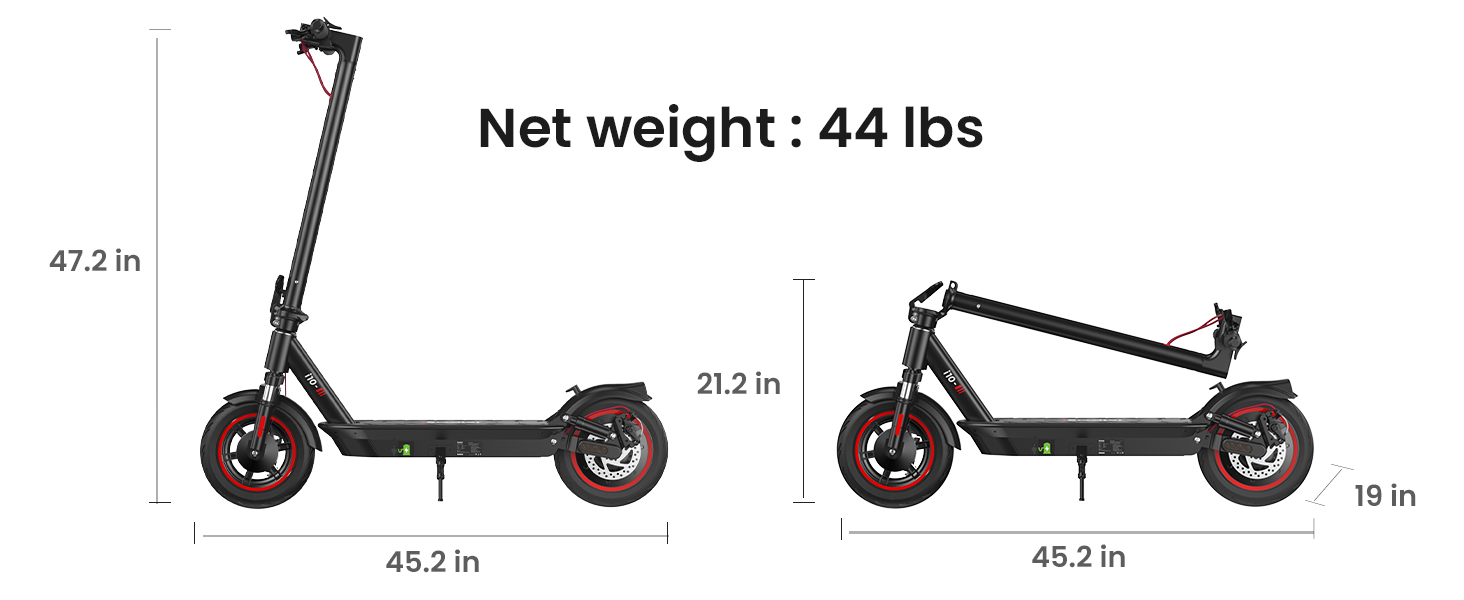
Image: Illustration of the iScooter i10's battery charging process.
7.2 Tire Pressure
Regularly check the tire pressure of your pneumatic tires. Proper inflation ensures a smooth ride, extends tire life, and maintains optimal range. Refer to the tire sidewall for recommended PSI.
7.3 Cleaning
Clean your scooter with a damp cloth. Do not use high-pressure water jets or corrosive cleaning agents, as this can damage electrical components. Ensure the charging port cover is securely closed before cleaning.
7.4 Storage
When storing the scooter for extended periods, ensure it is fully charged. Store it in a cool, dry place away from direct sunlight and extreme temperatures. Periodically charge the battery (e.g., every 30-60 days) to maintain battery health.
8. Troubleshooting
If you encounter issues with your iScooter i10, refer to the common problems and solutions below:
| Problem | Possible Cause | Solution |
|---|---|---|
| Scooter won't turn on | Low battery; Loose connections | Charge the battery; Check all cable connections. |
| Reduced range | Low tire pressure; Overloading; Battery degradation | Inflate tires to recommended PSI; Reduce load; Contact support for battery issues. |
| Brakes not effective | Brake cable loose; Worn brake pads | Adjust brake cable tension; Replace worn brake pads. |
| Unusual noises | Loose components; Debris in wheels | Tighten all screws; Inspect wheels for foreign objects. |
If the issue persists or is not listed here, please contact iScooter customer support for assistance.
9. Specifications
Detailed technical specifications for the iScooter i10 Electric Scooter:
| Specification | Value |
|---|---|
| Brand | iScooter |
| Model Name | i10 |
| Motor Power | 650W |
| Max Speed | 25 MPH |
| Max Distance Range | 28 Miles |
| Battery | 42V/15h |
| Weight Limit | 264 Pounds |
| Wheel Size | 10 Inches |
| Wheel Type | Pneumatic |
| Suspension Type | Dual Suspension |
| Brake Style | Front Braking (Dual Braking System) |
| Frame Material | Aluminum |
| Special Features | Turn Signals, APP Connectivity, Storage Bag |
| Age Range (Description) | Adult |
10. Warranty and Support
iScooter is committed to quality and customer satisfaction. Your i10 Electric Scooter comes with the following warranty:
- Scooter Warranty: 360-day warranty on the main scooter unit.
- Parts Warranty: 180-day warranty on individual parts.
For any inquiries, technical assistance, or warranty claims, please contact iScooter customer service. Our dedicated team provides fast and professional support to ensure your satisfaction.
For optimal performance, remember to fully charge your scooter before your first ride.
Ask a question about this manual
Ask about setup, troubleshooting, compatibility, parts, safety, or missing instructions. Manuals+ will review the question and use this page’s manual context to help answer it.