
1. Introduction
This manual provides essential instructions for the proper use and maintenance of your JBL Live 675NC Wireless True Adaptive Noise-Cancelling On-Ear Headphones. Please read this manual thoroughly before using the product to ensure optimal performance and longevity.
The JBL Live 675NC headphones are designed to deliver JBL Signature Sound with True Adaptive Noise Cancelling, providing an immersive audio experience. They feature Bluetooth 5.3 for seamless wireless connectivity and a comfort-fit fabric headband for extended wear.
2. What's in the Box
Verify that all components are present upon unboxing:
- JBL Live 675NC Headphones
- Charging Cable
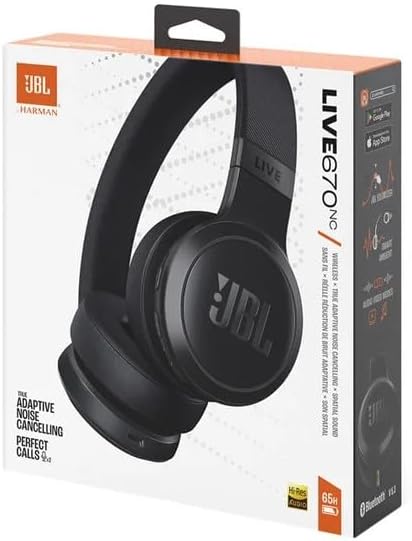
Image: The retail box for the JBL Live 675NC headphones, showing the product image and key features on the packaging.
3. Product Overview
3.1 Headphone Components

Image: An angled view of the JBL Live 675NC headphones in black, showcasing the earcups and headband.

Image: A direct front view of the JBL Live 675NC headphones, highlighting the JBL logo on the earcups and the "LIVE" branding on the headband.

Image: A top-down view of the JBL Live 675NC headphones, showing the adjustable headband and the on-ear design.

Image: A close-up view of the earcups of the JBL Live 675NC headphones, showing the soft padding and the internal speaker grille.
3.2 Controls and Indicators
The JBL Live 675NC headphones feature touch controls for various functions. Specific button layouts and touch gestures are typically detailed in a quick start guide or the JBL Headphones app.
- Power Button: Used to turn the headphones on/off.
- Bluetooth Pairing Button: Initiates pairing mode.
- Volume Controls: Adjusts audio output level.
- Multi-function Button: Manages playback, calls, and voice assistant.
- ANC/Ambient Sound Control: Toggles between noise cancelling, ambient aware, and talk-thru modes.
- LED Indicator: Displays power, charging, and connection status.
4. Setup
4.1 Charging the Headphones
- Connect the provided charging cable to the charging port on the headphones.
- Connect the other end of the cable to a USB power source (e.g., computer USB port, USB wall adapter).
- The LED indicator will show the charging status. It typically turns off or changes color when fully charged.
Note: For optimal battery life, fully charge the headphones before first use.
4.2 Bluetooth Pairing
- Power On: Press and hold the Power button until the LED indicator lights up.
- Enter Pairing Mode: Press and hold the Bluetooth pairing button (refer to your quick start guide for exact button location) until the LED indicator flashes rapidly, indicating it is ready to pair.
- Connect to Device: On your Bluetooth-enabled device (smartphone, tablet, laptop), go to the Bluetooth settings and select "JBL Live 675NC" from the list of available devices.
- Confirmation: The LED indicator on the headphones will turn solid blue (or another color) once successfully paired.
The headphones support Bluetooth 5.3 for stable and efficient wireless connectivity.
5. Operating Instructions
5.1 Power On/Off
- To Power On: Press and hold the Power button for approximately 2 seconds.
- To Power Off: Press and hold the Power button for approximately 3 seconds.
5.2 Audio Playback and Calls
Use the multi-function button and volume controls for the following actions:
- Play/Pause: Single press the multi-function button.
- Next Track: Double press the multi-function button.
- Previous Track: Triple press the multi-function button.
- Answer/End Call: Single press the multi-function button during an incoming call or active call.
- Reject Call: Press and hold the multi-function button during an incoming call.
- Volume Up/Down: Use the dedicated volume buttons.
5.3 Adaptive Noise Cancelling and Smart Ambient
The JBL Live 675NC features True Adaptive Noise Cancelling, which automatically adjusts to your environment, and Smart Ambient technology.
- Noise Cancelling (ANC): Reduces external distractions for focused listening.
- Ambient Aware: Allows you to hear your surroundings while enjoying your music.
- TalkThru: Lowers music volume and amplifies speech, enabling conversations without removing headphones.
Toggle between these modes using the dedicated ANC/Ambient Sound control button, or through the JBL Headphones app for more granular control.
5.4 Auto Play and Pause
The headphones are equipped with a sensor that automatically pauses audio playback when you remove them and resumes when you put them back on. This feature helps conserve battery and ensures you don't miss a moment of your audio.
6. Maintenance
6.1 Cleaning
- Use a soft, dry cloth to wipe the exterior surfaces of the headphones.
- For ear cushions, gently wipe with a slightly damp cloth and mild soap solution if necessary, then dry thoroughly.
- Do not use harsh chemicals, solvents, or abrasive cleaners.
6.2 Storage
When not in use, store the headphones in a cool, dry place, away from direct sunlight and extreme temperatures. If a carrying case is provided, use it to protect the headphones from dust and scratches.
7. Troubleshooting
| Problem | Possible Cause | Solution |
|---|---|---|
| Headphones do not power on | Low battery | Charge the headphones fully. |
| Cannot pair via Bluetooth | Headphones not in pairing mode; device Bluetooth off; interference | Ensure headphones are in pairing mode. Turn Bluetooth on your device. Move closer to the device. Restart both devices. |
| No sound or low volume | Volume too low; incorrect audio source; loose connection | Increase volume on headphones and connected device. Check if the correct audio output is selected on your device. Re-pair the headphones. |
| Noise Cancelling not effective | Incorrect mode selected; improper fit | Ensure ANC mode is active. Adjust headphones for a snug fit over your ears. |
If you encounter issues not listed here, refer to the official JBL support website or contact customer service.
8. Specifications
| Feature | Detail |
|---|---|
| Model Name | JBL Live 675NC |
| Connectivity Technology | Wireless (Bluetooth) |
| Bluetooth Version | 5.3 |
| Noise Control | True Adaptive Noise Cancellation |
| Ear Placement | On Ear |
| Control Method | Touch |
| Audio Driver Type | Dynamic Driver |
| Compatible Devices | Cellphones, Laptops, Desktops, Tablets, Smart Speaker |
| Included Components | Charging Cable |
| UPC | 703670976131 |
9. Warranty and Support
For warranty information, technical support, or further assistance, please visit the official JBL website or contact their customer service department. Keep your proof of purchase for warranty claims.
As this product is listed as "Renewed," specific warranty terms may vary. Please refer to the seller's warranty policy or the Amazon Renewed program details for applicable coverage.


